
Olivier Savoie
expand all and collapse all key shortcut
Hello,
Both hints are expected. When the vault (root) is selected, the menu shows Ctrl + and
Ctrl -, which expand or collapse the whole tree. When a folder is selected, the menu
shows * instead, because that key expands only the selected folder and its subfolders.
There is currently no dedicated key to collapse a single folder, which is why that line
is empty.
Note that Ctrl + and Ctrl - keep working while a folder is selected, even though the
menu no longer displays them. They always apply to the whole tree, so you are not
limited to the * shortcut when you are on a folder.
On our side these shortcuts do work in 2026.3.8.0. You mention that the mouse click still works. Could you confirm whether it works in both
cases, meaning Expand all and Collapse all from the vault as well as from a folder? Could
you also let us know your keyboard layout and whether your keyboard has a numeric keypad?
This will help us reproduce the issue on our side.
Regards,
Single search result Enter key press no longer launches RDP
Hello,
We have fixed an issue. It will be available starting from version 2026.3.7.0 of RDM.
Regards,
Single search result Enter key press no longer launches RDP
Hello,
We are currently investigating this issue, we'll let you know once we have more information and/or a possible fix.
Regards
I receive 4 warnings for a single entry.
Hello,
We have fixed an issue where entries with multiple shortcuts generated duplicate expiration notifications on the Dashboard and Action Center — RDM now shows a single notification per entry. It will be available starting from version 2026.2.17.0 of RDM.
Regards,
Last opened sessions no longer opening on startup.
Hello,
To help us with our investigation, could you please tell us which type of data source this occurred on?
Regards,
SFTP lower pane refresh keep current folder
Hello,
We've fixed the local (lower) pane so that refreshing now preserves your currently opened folder.
This fix will be available starting with version 2026.2.14.0.
Please don't hesitate to reach out if you have any questions or notice anything else.
Best regards,
SFTP lower pane refresh keep current folder
Hello,
Would it be possible for you to send us a video of the issue? It will help us find the cause more easily. I'll send you a secure link in private, and you can share the video with us that way.
Best regards,
Improve Typing Macro scripting
Hello,
We've implemented the new special command {CLIPBOARD} for more information check our documentation it is currently being updated. https://docs.devolutions.net/rdm/kb/how-to-articles/entry-types-events-settings/event-auto-typing-macro/
This feature should be available starting from the version 2025.3.19.0 of RDM.
Regards.
sync with Netbox
Hello,
We've fixed the issue internally and will be available starting from the version 2025.3.17.0 of RDM.
Regards.
How to get Jump host session undocked?
Hello,
We have fixed jump host not starting in undocked window, now all the scenarios should work fine. It will be available starting from version 2025.2.30.0 of RDM.
Regards,
Please support IKEv2 VPN (VPN Type "Microsoft VPN")
Hi,
We attempted to implement IKEv2 VPN support in RDM, but after testing, we found that creating an IKEv2 VPN connection in Windows directly from an RDM entry is not reliable with the current Microsoft API. This is primarily because the API does not allow us to pass credentials (Username/Password) or specify the sign-in method for certificate-based authentication.
As a result, we decided not to include a dedicated IKEv2 VPN type in RDM.
However, if you already have an IKEv2 VPN configured in Windows, you can still launch it from RDM by setting the VPN type to "Automatic" and selecting the name of your VPN.
Regards,
PowerShell entries open but dont run and close automatically
Hello,
We have fixed PowerShell (Local) entry not starting in Windows Server 2016, it will be available starting with version 2025.1.35.0 of RDM.
Regards,
Folder Copy Functionality
Hello,
This feature as been completed internally and will be available starting from the version 2025.2.3.0 of RDM.
Regards.
Powershell Entry support for credential from linked Host
Hello,
This feature as been completed internally and will be available starting from the version 2025.2.3.0 of RDM.
Regards.
BUG - Copy One-time password from menu doesn't work
Hello,
We have fixed a bug related to 'Copy one-time password' in the right click window with the clipboard not working, it will be available starting from version 2024.3.27.0 of RDM.
Regards,
PowerShell entry arguments containing $ are truncated
Hi,
Can you test with the entry link in this message. You just have to import it in RDM and Open the session.
Let me know if it works.
Regards,
PowerShell entry arguments containing $ are truncated
Hi,
I’ve replicated the issue where the parameter turns into a long string. It only happen in Hub.
You can't directly use a variable in the argument field; it must be passed as a parameter, as I demonstrated in my previous message.

Regarding the single quotes, yes, you can place $PASSWORD$ in the parameter, and it will work. However, if the password contains a $ symbol, it may cause the same problem where the password is truncated after the $. That’s why I recommend enclosing the variable in single quotes, like this: '$PASSWORD$', to ensure the password is not altered.
Best regards,
MultiExec Button SSH sessions with automatic split-screen
Hello,
The fix for the "Broadcast all" button not appearing after opening a second SSH session will be available starting with version 2024.3.11.0 of RDM.
Regards,
Triple popup for logon to Microsoft with Password List entry
Hello,
If you want to retrieve the OTP from the credentials, you can select "Current session's credentials" in the OTP section, which performs this action.
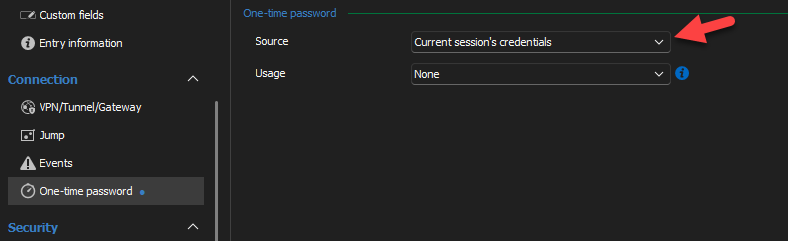
Let us know if you have more questions.
PowerShell entry arguments containing $ are truncated
Hello,
We have fixed a bug related to variables, and the fix will be available starting from version 2024.3.11.0 of RDM.
I believe I understand the issue you're encountering, but please let me know if I'm correct.
You have a password that contains a $ symbol, such as Before$After2.
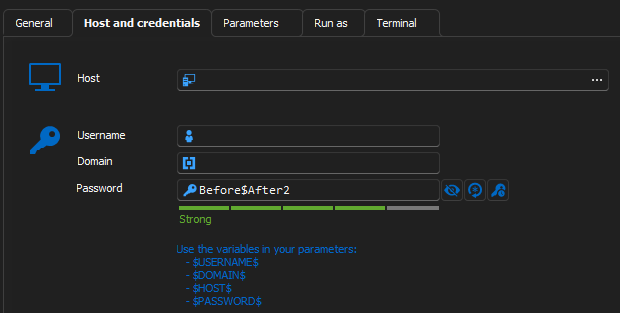
Then, you want to use this password in your parameters by referencing $PASSWORD$.

If that's the case, there are a couple of steps you need to follow:
Ensure that the "Allow password in variable" setting is enabled in the Security settings.
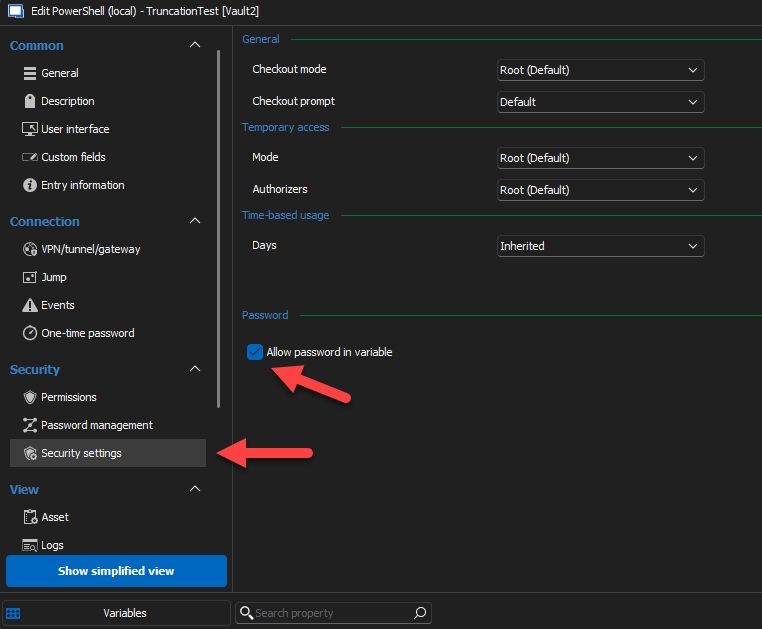
2-If your password contains a $, you need to enclose the variable in single quotes. Otherwise, everything after the $ in your password will be truncated.
Please let me know if this resolves the issue.
Regards,
PowerShell entry arguments containing $ are truncated
Hello,
The reason it's doing that is because the $ sign is interpreted as a variable. So if you want an argument or a parameter to contain $ sign you can do this:
How to Fix It:
You can avoid this issue by escaping the $ character with a backtick (`) or by using single quotes ' ' instead of double quotes " " when passing the argument or the parameter.
Option 1: Escape the $ Character -> "Before`$After1"
This tells PowerShell to treat $ as a literal character and not as the start of a variable name.

Option 2: Use Single Quotes -> 'Before$After1'
In PowerShell, single quotes ' ' do not perform variable expansion, so everything inside the single quotes is treated as a literal string.
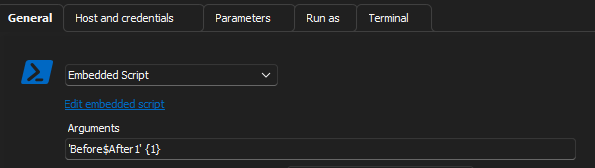
If you pass the string using one of these methods, the output will include everything after the $ sign without truncation.

Triple popup for logon to Microsoft with Password List entry
Hello Sander,
We have fixed the issue of the triple popup. It will be available starting from version 2024.3.6.0 of RDM.
Regards.
MultiExec Button SSH sessions with automatic split-screen
Hello,
We have implemented the feature to broadcast all opened sessions in RDM. This new functionality will be available starting from version 2024.3.5.0 of RDM. Here are the details:
New Buttons Added:
Broadcast All: Allows broadcasting across all open sessions.
Remove All Broadcasts: Clears broadcasts from all sessions.
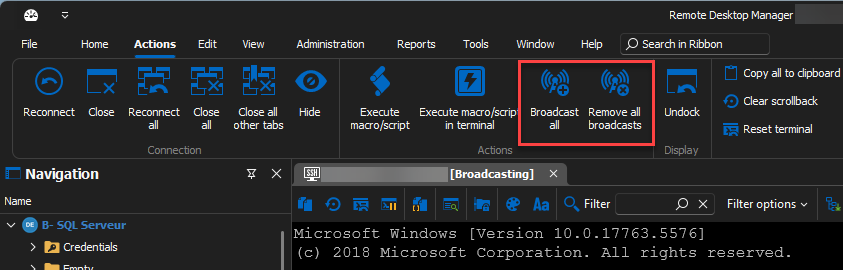
Behavior of "Broadcast All" Button:
Requirement: At least two entries open that can broadcast.
No Existing Broadcast Entry: Adds all entries to the broadcast.
Existing Broadcast Entry(ies): Adds any entry not currently broadcasted.
View Switching: If enabled, switches to a pre-configured view.
Behavior of "Remove All Broadcasts" Button:
Removes all entries from the broadcast if any are currently broadcasting.
We've also introduced a new configuration option under File > Settings > Types > Terminal: "Change view when toggling all broadcasts." This setting automatically adjusts the view when the "Broadcast All" button is activated.
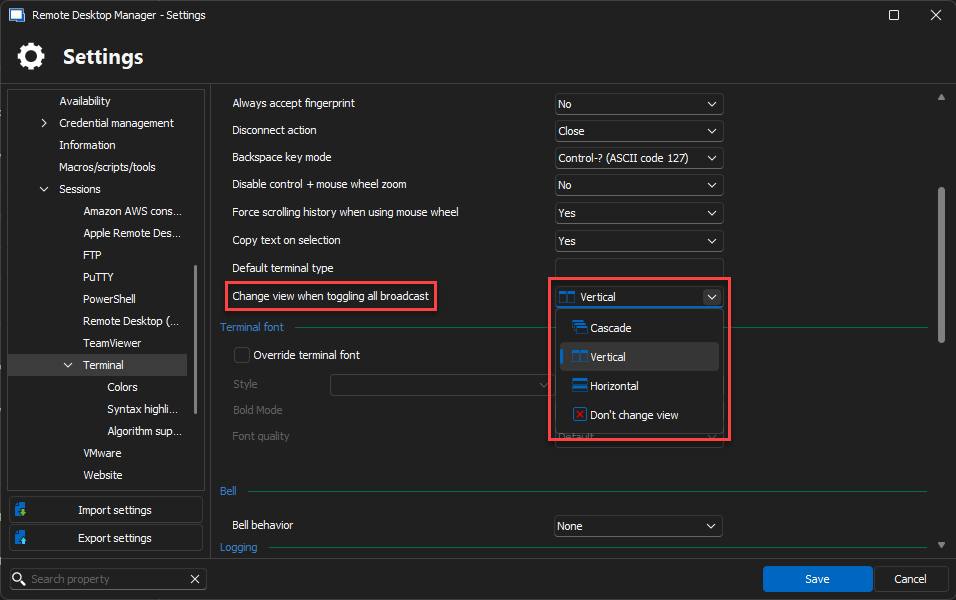
View Settings:
Cascade
Tile Vertical
Tile Horizontal
Don’t Change the View (default)
While broadcasting, you can still manually change the view via the ribbon, but it will revert to the originally set view once the broadcast ends.
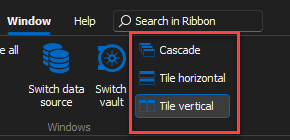
New Keyboard Shortcuts:
Cascade
Tile Horizontal
Tile Vertical
Broadcast All
Remove All Broadcasts
We hope these updates will enhance your workflow efficiency. Should you have any questions or require further assistance, please do not hesitate to contact us.
Regards,
Broadcast enhancements
Hello Patrick,
We have implemented the feature to broadcast all opened sessions in RDM. This new functionality will be available starting from version 2024.3.5.0 of RDM. Here are the details:
New Buttons Added:
Broadcast All: Allows broadcasting across all open sessions.
Remove All Broadcasts: Clears broadcasts from all sessions.
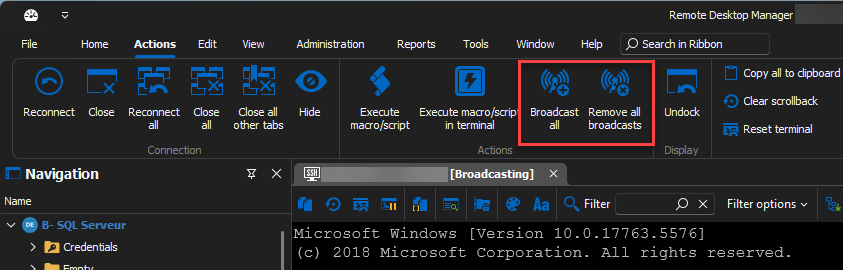
Behavior of "Broadcast All" Button:
Requirement: At least two entries open that can broadcast.
No Existing Broadcast Entry: Adds all entries to the broadcast.
Existing Broadcast Entry(ies): Adds any entry not currently broadcasted.
View Switching: If enabled, switches to a pre-configured view.
Behavior of "Remove All Broadcasts" Button:
Removes all entries from the broadcast if any are currently broadcasting.
We've also introduced a new configuration option under File > Settings > Types > Terminal: "Change view when toggling all broadcasts." This setting automatically adjusts the view when the "Broadcast All" button is activated.
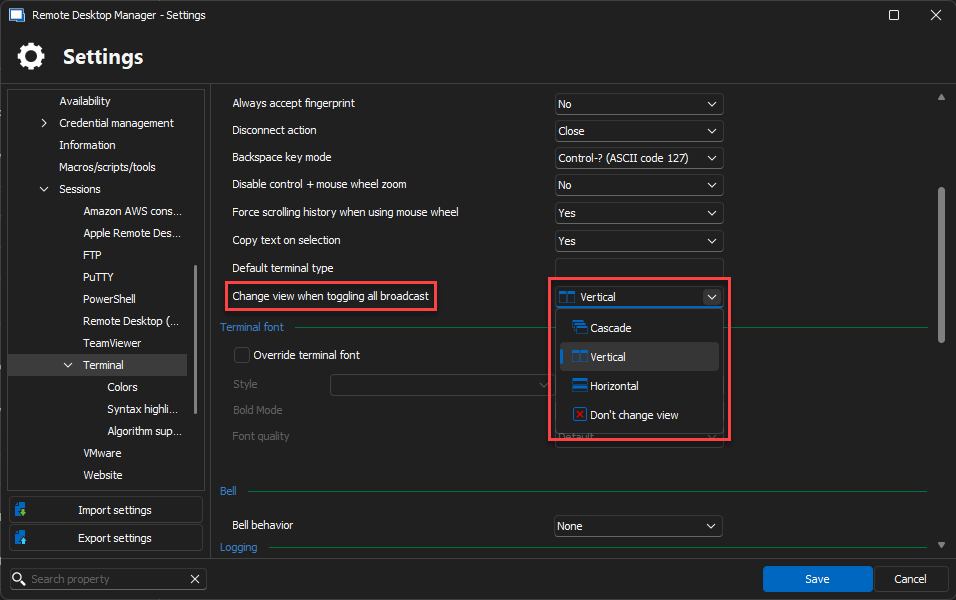
View Settings:
Cascade
Tile Vertical
Tile Horizontal
Don’t Change the View (default)
While broadcasting, you can still manually change the view via the ribbon, but it will revert to the originally set view once the broadcast ends.
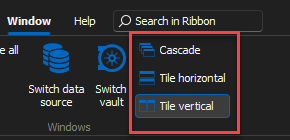
New Keyboard Shortcuts:
Cascade
Tile Horizontal
Tile Vertical
Broadcast All
Remove All Broadcasts
We hope these updates will enhance your workflow efficiency. Should you have any questions or require further assistance, please do not hesitate to contact us.
Regards,
Make option to link existing entry to parent available for non-administrative users
Hello,
This feature as been completed internally and will be available starting from the version 2024.3.0.0 of RDM.
Regards.