expand all and collapse all key shortcut

Hi
With new version RDM 2026.3.8, the expand all and collapse all key shortcut seems not working any more? Mouse click still works.
Also I got two different shortcut hints at different location, it shows should use CTLR +/- when I click on valut, but it shows use * for epxand all and no short cut for when I click on folder, is this normal? But no one key shortcut works. 

f2f767d6-5aea-4a54-a1e9-10b5f6e7a4c4.png
23daf87b-c554-4257-9ada-87f04bced5fb.png
All Comments (9)
Hello,
I've created a ticket to investigate / fix these issues. We will keep you updated on any progress.
Best Regards,
Michaël Beaudin
Hello,
Both hints are expected. When the vault (root) is selected, the menu shows Ctrl + and
Ctrl -, which expand or collapse the whole tree. When a folder is selected, the menu
shows * instead, because that key expands only the selected folder and its subfolders.
There is currently no dedicated key to collapse a single folder, which is why that line
is empty.
Note that Ctrl + and Ctrl - keep working while a folder is selected, even though the
menu no longer displays them. They always apply to the whole tree, so you are not
limited to the * shortcut when you are on a folder.
On our side these shortcuts do work in 2026.3.8.0. You mention that the mouse click still works. Could you confirm whether it works in both
cases, meaning Expand all and Collapse all from the vault as well as from a folder? Could
you also let us know your keyboard layout and whether your keyboard has a numeric keypad?
This will help us reproduce the issue on our side.
Regards,
Hello,
It's also worth noting that if you want the Expand/Collapse all to be displayed even when not targeting the root folder, you can restore this with the following option (File - Settings - Context Menu - Include (Expand/Collapse all) on entry/folder.
Regards,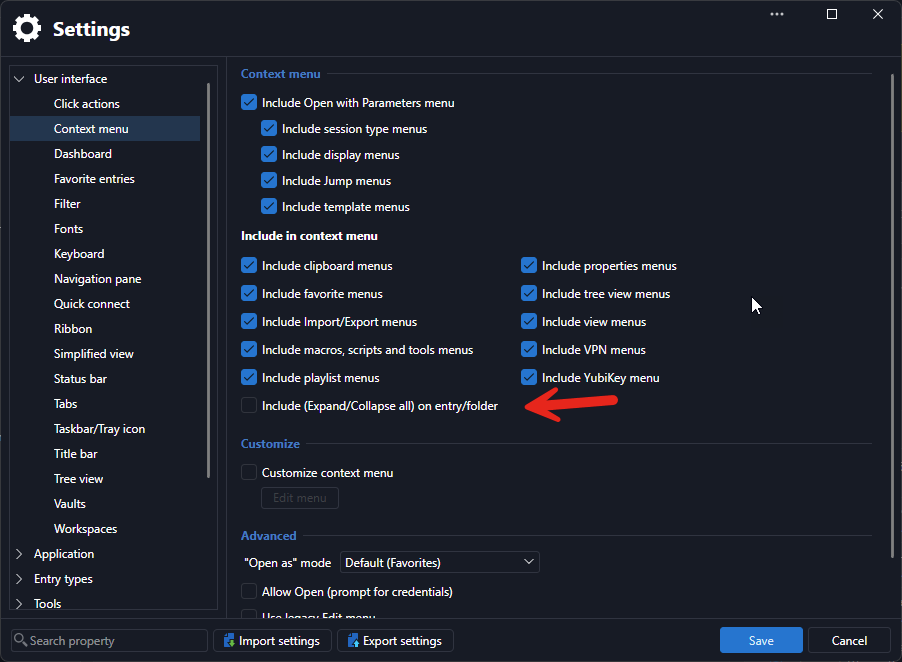
Jafran Majeau
d478215b-8fde-4885-8815-fb12a13a3a7c.png
Hi
Thank you for your response on this. This has been fixed in latest version. Would be nice if we can have shortcut key to expand only one folder.
Also I noticed when you have multi session opened, all those folders will be expaned, is possible have one option only expand the session currently focused.
Hello,
I'd like to clarify your request. Are you refering to opening multiple entries at once? Or are you referring to when you change the focus from one opened session to another? I'm under the impression that you're asking that all folders but the one containing the currently focused (and opened) entry all automatically collapse at all times but I just want to make sure we're on the same page.
Regards,
Jafran Majeau
Hi
I am referring to when change the focus from one opened session to another. I am asking for all folders but the one containing the currently focused (and opened) entry all automatically collapse at all times.
Hello,
I've opened a ticket for investigation and will give you an update when we can.
Regards,
Jafran Majeau
Hello,
I added a new option, in File - Settings - User Interace - Tree view, named Collapse unrelated folders on tab focus. This will be available with the upcoming 2026.3.16 version.
Regards,
Jafran Majeau
Thank you, great.