Triple popup for logon to Microsoft with Password List entry

Hi all,
I'm trying to get the login page of Microsoft workable with the browser plugin.
I've added the site and linked a password list containing username, password and OTP.
As soon as I go to login.microsoftonline.com and click the entry within the plugin, RDM popsup the credential list entry 3 times.
The form fields in the entry are correctly filled (loginfmt, passwd and otc).
The problem is, that in our case we have a long list of entries and need to search for the entry every time.
A bit more information:
If I use the entry embedded within RDM, it first popups the credential list once, than starts the site and popsup the credential list a second time. Only the username is filled in at that stage. As soon as I click next, the password list appears, but not filled.
This can be solved using the custom script https://forum.devolutions.net/topics/40493/web-session-embedded-javascript-custom-script-for-auto-fill-microsoft-web-authentication
But on my side, I want to be able to login in a seperate browser.
Tested using both RDM 2024.1.19.0 and 2024.2.8.0.
Can you guys help me out?
Sander
All Comments (22)
Hello Sander,
This behaviour looks the same as if the credentials were linked to a password list entry.
Could you tell me if you have overwritten the credential of this entry with another type, like user-specific settings?
Does this password list entry exist in your database?
Best regards,
Patrick Ouimet
Hi Patrick,
I'm not exactly sure what you mean.
I've created a new entry for the website and linked it to a newley created Password List entry.
Credentials is set to "Linked (vault)" with a link to the Password List.
One-time password is set to "Linked (vault)" with the same Password List, and usage to "Specific to session".
Sander
Hello Sander,
After a quick test, it seems that the select from the list in 2024.2 is not working properly.
This is probably why the complete list opens in RDM instead of your selected credential.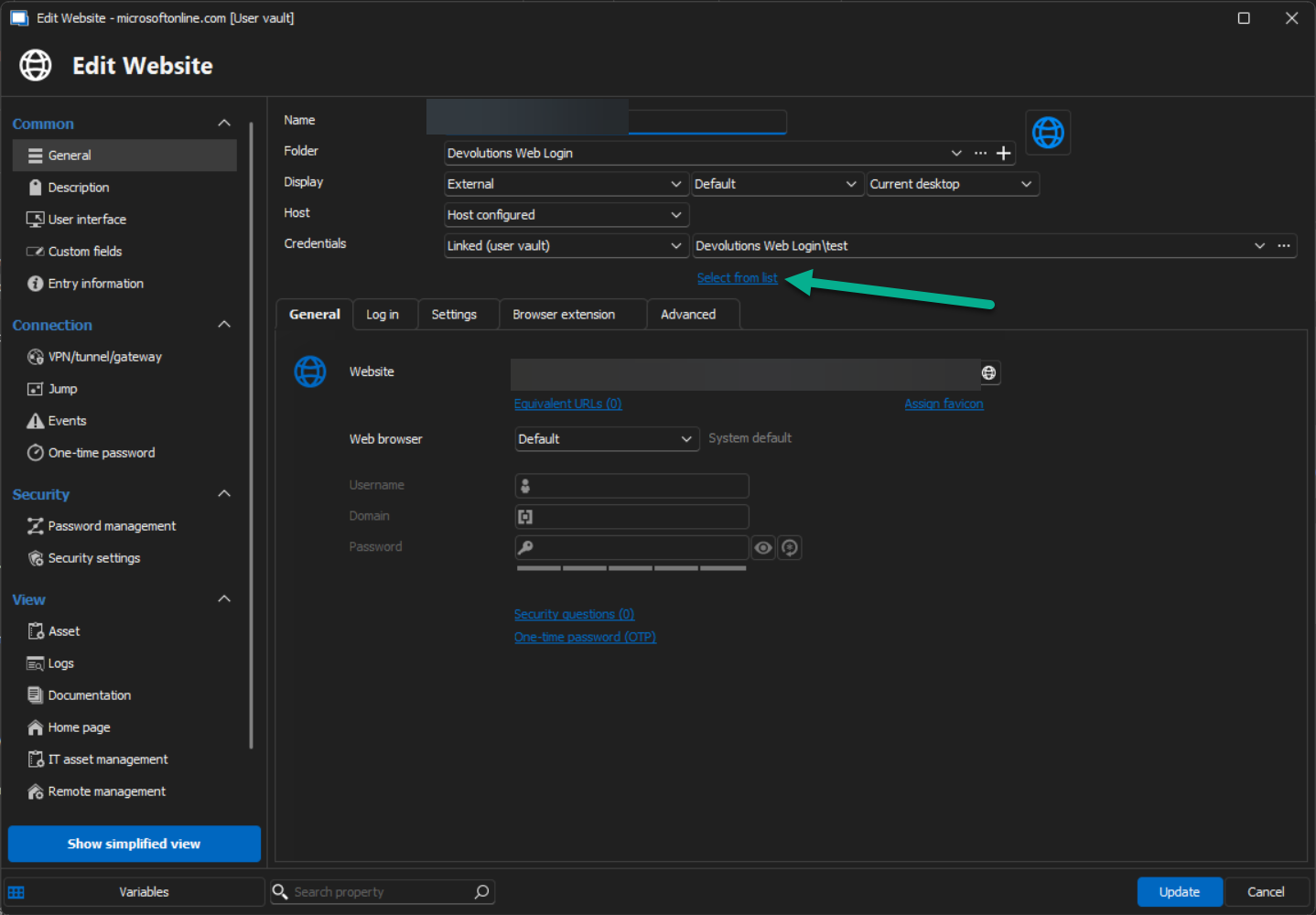
I will open an internal ticket on this and let you know when this will be fixed.
Best regards,
Patrick Ouimet
web.png
Hello Sander,
Well, it was fast!
This should be fixed with 2024.2.11.0.
Best regards,
Patrick Ouimet
Hi Patrick,
Thanks for your quick response.
I think we are talking about different things. I do not want to use the “Select from list” option. As soon as I open an entry, I want to popup the Password List so I can
specify for each session what credentials to use. As soon as I link the Website entry to the Password List entry for both credentials and One-time password, I would expect the Password List to popup once.
Only, the popup appears 3 times in a row, requiring me to search the preferred credentials 3 times instead of just 1.
Tested it in 2024.2.12.0, still the same issue.
Sander
Hello Sander,
After two days of trying with a generic web page, this issue cannot be reproduced.
In that case, would it be possible for you to create a portable installation of the latest version of RDM and see if this issue still occurs? To do so, you will need to do the following:
(Close RDM)
1- Download the .zip file below:
https://remotedesktopmanager.com/home/thankyou/rdmbin
2- Create a new folder on your Desktop
3- Extract the content of the .zip file into the folder created at #2
4- Go to this folder once the .zip file has been extracted and run remotedesktopmanager.exe
5- Connect to your data source
This test will allow us to rule out your local installation of RDM as a possible cause for this issue.
Best regards,
Patrick Ouimet
- Installed a new W11 Virtual Machine
- Extracted the ZIP fle and started RDM (2024.2.13.0)
- Installed .NET Runtime and started RDM again
- Skipped the Onboarding Wizard.
- Created a new Local. .XML datasource (42218-Connections.xml) without a master key and without a backup.
- Added a Password List entry named "PasswordList".
- Added 2 users within the entry with the following fake details:
Username
Password
OTP
- Witin Security settings, enabled "Allow password in variable"
- Added a "Command line (external application)" entry named "CommandTest".
Credentials: "Linked (Vault)", selected "PasswordList" entry. (I did NOT click on "select from list)
Run: cmd.exe
Arguments: /C echo "$USERNAME$" echo "$PASSWORD$" echo $ONE_TIME_PASSWORD$ & pause
Advanced: Wait for application to exit (Remote Desktop Manager will be unavailable)
- Witin Security settings, enabled "Allow password in variable"
- Within Connection - One-time password, selected Source: "Linked (Vault)", selected "PasswordList" entry.
Usage: "Specific to session"
As soon as you open the "CommandTest" entry, the Password list opens up. Double-clicking one of the entries, results in the same screen 3x in a row.
It does fill / echos in all the parameters as requested by above arguments.
Within the "CommandTest" entry, if you disable the OTP, the PasswordList only appears once.
Attached I've added the datasource XML and the exported .RDM with the 2 test entries.
The passwords and OTP are tests, so public sharing is fine.
If you need any more info, please let me know, I'm happy to help!
Sander
42218-Connections.xml
472218-EntryExport.rdm
Hello,
Just to let you know, this is still under investigation!
Best regards,
Etienne Lord
Hi Etienne, thanks for your reaction.
Are you able to reproduce the issue?
Sander
Hello,
My colleague reproduced the behaviour, and we are looking into it further!
Best regards,
Etienne Lord
Hello Sander,
After some tests, it looks like this is only related to command line entry.
I sent you an email to schedule a session and investigate this further.
Best regards,
Patrick Ouimet
Hi Patrick,
Thanks, I've created an appointment.
FYI:
I've got the same issue with the VPN entry, adding a custom connection.
It also asks 3 times for the PasswordList entry.
run: c:\windows\system32\cmd.exe
arguments: /C echo "$USERNAME$" echo "$PASSWORD$" echo $ONE_TIME_PASSWORD$ & pause
And also the same with a website.
That even asks me 5 times for the password.
Website: file:///C:/Users/Administrator/Desktop/ShowParameters.htm?arg1=$USERNAME$&arg2=$PASSWORD$&arg3=$ONE_TIME_PASSWORD$
Attached the files.
Sander
472218-Test.xml
ShowParameters.htm
CustomVPNTest.rdm
WebsiteTest.rdm
Hi Patrick, thanks for your time and follow up. Any news on this one (case 00065703)?
Sander
Hello Sander,
Thank you for this feedback.
After our session together, I opened a report regarding this behaviour.
This is still under investigation.
I will follow up on this forum when we have a fixed version.
Best regards,
Patrick Ouimet
Hello Sander,
We have fixed the issue of the triple popup. It will be available starting from version 2024.3.6.0 of RDM.
Regards.
Hi Olivier,
Just tested it in the beta version 2024.3.7.0.
The amount of popups changed from 3 to 2, but not yet to 1.
So as soon as I open the connection, it prompts twice for the credentials.
If wanted, I can provide a screen capture or the config files.
Sander
Hello sander02,
Thank you for this swift reply.
Could you send a recording of this issue?
You can use the secure link below to send us the recording(s);
https://devolutions.sharefile.com/filedrop
Simply name your file “FM-42218(2)” to easily identify it.
Best regards,
Patrick Ouimet
Hi Patrick,
Just uploaded the screen recording!
Let me know if you need anything else or want to schedule another session.
From 3x back to 2x, so we are almost there!
Sander
Hello Sander,
After some tests with the same entry structure, it is normal behaviour to have a double prompt.
This is related to the OTP configuration in the password list and the entry.
Best regards,
Patrick Ouimet
Hi Patrick,
Thanks for testing first of all!
Although it is not a big issue of course, could you elabrate some more? I use 1 single Password list, containing the username, password and the OTP.
Shouldn't it be referred to by a single choise?
Sander
Hello,
If you want to retrieve the OTP from the credentials, you can select "Current session's credentials" in the OTP section, which performs this action.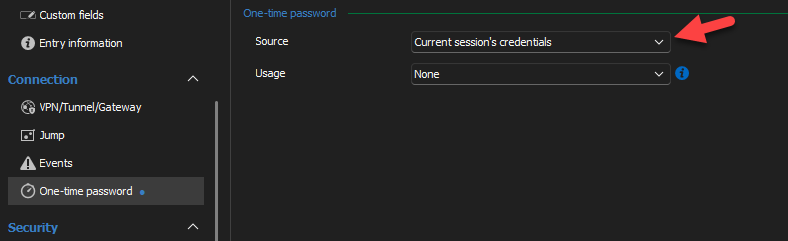
Let us know if you have more questions.
f672e2e7-cf99-4189-8fb3-76ae17e456ef.png
Hey Olivier,
I’ve missed your reply apparently!
Thanks for your answer, this fixed it.
Case closed, whoohoo!!
Sander