MultiExec Button SSH sessions with automatic split-screen
MultiExec Button SSH sessions with automatic split-screen
0 vote

I know in Remote Desktop Manager there is a function "broadcast" to send commands to different devices in SSH sessions at the same time. I just need this function combined with a shortcut button in navigation bar in order to be able to split the screen and automatically set all open SSH sessions to multiexec mode with one click. (This feature works perfect in MobaXterm)
All Comments (14)
Hello,
We have a configurable shortcut to open the 'manage broadcast' window. You can configure this in File > Settings > User Interface > Keyboard:
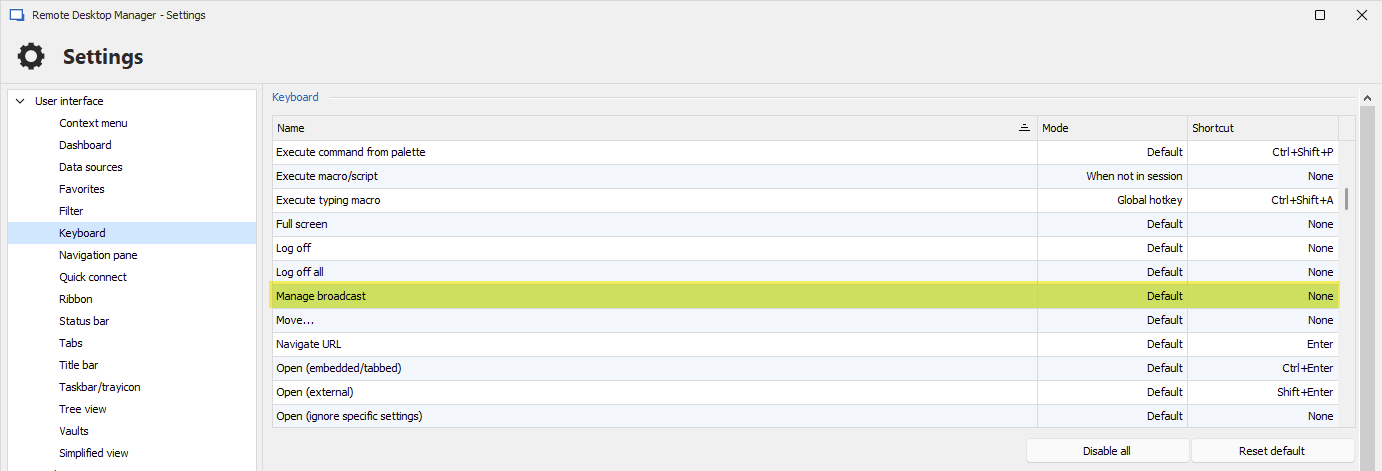
Could you try this out and see if it helps improve your workflow for the moment?
We could add a shortcut key to toggle broadcast on all currently opened SSH Shell entries, that shouldn't be difficult.
Do you also need the split screen functionality like mobaXterm? This might be trickier to do on a shortcut, especially if you have undocked windows, already split your screens, etc.
Regards,
Hubert Mireault
Hello Hubert,
thank you for your response. I'm already using the "manage broadcast" window with a keyboard shortcut.
But: I always have to press the broadcast shortcut keys + select all opened SSH Shell entries + click OK + click on windows / share windows vertically. I think every admin, who uses this broadcast mode, wants to see all command lines in all sessions while typing in commands so the split-screen button is always used after activating the broadcast function.
The good news: RDM already got these functions implemented, but all is separately, so it is inconvenient. Imagine you just have to open 2 SSH Shells and click a new "broacast"-button in navigation bar in ordner to activate broadcast mode and got a splitted screen only from opened SSH Shells. This could be 2 sessions, or 4 sessions ... just include all open SSH sessions (until you reach the maximum of the possible monitor size).
In my opinion, this would be a very important feature and could support a lot of admins and save time.
Best regards,
blackstream