Broadcast enhancements
0 vote

Broadcast does help some but would be more useful if it was easier accessible (even if this is a setting that can be toggled on if desired).
Can the broadcast feature be moved? accessed easier. If I have 4 sessions open and want to turn on broadcast for all 4. I have to always right click 1 > broadcast > broadcast manager > select all or select individual ones and ok. or right click each one > broadcast > enable. Its a lot of steps. would be easier maybe if those buttons were in the session toolbar instead of buried in right click menu. 
Or a global option (like winsshterm), visible (enable broadcast for all visible sessions), conn (enable broadcast for all connected sessions), none, turns off broadcasting on all: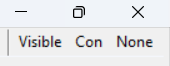
All Comments (9)
Hello,
I like your suggestion. I will create a ticket.
Regards
David Hervieux
Hello,
I like your suggestion. I will create a ticket.
Regards
Hi David,
Do we have an update on this request? Has it been looked into? approved/declined? placed in some sort of next step process?
Thank you
Hello,
We have this on our roadmap for version 2024.3. We are planning to add a button to toggle broadcasting of connected entries that will be available in the ribbon of RDM.
Regards,
Hubert Mireault
thank you for the update. looking forward to it
Hello,
It's assigned to one of our developers. We want to release RDM 2024.2 in June and we have started planning the next update. We want to focus mostly on a variety of small enhancements throughout the application like this one.
Regards
David Hervieux
I am now on 2024.2.16.0 and it is past June.
I know projects get shuffled around. Just wondering if there is a new guestimated timeframe.
Hello Patrick,
This is currently being worked on and is planned for our 2024.3 version coming out later this year.
Regards,
Hubert Mireault
Hello Patrick,
We have implemented the feature to broadcast all opened sessions in RDM. This new functionality will be available starting from version 2024.3.5.0 of RDM. Here are the details:
New Buttons Added:
- Broadcast All: Allows broadcasting across all open sessions.
- Remove All Broadcasts: Clears broadcasts from all sessions.
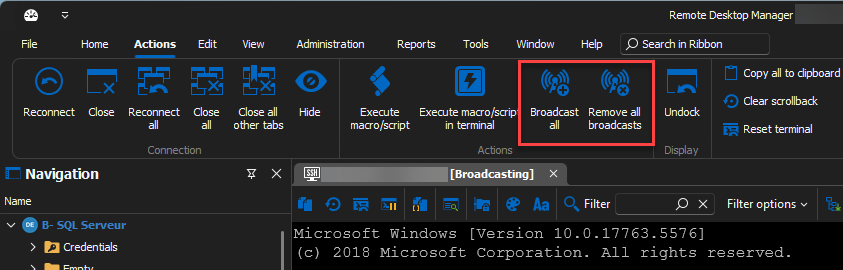
Behavior of "Broadcast All" Button:
- Requirement: At least two entries open that can broadcast.
- No Existing Broadcast Entry: Adds all entries to the broadcast.
- Existing Broadcast Entry(ies): Adds any entry not currently broadcasted.
- View Switching: If enabled, switches to a pre-configured view.
Behavior of "Remove All Broadcasts" Button:
- Removes all entries from the broadcast if any are currently broadcasting.
We've also introduced a new configuration option under File > Settings > Types > Terminal: "Change view when toggling all broadcasts." This setting automatically adjusts the view when the "Broadcast All" button is activated.
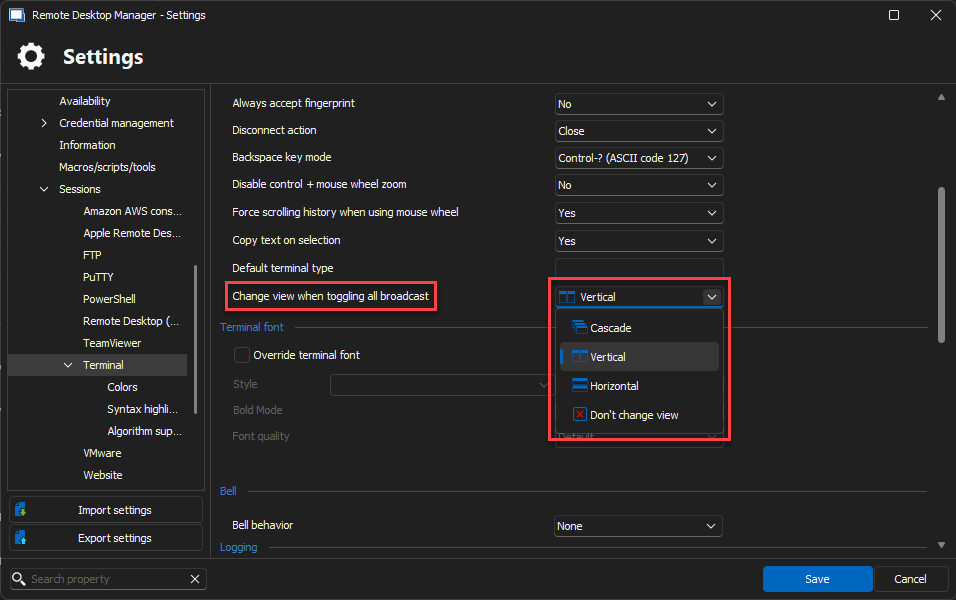
View Settings:
- Cascade
- Tile Vertical
- Tile Horizontal
- Don’t Change the View (default)
While broadcasting, you can still manually change the view via the ribbon, but it will revert to the originally set view once the broadcast ends.
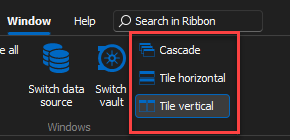
New Keyboard Shortcuts:
- Cascade
- Tile Horizontal
- Tile Vertical
- Broadcast All
- Remove All Broadcasts
We hope these updates will enhance your workflow efficiency. Should you have any questions or require further assistance, please do not hesitate to contact us.
Regards,
6e374467-1f45-409a-904d-97b2b2daca70.png
3a608c33-aae6-4659-beb0-86c7f81f4fe0.png
80c6bb22-ede5-4bbc-924e-c262350ade72.png
this will go perfectly with my other request:
https://forum.devolutions.net/topics/41350/tiled-windows--quad#195443
Hope that one comes soon as well