
zellaham
Do not use LSASS to retrieve credentials during update
Hi,
I was unable to reproduce the LSASS issue using Defender antivirus version 1.419.757.0. Could you please confirm if the problem persists with the latest versions of both Microsoft Defender and Devolutions Server? Additionally, is your Defender configured with the default settings?
Best regards,
Do not use LSASS to retrieve credentials during update
Thanks for the update!
We’re looking into the LSASS access issue during the latest update and will investigate it thoroughly. In the meantime, your PowerShell workaround is a great temporary solution. We’ll keep you posted as we make progress.
Best regards
Do not use LSASS to retrieve credentials during update
Hello,
Could you please provide us with the specific versions of your operating system (Windows) and Microsoft Defender? Knowing both the exact OS version and Defender version will help us better understand the issue and assist you more effectively.
Best regards,
Do not use LSASS to retrieve credentials during update
Hi ,
Thank you for your patience and detailed explanations. I’m happy to inform you that with version 2024.2.9.0, the issue with the updater accessing LSASS has been addressed.
You should no longer encounter this problem. However, if you run into any other issues or need further assistance, please don't hesitate to reach out to us.
Best regards,
Zacharia
Password Templates - Three Random Words
Hello,
We are pleased to inform you that this feature is now available in DVLS as a mode for the password generator. You can find more details in our documentation.
Additionally, this feature is also accessible in RDM. For more information, please refer to this link.
We anticipate that the feature will be available on the Hub platform shortly.
Best regards,
Security Concerns: You can break Credentials used to start RDM easily!
Hello,
I apologize for the issue you are currently experiencing and I wanted to confirm a few things with you.
When you say that you saved your Datasource in the cloud do you mean that you uploaded your sqlite file ?
Have you set a password on your Datasource ?
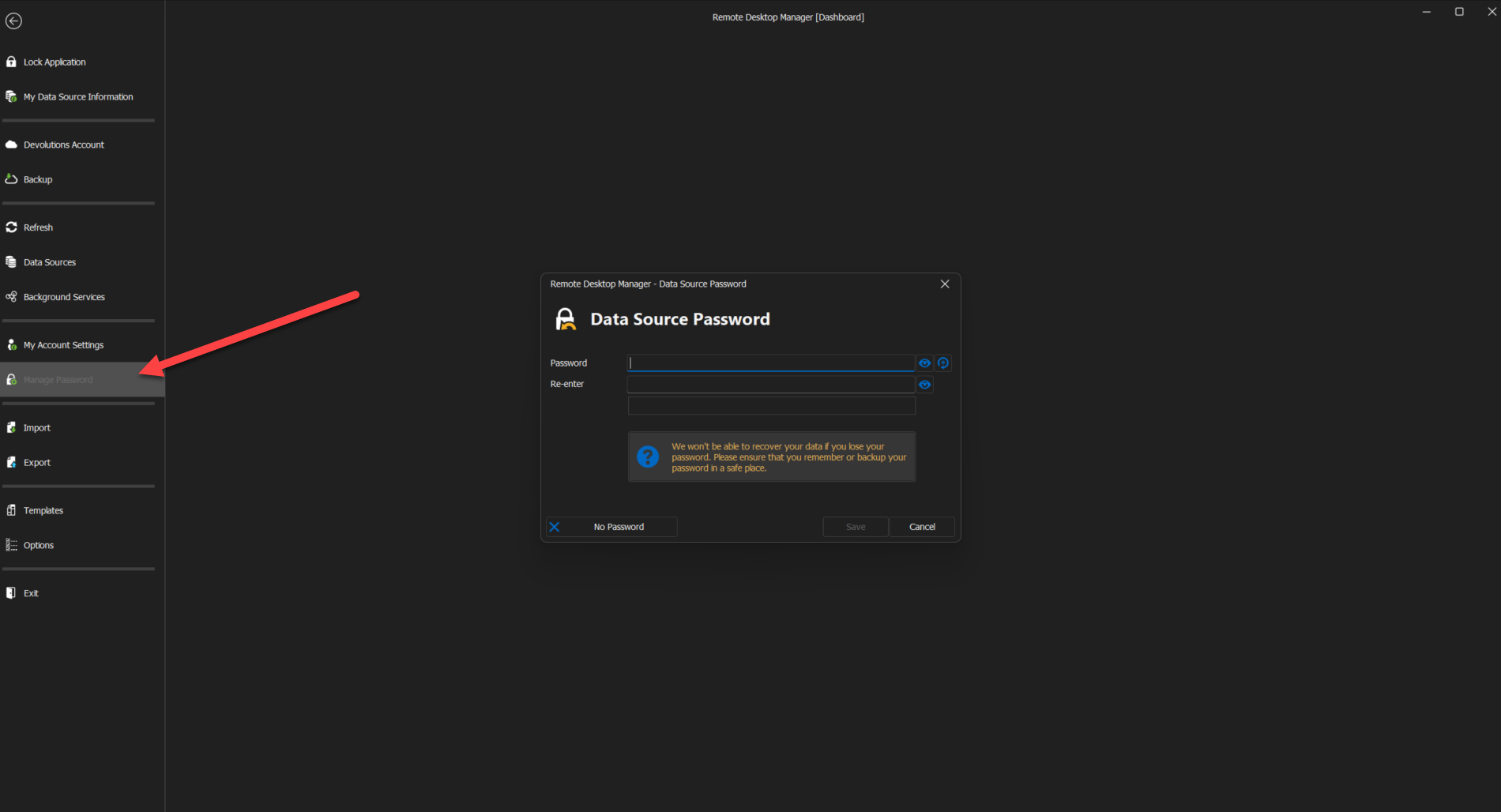
Doing so will ensure that the data in your SQlite database will be encrypted using the passphrase as encryption key.
Best regards,
Password Generator settings don't work
Hello Daniel,
This issue has been addressed and a fix should be available in the next version of DVLS.
Best regards,
Web interface dark mode and documentation
Hello M.Lars,
We have fixed the issue and it should be available on the next DVLS release.
Thank you for reporting it !
Best regards,
Backup manager "invalid path" on Linux SQL Server
Hello M.Lars,
You can use the dvls built-in backup tool with a SQL server inside a container starting from the next beta onward. However, due to the fact that the DVLS scheduler is not installed where the SQL server is the feature that zips and secure the file with a password will not work. Also, DVLS cannot guarantee that the file was successfully created. Despite this, after testing on our side we had no instance of failure during the backup process. Thank you for your patience.
Best regards,
Docker image used: http://mcr.microsoft.com/mssql/server:2022-latest
Multiple OTP requests every hour
Thank you for providing us with more details ! Currently our QA team is working hard to try and reproduce this issue. We will reach out to you as soon as we have more development on this.
Best regards,
Multiple OTP requests every hour
Hello I am so sorry to hear about these issues.Could you please provide me the following informations so that I can look further into this matter :
The version of DVLS you are using.
The version of the DVLS console you are using.
Any relevant log or error message you are getting.
Best regards,
RDM 13.5.3.0 Crashing
Hello,
I will take it from there.
Do you have an ssh entry that do not require a private key that you could try ?
Best regards,
13.5.0 Parent variable are not resolved
Hello,
I was able to reproduce your issue and will open a ticket for it.
Best regards,
Installed Setup.RemoteDesktopManagerFree.4.5.2.0.exe
Hello,
Did you try our portable version here ? ( https://remotedesktopmanager.com/home/download )
Simply go on our Download page and click here
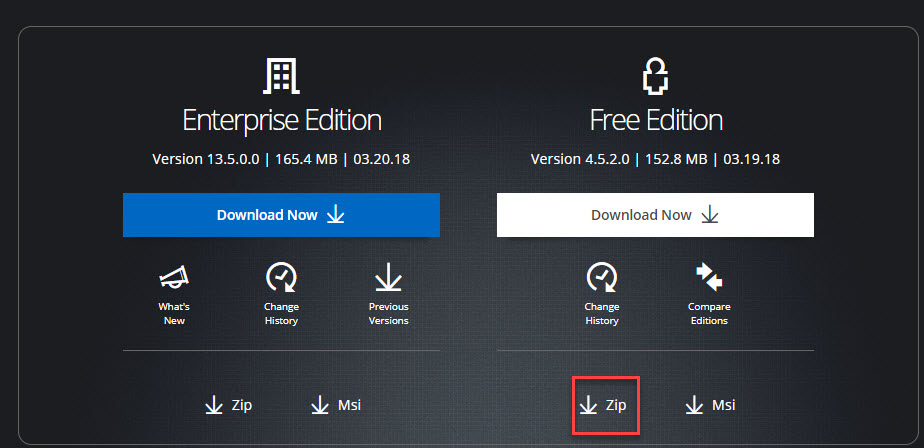
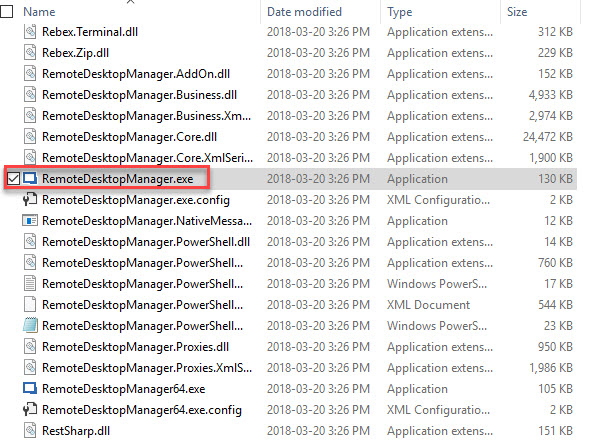
Then simply extract the files in a folder on your desktop and run the "RemoteDesktopManager.exe"
Best regards,
Documents update and Usage Logs
Hello,
Would it be possible for you to try the last beta and let us know if you experience the same issue.
( https://remotedesktopmanager.com/home/download )
Best regards,
Documents update and Usage Logs
Hello,
I could reproduce your issue and was wondering if you were editing your Excel file directly in RDM or if you were using the Update document button ?
Best regards,
Change focus from remote desktop session to local computer
Hello,
Could you confirm that this option under the action tab is disabled.

Best regards,
RDM Browser Plugins and Office 365
Hello,
If you wish to use websites like Gmail and Microsoft new sign-in experience in embedded mode you will need to use a typing macro.
( https://help.remotedesktopmanager.com/settings_events_autotypingmacro.htm )
The typing macro that you will need to use for this kind of website looks like that
$USERNAME${ENTER}{DELAY}{DELAY}{DELAY}{DELAY}{DELAY}{DELAY}{DELAY}{DELAY}{DELAY}{DELAY}{DELAY}{DELAY}{DELAY}{DELAY}{DELAY}$PASSWORD${ENTER}
Please also remember to put an Initial wait time long enough so that your credentials get filled properly.
That being said, We will verify with our engineering team if there is a way to make these websites work in external mode with the browser plugin
(Since it is not possible to use typing macro in external mode)
Best regards,
RDM Browser Plugins and Office 365
Hello,
Do you launch the session in external mode ?
Could you provide use the link you use to connect to Office 365 so that we can test it.
Best regards,
Smart Reconnect as a Default Not Working
Hello,
What is your version of RDM ?
What is your Datasource ?
Best regards,
Enable Smart Reconnect by default
Hello,
1. For the existing connections you can make a batch edit by selecting all of them like so.

2. If you wish that this setting apply to all your newly created entry please go in File -> Templates -> Default settings -> Session.
Once there simply look for the RDP entry and do the desired modification it will then apply to every newly created entry.

P.S.
Also note that if all your RDP entries are set as scrollbar (the default settings) you can go in File -> option -> Types RDP and change the "Screen sizing mode " there.
Best regards,
Lock Application when Idle
Hello,
It will only be when the machine is left Iddle That RDM will lock itself.
Best regards,
Firefox Not Working in RDM
Hello,
Could you please send us a screeshot of that issue.
Best regards,
12.5.12.0 - Serial Port Entry
Hello,
Thank you for your feedback we are glad that you could fix the issue.
Best regards !
12.5.12.0 - Serial Port Entry
Hello,
That is indeed very strange I created a serial port entry in a SQL Datasource without any issue.

Could you see in your Datasource settings if serial port is unchecked.
Administration -> Data Source Settings -> Types -> Availability

Best regards,