Security Concerns: You can break Credentials used to start RDM easily!
Security Concerns: You can break Credentials used to start RDM easily!

Situation:
I work on a VM in our local domain.
I use RDM at different machines.
I save the Datasource in your cloud.
I use a Yubi-key to protect my datasource.
Problem:
Because of problems, I removed RDM to reinstall it.. It didn't delete the *.cfg so I deleted it by hand.
The cfg file includes the use of the Yubi-key.
When I restartet RDM without the cfg file, it just connected to my online datasource WITHOUT asking for ANY credentials.
I didn't even need to give the location to my datasource!
So EVERYONE in my domain who knows this bug can use all my credentials!
Why isn't the datasource better protected? I was flabbergasted when seeing how friggn easily you can break security while using this product!
So how can I make sure, that my datasource is protected? The way it works now, I can't use RDM anymore!
All Comments (7)
Hello,
Thank you for bringing this issue to our attention. We understand your concern regarding the security of your data source and the ease with which someone could potentially access your credentials. We apologize for any inconvenience or worry this may have caused you.
To address your concern, we would like to clarify the security measures in place for our online data source. We utilize standard OAuth authentication to protect the login process. This means that authentication tokens are handled by the browser and not stored in the .cfg file. Therefore, deleting the .cfg will not help to protect your online data source.
You could clear your logged session from here if you are on another machine:
https://portal.devolutions.com/security/sessions
Additionally, you can use the "Log Off" button within your virtual machine to ensure a complete logout from your Devolutions Account.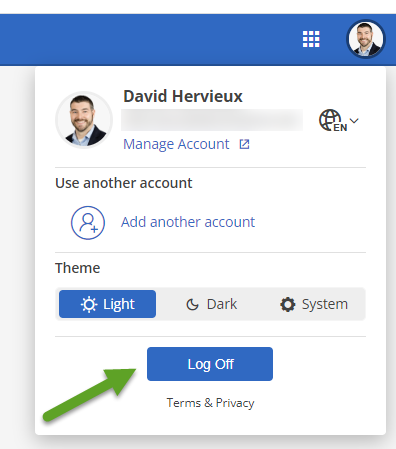
Regarding your Yubikey, please ensure that it is configured to protect your Devolutions Account rather than the local data source. By doing so, you can add an extra layer of security to your account and ensure that unauthorized access is prevented.
Regards
David Hervieux
c40769eb-f61a-40cd-9839-bd3dbbe151a3.png
It's not that deleting the config file doesn't protect my data. It's that deleting the config makes it, that any protection I configured is worthless..
The credentials do not encrypt ANYTHING, they are just a little: "if password is good then let user in." Also: "if I dont know about a password I let any user in!" That's not acceptable at all.
My colleagues just tested a few things with a local database: They don't get encrypted at all! You delete the config.. you get access.
Even when you protect your SQLite database with 2 factors: After deleting the config you just ignore the dialog asking for a new data source and voila... you have access to the database which was used before.
We were not able to secure the local data source at all. We used credentals both for A: starting RDM and B: securing the SQLite DB.
Deleting the config file gives you full access to anything!
We lost trust in this software completely.. it's not that hard to encrypt a database or credentials.
I liked your software and tested it some time for our company, but I am sorry to say.. RDM is banned for now.
Hello,
I apologize for the issue you are currently experiencing and I wanted to confirm a few things with you.
When you say that you saved your Datasource in the cloud do you mean that you uploaded your sqlite file ?
Have you set a password on your Datasource ?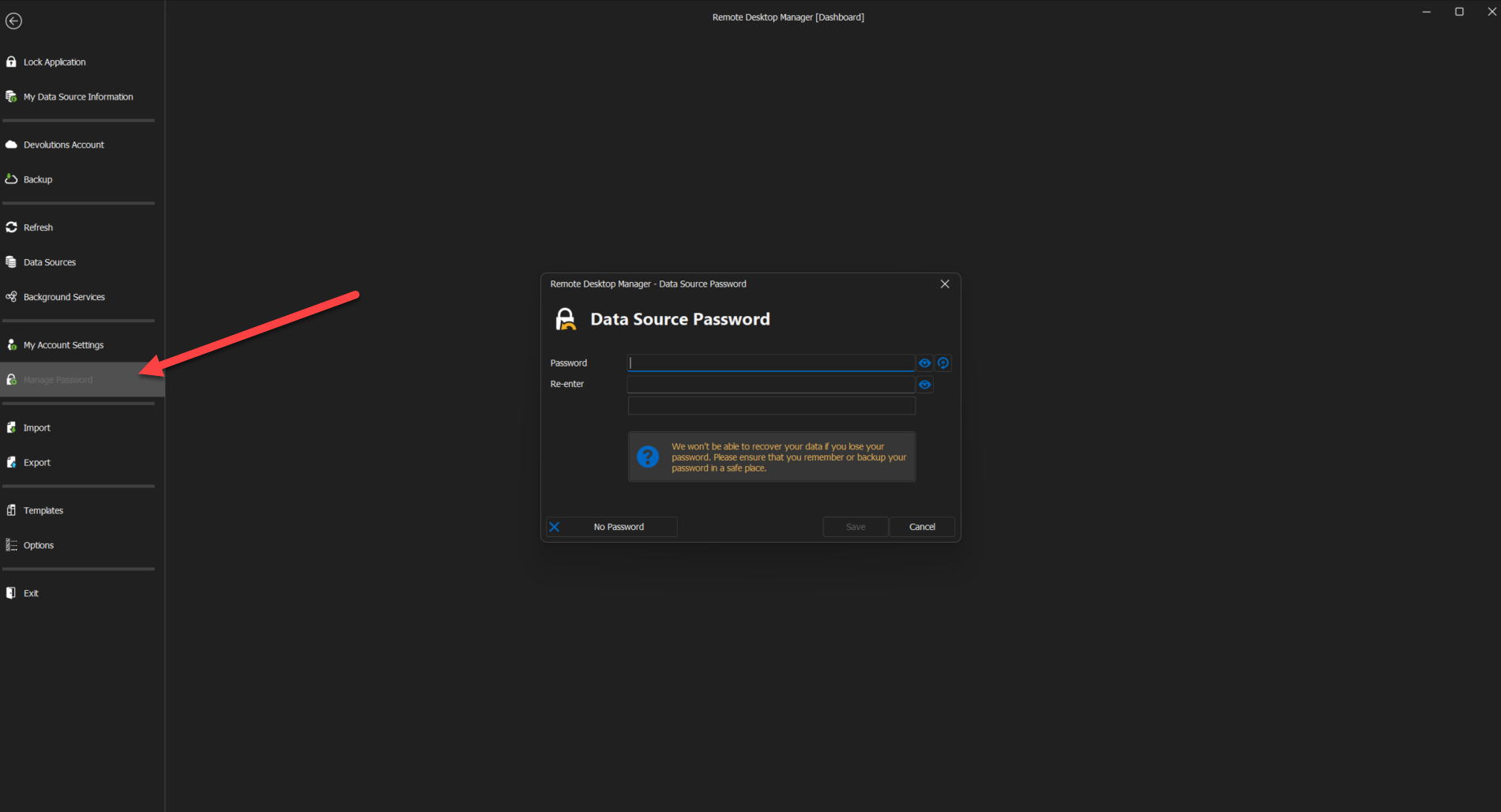
Doing so will ensure that the data in your SQlite database will be encrypted using the passphrase as encryption key.
Best regards,
Zacharia Ellaham
f1ddbbac-88d3-4769-a157-bd7db455f85a.png
Please try it: Create a new datasource using SQLite, "encrypt" it with a password, close RDM, delete config, restart RDM. You will have your encrypted data source just opened for you.
At this point, I've lost trust.
Hello,
Following a discussion we had with our engineering department and the conclusion of our tests, here is a summary of the situation along with the steps that must be taken to secure the content of your data source.
1- You mentioned that due to issues that you encountered, you reinstalled RDM and noticed that the RemoteDesktopManager.cfg file was not deleted during this process.
This is intended to avoid deleting the configuration made by our users when RDM is reinstalled or updated.
2- When you restarted RDM without the cfg file, it just connected to your data source without asking for your credentials. You didn't even need to give the location to your data source.
Unless you've changed the default location to store your connections.db (the file that holds the data of your local data source) RDM will look into this location when launched without a configuration file to see if it needs to create a local data source. This is required for RDM to start. In your case, since a connections.db was already present, it didn't create a new one and simply loaded the previous one into the application.
To add to what David mentioned, you could opt for a Devolutions Hub Personal data source to replace your local SQlite data source, and in doing so, you will be able to set your Yubikey on your Devolutions Account directly. That way, this setting will no longer be stored locally and can't be removed without your intervention.
To learn more about the Hub Personal data source, I would invite you to consult this link: https://docs.devolutions.net/rdm/windows/data-sources/data-sources-types/hub-personal/
As for configuring your Yubikey on your Devolutions Account, this can be done by going under the following section: https://portal.devolutions.com/security/key
As for what my colleague Zacharia mentioned, to encrypt the content of a local data source, a master key must be set. Once this is done, it won't be possible for anyone who doesn't have access to the master key to consult the data contained in your connections.db. To configure a master key, please refer to this topic: https://docs.devolutions.net/rdm/windows/commands/file/change-master-key/
If you would like to have some clarifications, I can open a support case on your behalf and provide you a link to schedule a remote session with us at your convenience.
Best regards,
James Lafleur
Thanks for your reply. I bet there are ways to secure the data, but when it is that hard or unintuitive for me to do so and also so easy to break trough the protection I assumed was save, then this software is just not for me or our company. Also I think you have lots of users who did the same as me to protect their data, thinking their data is secured when it's just not.
I would wish for future users to not get tricked into thinking their data is secured by using the easy accessable password settings. Any password should be set to the data source itself, not any config-file that plays gate-keeper.
I wish you guys best luck and a nice day.
Greetings,
I appreciate your prompt response!
Although I regret that you have arrived at that conclusion, I comprehend your choice. Please don't hesitate to get in touch with us if you require additional help.
Best regards,
James Lafleur