
David Godin
ProtocolsSharp SSH fails against FortiSwitch OpenSSH 9.9 after hostkeys-prove request
Hello Albert,
The option to disable SSH host key updates has been implemented and should be available in version 2027.1.1 of RDM.
Best regards,
Active Directory Console: move objects between OUs
Hello Eduard,
This feature has been implemented and should be available in version 2027.1.0 of RDM.
Thanks,
HTML bookmarks import
Hello,
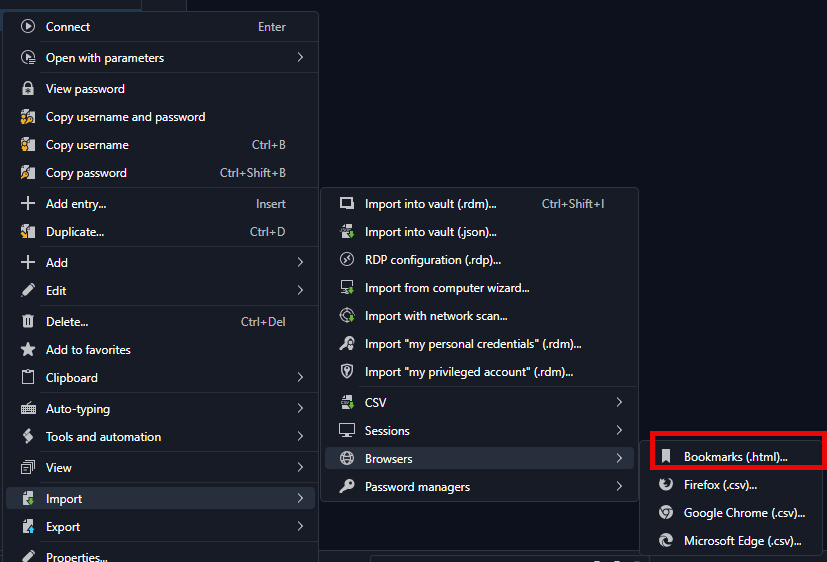
We've restored the HTML bookmarks import option, which will be available in RDM 2027.1.
You'll be able to import bookmarks directly from an HTML file through Import > Browsers > Bookmarks (.html), without having to convert it to CSV first.
Regards,
Suggestions on Grammar Highlighting and Code Highlighting
Hello,
Both options will be available. You'll be able to use a global syntax highlighting profile or configure a custom profile for each Telnet or Serial session.
Regards,
Suggestions on Grammar Highlighting and Code Highlighting
Hello,
We've added syntax highlighting support for Telnet and Serial entries. This feature should be available in version 2027.1.0.
Best regards,
Entry expiration notifications
Hello,
Following up on this, the entry expiration notification settings are available in Remote Desktop Manager when using a Devolutions Server data source.
You can find the configuration in the following locations:
Per entry: Edit the entry > Description > Expiration > Notify for expiring entries.
Vault level: Edit the vault's root entry > Common > Settings > Notify for expiring entries.
Entries configured to "Inherited" will use the notification settings defined at the vault level.
Best regards,
Variables not resolved in shortcuts in RDM with Devolutions Cloud datasource
Hello Jelle,
The issue with variables not being resolved in shortcuts has been fixed. The fix should be included in the upcoming version 2026.3.14.
Best regards,
Web browser entry's automatic favicon not showing in tabs
Hello,
The issue with automatically assigned favicons not being displayed in the session tabs has been fixed. The fix should be available in the upcoming version, which should be 2026.3.13.
Regards,
Expand Remote Monitoring capabilities in Terminal > Advanced
Hello,
It turns out we should be able to include these improvements in version 2026.3.10 after all.
Regards,
Expand Remote Monitoring capabilities in Terminal > Advanced
Hello,
The Remote Monitoring capabilities have been expanded based on your request. These improvements will be available in Remote Desktop Manager 2027.1.
Thank you for the suggestion!
Regards,
SFTP in SSH enhance failure handling
Hello,
This issue has been resolved and should be available in the upcoming version 2026.2.20.
Regards,
Passwords not shown in Password Depot Integration
Hello Christoph,
Thank you for the additional information.
To answer your earlier question: the issue was on the RDM side, not with Password Depot. Entries located in subfolders were not being displayed correctly, which is why only entries at the root level appeared.
This has now been fixed, and the fix should be included in the upcoming version, which should be 2026.2.18.
Thank you for your patience and for the information you provided while we investigated the issue.
Best regards,
partical sync with nextbox
Hello Neil,
Thanks for reporting this. I was able to confirm the behavior on my side. The NetBox synchronizer currently forces synced sessions into embedded mode regardless of what the template specifies, so the external display setting from the template gets overwritten during the sync.
I've pushed a fix for this which should be available in version 2026.1.23.0.
Best regards,
partical sync with nextbox
Hello,
The role filter in NetBox sync uses slug values (lowercase, with hyphens instead of spaces), as this is what NetBox's API matches against.
A few things that would help us narrow this down:
What value did you enter in the role filter? For example, wireless-lan-controller versus Wireless LAN Controller.
What's the actual slug in your NetBox? You can confirm it under Organization → Device Roles in the NetBox UI, in the Slug column. The slug isn't always what you'd expect from the display name (for example, it could be something like wlc or wlan-controller).
Do you have "Only devices containing a management IP" enabled in your sync parameters? If so, any Wireless LAN Controller devices in NetBox without a primary IPv4/IPv6 assigned would be filtered out, which could explain getting 0 results even with the correct slug.
The first two points cover the most common cause when one role works and another doesn't.
Let us know what you find and we'll go from there.
Best regards,
Execute Typing Script After SSH Connection
Hello Matthew,
The issue where Typing Macro entries configured through "After opening → Execute macro/script/tool" were not properly sending keystrokes to SSH Terminal sessions has been fixed and should be included in the upcoming version 2026.1.23.
You should now be able to reuse the same Typing Macro entry across multiple SSH sessions without needing to duplicate the commands in each entry.
Best regards,
Unable to update user object account expiry in AD dashboard
Hello Joe,
Both issues have been fixed and the changes should be included in the upcoming version 2026.1.23.
The accountExpires attribute now uses a proper editor (date picker with a "Never" option), which resolves the LDAP error encountered when updating the value.
The Common Name field now validates unsupported characters and displays a clearer message instead of the unexpected LDAP error. The root cause comes from a lower-level LDAP library limitation related to escaped commas in CN values. We have contacted the person in charge of the library regarding proper support for this scenario in a future update.
Regards,
Netbox Sync - Additional funactionality
Hello @sleepyskeleton
Thank you for flagging this. We tracked down what’s most likely the cause: an edge case in how our sync handles devices with unset session_type values, which was causing it to exit prematurely instead of importing the data.
This issue has been resolved, and the fix should be included in version 2026.1.21. In the meantime, if you’d like to keep your sync running before the update, you can use NetBox’s bulk edit feature on your Devices list (select rows → Edit selected) to assign a session_type value (e.g., rdp) to all entries at once. You can repeat the same steps on the Virtual Machines list if the field is configured there as well. You can also fine-tune values per device afterward if needed.
Once the update is available, feel free to try it and let us know if everything works as expected.
Best regards,
entry sim card
Hello,
The “Other (custom)” entry has been reworked and renamed to Custom record. This improvement addresses the usability issues you mentioned, and should be available in version 2026.2.0.
The new version removes the grid and allows fields to be directly viewed, edited, and copied. It also introduces field types (including sensitive fields), per-field copy buttons in the dashboard, and quick access to frequently used values.
Your SIM card use case should fit much more naturally with this updated entry.
Regards,
Netbox Sync - Additional funactionality
Hello,
We’ve added support for syncing virtual machines from NetBox. This improvement will be available in version 2026.2.0.
Regarding the request to use FQDN instead of IP, this is most likely tied to custom fields or specific configurations in NetBox. To properly support this and avoid handling similar requests on a case-by-case basis, this will be addressed in a separate ticket focused on improving custom field support in the NetBox integration. This is not planned for the immediate term but remains under consideration.
Additionally, enabling both the “Management IP” option and the “Include virtual machines” option will not interfere with VM synchronization. Virtual machines typically do not have a management IP defined, so they will still be imported correctly.
Best regards,
Crash when closing a serial port session
Hello,
The fix has been implemented and should be available in the upcoming version 2026.1.16.
If you still experience any issues after updating, please let us know.
Thank you for your patience.
Regards,
Add support for SSO in LastPass integration in RDM
Hello,
Thank you for the follow-up. The SSO authentication is indeed handled automatically by the LastPass library. When you attempt to connect, it detects that your account requires SSO and initiates the appropriate authentication flow.
To answer your question: the Master Password field refers to the LastPass vault master password (not the RDM data source master key). However, since SSO users authenticate through their identity provider, they don't have a traditional LastPass master password.
As you've noticed, when "Always ask Password" is enabled or no password is configured, the application prompts for a master password before the SSO detection can occur.
Workaround for now: You can enter any placeholder value in the Master Password field in properties (the actual value doesn't matter for SSO accounts). Once submitted, the system should detect that your account uses SSO and redirect you to the proper SSO login flow. No additional settings need to be enabled.
We'll implement an explicit "SSO" authentication mode option that will skip the password prompt entirely and go directly to the SSO flow. I'll update this thread once this becomes available.
Best regards,
WireGuard connection doesn't work when no DNS is provided
Hello @corey01,
We've added a new option to better support split tunneling scenarios.
In the WireGuard entry settings, you’ll now find a "Use empty DNS" checkbox below the DNS field. When enabled, no DNS configuration is sent to WireGuard, allowing your system’s existing DNS configuration (such as NRPT rules) to be used as expected. This option is disabled by default, and DNS remains required unless it is explicitly selected.
The fix should be available in version 2026.1.15.
Regards,
Ignore Certificate Errors in ProxMox Console
Hello,
This has been implemented, and the option to ignore certificate errors is now available at the entry level.
The fix should be included in version 2026.2.0.
Regards,
Typing Macro bug in SSH
Hello Peter,
We were able to identify and fix the issue affecting the {DELAY} behavior in SSH Typing Macros. The fix should be included in the upcoming version, which should be 2026.1.12.
Regards,
Crash when closing a serial port session
Hello,
We've identified the root cause of the issue and a fix is in progress. We'll update this thread once a release version is confirmed.
Thank you for your patience.
Regards,