Expand Remote Monitoring capabilities in Terminal > Advanced
Expand Remote Monitoring capabilities in Terminal > Advanced
2 votes

The current Remote Monitoring option under an SSH entry's Terminal > Advanced settings are quite limited compared to similar features in other terminal tools (e.g. MobaXTerm's status bar).
It would be great to see the monitoring bar expanded to include:
- OS / hostname
- CPU % (ideally with a small live graph, not just a number)
- Memory: available / total
- Network: upload and download throughput
- System uptime
- Logged-in username
- Disk/partition usage % per mount point
This would make RDM's SSH sessions much more useful for day-to-day sysadmin work, where at-a-glance system health is a big part of the value of having a terminal open.
Current remote monitoring in RDM `2026.2.12.0` Windows 64-bit client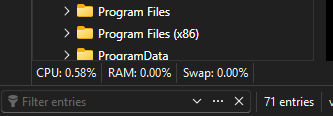
MobaXTerm:
d03c308e-3dff-4ea7-b247-a355d46cd7bb.png
82eaa195-e6f1-4275-a18f-e5ac686d2b45.png
All Comments (5)
Hello,
Thank you for the request. I will open an internal ticket for this and our terminal expert will analyze this and see how we could support this. Since programs like MobaXTerm support this information, it should be possible for us to do it as well.
Regards,
Hubert Mireault
Hello,
The Remote Monitoring capabilities have been expanded based on your request. These improvements will be available in Remote Desktop Manager 2027.1.
Thank you for the suggestion!
Regards,
David Godin
Hello,
It turns out we should be able to include these improvements in version 2026.3.10 after all.
Regards,
David Godin
Thanks so much @David Godin!
Can't wait 😊
Hello,
Thank you for being so patient!
I'm pleased to inform you that a new version of RDM (2026.3.10.0) has been released, including the requested feature.
Latest Version: Download RDM
Please let us know if this works or if you encounter any issues.
Best regards,
Maxim Robert