HTML bookmarks import
1 vote

Not sure why this feature was deprecated, certainly a lot easier that needing to export HTML to CSV then use the CSV wizard to import, why make things more challenging?
All Comments (5)
Hello,
Could you describe more which feature you're talking about? Do you have any screenshots of the feature in previous versions? It's possible we could bring it back depending on the reason it was deprecated, but I'd like to ensure we're talking about the same feature.
Regards,
Hubert Mireault
My teammates add prod, iPMI, etc servers as bookmarks. As servers are added / removed they export the bookmarks as an html file. I then want to import the HTML file into RDM into the Devolutions Workspace folder ( I am using the RDM Chrome Extension ), this way I can easily update the credentials and leverage the RDM extension in Chrome, this allows me to save multiple hours on manually creating the Web session for each server in RDM. Now I need to export the HTML to CSV and then import into RDM using the CSV Wizard, bypassing the CSV export would just save a step, nothing major just asking.
Hello,
What I understand is you're using Chrome and you want to export these bookmarks in HTML and import them directly in RDM. At the moment I do see we're only allowing CSV format. We could definitely add an HTML import option for the browser bookmark imports. From a quick investigation I see we removed it when we went from 2026.1 to 2026.2, as part of our efforts to streamline a lot of features that saw less use and remove integrations with legacy software.
I'll open a ticket for this.
Regards,
Hubert Mireault
Hello,
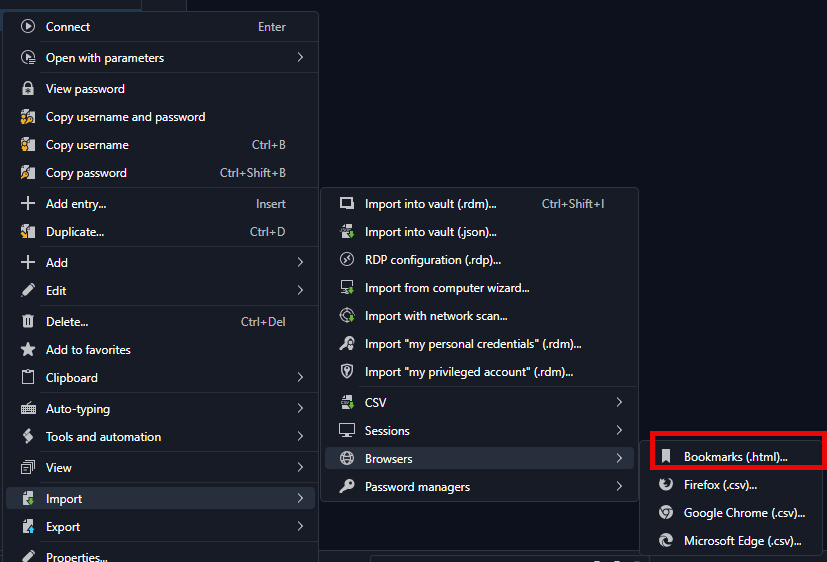
We've restored the HTML bookmarks import option, which will be available in RDM 2027.1.
You'll be able to import bookmarks directly from an HTML file through Import > Browsers > Bookmarks (.html), without having to convert it to CSV first.
Regards,
David Godin
Thank you, much appreciated as always...Josh