Unable to update user object account expiry in AD dashboard

Hello,
When attempting to update the 'accountExpires' attribute of an Active Directory user object via the RDM AD dashboard, the following error message appears.
Using RDM 2026.1.20.
Please let me know if any additional information is required.
Thanks
Joe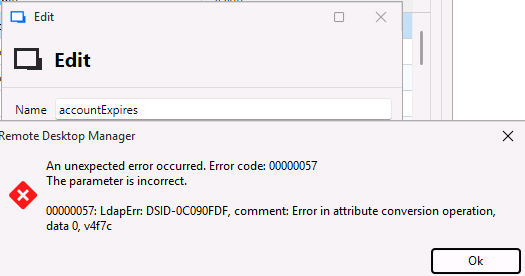
62ee7aa3-74cf-4ac8-99b1-8babfc77a789.png
All Comments (6)
Also getting same error when attempting to include a comma in the 'Common name' field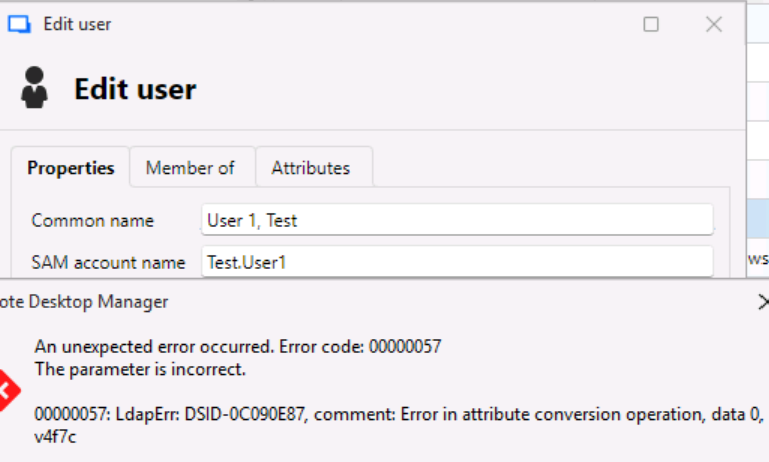
af5e138f-20f3-4734-a1b1-ab73c5c2854b.png
Hello Joe,
Thank you for reaching out to the Devolutions support team.
Yeah, I can reproduce it.
I will open an internal ticket regarding the LDAP error you receive in RDM.
Best regards,
Patrick Ouimet
Great, thanks Patrick
Hello Joe,
Both issues have been fixed and the changes should be included in the upcoming version 2026.1.23.
- The accountExpires attribute now uses a proper editor (date picker with a "Never" option), which resolves the LDAP error encountered when updating the value.
- The Common Name field now validates unsupported characters and displays a clearer message instead of the unexpected LDAP error. The root cause comes from a lower-level LDAP library limitation related to escaped commas in CN values. We have contacted the person in charge of the library regarding proper support for this scenario in a future update.
Regards,
David Godin
Hello,
Thank you for being so patient!
I'm pleased to inform you that a new version of RDM (2026.1.23.0) has been released, featuring the fix for your issue.
Latest Version: Download RDM
Please let us know if this works or if you encounter any issues.
Best regards,
Maxim Robert
Thanks Maxim. Confirmed this is resolved.
Joe