Entry expiration notifications
3 votes

Hello.
I saw other topics, but I have 2 topics to address, so I created a new post.
Would it be possible to set :
- an e-mail address for entry expiration notifications ? In our case, we would like to be able to send an e-mail to our support inbox, so we can create a ticket.
- set the number of days before the expiration needs to be sent. This could be managed with baselines so we could choose a baseline for certificates, another for passwords, or for a specific customer or whatever.
Thank you and best regards.
Marcel
Devolutions Server, RDM and GW admin.
All Comments (9)
Hello Marcel,
Thank you for your suggestion. Regarding your first request, this is not a product development that is currently planned. We're taking note of your feedback and will follow this topic to see if there's any additional interest or input from other users.
For your second point, it is already possible to specify when you want to be notified. 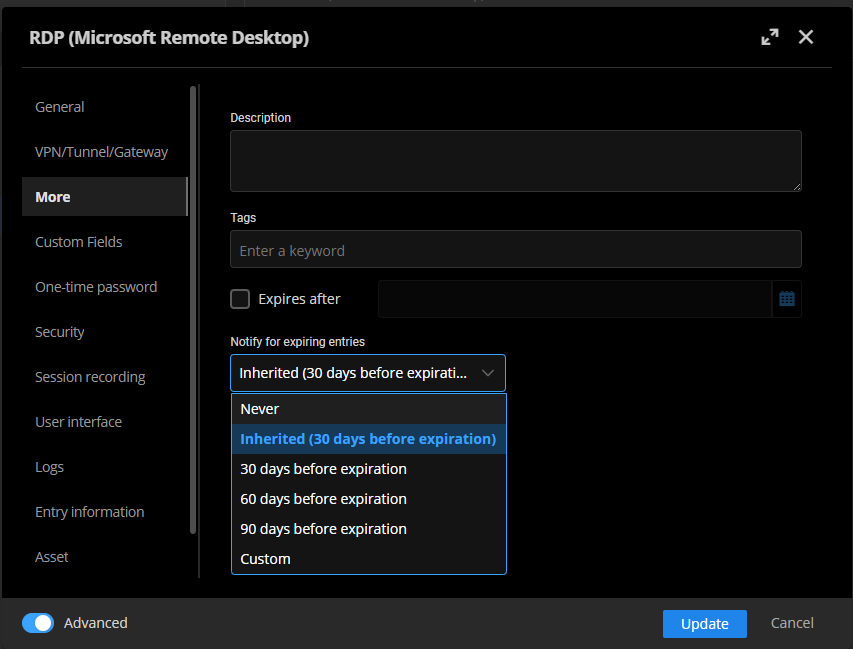
Does this help ?
Best regards,
François Dubois
f3d4b88e-6597-4307-961e-a1f278a6df41.png
Hello François.
About the notifications themselves, we find them very easy to miss in RDM. Because we basically never use the dashboard of a vault and the red dot is not very obvious in the bottom righ corner. We need to be informed so that we can take actions. Meaning we need to be able to create a ticket out of it. How would that be possible ?
It would if it was also available in RDM.
I don't want my users to have to switch between RDM and web all the time because some features are only in WEB and others only in RDM.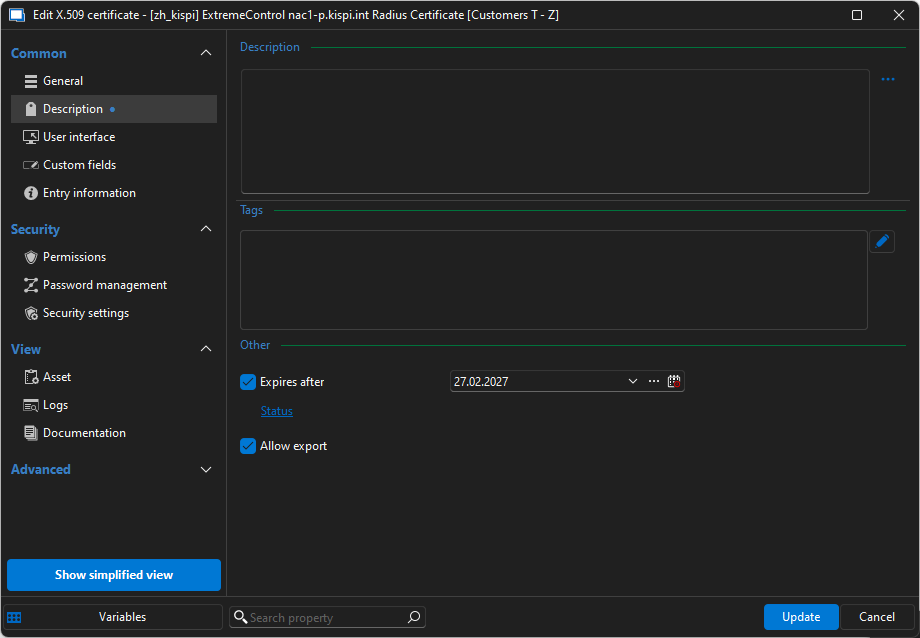
Thank you and best regards.
Marcel
Devolutions Server, RDM and GW admin.
5045233d-110c-435a-9e5a-d9850f1ec846.png
Hello Marcel,
Thank you for your response. I completely agree with you. One would not want to switch from RDM to the web interface depending on the feature needed. I'm surprised that it is not integrated though. I will discuss adding this configuration with the RDM team as well. There is no reason why it shouldn't be included.
I also wanted to let you know that starting with version 2025.2, notifications visible in DVLS Web (under the bell icon) will be available in RDM as well. The bell icon will also be positioned at the bottom right corner. So all notifications received by users to notify about an expiration should be visible in RDM as well. If I understood correctly, the red dot is probably too small on the user interface because you missed it. I will discuss potential improvements with our UX/UI team and see if a small change could enhance the user experience. Finally, I think you know, but notifications are also sent to users via email. I understand that you would like to use a support email handled by a team, not just one person. I have noted this and will explore what can be done later. However, I do not have an ETA for this.
Here is a screenshot of the 2025.2 build (a BETA version is already available: https://forum.devolutions.net/topics/44761/remote-desktop-manager-20252--beta) DVLS Beta should be available in the next few days.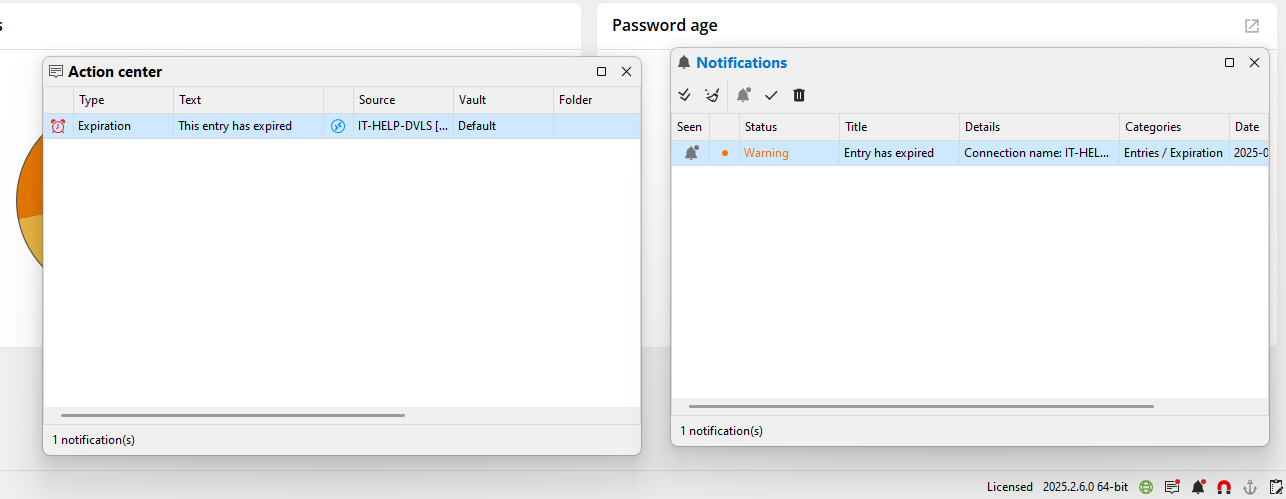
Do you think it is something that will help if it is directly in RDM ?
Best regards,
François Dubois
a6027c37-c05e-43cd-931f-80d830a89fa1.png
Hello François.
Thank you for the update and the positive feedback.
Notifying the user who added a secret is not the best idea, because:
- he might have left the company.
- be on holidays or medical leave.
- have changed role.
- Not his role to maintain the secret.
- etc.
That's why we need a configurable e-mail address for notifications, where a team can follow-up.
Best regards.
Marcel
Devolutions Server, RDM and GW admin.
Hello Marcel,
Sorry for the inconvenience. We try hard to avoid situations where features are available only on the web. I don't have an ETA for when the setting will be added to RDM, but tickets have been created and teams will improve that aspect. At least, it will be possible to configure when you want to receive notifications on different entries via RDM.
I completely understand your need for why it would be useful to avoid notifications sent only to a specific user. One workaround that I see, even though this solution is not elegant, would be to create an administrator user (no need to be in your IdP, just create a Devolutions user) that nobody will use, but configured with your support team's email. If you want that email to receive only expiration notifications, you could configure it to receive only expiration notifications in notification preference.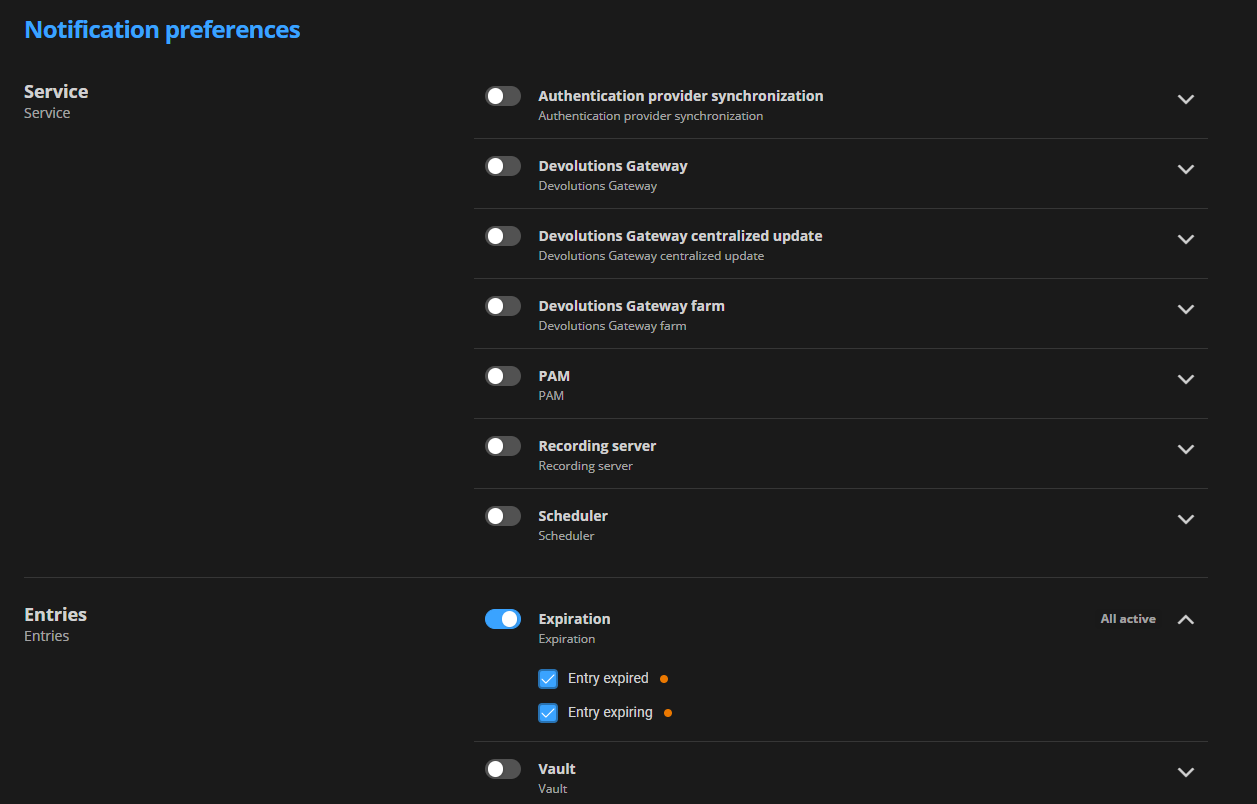
I know, it is not a nice way to fix that issue. I'm letting you know in case it could be acceptable for you and could allow you to address it right now. Meanwhile, I took note of that and will see what could be done to meet your needs.
Don't hesitate if you have other questions.
Best regards,
François Dubois
442ba297-7a82-4665-987d-eec4d559d24e.png
Hello François.
I'm setting this up, as this could be a nice workaround.
Let's see if we get all the expiration notifications.
I have set the user up to be a normal user with access to some vaults.
I don't want to receive expiration for all vaults with that user. Will that work ?
PS: with pwned seemingly unavailable this morning, I had to disable the feature to create the user, even though, in System Settings, pwned check was set to "Default (None)" / "None" (I tried both).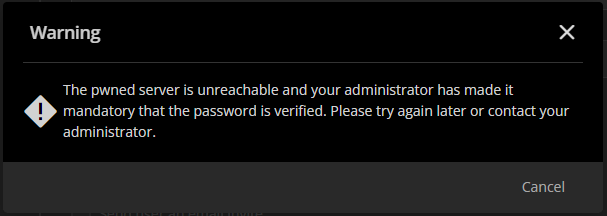
Devolutions Server, RDM and GW admin.
ecdfccb4-6675-4e70-b53b-91f53c385695.png
Hello Marcel,
If you don't want to receive expiration for all vaults, you could create a normal user, but configured that user as Vault owner on vaults that you want him to receive notification. That would work to limit only notifications from specific vaults.
Let me know if that work around works for you.
And about the pwned check, I'm wondering if you look the right parameter. If you created a user, here is the parameter that is used : 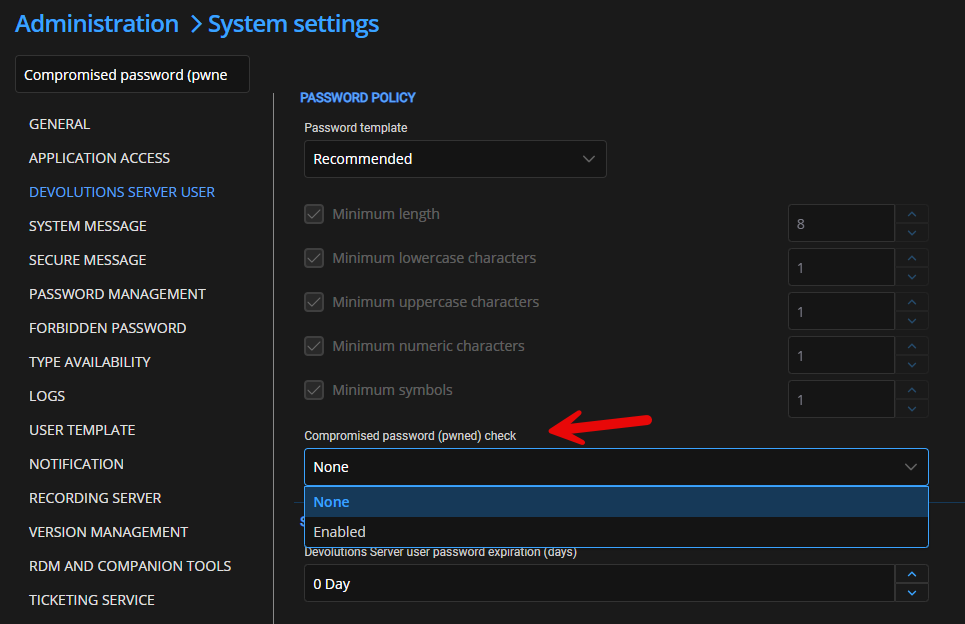
There is two options for that. Could you confirm that it was set to none ? I suspect that you look the other parameter in Password Management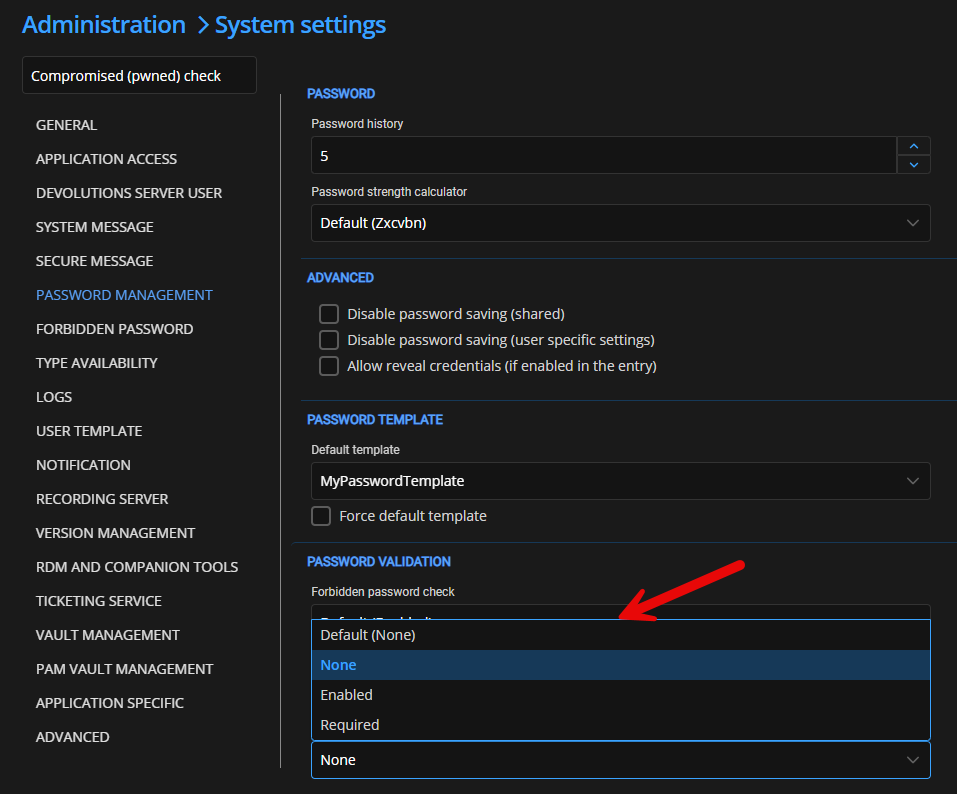
Could you confirm if you checked the right parameter ?
Best regards,
François Dubois
957de033-bee5-4fa7-94ac-bcce1903f364.png
aeecd81c-f96d-4ef0-ba16-36d72070f91c.png
Hello François.
Ah yes, that's a good hint to configure it this way! In that manner we can separate notifications.
It's a workaround, but I'm happy to use it until such a feature gets added to Devolutions.
Great, I didn't see that setting before for the pwned check.
Best regards.
Marcel
Devolutions Server, RDM and GW admin.
Hello,
Following up on this, the entry expiration notification settings are available in Remote Desktop Manager when using a Devolutions Server data source.
You can find the configuration in the following locations:
- Per entry: Edit the entry > Description > Expiration > Notify for expiring entries.
- Vault level: Edit the vault's root entry > Common > Settings > Notify for expiring entries.
Entries configured to "Inherited" will use the notification settings defined at the vault level.
Best regards,
David Godin