Execute Typing Script After SSH Connection

Hello, I have created a typing macro intended to auto-execute a few commands after logging in to my SSH sessions. I am editing the session, selecting Events, After opening, Select Execute macro/script/tool and choose the typing script I created.
When connecting to the host, I see in the lower right of the console it says 'Executing macro for 'my host name', but nothing is executing.
All Comments (10)
Hi Matthew,
Could you please let us know which version of RDM you are using, and what type of data source you are connected to?
Also, could you send us screenshots of how your SSH terminal entry is configured so we can try to replicate your setup on our side?
Finally, I’m sharing a private link where you can upload the video showing the complete behavior you described, including the moment where it says the macro is executing but nothing actually happens.
Best regards,
Alexis Geller Peiro
Hi there. I am running version 2026.1.20.0 64-bit (PreJIT). I am connecting to a linux based system over SSH. I have uploaded a video to that sharepoint link.
Hi Matthew,
Thank you for the update and for uploading the video.
We were able to reproduce the behavior on our side and found a bug where adding and selecting the Typing Macro entry the way you currently have it configured does not execute properly.
The solution would be to add a delay/wait time directly in the Typing Macro entry so that it runs a few seconds after the SSH Terminal session has opened.
As a workaround, we also found that you can add the same commands directly in the "After opening" tab, in the section at the bottom, instead of calling the Typing Macro entry. This should allow the commands to run after the SSH session opens.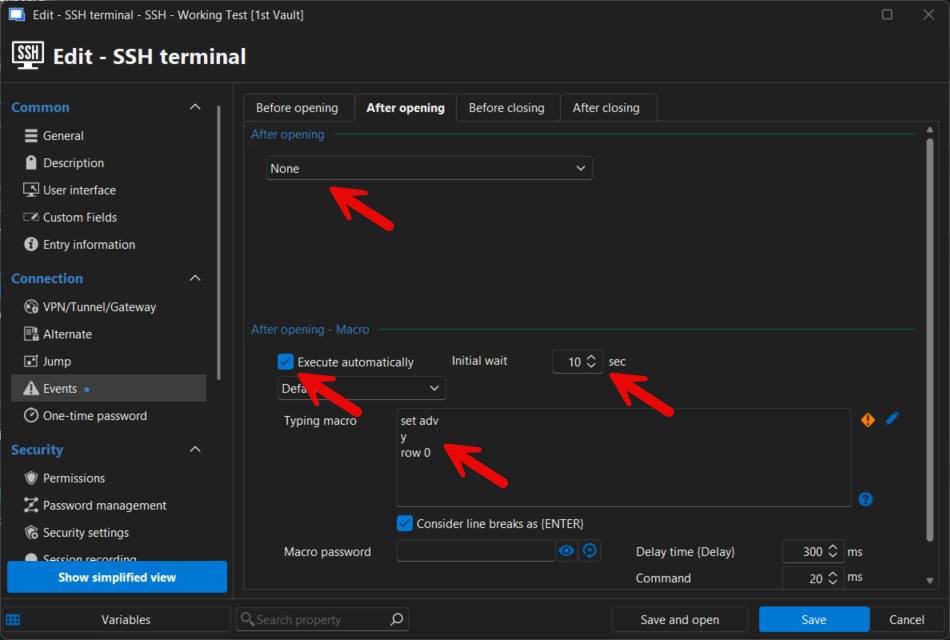
Could you please test this and let us know if it works now?
Best regards,
Alexis Geller Peiro
54592515-6fc6-448b-b29d-fe7dbaf70b58.png
I put in a 10 second delay for the macro/script, but still didn't work. It does work if I do it on an individual basis per your screenshot. I was just hoping to not have to do that since I have many of these types of systems that would need it.
With that said, I will add it though since I know it does work.
Thanks for your help.
Actually, the way I've done it that I know works is by setting it like this: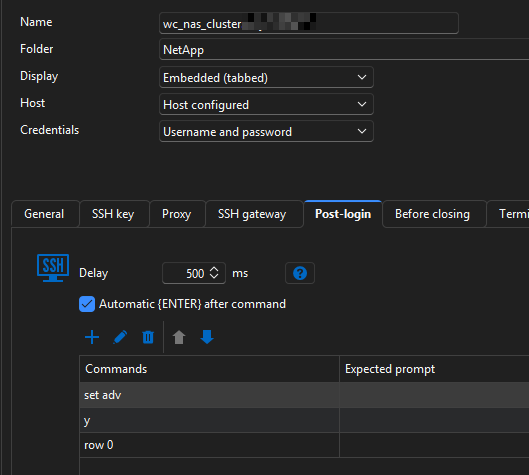
a2f7f0b5-fda6-405d-a43d-bf59ad155bdf.png
Hello Matthew,
The issue where Typing Macro entries configured through "After opening → Execute macro/script/tool" were not properly sending keystrokes to SSH Terminal sessions has been fixed and should be included in the upcoming version 2026.1.23.
You should now be able to reuse the same Typing Macro entry across multiple SSH sessions without needing to duplicate the commands in each entry.
Best regards,
David Godin
Great news! Thanks!
Hello,
Thank you for being so patient!
I'm pleased to inform you that a new version of RDM (2026.1.23.0) has been released, featuring the fix for your issue.
Latest Version: Download RDM
Please let us know if this works or if you encounter any issues.
Best regards,
Maxim Robert
Thank you! At this time I am only seeing the 1.22 version still. I'll check back.
Just installed and tested. Works perfectly!
Thanks again.