Suggestions on Grammar Highlighting and Code Highlighting
Suggestions on Grammar Highlighting and Code Highlighting
1 vote

Is it possible to set syntax or command highlighting separately for each terminal session connection? Currently, there is only one global setting, but the keywords vary for different devices, which is very inconvenient. Please consider this. Thank you very much.
All Comments (10)
Hello,
It's already possible to change the syntax highlighting mode per-entry. You can see the settings here: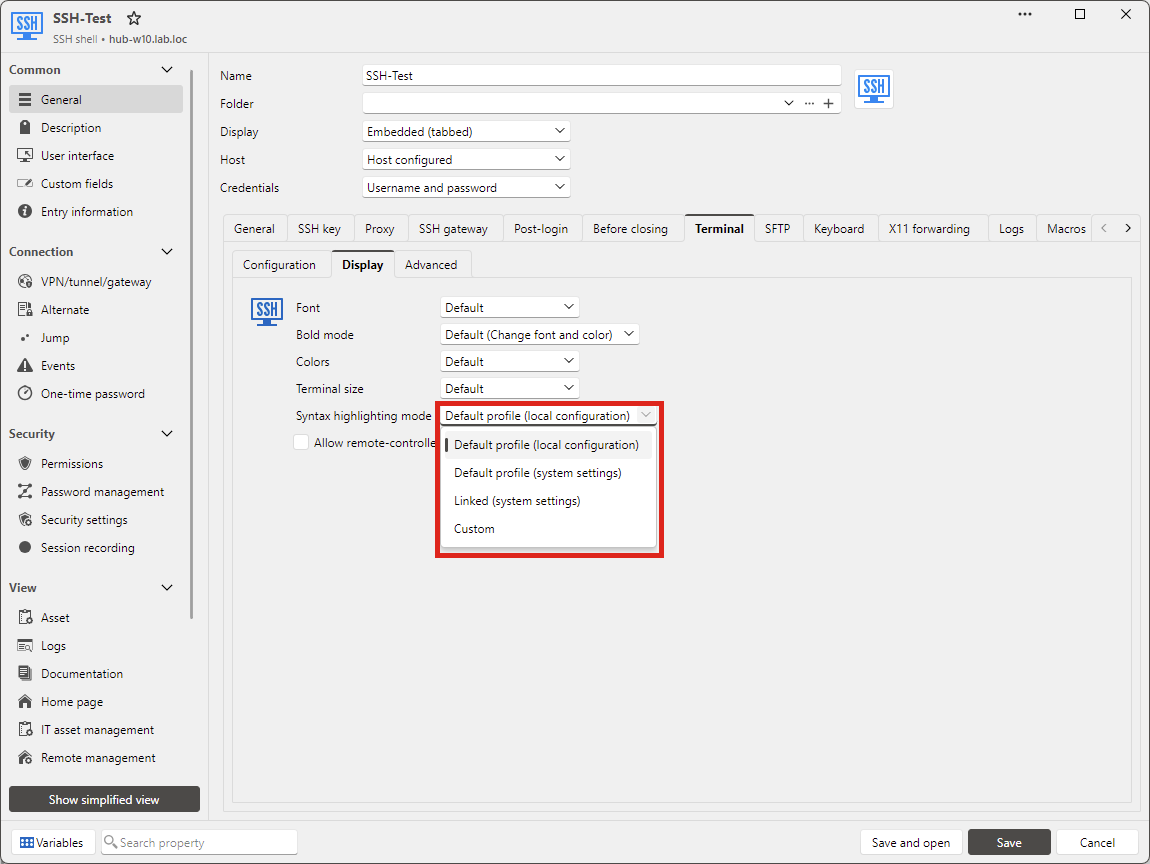
You can either link to a configured profile in the System Settings (available on DVLS and SQL Server at present), or customize what you want directly in the entry.
Regards,
Hubert Mireault
934c3e0d-39ef-48b8-b53e-7986cc949c3c.png
Thank you for your reply. I believe these two are far from sufficient. The terminal also desperately needs syntax highlighting. When managing some devices, having syntax highlighting can indeed enhance work efficiency.
You can either link to a configured profile in the System Settings (available on DVLS and SQL Server at present), or customize what you want directly in the entry.
Regards,
Hello,
When you mention the terminal I thought you meant the SSH terminal, did you mean a different one? Do you have screenshots of what you're currently using? I may not fully understand what you need but we'd be happy to work on a solution if you can provide us a little more information.
Regards,
Hubert Mireault
Hello,
It's already possible to change the syntax highlighting mode per-entry. You can see the settings here:
You can either link to a configured profile in the System Settings (available on DVLS and SQL Server at present), or customize what you want directly in the entry.
Regards,
@Hubert Mireault
Thank you for your reply. For example, telnet, ssh, serial, etc. require syntax highlighting. Additionally, we look forward to having more detailed configuration options for the terminal entry-related sessions. thank you
I see we indeed don't support these options for the Telnet and Serial entries. I will open a ticket for this.
As for the SSH terminal entry, could you clarify what is missing exactly? I'm not sure I understand. Did you try out the options I mentioned? The "customize" option lets you configure a specific syntax highlighting for that entry so you can have different ones for each of your host if you want.
Regards,
Hubert Mireault
I see we indeed don't support these options for the Telnet and Serial entries. I will open a ticket for this.
As for the SSH terminal entry, could you clarify what is missing exactly? I'm not sure I understand. Did you try out the options I mentioned? The "customize" option lets you configure a specific syntax highlighting for that entry so you can have different ones for each of your host if you want.
Regards,
@Hubert Mireault
Thank you for your reply. I saw it in the SSH terminal. It is indeed the same meaning, but it seems that it cannot inherit the syntax highlighting from the terminal settings. Instead, it has to create its own highlighting configuration. I suggest that this setting can inherit the highlighting configuration from the terminal settings.
There are no such settings in other types of terminals like the SSH terminal.
We could see about adding inheritance for these settings, but at the moment we don't usually have inheritance for type-specific settings in folders.
In the mean time, I would recommend using a combination of two features we have:
- The "Linked (system settings)" choice in the entry, so you can configure your list of syntax highlighting profiles in the system settings once, and reuse them across your entries
- Templates can be used to create entries with specific configurations already pre-configured. You can read more about them here. This could allow you to set specific syntax highlighting configurations on your templates, and then create entries based on those templates so you already have the correct syntax highlighting set.
Regards,
Hubert Mireault
We could see about adding inheritance for these settings, but at the moment we don't usually have inheritance for type-specific settings in folders.
In the mean time, I would recommend using a combination of two features we have:
- The "Linked (system settings)" choice in the entry, so you can configure your list of syntax highlighting profiles in the system settings once, and reuse them across your entries
- Templates can be used to create entries with specific configurations already pre-configured. You can read more about them here. This could allow you to set specific syntax highlighting configurations on your templates, and then create entries based on those templates so you already have the correct syntax highlighting set.
Regards,
@Hubert Mireault
Thank you for your reply. I couldn't find the "Link (System Settings)" option in the Telnet and SSH session settings. I have only been using the software for a short period of time, please forgive me.
The terminal may connect to different devices each time, so the grammar highlighting is not universal and cannot be set as a template. Unless I set multiple templates for multiple manufacturers, it won't be possible. Regarding the settings related to grammar highlighting, detailed settings are available in both MobaXterm and SecureCRT. I also hope this software has such settings as well. Wishing the software to continue improving. Thank you.
From what I can see when using MobaXTerm, the main difference seems to be that they provide a preset list of profiles: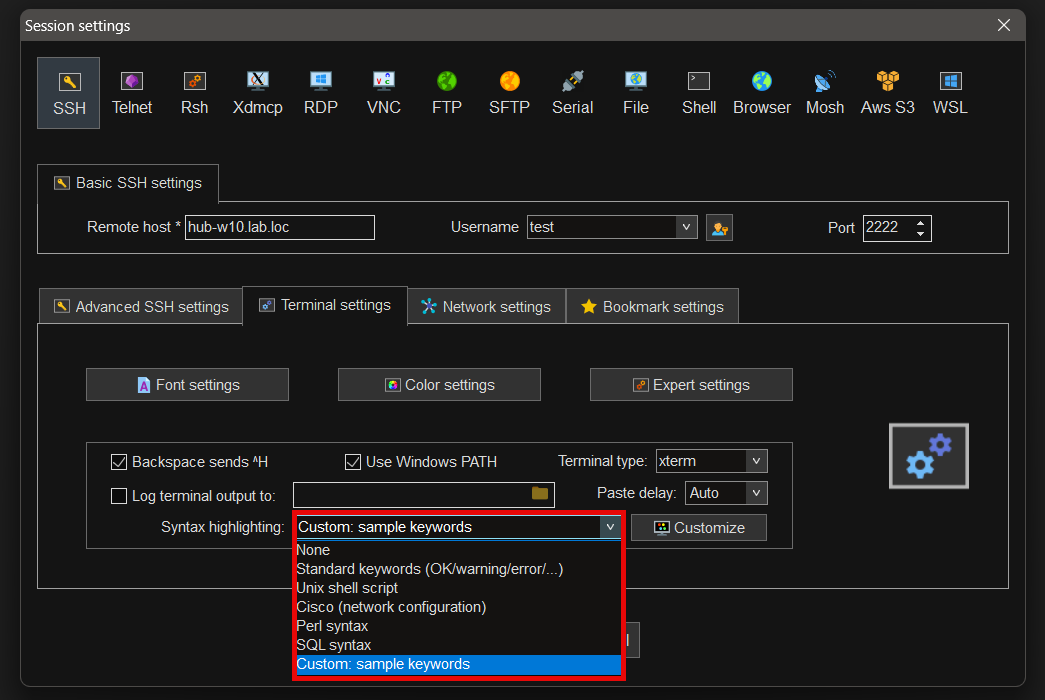
Otherwise it looks like the feature enables pretty much the same thing as in RDM. We could look into providing presets as well, so you don't need to create them yourself from scratch.
The terminal may connect to different devices each time, so the grammar highlighting is not universal and cannot be set as a template. Unless I set multiple templates for multiple manufacturers
At the moment that would be a good way to achieve this, but I understand it may be inconvenient. We'll look into more ways to make this process more convenient. Profiles could be a first step here.
Regards,
Hubert Mireault
bee86e7b-9406-423a-842e-20c0303d3ae0.png
From what I can see when using MobaXTerm, the main difference seems to be that they provide a preset list of profiles:
Otherwise it looks like the feature enables pretty much the same thing as in RDM. We could look into providing presets as well, so you don't need to create them yourself from scratch.
The terminal may connect to different devices each time, so the grammar highlighting is not universal and cannot be set as a template. Unless I set multiple templates for multiple manufacturers
At the moment that would be a good way to achieve this, but I understand it may be inconvenient. We'll look into more ways to make this process more convenient. Profiles could be a first step here.
Regards,
@Hubert Mireault
Thank you for your reply. Providing some simple defaults is indeed a solution. Some devices may require users to configure certain specific settings themselves. Therefore, after setting up the global settings, being able to select the global settings' configuration when creating a new session is a very good approach. Firstly, it is convenient for management, as there is no need to modify each different session separately. Of course, this is just my suggestion.
Regards