
Alexandre Roy
Tabgroup focuses on first tab instead of last opened or last used
Thank You. Hope it will be a quick fix.
Is there a way to downgrade to previous working version?
Hi again,
I'm not sure if It's the standard way to downgrade officially with our support team, but I'll give you mine as I do it often this way as a Quality assurance tester.
Simply uninstall RDM and re-install the following working version, https://cdn.devolutions.net/download/Setup.RemoteDesktopManager.2024.3.31.0.exe
Your configuration should stay the same. You shouldn't notice a difference.
We'll give you news when the fix will be available.
Regards,
Tabgroup focuses on first tab instead of last opened or last used
Hello @rohithbalusu,
You're right—I compared the two versions, and previously, the focus on the tab group did remember which tab had focus when the group was selected. Nice catch! I’ll submit a regression ticket internally for the developers to investigate.
Thank you for the report.
Best regards,
Bug Icone dossier
Bonjour,
Les 2 problèmes ont été reproduis a l'interne et les tickets de développement sont crée.
Merci beaucoup du rapport.
RDM becomes unresponsive when opening entries
Hello @mg,
we've found a way to reproduce the issue, might be the culprit.
Under Administration > System settings > Cache/Offline > Refresh before execute etry
Is this option checked up for you?
Regards,

RDM becomes unresponsive when opening entries
Can you export the template too?
the one that is refered here. Unless It's the RDP session that is attached?

RDM becomes unresponsive when opening entries
Just to be certain are you able to reproduce this on command every single time with the same entries and template?
If you could duplicate that RDP entry and replace all sensitive information by "Test" so we'd know which field were filled and used and do the same for the template used and export it for us to look into, I think we'd get to the bottom of this faster.
If we cannot reproduce after this, we'll start looking into your system settings.
Regards,
RDM becomes unresponsive when opening entries
Thank you mg,
I assure you every bit of information help.
Since the issue does not happen in offline mode.
This one leads me to believe that it should be a feature that is trying to contact the server as soon as you launch the entry.
Narrows down our search really.
The QA department is looking into it.
Regards
RDM 2024.3.10 Issues
Perfect!
Have a good day
RDM 2024.3.10 Issues
Hello Deas,
We've found a way to reproduce the issue internally and fixed it for the next version release 2024.3.12 +.
The issue seemed to be only happening inside a user vault with a non-admin user.
Can you confirm this was the behavior you encountered?
Regards,
RDM 2024.3.10 Issues
Hello,
What type of datasource are you connected to?
Also, are you seeing this message on an admin or user account ?
regards,
VMWare Dashboards No Longer Working After v2024.1.32.0
I do not have a single VMWare version installed on my computer right now as the embedded version of RDM doesn't require an installation locally to work, doesn't seem to communicate with the installations file at all too.
I've got 1 theory, I see you have a lot of portable version configured on the computer.
In those session I see you jumping from the working version 2024.1.32 to a non-working version 2024.2.8 without any real change. The only thing I could see is that you're somewhat losing your user specific settings when you're jumping on that new version.
You're session is configured like so, credentials set to "none"
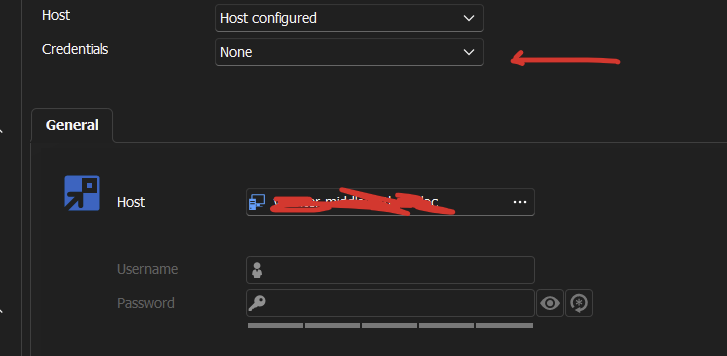
So this would make sense that if the user specific settings overridden credentials are empty, or none existent, that this "none" setting would fall next in line, which result in you getting the prompt asking for the credentials. User specific settings are bound to the database user, I can't say for sure If it's a .cfg issue / manipulation error, but here give this a go because it might just be it.
Could you please, manually create your data source again from scratch? Select the database and the right users that should have those user specific settings on. The usual stuff.
I thank you for the time you spent on that case with us trying to figure this out, you've done alot and I very much appreciate the dedication.
Thank you
VMWare Dashboards No Longer Working After v2024.1.32.0
Hey Chuck,
I'm here trying to reproduce your issue for a little bit now and I'm trying to put my finger on what the issue could be, sorry If I'm going to ask you questions you've already answered in the past but I think I have to because the picture painted so far with the information I got doesn't make any sense to me haha.
Since the session you've had with Tommy I've seen that you had an Overridden credentials set in the User Specific Settings sections.
My questions,
1- Does it work when you launch your sessions with overridden credentials?
2- Have you since the beginning of when you started experiencing the issue, had active user specific settings set on the entry?
3- have you ever tried to re-create the entry from scratch and setup the credentials manually to make it work?
Finally, It's a small detail but, the icon of the entry is showed like this on your RDM and mine is looking like this
I'm trying to make sure if we have the same entry at all or if you got an older version/deprecated entry. Did you ever changed the default icon of the entry for the original VMware logo?
Thank you ahead of time for answering these.
Regards,
RDM unable to get system proxy setting
Hello,
I am not able to reproduce your issue, but I think this prompt is just a catch from the proxy output on the failed attempt and is returned to you.
I myself got a "refused" response in that prompt due to our GPO but on my VM it is an instant "success"
Yours seems to be a timeout response so my closest guess is that your firewall might be blocking this RDM version.
Might be due to the RDM executable needing some permission in that firewall in order to run. It's possibly that the executable changed after updating.
Other thing you could try is maybe running the application in elevated mode.
Give us some news if it helps.
Regards,
Domain Auto Sync Clarification
Thank you for the quick reply chuck.
We'll take a look at the session recording and try to figure out what's going on.
Regards,
Domain Auto Sync Clarification
Hello,
The automatic refresh is done every 10 minute by default while staying connected to the datasource, sometime after launching the application it is also done automatically on the datasource connection.
You can change the value of the automatic sync in File > Background Services.
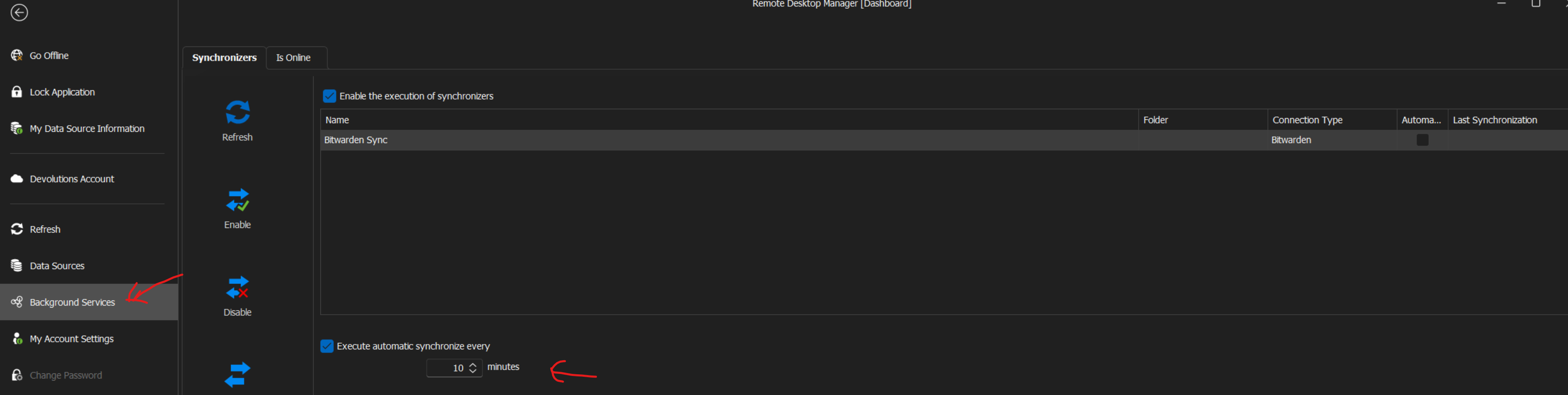
Also if you'd like to know exactly when the sync is triggered you can use the profiler in RDM in the help tab. Profiler (debug tab) level need to be set to 1 in order to see the information about the sync result. should look like this, I've cropped the screenshot on the right side to not reveal our super secret machine name. If those information was already known, please ignore this post :).
Regards,
.png)
RDM Opening Windows On Different Monitors
Hello @Chuck,
So I've opened an internal ticket to review this as this will end up being an "improvement" attempt.
Reason being is because this behavior is also present in Outlook and realized that it is the OS that is pulling those kind of string.
When I tested It with Outlook, I've tested it with "New Email" window. The behavior is exactly the same. I understand that RDM has a lot more window prompt possible
than Outlook which is why the problem becomes more apparent on our side.
We have a few solutions in mind that we'll need to evaluate to see if It's possible to implement seamlessly as they could come with undesirable side effects and affect other customers.
The temporary workaround for you for the moment is to make sure that the application is closed before unplugging the laptop from the dock station and also make sure the laptop is plugged in the dock station before opening the app.
We'll keep you posted on the development of this issue.
Regards,
RDM Opening Windows On Different Monitors
With further investigation I realised that each prompt will be saved on X display at X and Y position when you closed them.
I believe that if that display become undetected to bring up those specific window (in a scenario where you unplug your laptop and work with RDM), it will reset the positioning of those window and be prompted again on the main display by default, thus erasing the previous config saved when you have multiple monitor connected.
I'll have to discuss with the engineering team about this. I can see why this could cause irritation.
Regards.
RDM Opening Windows On Different Monitors
Hello,
I do reproduce the behavior, the application will be saved in the monitor you last closed as usually but any followed opened window that RDM will generate will be on the primary monitor that is selected as "main display" in your OS properties.
I'm trying to look around if there are an option to change those window prompt to a specific monitor. I'll let you know the outcome.
Correct me if I'm wrong on the behavior.
Best regards,
Dashboard very slow
Hello,
Thanks for reporting this, the QA department is investigating performance issues related to the dashboard.
We might come back later to validate a couple question if its necessary.
Regards,
Dashbord overview slow on Terminal server
Hello,
Thanks for reporting this, the QA department is investigating performance issues related to the dashboard.
We might come back later to validate a couple question if its necessary.
Regards,
2023.3.24 - Reopen last Session(s) not working again for User Vault
Good news,
It's solved on the internal build 2023.3.25, this versions should be pushed this week if everything goes well.
Regards,
2023.3.24 - Reopen last Session(s) not working again for User Vault
Hello,
If the entry is stored in the user vault I do reproduce the issue.
Management tools-prompting for password
We do reproduce the issue on our side now, we'll investigate see what we can do.
Regards,
Management tools-prompting for password
@douglasbell
Hello, I've tested this on an internal build and we have the same problem, after some digging we've isolated the issue.
My colleague can use the remote tools as before with the same setup but he's on windows 10. I do not know since when but on windows 11 at the moment I seem to be unable to make the remote tools work as they used to.
We're going to investigating on our side still see if we can figure this out.
Regards
SSH terminal input broken when using Alt-Tab
Welp,
Good news I heard this will be potentially fixed in the next version 2023.2.33.0, It's fixed internally.
Let me know if the issue persist on this version or turther ones.
Best regards,