Dashbord overview slow on Terminal server

Hello all,
we are using the latest version of RDM 2023.3.24 with MSSQL DB v2022.
if i start RDM local on my device the Dashboard overview is immediate there, but on the Terminal Server where we are working with 5-8 ppl at the same time it's taking about 10-20 seconds before the Dashboard overview is showing any (new).
it worked until version 2023.1.xx
Any idea how to solve this issue.
Many thanks and best regards
Andreas
All Comments (11)
Hi Andreas,
Thank you for reaching out to us regarding the matter at hand.
To better understand the issue, kindly let us know if you use a VPN connection to connect to this TS. Additionally, could you confirm if you use an RDP entry in RDM embedded or external?
Moreover, we would appreciate it if you could test if the issue persists when connecting to another server. Also, kindly let us know if you experience the same issue with another application on that TS server.
Please feel free to provide us with any additional information that you think may be helpful in resolving the issue.
Best regards,
Patrick Ouimet
Hi Patrick,
the TS isn't using any VPN.
the Dashboard and any other sessions like RDP or Borowser(EDGE) are starting embedded
the issue is not the connection to any other application, this is working as it should.
My issue is: when i select a RDP/SSH entry and would like to see the information in the Overview tab, RDM need 10-20 secound to display this information for each RDP/SSH/Browser entry.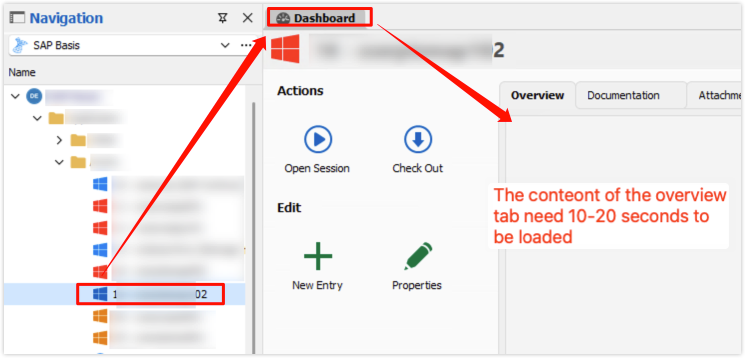
this behavior is only on our TS
Best regards
Andreas
754ab3f6-f46f-415c-9fa5-f79026d807dc.png
Hello,
Thanks for reporting this, the QA department is investigating performance issues related to the dashboard.
We might come back later to validate a couple question if its necessary.
Regards,
Alexandre Roy
Hello Andreas,
I created a case on our side to investigate this issue further.
Best regards,
Patrick Ouimet
Hello,
We appreciate your patience.
Could you uncheck the option to use embedded Microsoft Edge for the overview panel?
This option is under File -> Option -> Advanced.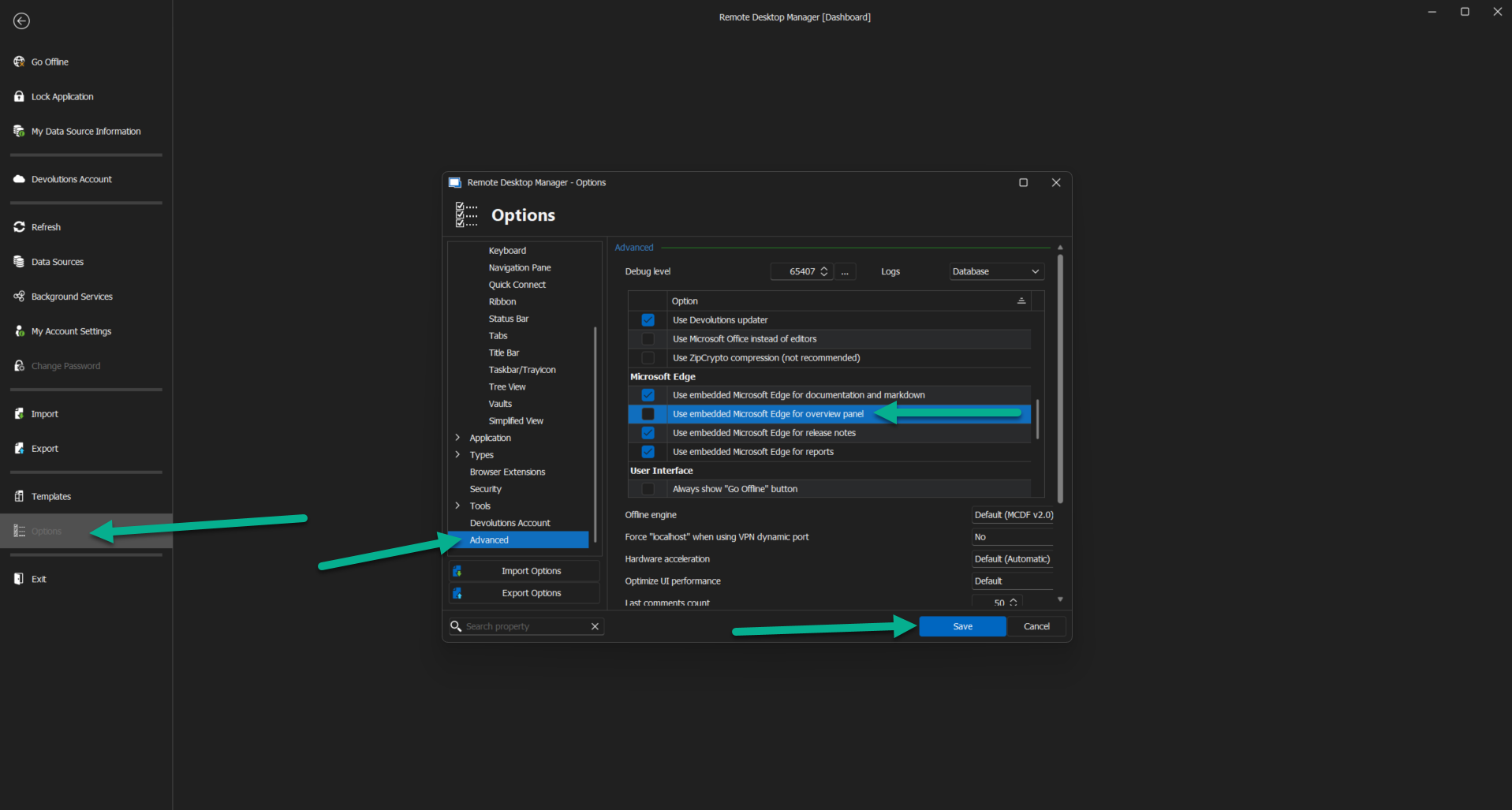
After saving this option, you will need to restart RDM, and the option should be unchecked.
Let us know if your dashboard is still slow after this.
Best regards,
Patrick Ouimet
edge.png
Hi Patrick,
with this configuration the Dasboard overview is still slow.
Best regards
Andreas
Hello Andrea,
Could you try to update your Webview2 by following these steps here:
https://docs.devolutions.net/kb/remote-desktop-manager/troubleshooting-articles/slow-dashboard-webview2/
Let me know if this fixes your issue.
Best regards,
Patrick Ouimet
Hello Patrick,
i tried this already several times, but the issue still persist.
is there any dependencies or prerequisites for RDM beside of WebView2
Thanks and best regards
Andreas
Hi Patriick,
just notice one think, for testing i added our Proxy to the Terminal Server and the OverView Dashboard issue is gone.
i think, there is something configured that try to check from Internet and only after the timeout reached it's showing the content.
is there something where i can disable this validation against the Internet?
Thanks and best regards
Andreas
Hello Andreas,
We have a No Internet Connection option in RDM to disable that.
This option is under File -> Options -> Advanced -> No Internet Connection.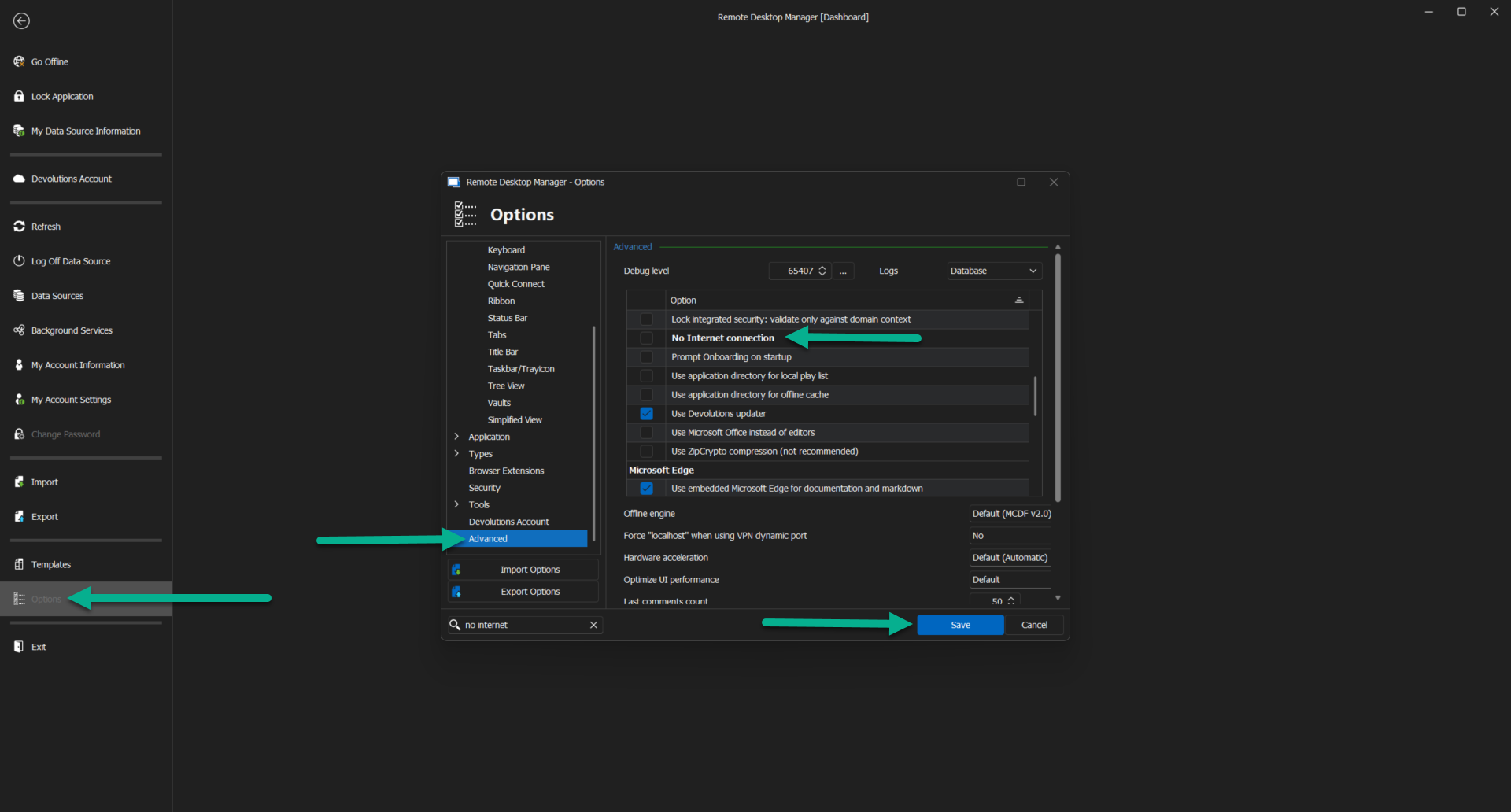
Let me know if this works for you.
Best regards,
Patrick Ouimet
no internet.png
Hello Patrick,
after successfully validating this configuration with other accounts on the TS.
We will use this option for all accounts.
thank you for your support.
Best regards
Andreas