SSH terminal input broken when using Alt-Tab

I can switch to other applications and then back without issues, when using the mouse.
But when using Alt-Tab, keyboard input to the SSH session no longer works. This also occurs when the RDM application is the only application running.
Some keys keep working however: Ctl-C and Ctl-D still work.
All Comments (31)
The same behavior when opening the 'command starter' Alt+F2.
Hi David,
I can easily reproduce your issue on my end.
I've opened a ticket with the engineer responsible for our SSH integration.
Regards
Jonathan Lafontaine
Hi davidl,
I just wanted to inform you that this issue should be resolved in the newly released update of RDM Linux (2022.1.0.7).
Regards.
Nicolas Parr
Sorry to disappoint you, Nicolas, but the issue is not solved in the new version.
I can alt-tab or use alt-f2 and upon returning to RDM, my SSH terminal still has focus and accepts keyboard input.
Looks like there might be something else, that I'm lacking, what can trigger this issue.
I'm on a rather vanilla Ubuntu 20.04 install.
Is that also you setup?
Jonathan Lafontaine
Yeah, a rather standard focal installation:
$ cat /etc/lsb-release
DISTRIB_ID=Ubuntu
DISTRIB_RELEASE=20.04
DISTRIB_CODENAME=focal
DISTRIB_DESCRIPTION="Ubuntu 20.04.3 LTS"

$ cat /etc/debian_version
bullseye/sid
I can 'unlock' with pressing 'Alt' once.
I'm having this same issue on 2022.1.0.7, although I can't 'unlock' it by pressing Alt. Ctrl-C still works. I mostly see this issue when I switch the input on my keyboard (I have a 'Logitech MX Keys' keyboard) from my laptop to my desktop and back (although it doesn't happen every time).
Weird.
First time around we could reproduce it easily every single time.
We'll have to to do further testing to try and have the issue again.
Jonathan Lafontaine
Still an issue with 2022.2.0.6
This is with a SSH connection using a private key (file), connecting with an Ubuntu server with OpenSSH-1:7.6p1-4ubuntu0.5, in case it makes any difference.
Display setting: docked or embedded, both display the same behavior.
We might have found something and if this the same issue you have, there's a temporary work around.
After alt-tabbing back or returning to your SSH session any other way, press the ALT key once and try typing.
Let me know if this fixes your focus issue and if it does, we are working on a fix.
Jonathan Lafontaine
That work around was proposed by myself.
So, yes, the work around works for me :-)
Sorry I have referred you to your own work around.
Jonathan Lafontaine
Hi davidl,
Multiple focusing issues with the SSH terminal, including the issue you reported, should be resolved in our next release 2022.2.1
Simon Duguay Létourneau
Feedback: issue no longer appears (running 2022.2.1.5)
I have same trouble in version 2023.2.28. Again ALT-key press resolves the trouble but it is disagreeably.
in order to pinpoint the issue: 2023.2.0.5 on Linux does not suffer from this problem
Hi aleskomarek,
Could you please confirm if it's on the Windows or Linux version that you are experiencing this issue?
Regards,
Gabriel Dubois
Hello Gabriel.
Latest Windows version on Windows 11 22H2 system.
I think that version before (2023.02.26 or 2023.02.27) was ok.
Thank You for Your care.
Best regards, ales
Hello aleskomarek,
Could you tell us the OS build version of windows?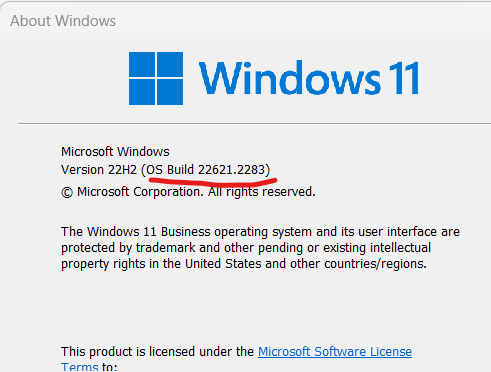
Since this is a very niche issue, I'd like you to help us validate that the RDM version 2023.2.26 does not have the issue like you mentioned, If the issue does not apear on .26, please update back to the .28 version and confirm this is present. This will save both of us alot of time and we would apreciate it alot if you help us isolate this anomaly.
best regards,
Alexandre Roy
435f77b8-5e23-4d69-b13c-da23882752fa.png
Hello.
My Windows 11 build: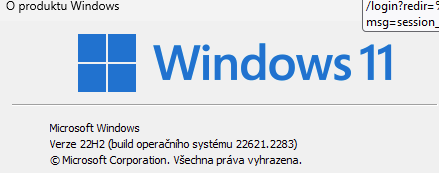
obrazek.png
Hello.
Today I tested versions from 2023.1.29.0 to 2023.2.27.0 and all have this issue.
I think that this means that there is another causion of the problem.
I think that month before there was not the issue but the version of the software was 2023.2.x and today I tested all these versions with the issue.
But I didn't detect what is cause of the issue.
Key press of ALT after ALT+TAB (switching of window) resolve the issue and then is possible write characters and using arrow keys to linux console.
Thank You for Your care.
Best regards, Ales
Thank you alesk, we can only theorize on what the issue could be on our side, now that the versioning of RDM is out of the equation as well as the OS build version of windows too. That leaves a couple scenarios.
Either a setting changed in the entry or RDM configuration
Or It's doing this on one specific SSH server, which you can help us validate if you have a different SSH server and the behavior still persist.
Narrowing down which option might have changed could be tricky, but If you'd be willing to spend some time trying this here's what you could do.
Close RDM > Navigate to %Localappdata% > Devolutions > remote desktop manager and rename the file RemoteDesktopManager.cfg to RemoteDesktopManager.cfg.old, Launch RDM again, connect back to your datasource and launch the same connection in which you had the issue with, try to reproduce. If it's still happens then we know It's not a RDM configuration issue. If you want your old settings back then just close RDM, delete the current RDM.cfg and rename the .old file to what it use to be, everything will be back to normal.
If you do not reproduce the issue with a new configuration file, I'll be asking that you privately send this file to me so I can analyse it and compare it with a fresh one to see which options could be the culprit causing this.
Thank you again.
Best regards,
Alexandre Roy
Thank You Alexandre for Your response.
I tryied some tests but without success - still same issue:
- removing the configuration file RemoteDesktopManager.cfg
- removing applications installed last week
- another linux connections (centos linux 7, rocky linux 8 and 9, debian linux 12)
- another computer
When I use ALT+TAB combination to switch to window with Devolutions Remote Desktop Manager with linux terminal tab it seems that key ALT je still pressed and does not release. When I press ALT key again it release and linux terminal is functional as normal.
It has same behavior as I hold ALT key in linux terminal window.
It does not matter on version and configuration of RDM.
Any other suggestions what can I try?
Thank You for Your response.
Best regards, Ales
Thank you so much for these validation.
I'm slowly running out of ideas on why you'd encounter this uncommon issue. That's why I think it must be environment specific.
Just some quick Ideas to give you perspective,
Sometime customers have the application run through Published Remote App from a terminal server, similar to what Citrix do, the app is streamed to a computer and used, It is not uncommon to hear about focus issues when RDM is used this way.
But any information about a technology that you use in your environment structure that could affect RDM directly would certainly help us isolate this.
Thanks again for working with us on this.
Best regards,
Alexandre Roy
Hello!
This issue is now impacting me as well after the latest update to RDM.
When alt+tabbing away from the RDM window that is currently connected to any of my Linux servers, this issue occurs, and I have to press "alt" in the SSH window OR I can switch tabs in RDM to another server and then back again and it resumes functioning.
This is happening on all of my Linux servers, of which I have some running Red Hat Enterprise Linux 7 and Red Hat Enterprise Linux 8. Both sets of servers are of dissimilar configurations from each other and I haven't made any changes to my defaults SSH settings in RDM. The only similar configuration between all of my servers is that I'm using the xterm-vt220 terminal setting on them -- however, I changed one of them to use xterm instead and the issue persists.
r/
Joseph
Hi, I think I'm also have this issue.
I have Windows 10 (22H2 - 19045.3448) and also Windows 11 (22H2 - 22621.2283)
Both use the save version of RDM (2023.2.32.0 64-bit)
When I switch to other application by using Alt + Tab, after switch back to RDM SSH Session still lock Alt button and I have to press alt to release it.
I use to manage Ubuntu and Red hat, and I have same issue
Hello.
I tested Windows 2019 Server installed in default localization (EN) and there is no this issue.
Is there any bind to the issue to Windows with another than default localization?
Keyboard settings does not matter.
Hello,
I was away for hunting season, very sorry for the late reply but I'll continue the investigation on our side.
Regards,
Alexandre Roy
Welp,
Good news I heard this will be potentially fixed in the next version 2023.2.33.0, It's fixed internally.
Let me know if the issue persist on this version or turther ones.
Best regards,
Alexandre Roy
Hello Alexandre.
Great work!
In version 2023.2.32.0 there is the issue, but in beta version 2023.3.14.0, which I downloaded today morning, there is NOT the issue.
Thank You very much for great job.
Best regards, Ales