Domain Auto Sync Clarification

Good morning folks.
I have searched the Devolutions forums and InterTwebs, and seem to have some confusion I was hoping you could assist with.
I understand that A/D Sync can be setup to Auto Sync changes that are made within A/D after DataSource refreshes.
I've currently got my DS set up as follows: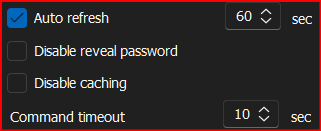
And I've got my A/D Syncs setup as follows:
However, I don't seem to get any updates that are actually made to A/D on the information that is sync'd with RDM.
Can you please elaborate the best way to set this up to get automatic updates from A/D without having to manually run Sync's?
Thanks!
--- Chuck
Overgaard, AZ (-7 MST / Zulu Year-Round)
RDM Version: 2026.3.2.0 64-Bit - Free
0faf92c0-977a-47c1-bb51-aa8f557f467b.png
9921c72e-8133-4e40-b3f1-9306bbfcbcf1.png
All Comments (27)
Hello Chuck,
Thank you for reaching out to Devolutions Support.
I noticed that you have another ongoing forum with us, and it's possible that your two issues are related.
I don't mean to repeat myself, but could it be that your synchronizer entries are located inside your user vault?
Best regards,
Carl Marien
They are located in my main vault.
I don't have anything in my personal vault.
--- Chuck
Overgaard, AZ (-7 MST / Zulu Year-Round)
RDM Version: 2026.3.2.0 64-Bit - Free
Hello,
Could you please let us know which data source you are using?
Best regards,
Carl Marien
Hello,
Could you please let us know which data source you are using?
Best regards,
Good morning. The standard SQLLite
--- Chuck
Overgaard, AZ (-7 MST / Zulu Year-Round)
RDM Version: 2026.3.2.0 64-Bit - Free
Hello,
Would you be available for a remote session with us? This would allow us to directly observe and record the issue you're experiencing.
Best regards,
Carl Marien
Hello,
Would you be available for a remote session with us? This would allow us to directly observe and record the issue you're experiencing.
Best regards,
Sure! And then that way, you can drive and also check for things that I may have missed.
--- Chuck
Overgaard, AZ (-7 MST / Zulu Year-Round)
RDM Version: 2026.3.2.0 64-Bit - Free
Hello,
I have created a case and provided a link for you to request a remote session.
Best regards,
Carl Marien
Hello,
I have created a case and provided a link for you to request a remote session.
Best regards,
Scheduled and will speak / share with you soon.
Cheers.
--- Chuck
Overgaard, AZ (-7 MST / Zulu Year-Round)
RDM Version: 2026.3.2.0 64-Bit - Free
Just wanted to update from our session.
That computer I added in Active Directory did not remove when Auto Sync.
When I did manual sync, it deleted the entry.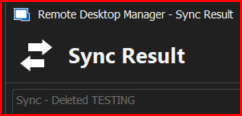
--- Chuck
Overgaard, AZ (-7 MST / Zulu Year-Round)
RDM Version: 2026.3.2.0 64-Bit - Free
236602e6-ba6c-4830-a6c6-14bf03766ccb.png
Hello,
Thank you for the session. During our time together, we recreated the issue and produced a video for our QA department to further investigate why the automatic sync doesn't seem to function properly.
I will keep you updated about any advancement on this case.
Best regards,
Carl Marien
Hello,
The automatic refresh is done every 10 minute by default while staying connected to the datasource, sometime after launching the application it is also done automatically on the datasource connection.
You can change the value of the automatic sync in File > Background Services.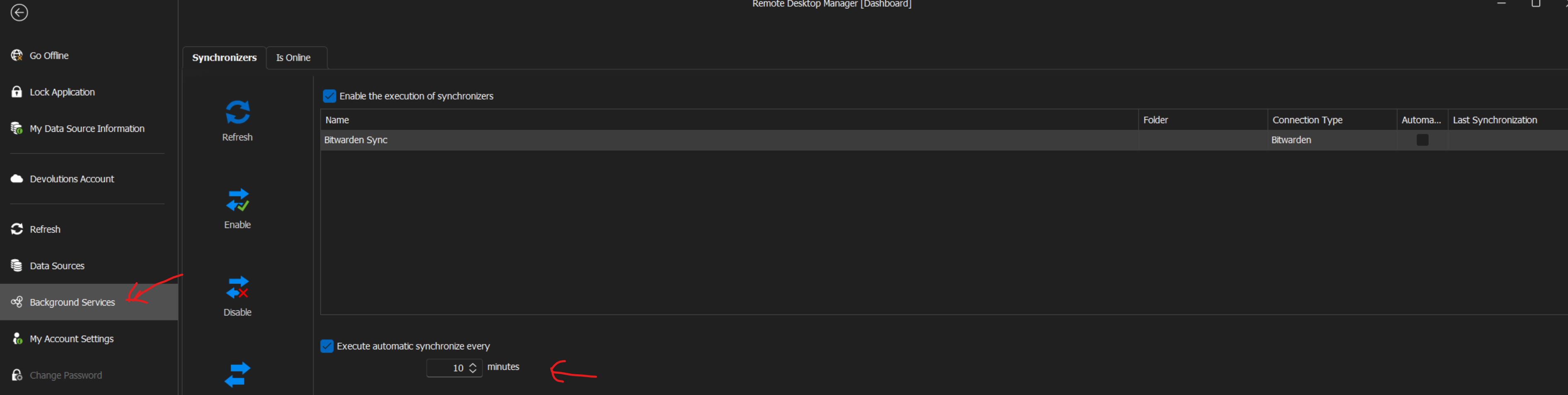
Also if you'd like to know exactly when the sync is triggered you can use the profiler in RDM in the help tab. Profiler (debug tab) level need to be set to 1 in order to see the information about the sync result. should look like this, I've cropped the screenshot on the right side to not reveal our super secret machine name. If those information was already known, please ignore this post :).
Regards,.png)
Alexandre Roy
19be7342-8c21-46fb-90fd-a485df6cb1b3.png
ad (1).png
Lex.png
Good morning Alexandre.
I did a session with Carl yesterday and he was able to see that the background sync is not working as expected within the program.
--- Chuck
Overgaard, AZ (-7 MST / Zulu Year-Round)
RDM Version: 2026.3.2.0 64-Bit - Free
Thank you for the quick reply chuck.
We'll take a look at the session recording and try to figure out what's going on.
Regards,
Alexandre Roy
Hello,
We figured out the reason why auto sync was disabled on SQLite and made a fix that will be available in version 2024.1.11.0.
Regards
Jonathan Del Signore
Hello,
We figured out the reason why auto sync was disabled on SQLite and made a fix that will be available in version 2024.1.11.0.
Regards
Awesome! We are 1/2 way there with the issue.
Much appreciated for the update, sir.
--- Chuck
Overgaard, AZ (-7 MST / Zulu Year-Round)
RDM Version: 2026.3.2.0 64-Bit - Free
Hello,
We figured out the reason why auto sync was disabled on SQLite and made a fix that will be available in version 2024.1.11.0.
Regards
Good morning, Johnathan.
Just an update for the A/D Sync in v2024.1.11.0 (beta).
The manual sync still is not working to add / delete / modify existing and new entries.
I turned on the background sync about three hours ago, and the sync interval is set at the default 10 minutes.
I created a test object on the A/D server prior to turning on the background syncs called "TESTING-RDM".
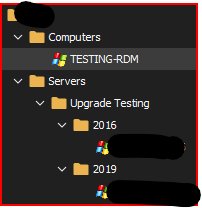
After letting it manually sync for quite a few times, I have the following for a search of "TESTING":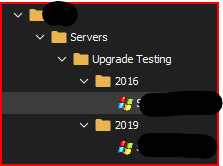
After I do a manual sync, I now see the following: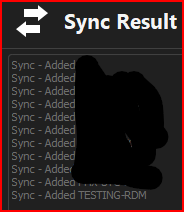
--- Chuck
Overgaard, AZ (-7 MST / Zulu Year-Round)
RDM Version: 2026.3.2.0 64-Bit - Free
2d566b8f-06d5-4790-95ea-1e031f3f6450.png
b7efeaf7-962d-4587-b72a-a4a909289380.png
965d3c5f-13ae-4656-adec-ac20d5d83e76.png
UPDATE:
After manually running another A/D Sync for a different Domain, I did see a new option pop up that we did not see in the previous version of RDM: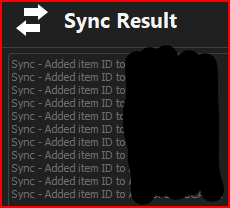
Before it was either deleted or added. No other results.
What is the "item ID"?
--- Chuck
Overgaard, AZ (-7 MST / Zulu Year-Round)
RDM Version: 2026.3.2.0 64-Bit - Free
5f1ebde7-287a-4111-8012-e437fca1bc33.png
In 2024.1, we now import the Item ID to keep a reference to the item that was imported from AD. This means that even if an AD entry's Name or Host changes, RDM will still see it as the same entry, and simply update the corresponding fields. An entry will now only be mismatched (deleted) when it no longer exists on the server.
As for the auto-sync, we'll take another look to see what we could've missed and keep you updated with our findings.
Regards
Jonathan Del Signore
Could you please open the profiler (Help -> Profiler) with Debug level 1, and let the auto-sync trigger? This could help us pinpoint any error that might happen during the sync.
For now, I don't see any reason why an auto-sync would behave differently than a manual one.
Regards
Jonathan Del Signore
Could you please open the profiler (Help -> Profiler) with Debug level 1, and let the auto-sync trigger? This could help us pinpoint any error that might happen during the sync.
For now, I don't see any reason why an auto-sync would behave differently than a manual one.
Regards
Done, sir.
I will keep an eye on the Profiler Debug Screen until the next AutoSync happens.
Then I will delete an entry that I have in RDM from Active Directory, let the next round of AutoSyncs Run, then run a Manual Sync.
Once that is all done, I'll do the "Send Trace To Support" option for y'all.
--- Chuck
Overgaard, AZ (-7 MST / Zulu Year-Round)
RDM Version: 2026.3.2.0 64-Bit - Free
Johnathan,
The Trace Log has been sent utilizing the feature within the Debug Log window.
Do you need me to send it a different way as well?
--- Chuck
Overgaard, AZ (-7 MST / Zulu Year-Round)
RDM Version: 2026.3.2.0 64-Bit - Free
HI Chuck,
Our support team sent me your trace log, and I can see that you're not getting any computers from AD when there are no OUs specified. I'm not sure if it's related or just a coincidence, but could you please look into your application logs and let me know if you see any errors at the time of an auto-sync?
Thanks
Jonathan Del Signore
I don't see any errors just right off the bat.
However, I have exported my application log file from yesterday.
If you want to send me a link, I will upload it to you.
--- Chuck
Overgaard, AZ (-7 MST / Zulu Year-Round)
RDM Version: 2026.3.2.0 64-Bit - Free
Hello Chuck,
Thank you for your reply,
I will provide you a link in a private message so that you can send us the application logs.
Best regards,
Samuel Dery
File uploaded as requested.
--- Chuck
Overgaard, AZ (-7 MST / Zulu Year-Round)
RDM Version: 2026.3.2.0 64-Bit - Free
Good morning, and just wanted to provide an update.
I upgraded to the latest stable version release this morning in my signature.
Upon that, I decided to test the A/D Auto (Background) Sync funcationality.
So on my Jump Server, I deleted all the folders for the domain I have set up to Auto Sync, Removed all Deleted entries, Vacuum'd my DataSource, and started off with this: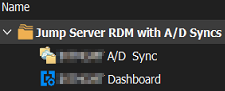
After waiting 10 minutes, I noticed the folder structure now shows as this: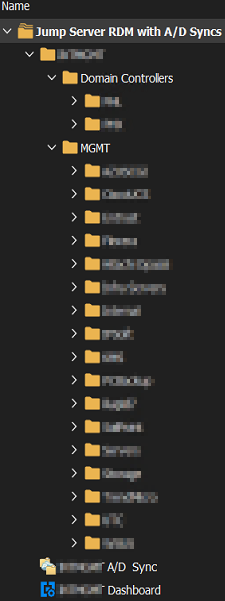
In the profiler log, I also see it detected how many computers right off the bat, which is one issue we were having prior. Even during a sharing session with Carlos, we weren't seeing this:
One other thing I am now seeing, is the trailing lines at the end of the profiler that also were never there before:
So it looks like the fix to allow Auto Sync on SQLite installations did the trick.
So if users are still experiencing this issue, all they have to do is upgrade to v2024.1.12.0 for it to work.
I appreciate all the help and assistance on this, as it helps tramendously on my laptop where I have almost 1,500 entries across multiple domains to keep track of.
Please mark this issue as resolved.
--- Chuck
Overgaard, AZ (-7 MST / Zulu Year-Round)
RDM Version: 2026.3.2.0 64-Bit - Free
40c5885e-e792-44cf-b489-b89176d931df.png
5898ead9-07a0-41fe-a517-df46fd0e2fd2.png
b87b7644-029d-47c4-8a06-a4fc2fe53db3.png
66d08e30-e1bc-4691-a6dd-0e5b3e320cb2.png
Hello Chuck,
Thank you for your reply,
Perfect, I'm glad to hear that this is now working as expected,
Feel free to let us know if you encounter further issues regarding this,
Best regards,
Samuel Dery