Dashboard very slow

Hi
After upgrading to version 2023.3.24.0 (RDM and DPS) we have the issue that the dashboard is very slow.
If you click on the dashboard and then switch to another entry it takes about 10 seconds for the data (of the new entry) to be displayed.
Any idea how to solve this?
best regards
Mike
All Comments (8)
Hello,
Thanks for reporting this, the QA department is investigating performance issues related to the dashboard.
We might come back later to validate a couple question if its necessary.
Regards,
Alexandre Roy
Hello Michael,
Thank you for contacting us on that matter.
Could you provide your Devolution Server version?
Could you try to update your Webview2 to the latest and try again?
Best regards,
Patrick Ouimet
Hi Patrick
We're running DPS on Version 2023.3.7.0 and WebView2 Release 119.0.2151.58 which should be latest.
Best regards
Mike
Hello,
We appreciate your patience.
Could you uncheck the option to use embedded Microsoft Edge for the overview panel?
This option is under File -> Option -> Advanced.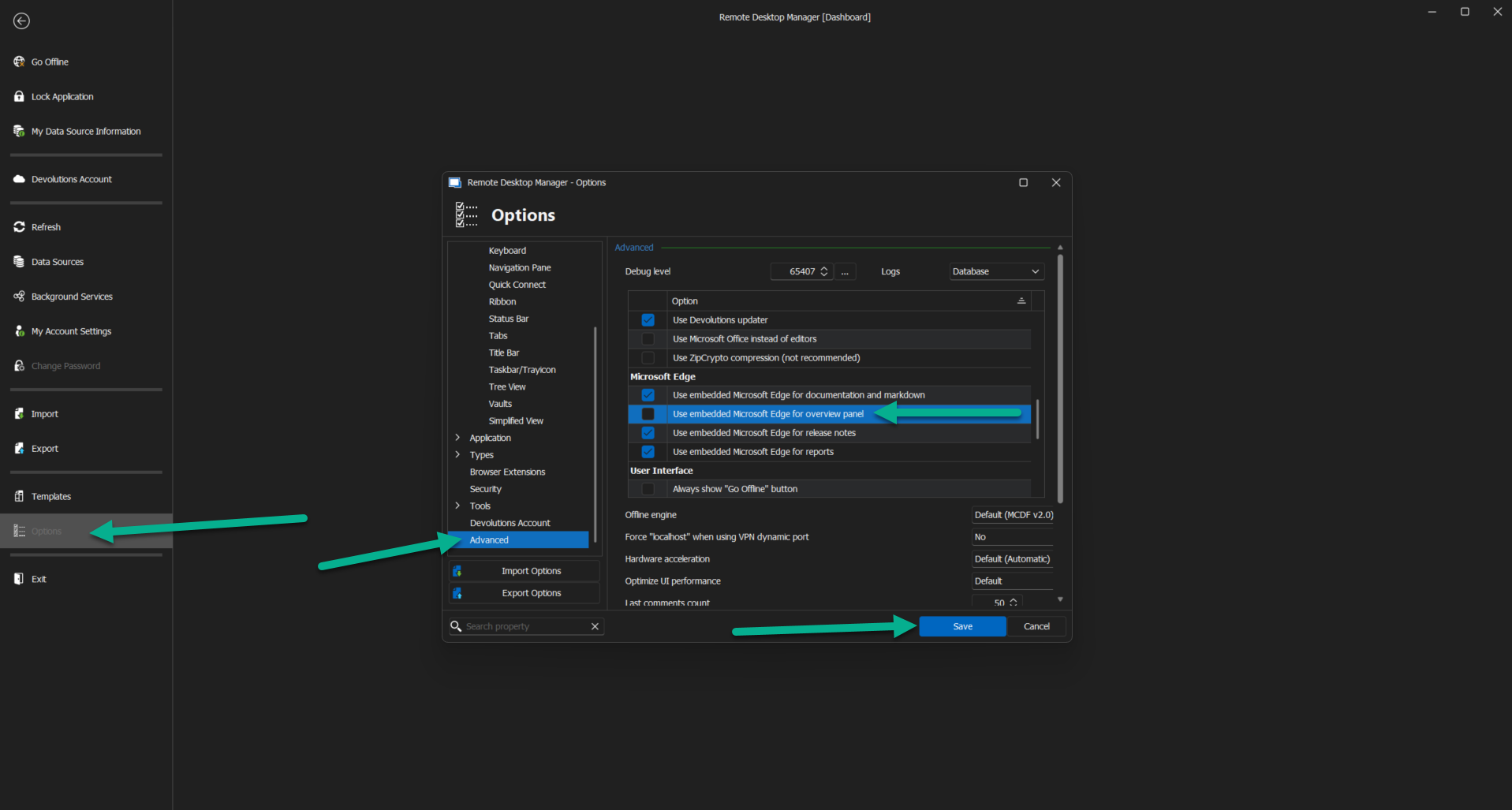
After saving this option, you will need to restart RDM, and the option should be unchecked.
Let us know if your dashboard is still slow after this.
Best regards,
Patrick Ouimet
edge.png
Hi Patrick
Unchecking the option did not solve the problem. We found the following information in the debug log:
[16.11.2023 12:17:44]ERROR
SILENT System.Net.HttpListenerException (0x80004005): Access is denied
at
System.Net.HttpListener.AddAllPrefixes()
at
System.Net.HttpListener.Start()
at
Devolutions.RemoteDesktopManager.Business.HttpBrowserLinker.StartHttp()
[16.11.2023 12:17:45]ERROR
SILENT Microsoft.Web.WebView2.Core.WebView2RuntimeNotFoundException: Couldn't
find a compatible Webview2 Runtime installation to host WebViews. --->
System.IO.FileNotFoundException: The system cannot find the file specified. (Exception from HRESULT: 0x80070002)
--- End of
inner exception stack trace ---
Webview2 is installed and it's funny that not all users on the same server do have the problem.
Best regards
Mike
Hi Patrick
i found the problem. it was my mistake. i had do install webview2 latest version manually because the server has no internet connection. i made the installation of the package without clicking "Run ad Administrator" and because of that the webview2 package was installed in my user-context. i installed it again and now all users have smooth dashboard.
best regards
Mike
Hello Michael.
Could you give me the version of Webview2 you have installed?
Best regards,
Patrick Ouimet
Hello Patrick
Sure - it's 119.0.2151.58
best regards
Mike