
Yevgeniy Shmygun
Bug: Vault templates do not apply permissions to sub-entries (folders/items) when creating a new vault
Hello @florianbardiani,
The ticket is currently in development, and we are working hard to deliver it as soon as possible. However, we do not yet have an estimated delivery date.
Thank you for your patience and understanding.
Best regards,
Bug: Vault templates do not apply permissions to sub-entries (folders/items) when creating a new vault
Hello @garypiat,
Thank you for reporting this issue. I’ve reproduced it on my end and created an internal ticket to track it.
Best regards,
Offline mode when using Cloud does not trigger properly when network connection fails
We’ll keep this scenario in mind as we improve offline data handling.
Thank you again for the detailed feedback. It helps us understand where improvements matter most.
Best regards,
Offline mode when using Cloud does not trigger properly when network connection fails
Hi @RDMTinkerer,
We’re sorry for the inconvenience, especially when you need to access your entries during an outage. Thank you for the detailed feedback and for offering to demonstrate the issues live.
We’re working hard to find a solution and improve how RDM handles offline data and backend calls. This is a complex change, as it requires a major refactor of how we manage data. We understand how important reliable access to your data is, and we’re committed to making improvements that deliver a better product and service.
We’re sorry again for the inconvenience, and thank you for taking the time to share your experience.
Best regards,
Offline mode when using Cloud does not trigger properly when network connection fails
Hello @RDMTinkerer,
Thank you for the detailed feedback and reproduction steps. We take the user experience seriously, and we understand your concern: losing connectivity unexpectedly should not prevent you from accessing your cached entries or leave RDM unresponsive.
There are a few settings worth checking to ensure all your vaults are available offline:
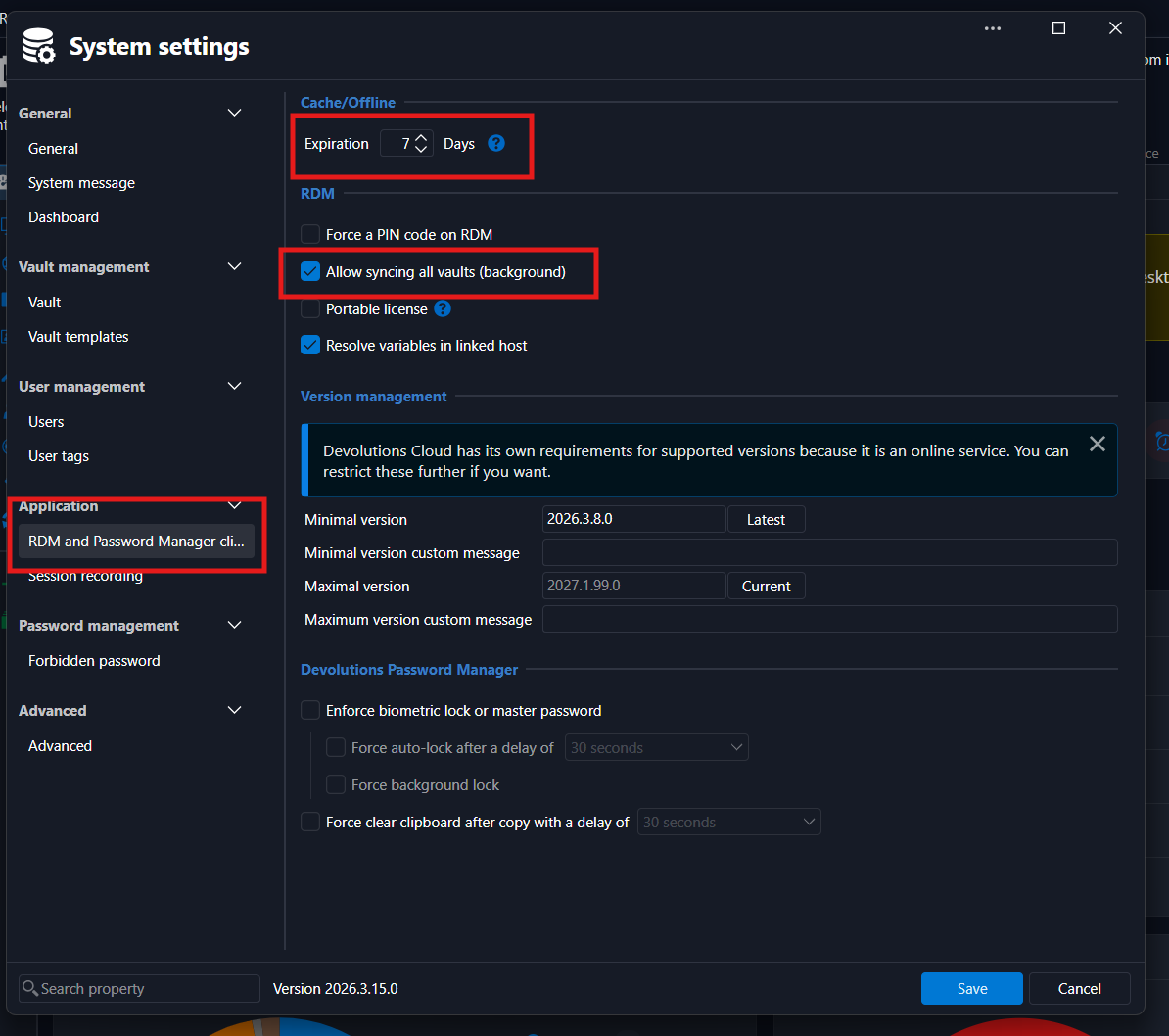
In each Hub, go to Administration → System Settings → RDM and Password Manager Clients:
Cache/Offline: Set the cache duration to suit your needs. We recommend keeping the default of 7 days. This period is refreshed each time you access your Hub online.
Allow syncing all vaults (background): Make sure this is enabled. This security setting is enabled by default.
In RDM, go to Workspaces Overview → Edit Workspace → Advanced:
Set Sync all vaults (background) to On first load for each Hub workspace.
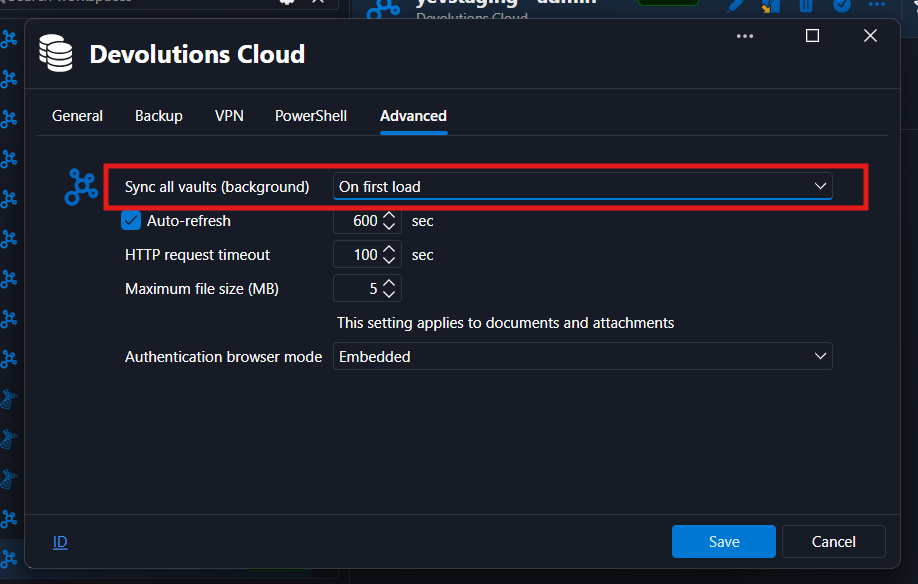
Together, these settings allow RDM to synchronize all vaults in the background when the workspace first loads, so their entries are available offline once synchronization completes. The workspace setting provides an additional user-controlled option alongside the Hub’s policy. We are currently reviewing whether this separate option is still needed.
We also understand that preparing the cache does not fully address your concern about switching offline automatically. Currently, when RDM detects a lost internet connection, it displays a notification that you can click to enter offline mode. You can also use the globe icon in the bottom-right corner. We will investigate automatically switching to offline mode when connectivity is lost, along with the workspace and vault switching behavior you described.
We are also making performance and responsiveness improvements for the next major release.
Thank you again for taking the time to raise this and explain the impact on your work. Please let us know if the behavior persists with these settings enabled, or if you have any questions.
Recent Entries Empty
Hello @adamsturdivant @chubbyscooter,
We are currently investigating how we can resolve this issue in the current version of RDM.
In the meantime, you can create a shared vault by navigating to Administration → Vaults. This should unlock the MRU section in the currently available versions of RDM.
Please let us know if this workaround resolves the issue. In the meantime, we will continue working on a more permanent fix.
Thank you,
Browser based RDP sessions not launching via WebUI
Hello @jm2,
This issue was investigated by one of my colleagues. I am waiting for their response to see the result of the investigation.
Thank you for your understanding.
Devolution Cloud Backup
Hello @jm2,
Could you please verify the export file? We have recently discovered that, when saving, an extra line is appended to the file, which was not expected during decryption with the master key.
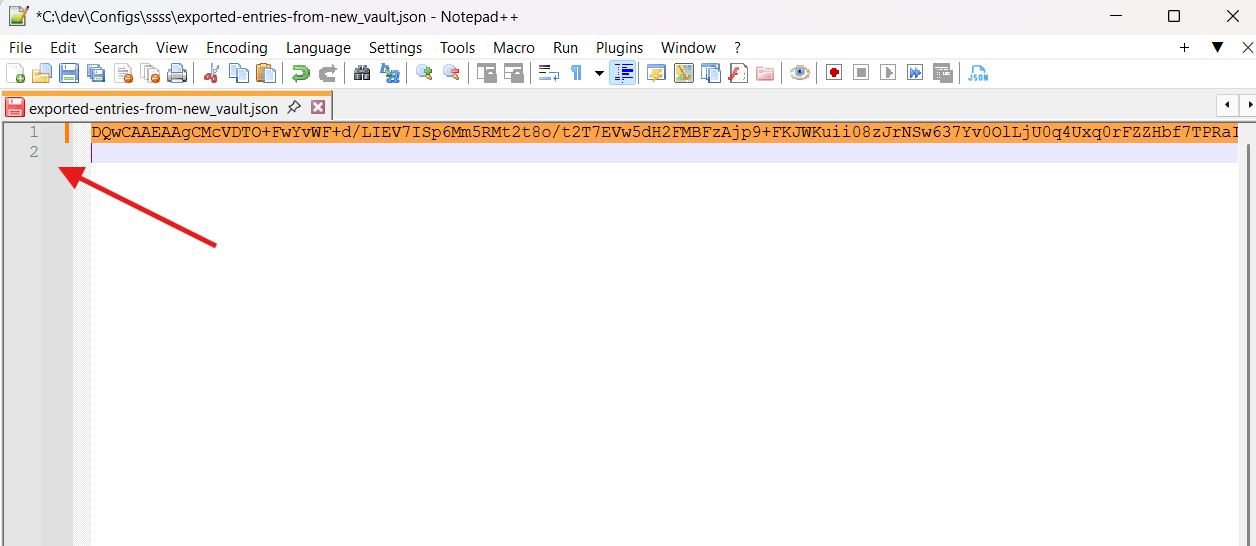
Simply removing this extra line will fix the issue. In the meantime, we are investigating how to fix it during the save process.
Thank you, and have a good day.
Error saving properties after RDM update
I'm glad to hear that it helped. We're currently working to identify the root cause of the initial issue.
Have a great day!
Error saving properties after RDM update
Hello @phosek,
We are currently investigating the reported behavior.
Could you please let us know whether you experience the same behavior with every entry you are trying to modify? If the issue only occurs with a specific type of entry, could you please provide the entry type?
This error is often caused by cached data that has not been updated to the latest version. Could you please press Ctrl + F5 to perform a full refresh, then try the operation again and let us know if the issue persists?
Thank you for your cooperation.
Best regards,
Error after switching account on same laptop
Hello @rob02,
We have pinpoint the issue and it will soon be send to the our QA team.
Best regards,
Error after switching account on same laptop
@rob02 I am glad to hear that the issue has been resolved for you.
We will investigate on our end to determine why the email change feature is not working as expected.
Thank you for bringing this to our attention. Have a great day!
Error after switching account on same laptop
Hello @rob02,
To create a new workspace in RDM, you can click File -> Workspaces -> Add. The 401 could mean that the entered email is not in the Devolutions Cloud workspace. Could you confirm please that you have entered the right one?
Could you also please confirm the RDM version you are using?
Best regards,
Devolution Cloud Backup
Hello @jm2,
Thank you for bringing this to our attention. We are investigating it on our end and will get back to you when we have news.
Thank you for your comprehension and your patience.
Devolution Cloud Backup
Hello @stefanofontanini,
You can refer to the following documentation page to learn more about how to set up the backup and export options for your vaults and their contents.
Have a great day.
Best regards,
RDM unable to access Hub/Cloud datasource after restart
Thank you for confirmation @burm003adm,
Have a good day!
Best,
RDM unable to access Hub/Cloud datasource after restart
@burm003adm
The issue have been fixed since 2026.1.22, could you update and confirm whether everything is working on your end?
RDM unable to access Hub/Cloud datasource after restart
Hello @burm003adm,
It has been fixed in RDM. Could you confirm what version are you using, and what is the behaviour you are having?
Thank you in advance.
Best regards,
Unable to convert entry to connection
Hello @raskatomas,
It is an entries that have been saved in Devolutions Password Manager (previously Devolutions Workspace) in Authenticator section. In previous versions, there was a migration that have failed. It is now fixed and you should still be able to see your authenticator entries in the Devolutions Password Manager app.
This said, it is safe to delete those entries.
Best regards,
Browser based RDP sessions not launching via WebUI
Hello @jm2,
Our team is currently investigating this issue. Thank you for the additional investigation on your end. We will keep you posted if there are any updates or if we need more information.
Have a good day.
Best regards,
Browser based RDP sessions not launching via WebUI
Hello @jm2,
Could you please provide the PAM and Gateway services logs please.


Best,
export en powershell
Bonjour @stephanelhotellier,
Vous pouvez utilisez la section Aide et outils -> Exporter pour avoir un template de script pour exporter plusieurs coffres à la fois.

Sinon, pour utilisez la commande Export-RDMRepository, vous devez vous connecter en tant qu'un utilisateur RDM sur une data source existante.
Pour connaitre la data source actuelle sur laquelle vous êtes connecté, vous pouvez utilisez Get-RDMCurrentDataSource. Pour changer, vous pouvez utilisé Get-RDMDataSource -Name 'le-nom' | Set-RDMCurrentDataSource.
Bonne journée,
User with view-sensitive permission cannot read license information in web
Hello @jellehillen,
Thank you for bringing this to our attention.
I have noticed that the button is not visible in the UI; however, it remains clickable.
I have added this issue to our bug list for further investigation.

Best regards,
HTTP error 422 when updating entry credentials
Thank you for the communication. We will investigate on our end.
If you have any additional details to share, please do not hesitate to contact us.
HTTP error 422 when updating entry credentials
Hello @RDMTinkerer2,
Could you please provide the RDM version you were using? We believe there may have been an issue with the local cache.
Thank you in advance.