HTTP error 422 when updating entry credentials

I got the following error today: "A non pam vault entry update forbid metadata keys."
It was during updating an entry's credentials.
- A teammate created a web entry in his local data source.
- He entered his own credentials, apparently from his own vault in the data source.
- He then copy/paste'd the entry from his data source into the Hub data source (why did he do it that way is a different topic related to disappearing entries when losing internet connection).
- We agreed that we will replace the credential of the Hub's entry by the credential drawn from a user's vault (everybody has their own account).
- When editing the above entry in Hub data source (through RDM), I got error "Unable to find the credential entry; this setting will be lost" - this one is okay for me.
- When editing the entry, the "Credentials" was set to "Linked (vault)", the value was empty (expected).
- I changed it to "Find by name (user vault)".
- I entered the entry name as agreed with the teammate.
- I clicked OK and the following error appeared.
- I am unable to change the credentials of the entry to anything else - I tried "Username and password", "None", but the error still appears.
The only workaround for now is to create a brand new entry and delete this one.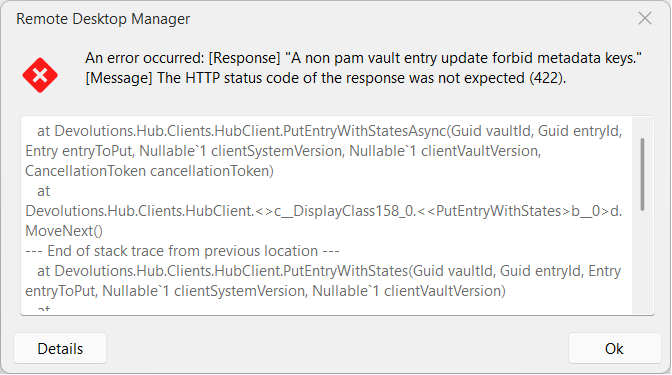
6c67321b-7fad-4f17-a0c5-cd7b974bfa94.png
All Comments (7)
This is the full message:
   at Devolutions.Hub.Clients.HubClient.PutEntryWithStatesAsync(Guid vaultId, Guid entryId, Entry entryToPut, Nullable`1 clientSystemVersion, Nullable`1 clientVaultVersion, CancellationToken cancellationToken)
   at Devolutions.Hub.Clients.HubClient.<>c__DisplayClass158_0.<<PutEntryWithStates>b__0>d.MoveNext()
--- End of stack trace from previous location ---
   at Devolutions.Hub.Clients.HubClient.PutEntryWithStates(Guid vaultId, Guid entryId, Entry entryToPut, Nullable`1 clientSystemVersion, Nullable`1 clientVaultVersion)
   at Devolutions.RemoteDesktopManager.Managers.DevolutionsHubDataSourceManager.SaveConnectionAsEntry(Guid dataSourceID, Guid repositoryID, Connection toSave, Connection[] currentConnections, Boolean skipHubRefresh)
   at Devolutions.RemoteDesktopManager.Managers.DevolutionsHubDataSourceManager.SaveConnection(Guid dataSourceID, Guid repositoryID, Connection toSave, Boolean forceNoGetCurrentConnections, Boolean skipHubConnectionsRefresh)
   at Devolutions.RemoteDesktopManager.Business.DataSources.HubConnectionDataSource.SaveConnection(ConnectionEngine engine, Connection connection, Boolean skipHubRefresh)
Hello,
Thank you for reaching out regarding this matter.
I tested the behavior on my side but was unable to reproduce the issue. Could you please share which options or settings were selected when the entry was copied?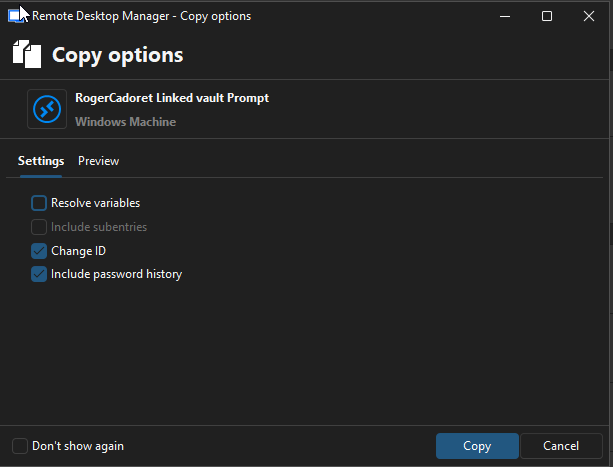
Could you also confirm whether you mean a different local data source, or the user's User Vault within the same Devolutions Cloud data source?
I look forward to your reply.
Best regards,
Jacob Lafrenière
7d7f9053-afa1-4bbb-9632-82a444ff5751.png
Thanks. The person is on extended leave now, so I can't reliably confirm, but I can tell you with 95% confidence:
- The data source from with entries were copied was the local data source (SQLite), with credentials entry linked to the session entry being in the same local data source.
- The copy options were left at default values.
EDIT. Those "broken" entries have been deleted, and I'm unable to find "thrashcan"/"recycle bin" in RDM, so I can't inspect them further. Is there a place where deleted entries are moved, or are they hard deleted immediately? It's Business Hub data source.
OK I managed to undelete the entries. This issue is no longer occurring. But I quit the RDM and started it anew since the original report. Or maybe the deletion/undeletion changed something with the entries.
Anyway, the issue did happen and now I can't repro it either.
We may put this on hold, I'll respond if it reoccurs.
Hello @RDMTinkerer2,
Could you please provide the RDM version you were using? We believe there may have been an issue with the local cache.
Thank you in advance.
Sorry I forgot that, it was 2026.1.22 on Windows.
Thank you for the communication. We will investigate on our end.
If you have any additional details to share, please do not hesitate to contact us.