Devolution Cloud Backup

Hi,
i'm looking for backup my vaults that are stored in Devolution Cloud,
i've saw that i can see and restore deleted items, there a way to export all my vaults from powershell or something else using scheduler?
Thanks
All Comments (14)
Hello @stefanofontanini,
You can refer to the following documentation page to learn more about how to set up the backup and export options for your vaults and their contents.
Have a great day.
Best regards,
Hi Yevgeniy,
When attempting to use the powershell backup script generated by hub/cloud, it fails to run in PowerShell 7 due to the following:
1) Unable to resolve '[Devolutions.Hub.Clients.VaultType]::PAM'
2) Presence of '%masterPassword%' string appended to the per vault Get-HubEntriesForExport
Is there an additional command needed for '[Devolutions.Hub.Clients.VaultType]::PAM' to resolve properly, and does the 'Get-HubEntriesForExport' support a master password parameter?
Thanks
Joe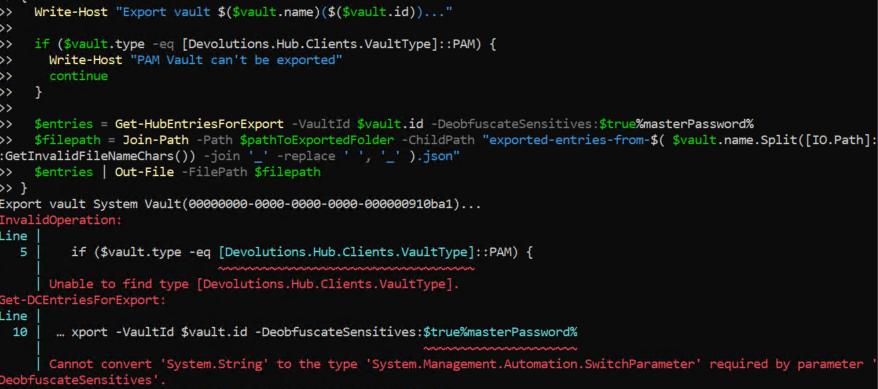
eaadb511-adf0-4028-aa76-6943c0e96cd1.png
Hello @jm2,
Thank you for bringing this to our attention. We are investigating it on our end and will get back to you when we have news.
Thank you for your comprehension and your patience.
Good Afternoon @jm2
Here are the 2 things we can directly see from your script.
First, you should replace the name of the VaultType enumeration with HubVaultType. This has been updated recently. I will follow up with our support/documentation team to validate if this has been correctly updated in our documentation.
Secondly, this is not the proper way to use the MasterPassword parameter, it should be used like this: -MasterPassword %masterPassword% (resulting in something like: -DeobfuscateSensitives:$true -MasterPassword %masterPassword%). (this parameter can be ignored if no master password is required).
I hope this can help a bit. Let us know if it still doesn't work on your end.
Regards
Good Afternoon @jm2
Here are the 2 things we can directly see from your script.
First, you should replace the name of the VaultType enumeration with HubVaultType. This has been updated recently. I will follow up with our support/documentation team to validate if this has been correctly updated in our documentation.
Secondly, this is not the proper way to use the MasterPassword parameter, it should be used like this: -MasterPassword %masterPassword% (resulting in something like: -DeobfuscateSensitives:$true -MasterPassword %masterPassword%). (this parameter can be ignored if no master password is required).
I hope this can help a bit. Let us know if it still doesn't work on your end.
Regards
@Dominic Dansereau
Hallo Dominic,
i've try to change script as you specify but give me this error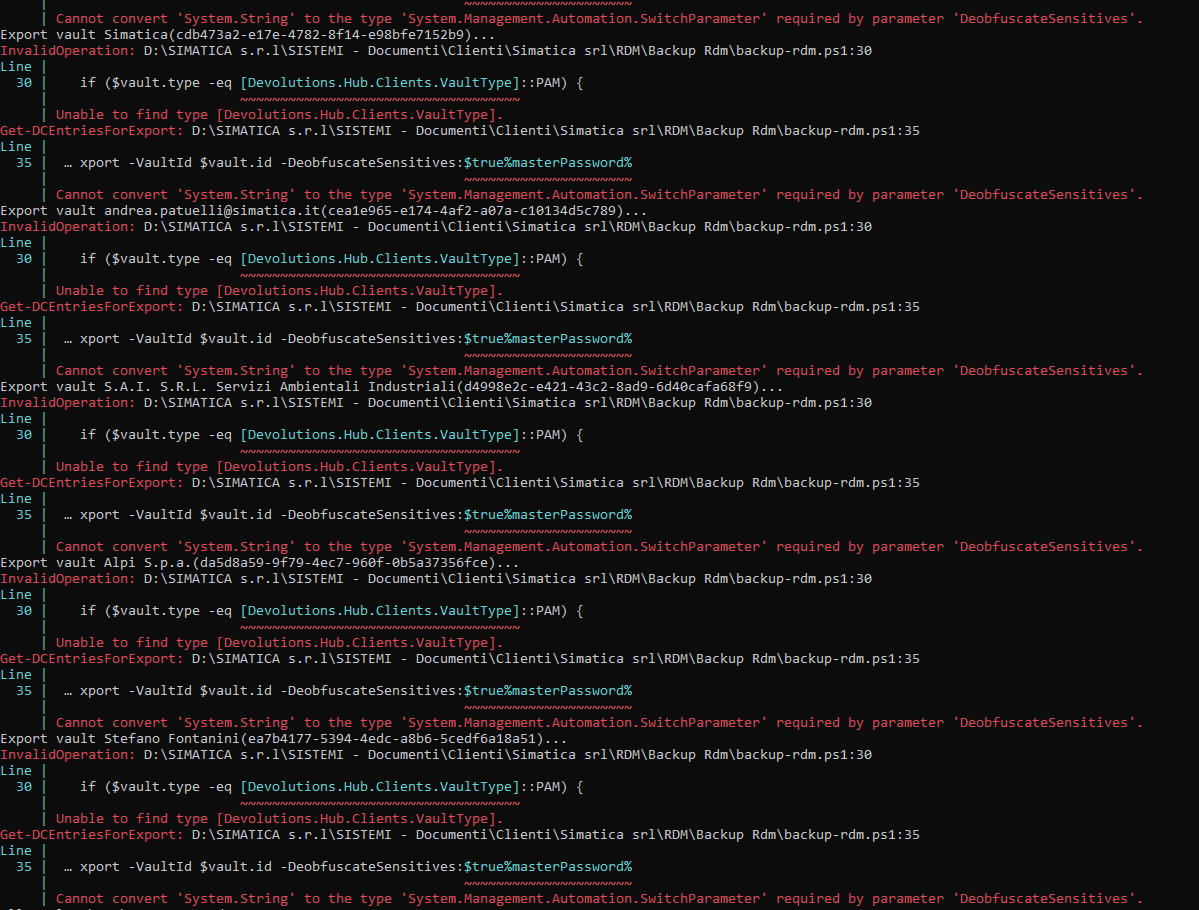
I've no master password in my cloud
immagine.png
Good Afternoon @stefanofontanini
Quick look at your screenshot and none of the changes seem to have been applied.
Line 35: %masterPassword% has not been updated (delete it if no master password is needed, or replace it with '-MasterPassword mypassword' (with a space at the beginning))
Line 30: VaultType has not been updated to HubVaultType
Let me know if this gives you a better result.
Hallo Dominic,
now it works fine thanks
just a question, there a way to exclude personal vaults from the export?
Good Morning @stefanofontanini
2 quick things that could be worth trying:
From the system settings, you can probably user "disable user vault export"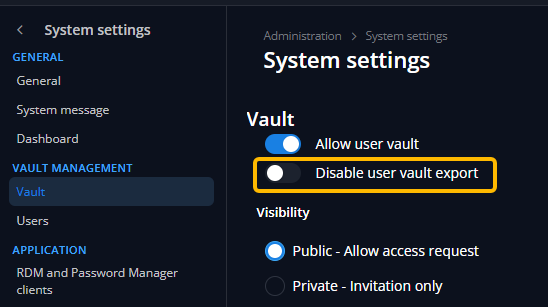
or
From the script, line 24, replace "$vaults = Get-HubVaultsForExport" with "$vaults = Get-HubVaultsForExport | Where Type -ne 'SingleUser'"
Let me know if either of these options works for you.
Regards
14523ce3-5672-43db-8bda-6f9edb7223b3.png
Hi Dominic,
Just managed to get around to testing the updated script, and it seems to work correctly now.
However, when I try to restore the json file via either Hub/Cloud UI or RDM, it reports that the master key is invalid. I copy/pasted the master key string from the backup script into the restore dialogs, so it should be exactly the same.
Joe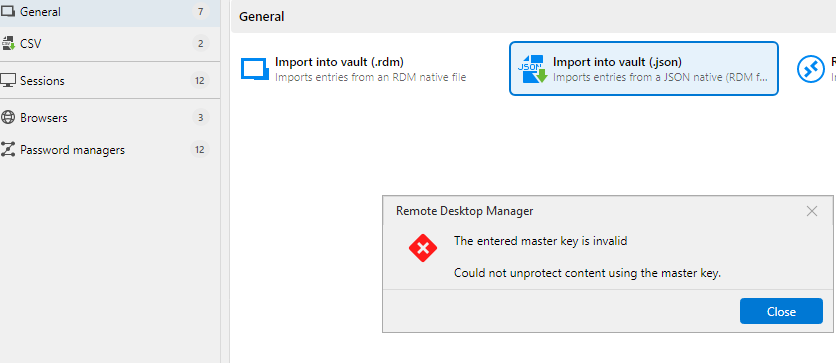
d036ed68-460e-49fd-b430-26c2898c12d9.png
Hello @jm2,
Could you please verify the export file? We have recently discovered that, when saving, an extra line is appended to the file, which was not expected during decryption with the master key.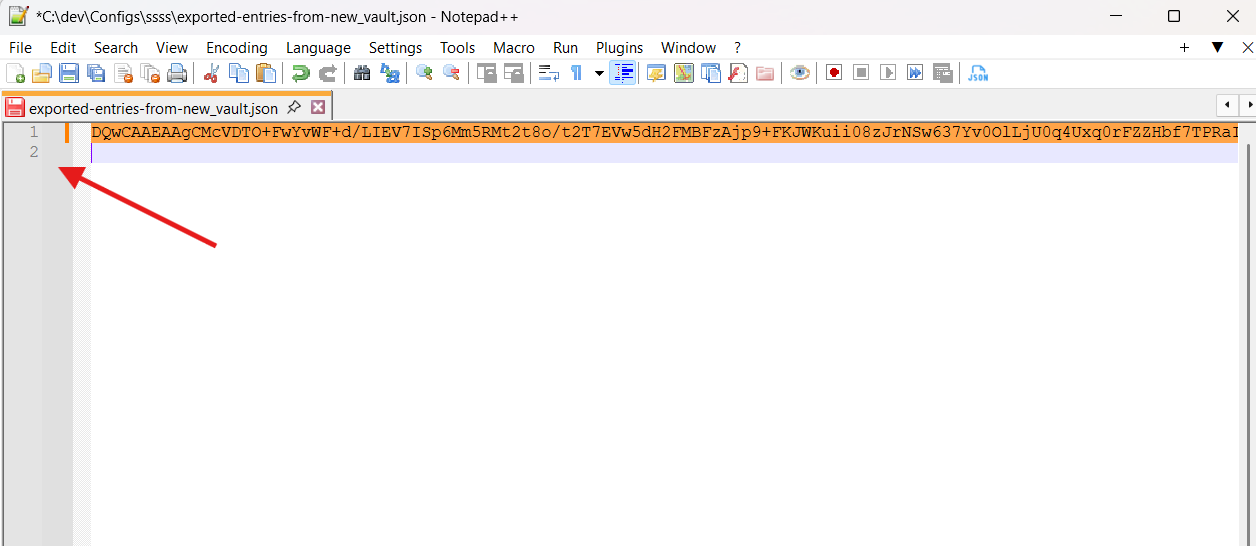
Simply removing this extra line will fix the issue. In the meantime, we are investigating how to fix it during the save process.
Thank you, and have a good day.
8563c03f-e1f2-42c7-9659-47766a91da54.png
Hi Yevgeniy,
Thanks for the update. Confirmed removing the empty line resolved the import issue.
Joe
Good Morning @stefanofontanini
2 quick things that could be worth trying:
From the system settings, you can probably user "disable user vault export"
or
From the script, line 24, replace "$vaults = Get-HubVaultsForExport" with "$vaults = Get-HubVaultsForExport | Where Type -ne 'SingleUser'"
Let me know if either of these options works for you.
Regards
@Dominic Dansereau
Good Morning Dominic
Is there a way to exclude specific vaults from the backup?
I tried modifying the script by adding "$vaults = Get-HubVaultsForExport | Where Type -ne 'SingleUser'" but it still tries to export the personal vaults."
I also noticed that it tries to export old vaults that I deleted from the cloud and have also permanently removed.
Thanks
Good Morning @stefanofontanini
So, you are right, it is not possible to filter directly in a single command line. Get-HubVaultsForExport will always return the complete list of vaults. However, nothing prevents you from doing it in 2 steps with something like this:
$vaults = Get-DCVaultsForExpor
$nonSingleUserVaults = $vaults | Where Type -ne SingleUser
Please note that during our internal tests, sometimes vaults appear duplicated. An internal ticket has been created, and I will update you as soon as we have a solution.
Furthermore, I have created another internal ticket to validate what may occur with deleted vaults... once again, I will provide you with an update when I have more details.
I hope this can help you.
Hello,
Thank you for being so patient!
I'm letting you know that a new version of Devolutions Cloud has been released, which should include a fix for your issue.
If possible, could you try this version and see if the problem persists? If it does, please let us know so we can inform our development team.
Best regards,
Maxim Robert