Error saving properties after RDM update

I have just updated RDM to version 2026.2.13.0 64-bit (PreJIT). Now, when saving any modified property, I receive the following error: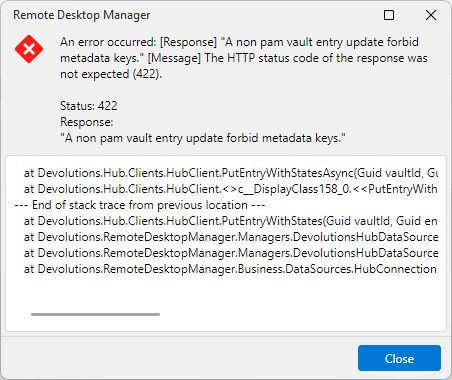
at Devolutions.Hub.Clients.HubClient.PutEntryWithStatesAsync(Guid vaultId, Guid entryId, Entry entryToPut, Nullable`1 clientSystemVersion, Nullable`1 clientVaultVersion, CancellationToken cancellationToken)
at Devolutions.Hub.Clients.HubClient.<>c__DisplayClass158_0.<<PutEntryWithStates>b__0>d.MoveNext()
--- End of stack trace from previous location ---
at Devolutions.Hub.Clients.HubClient.PutEntryWithStates(Guid vaultId, Guid entryId, Entry entryToPut, Nullable`1 clientSystemVersion, Nullable`1 clientVaultVersion)
at Devolutions.RemoteDesktopManager.Managers.DevolutionsHubDataSourceManager.SaveConnectionAsEntry(Guid dataSourceID, Guid repositoryID, Connection toSave, Connection[] currentConnections, Boolean skipHubRefresh)
at Devolutions.RemoteDesktopManager.Managers.DevolutionsHubDataSourceManager.SaveConnection(Guid dataSourceID, Guid repositoryID, Connection toSave, Boolean forceNoGetCurrentConnections, Boolean skipHubConnectionsRefresh)
at Devolutions.RemoteDesktopManager.Business.DataSources.HubConnectionDataSource.SaveConnection(ConnectionEngine engine, Connection connection, Boolean skipHubRefresh)
e4b0feb0-93a6-4bb5-a5ee-2554fa463063.png
All Comments (5)
Hello @phosek,
We are currently investigating the reported behavior.
Could you please let us know whether you experience the same behavior with every entry you are trying to modify? If the issue only occurs with a specific type of entry, could you please provide the entry type?
This error is often caused by cached data that has not been updated to the latest version. Could you please press Ctrl + F5 to perform a full refresh, then try the operation again and let us know if the issue persists?
Thank you for your cooperation.
Best regards,
The error occurred on all entries, regardless of their type. CTRL + F5 really helped. Thank you very much.
I'm glad to hear that it helped. We're currently working to identify the root cause of the initial issue.
Have a great day!
Hello,
Thank you for being so patient!
I'm pleased to inform you that a new version of RDM (2026.2.14.0) has been released, featuring the fix for your issue.
Latest Version: Download RDM
Please let us know if this works or if you encounter any issues.
Best regards,
Maxim Robert
After the update 2026.2.14.0, the issue no longer occurred.