
Sebastien Duquette
Devolutions RDM
I suggest continuing to highlight features like this—perhaps via a dedicated panel, using simple examples, screenshots, or short videos—so that RDM users become aware not only of new additions but also of significant, high-impact features such as this one.
We cover a large number of these features in the Quick Tips section of the Devolutions Academy (100% free). We have a video specifically on broadcasting actions in SSH sessions. We also reference these videos in our documentation, again taking Broadcast actions in SSH sessions as an example. I agree that feature discovery is a challenge since RDM has so many of them. When you say "via a dedicated panel", are you talking in RDM directly?
Encryption via authentication for offline access
Another update, we are working on adding support to encrypt the configuration files with Windows Hello, we hope to have this ready for 2026.3. We will let you know when it is available.
Potential bug on 2FA-enforcement for new users in DVLS
We have released DVLS 2026.2.11.0 which fixes this issue and hardens the handling of default MFA values.
Potential bug on 2FA-enforcement for new users in DVLS
Hi Markus,
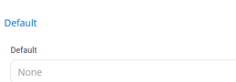
We think we have identified the cause of this behavior, could you try setting the Default MFA in the Multi-factor settings page and check if the issue persists? We noticed that your default is set to None which is an invalid configuration and we reproduce the issue when we force it to this value. This is only as a workaround and to help us confirm if this is your issue, we are working on a fix to make sure the MFA is always be enforced, users shouldn't be able to login this case.
Winget upgrades not working
The winget output displays "A newer package version is available in a configured source, but it does not apply to your system or requirements". Could you run the command with --verbose-logs and share the output? According to this winget issue it should output the reason why the package does not apply and look something like this:
2024-03-26 19:15:53.600 [CLI ] Installer [X86,msi,User,en-US] not applicable: Installer scope does not match currently installed scope: User != MachineLooking at this message makes me think, could RDM be installed in your user folder? The winget package is installed at the machine scope (Program Files folder), that would explain the issue.
Winget upgrades not working
There can be a slight delay for versions to be available on winget as Microsoft needs to approve the update request. Version 2026.1.14 was approved a couple minutes ago and should be available soon.
DVLS Certificate
Where does RDM store the certificate when you choose "Continue and remember"?
What would cause it to repeat popup after choosing "Continue and remember"?
The certificate hostname and fingerprint are stored in a configuration file (RemoteDesktopManager.stv) in the appdata folder. When you say that the popup is repeating, is it immediately after clicking on Continue and remember, or the next time you connect? Also which type of connection are you opening when you get the popup?
Unable to start Powershell Terminal since latest update
@hjbos Do you have Microsoft PowerToys installed by chance? There is a known issue with Windows Terminal, I just ran into this issue and updating the version 0.96 fixed the crashes for me.
Import/Integration with ProxMox
We have added a console entry for Proxmox in RDM 2025.2 that can list and start/stop/resume VMs and containers. We are currently exploring if we can add support to connect to the VMs. Let us know if you try the console and if you have any feedback.
Regards,
Copy public key info for authorized_keys file
We made another small quality of life improvement, in RDM 2025.2 (due to release in June) it will be possible to copy the public key in different formats.
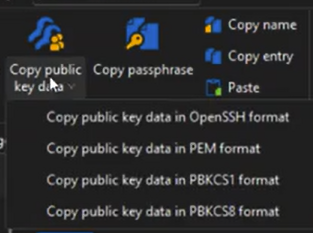
Copy public key info for authorized_keys file
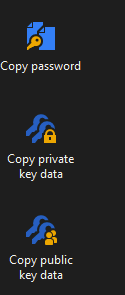
Apologies for not getting back to you sooner, we added buttons in the ribbon to copy the public and private key of SSH key entries.
Updated to Version 2025.1.13.2, no RDP connections are working
We pulled the 2025.13.2 version due to this issue, we invite you to reinstall the previous version (2025.1.12.5) if you have not already done so. We apologize for the inconvenience.
Module to generate Devolutions Send links
From a client request: A Powershell module to automate the creation of Devolutions Send links to share passwords.
Is it possible to browse/delete files from DOD?
Hi jharle,
You can list your online drives from the following page: https://portal.devolutions.com/rdm-online-services/online-drive. We invite you to delete them if you no longer need them.
Regards,
gsudo.dll in new version Version 2025.1.24.0 - Suspicion?
Hi Rafal,
This is expected, gsudo is packaged with RDM for our new gsudo feature. The file is completely safe but I can understand why an EDR would report this file as it deals with privilege elevation.
Regards,
RDM crash on start with Devolutions Cloud
@RpR We released RDM 2025.1 today, would it be possible for you to update to this version to see if you still have the issue?
RDM crash on start with Devolutions Cloud
I renamed the topic to "RDM crash on start with Hub Personal". We have another user that reported the same problem with Hub Personal, we are investigating the issue.
Scan MFA QR-Code from Browser Add-in
Hi Tobias, thank you for your request. I moved this thread in the Workspace section which is our browser extension. I will let the team get back to you.
For reference this is the documentation page of the feature you are mentioning.
https://bitwarden.com/help/integrated-authenticator/#tab-browser-extension-4eWjy5G0QLbgxyLIzd91g8
Playlist feature for Linux RDM
@danktankk Thank you for your feedback, we're happy to know that you are enjoying RDM. We are noting your interest for this feature, you can also upvote feature requests (the thumb icon next to the first message), this helps us with prioritization.
Regards,
Copy public key info for authorized_keys file
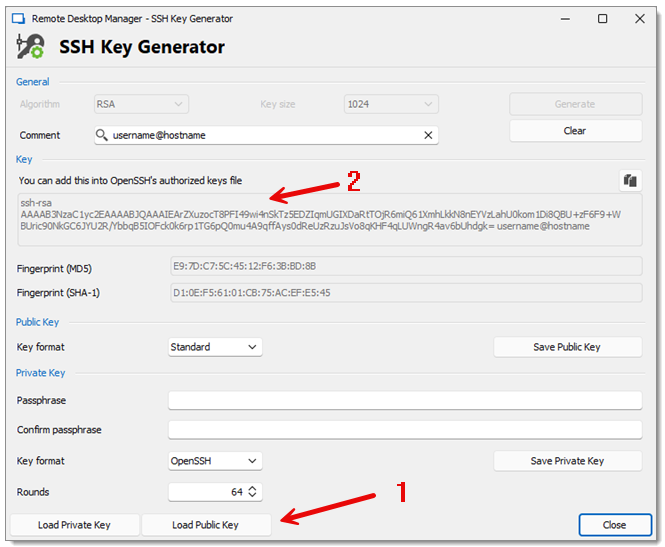
If you have an existing ssh key on disk, you can load it in the SSH key generator (under Tools in the ribbon) by using the load buttons at the bottom of the dialog. The key will then be displayed int he authorized keys format.
However this made me realize that we do not have a convenient way to get this from an SSH key entry, I'm taking a note to add way to get it easily.
Sealed entries
In DVLS 2025.1 logs will be added in the Entry logs when an entry is sealed and unsealed. I noted your request to make notifications customizable. Our planning for the next major version is still in preparation but we are considering bringing sealed entries to Hub.
New SonicWall NetExtender 10.3.0 changed .exe (addon broken)
RDM 2024.3.22 is now available with the support for the new version of NetExtender.
Playlist feature for Linux RDM
Hi vasilzgurev, I moved this thread to the RDM Linux forum section and notified the RDM Linux team.
Passkey Support for Devolutions Server
Is there a reason why this is in preview still?
That's actually a very good question, we had a discussion about it and we will remove the preview label in 2025.1. We initially put it in preview because we added support for passkeys progressively in our products. Passkeys are now supported by all our products and it works correctly with most websites that support passkeys. Passkeys is still a relatively young technology and the support across browsers and platforms is a bit of mess at the moment so your mileage may vary, but these issues should be ironed out over time.
New SonicWall NetExtender 10.3.0 changed .exe (addon broken)
Thank you for reporting it, we added the information to our ticket to handle those changes correctly.