Passkey Support for Devolutions Server
8 votes

Hello,
I am currently setting up our Devolutions Server and would be very happy if the current YubiKey method would be extended by Passkey support, to enable real passwordless login. This would greatly increase security and user-friendliness. I can already use the function in my Devolutions Online account and I am delighted with it.
Is this function perhaps already on the roadmap?
Thank you and best regards 😊
All Comments (21)
Hello,
Thank you for your suggestion. This is not a product development that is currently planned. We’re taking note of your feedback and we will analyze it to see if we could work on a such improvement. We will also follow this topic to see if there's any additional interest or input from other users.
Best regards,
François Dubois
I am also interested in passkey support for this and Devolutions hub.
Hey Francois,
any update on that case? - Regarding the change from microsoft which requires mulitifactor authentication also for break-glass admins, it would be a nice feature to configure a phishing resistant mfa method in devolutions server for that kind of admins.
BR Dominic
Hello Dominic,
Thank you for your interest. Unfortunately, we don't have an ETA for that, but I'm taking note of your interest and will see if it could be integrated in our roadmap.
Best regards,
François Dubois
+1 for passkeys. Devolutions always talks about security and is integrating so many good security features.
Passkey support is a must have, for any Passwort Manager in the future. So get it on the roadmap asap 😉
+1 for passkeys. Passwordless is the future, so like already said in some comments before, an absolute must-have!! :)
This would also very important for us as more and more websites we use move to passkeys
+1
Passkey seems to be the next trend for secure authentication.
Devolutions Server, RDM and GW admin.
Hello all,
Thank you for your interest in that feature. Before going further, I would like to know what type of authentication you use. Our passkeys implementation would work for Custom users (Devolutions Server user), but would not be possible for Active Directory authentication. If you use EntraID, Okta, or PingOne, it is probably already possible through your identity provider. However, we understand your interest and will analyze it for our next development cycle to see if it would be possible to work on that based on our priorities.
Best regards,
François Dubois
Hey Francois,
i am not sure if something is missunderstood here.
From my side the passkey support needs to be implemented in the entry section. For example: 1Password has the option to add an entry for passkeys to an existing account.
The passkey implementation in the user login is not my feature request because in 90% of the cases the user is synced through entra id or another identity provider and the login security is handled by them.
BR Dominic
Yeah I think there is a missunderstanding here.
We need to be able so safe passkeys within a Entry to be able to Authenticate on Websites that support it as a new secure authentication method.
As @dominicdreier wrote in 1Password you can add a Website as an entry and then register a passkey for authentication.
This is a must have feature for us as a few Websites transition from TOPT over to passkey and enforce it quite agressively.
BR
Mathias
@dominicdreier @mathiaskessler We have added support for passkeys in our Workspace browser extension, they can be saved in DVLS and Hub and used to login to sites that support them. Once configured the passkeys will be made available on log in. This feature is technically still in preview but I have personally been using it without issues for the past couple months.
https://docs.devolutions.net/workspace/kb/workspace-browser-extension/passkey/
We also support passkeys to connect to a Devolutions account and Devolutions Hub. This can be configured on portal.devolutions.com under Security Key and Passkey.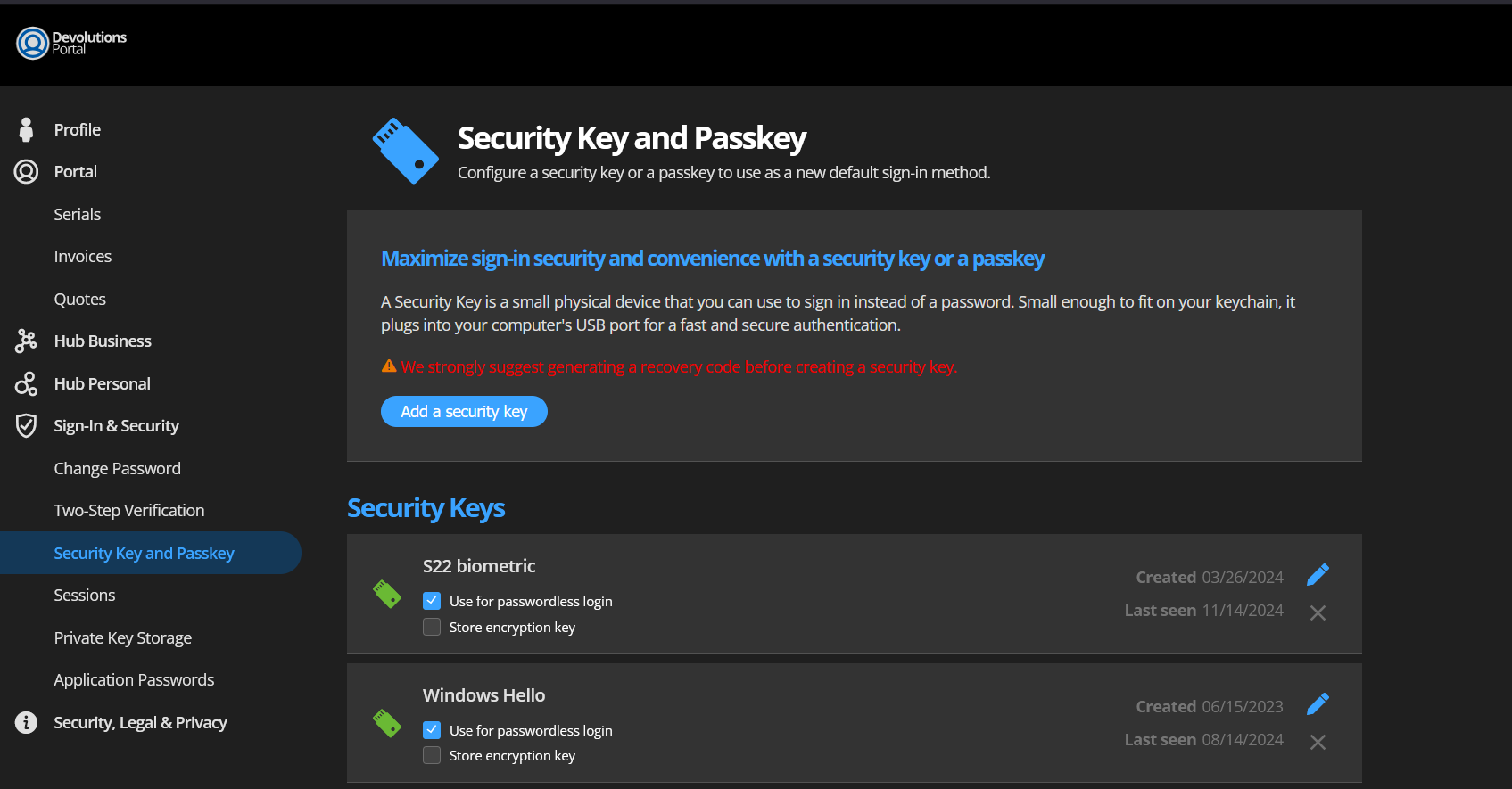
Let us know about your experience if you try these features.
Sébastien Duquette
Hi @sebastienduquette,
this is exactly what I was asking for!
Why did this not work last week? ^^
Is there a reason why this is in preview still?
I tried it with one login and it worked without a problem.
BR
Mathias
Is there a reason why this is in preview still?
That's actually a very good question, we had a discussion about it and we will remove the preview label in 2025.1. We initially put it in preview because we added support for passkeys progressively in our products. Passkeys are now supported by all our products and it works correctly with most websites that support passkeys. Passkeys is still a relatively young technology and the support across browsers and platforms is a bit of mess at the moment so your mileage may vary, but these issues should be ironed out over time.
Sébastien Duquette
Hello,
Would it be possible to implement saving the passkeys without using the browser extension? For example from Remote desktop managers embedded browser?
Br
Ville Peltola
Would it be possible to implement saving the passkeys without using the browser extension? For example from Remote desktop managers embedded browser?
Hi @villepeltola
This is on our roadmap for the future, but we don't have an ETA on when this will be available.
We'll get back to you as soon as we have more information to provide on this matter.
Best regards,
Luc Fauvel
Hi!
Any updates on this matter?
br
Ville
Hello,
I am currently setting up our Devolutions Server and would be very happy if the current YubiKey method would be extended by Passkey support, to enable real passwordless login. This would greatly increase security and user-friendliness. I can already use the function in my Devolutions Online account and I am delighted with it.
Is this function perhaps already on the roadmap?
Thank you and best regards 😊
@kschmidthals
Big thumbs up!
As a password manager security functions like supporting yubikey as a passkey for 2nd factore for login should be top priority!
Hi @licensing,
Passkey support as 2FA for DVLS has been available since DVLS 2026.1. We're also planning enabling real passwordless sign-in with passkeys (not just 2FA) soon.
We're still in the planning phase of our next product iteration, but we're hoping to start work on this in the later part of the year.
Cheers,
Luc Fauvel
Hi @Luc Fauvel
thank you very much, real passwordless sign in would be nice too.
But at the moment Yubikey is only supported as TOTP, not as a physical safe for passkey. Would be nice if Yubikey woul also get real Passkey support, not only TOTP.
Thank you!
Hi @gernoth,
A YubiKey should work with the Passkey MFA option that we’ve added in DVLS 2026.1. We left the YubiKey option there as to not lock out users relying on it, but I would recommend using the Passkey option over the YubiKey OTP option.
Cheers,
Luc Fauvel