New SonicWall NetExtender 10.3.0 changed .exe (addon broken)

Hi there,
just installed the new SonicWall NetExtender client (10.3.0) and RDM is not able to call it anymore. I think that the issue is that in the program folder there's no necli.exe anymore, but a nxcli.exe instead.
Can you try to look at that? RDM entries are now broken (for NetExtender VPN).
Thanks.
All Comments (45)
Hello,
Thank you for your feedback.
Have you tried updating the Path properties of the SonicWall NetExtender in File - Settings - Application - Paths?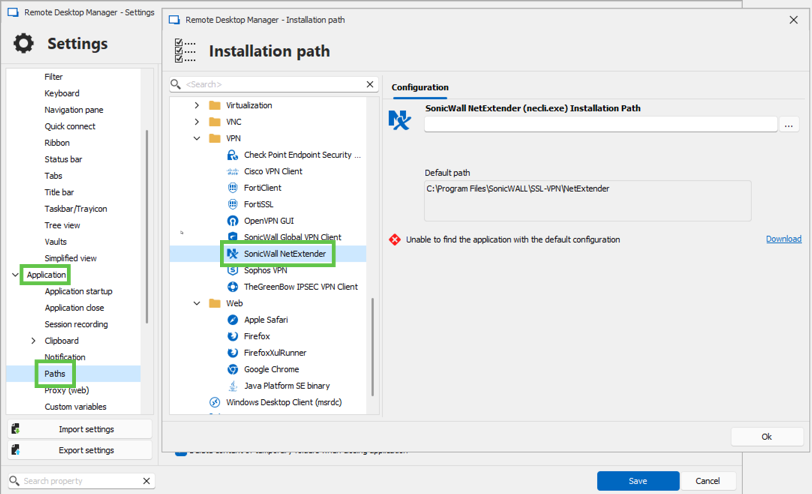
Best regards,
Érica Poirier
1b194664-126b-47a4-bc2f-debe1c272c5f.png
Hi,
please note that I specified that the exe file name is changed, not the folder path...
Hello,
Thank you for your feedback.
Have you tried renaming the .exe file to see if that helps?
Best regards,
Érica Poirier
Hi Nicola,
We will add support for this new executable name. As a workaround in the meantime you can make a copy of nxcli.exe named necli.exe, I just tested it it works with the current version of RDM.
Sébastien Duquette
Ok, thanks.
My main attempt was to notify to you the new version change.
Cheers.
WARNING: certificate acceptance message is changed as well, so I think a code change in RDM is needed.
22b00c42-cce1-4746-a544-5644fc611610.png
I can confirm that copying the file works - though in our case we also had to update the name of the name of the network adapter is looks for an IP on (previously it was "SonicWall NetExtender" and it's now "SonicWall_NetExtender_SSL":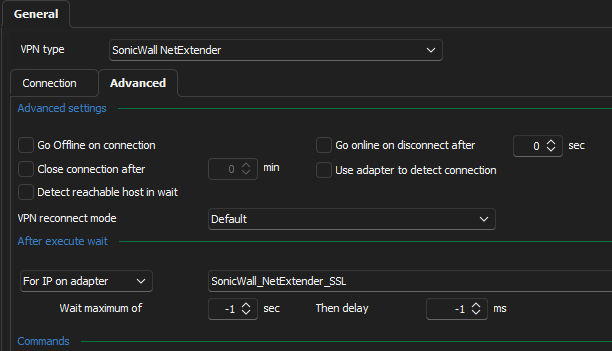
2fa38012-60de-4138-9b3d-f7332bb9dbe4.png
I can confirm that copying the file works - though in our case we also had to update the name of the name of the network adapter is looks for an IP on (previously it was "SonicWall NetExtender" and it's now "SonicWall_NetExtender_SSL":
I confirm the same too.
Thank you for reporting it, we added the information to our ticket to handle those changes correctly.
Sébastien Duquette
Hello,
We've fixed the executable issue as well as the confirmation for the certificate.
For the certificate confirmation fix to work (sending "T" instead of "Y"), make sure that the executable is named "nxcli.exe" if you've renamed it to "necli.exe" as a temporary fix. We use the executable name to ensure that the correct confirmation is sent to the correct version of SonicWall.
You can expect these fixes to be in the upcoming 2024.3 version.
Regards,
Jafran Majeau
Thanks!
RDM 2024.3.22 is now available with the support for the new version of NetExtender.
Sébastien Duquette
Hi there,
back on topics. I'm using NetExtender 10.3.4 and there is something wrong. I have "Automatically accept the certificate" option enabled and sometimes I see: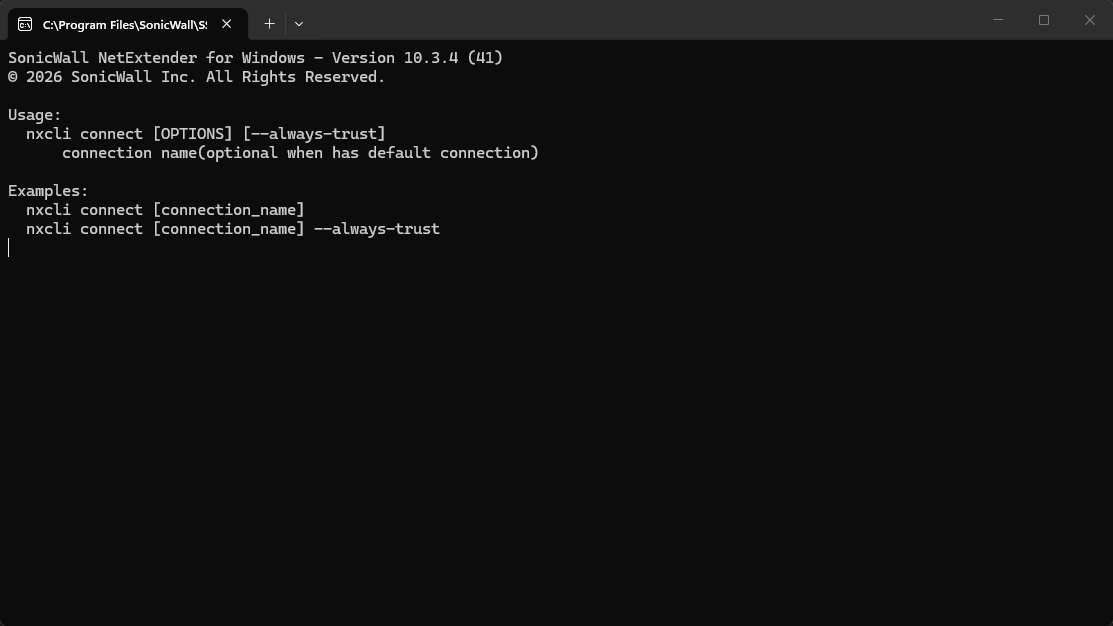
Other times, if I wait, a "T" char is outputted: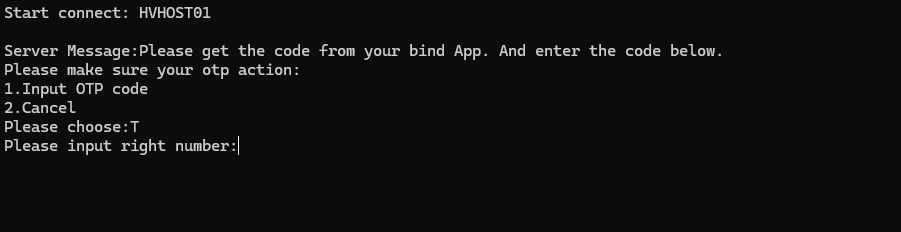
Also, "Automatically delete profile on close" doesn't work, it remains saved within the client.
Any help?
Thanks
9a927ad1-39ae-4473-b04f-48394a2b153e.png
3e5866c2-647c-422d-adb2-68092a06aa49.png
Sometimes "Connection already existed"...
I see exactly the same issue as Nicola. @Jafran Majeau / @Sebastien Duquette perhaps something changed in their command line parameters?
It's unusable for me at the moment. I don't see any follow-up, so I'm trying to open a specific new thread.
Hello,
Thank you for your feedback.
We are sorry that the SonicWall entry no longer works on your end. We will investigate this internally and get back to you.
Thank you for being so patient.
Best regards,
Érica Poirier
Erica,
I suppose you need to investigate the new CLI commands and test his responsiveness. It seems quite different from the old one and not manageable from RDM at the moment.
Moreover, having NetExtender not deleting/saving the connection it's a mess (and security concern).
Thanks,
Hello,
You’re absolutely right in your observations here. Based on what you’ve described, it does look like something has changed again in the NetExtender CLI behavior.
I’ve checked internally, and our development team has opened a new case specifically to investigate this exact issue (including the inconsistent certificate acceptance behavior and profile handling).
We’ll keep you updated as soon as we have more information or a fix.
Thanks again for the detailed feedback it really helps us track these changes.
Best regards,
Carl Marien
Using 2026.1.15.0 64-bit (PreJIT), I now get slightly improved behavior; it now pauses to ask me to key a password into the popup terminal box.
Keying this in allows it to continue, but also kind of defeats the point.
Let me know if there's anything else I can try in the setup for the VPN?
Cheers,
Geoff
2026.1.18.0 seems fixed the connection/disconnection behavior.
WARNING: profile is not deleted on connection close though and, moreover, password remain saved within the NetExtender!
Having RDM creating a connection profile named as the selected entry, it's a mess. Even if I prefer to delete it, may I suggest adding a field to adjust this value when saving profile is needed? Could be useful to better identify the active connection also.
About password saving, I suppose that there's something broken within the NetExtender itself because I always had "Not allow password saving" in the firewall/VPN server policy and this is clearly not applied. The password is saved only if inserted by RDM though.
Hello,
We'll investigate this issue and come back to you as soon as we can.
Regards,
Jafran Majeau
Hello,
We haven't been able to replicate the issue you're experiencing. The profile is correctly deleted for us (by extension, no password is saved as well).
If we proceed with the assumption that your SonicWall is fully up to date, we might need more information as to your paritcular setup. It's possible that some other setting is conflicting with the recent changes SonicWall introduced and its preventing your profile from clearing properly when closing.
Any additional information you can provide would be useful. Without mentioning Hosts, usernames or any such information, any setting or additonal command set in the entry would be useful in attempting to replicate your problem.
Regards,
Jafran Majeau
Hi Jafran,
I tested it again now, and I think the "issue" is that NetExtender GUI clears itself on application restart. I'll test it a bit more now (I moved to manually profile creation before for the original issue).
Furthermore, I want to add another point of attention. I think that there's something broken with the "Always accept certificate" in conjunction of SonicWall OTP option: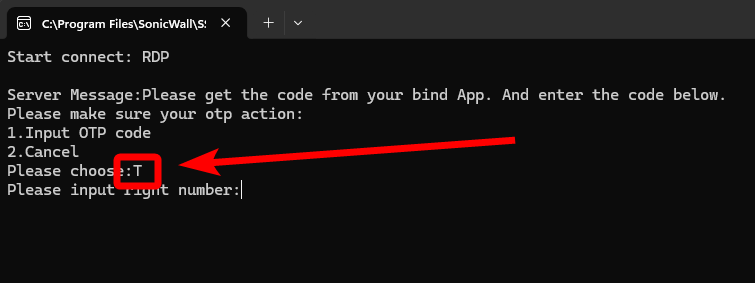
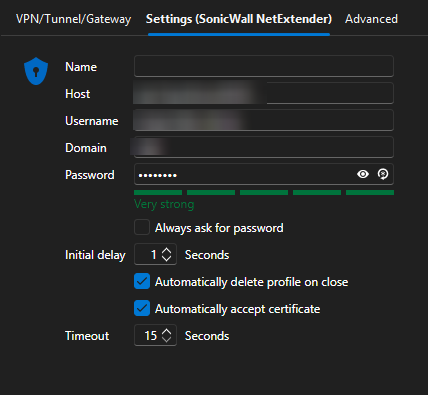
I managed it by manually accepting the certificate at the first request and clearing the "Automatically accept certificate" flag, but it's not ideal. Can be possible that RDM is not considering the SonicWall OTP feature?
Let me know and thanks,
88b4a9c0-4b34-48fb-a641-dbfe66cf0437.png
a575b285-019d-44e2-a865-8eaef2858961.png
Well,
another situation that I want to alert all (I'm quite sure that is not a Devolution issue in this case).
- Connecting to the VPN by RDM > OK
- The "temporary" NetExtender profile is added with the RDM entry name > OK (as my previous post, it's not ideal for me using the entry name with no customized property)
- NETWORK DROP > VPN DOWN (so, no closing command issued by RDM)
- The "temporary" NetExtender profile remains saved with password also! (this is a violation of the SonicWall UTM/Appliance policy)
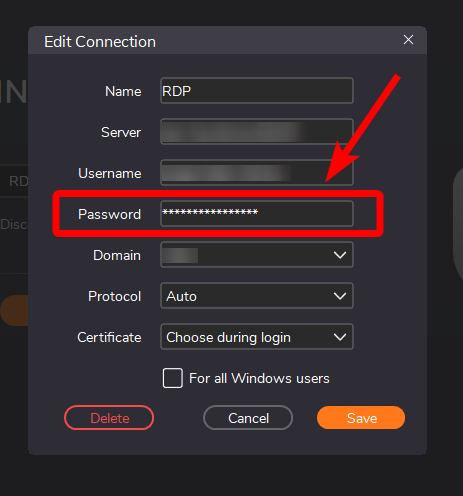
Hope to be helpful.
531e2f8a-e505-42db-a2d4-24c541f8fcf3.png
Same issue if the OTP input is wrong: the profile remains saved (as I suppose RDM not issues the deletion command).
Hello,
We will look into the OTP issue. I agree that this looks like something that RDM is sending incorrectly. I will provide you an update when I can.
Regards,
Jafran Majeau
Anyway, I suggest testing the profile deletion because it seems inconsistent (sometime RDM doesn't launch the command > in fact, I don't see it in the terminal prompt or, maybe, for less than a second I see a command before prompt is closed).
Can be something related to a "wait" needed between commands?
I don't see any update about this topic.
In the while, I wanna warn that profiles are saved within the NetExtender and, when RDM try to establish a new VPN connection again, it requires the password input (even if saved inside RDM).
If I manually delete the saved profile within NetExtender, RDM successfully launch the connection again.
Hello,
The investigation is still ongoing here, I've increased it's priority. Hopefully we should be able to provide you with an update shortly.
Regards,
Jafran Majeau
Hi,
I've just seen the new release note with "various SonicWall Netextender fix". Any further details? I think that can be useful adding them to this post.
Thanks,
Hello,
Thank you for your feedback.
The following fixes have been released in RDM 2026.2.19.0
- Password prompt shouldn’t be an issue anymore
- For automatic OTP input, the user needs to link the same credentials in the OTP section of the session and ensure the usage field is set to Specific to session.
Let us know if that helps.
Best regards,
Érica Poirier
Hi,
it seems that we have now a better experience but take care that:
- delete connection on exit option DOESN'T WORK;
- credentials are SAVED within NetExtender in any case (!!!!).
This behaviour is a great security flaw! (I suppose that there's something broken from NetExtender side, as I always set the SonicWall firewall VPN policy to do not let save them within the client).
Another idea
Can be possible to have an option to avoid the "1" input in case of OTP request? I don't the point to spend time on digit an obvious "1" (NetExtender weird behaviour):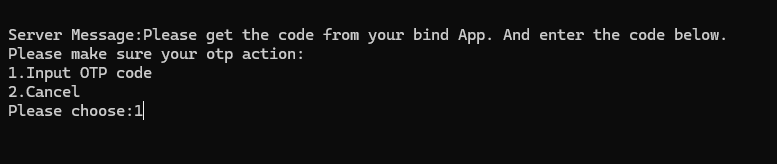
Thanks,
89e48f44-0df1-4282-b59c-8987d2df6e86.png
Hello,
The investigation is still ongoing, but we haven't been able to replicate your first 2 issues (connection not deleting and credentials saving), which makes me think that either we have a version difference, or we're misunderstanding each other.
When you're saying "delete connection on exit option doesn't work", what form exactly does that take? On my side I can see that the connection has disappeared from the "quick selection" in NetExtender (and since it's gone, obviously so are any credentials).
Regards,
Jafran Majeau
Exactly: on my side, with the NetExtender the profiles are completly saved once disconnected from RDM.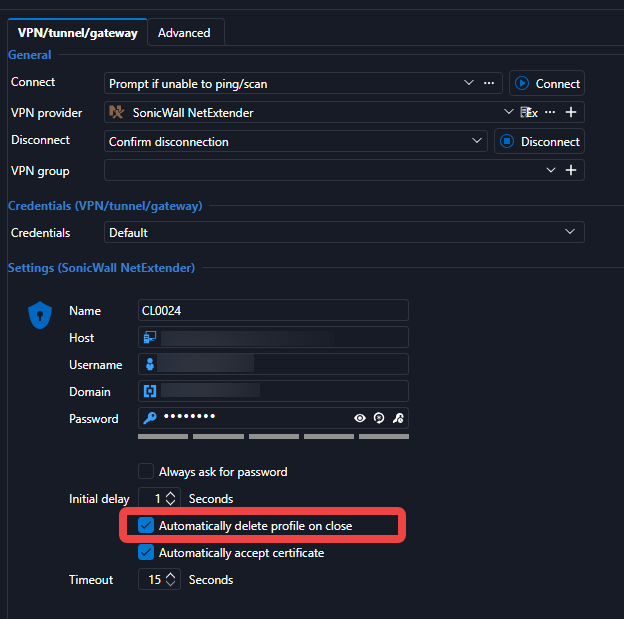

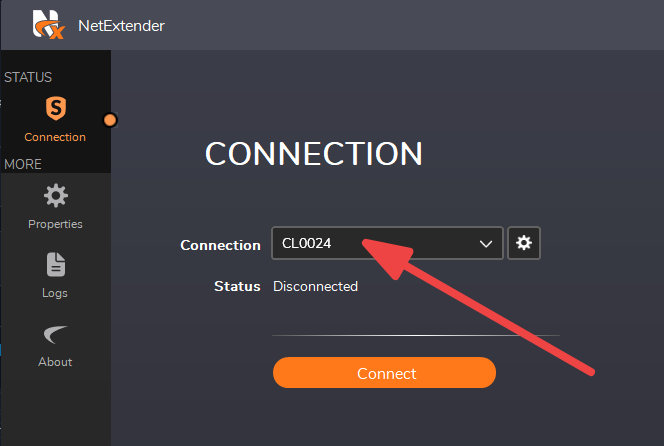
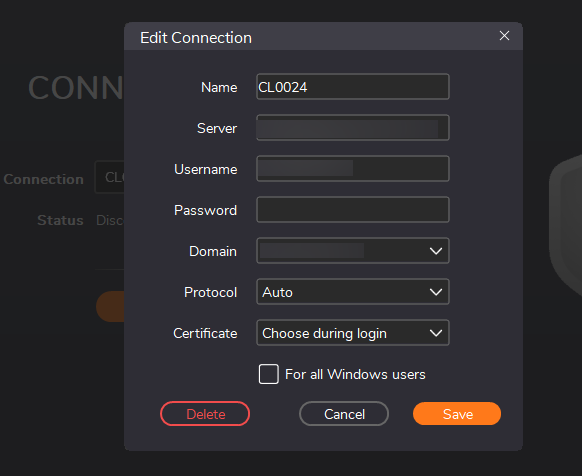 (this time, dunno why, password was not saved at least)
7b8a4adf-4226-4caf-8713-8d6b1fe5defc.png
cc97f9ba-945e-44dd-beac-9ed8b32351a2.png
68eb371b-1767-4ee1-9b1d-20097e446393.png
a8730170-e1c3-4470-ad95-39c9aadfe830.png
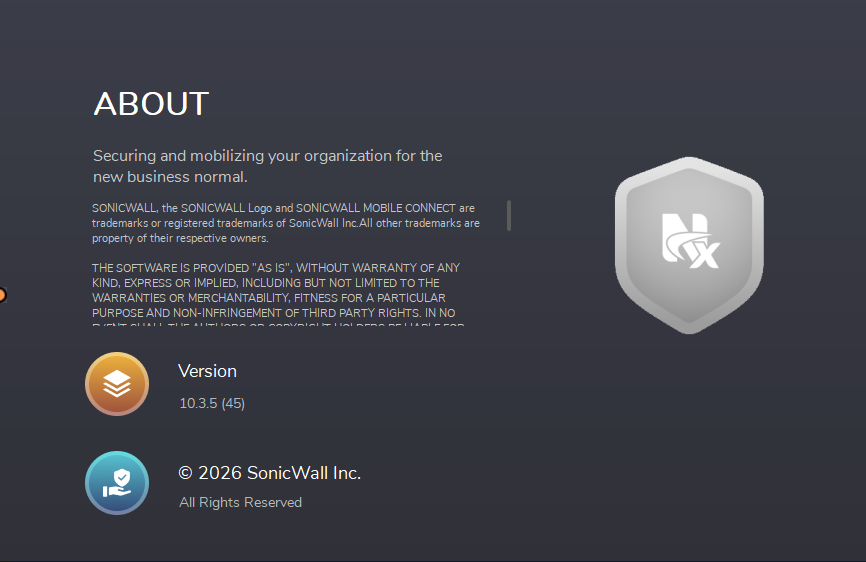
e39e3278-3fde-4646-b377-caba0c8425bc.png
In addition: I don't see any prompt window with deletion command (as I remember from the past).
Hi Nicola,
Thank you for the additional details.
I have not yet been able to consistently reproduce either the profile-deletion issue or the OTP behavior in every setup. However, I was able to reproduce a specific profile-deletion scenario:
- A VPN is configured on a session entry.
- The VPN is started using the Open VPN Dashboard action.
- The VPN is then stopped using the separate Close VPN Dashboard action.
In this workflow, the NetExtender profile was not deleted. In my tests, opening the session normally and then closing the session worked correctly. We identified why the separate Dashboard VPN-action workflow can lose the generated NetExtender profile name that is required for deletion, and we are working on a correction.
Could you please confirm whether this matches your workflow? In particular, are you using the Dashboard Open VPN action followed by the Dashboard Close VPN action, rather than opening and closing the session itself?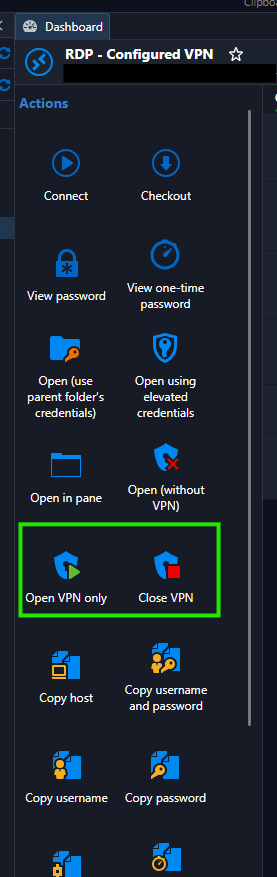
It is also expected that you no longer see the NetExtender terminal window when RDM deletes a profile. The deletion now runs in the background; RDM displays a small loading indicator with “Deleting connection” instead.
Regarding OTP, I have not been able to reproduce the automatic OTP issue in my environment so far, so I would like to better understand your configuration. For NetExtender, automatic OTP injection requires the OTP credential to be configured for the session with its Usage set to Specific to session.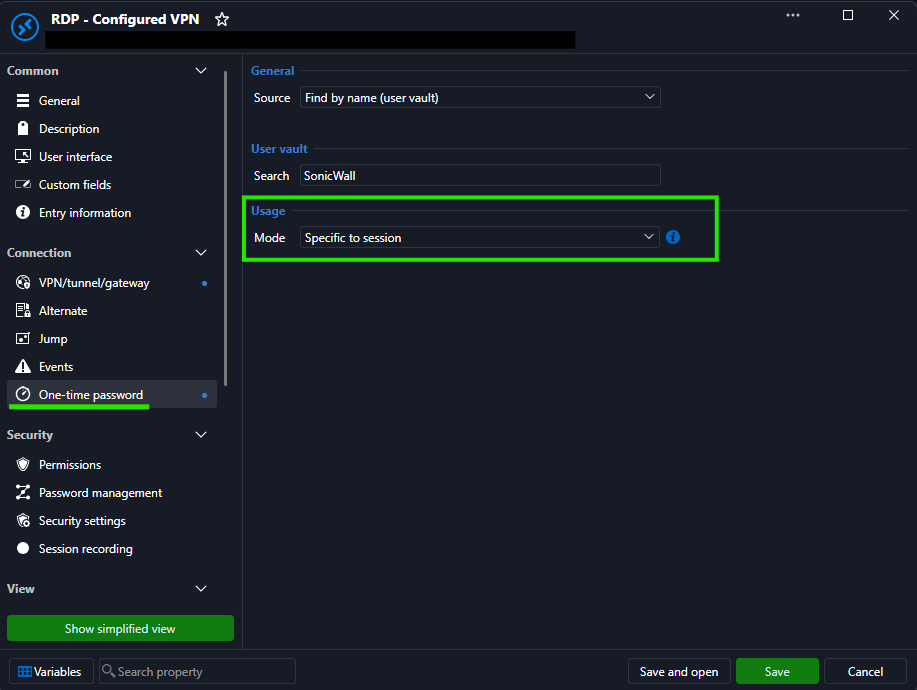
Could you please share how the OTP credential is configured and linked to the affected session?
Best regards,
Léon Le Brun
aec0f59e-2af4-4d0a-96dc-dadf2d6107d9.png
86fbbb59-609c-45fe-a261-4ef40a451c19.png
b44aae7d-755e-4c3c-a716-6f6b46f275cf.png
Hi Leon,
it's correct. I've the VPN set up whitin the client (folder) and inherited within every entry. I always use the dashboard/entry toolbar to open and close.
The OTP is requested by our SonicWall SSL accounts and we don't store/generate them within RDM, we simply need to digit when asked: for some reason, the NetExtender CLI ask "1" to let you digit the OTP and it's tedious as "obvious" (why I should cancel with "2"?). Maybe, there's a misundersting about which OTP I'm talking about (you can simply reproduce it enabling TOTP option within your SonicWall SSL VPN server/Firewall).
Hi Nicola,
Thank you for the additional information. I was able to fix both the NetExtender connection-profile deletion issue and the automatic input of 1 for the OTP action.
These fixes are planned for the next minor release, 2026.3.13.0. Please do not hesitate to let us know if anything does not work as expected.
Best regards,
Léon Le Brun
Fantastic news, thanks!
Hello Nicola,
Thank you for your patience while our team looked into the issue you reported.
I'm happy to let you know that the latest version of Remote Desktop Manager (2026.3.13.0) is now available. You can download it from our website here:
https://devolutions.net/remote-desktop-manager/download/
Once you have installed the update, could you please test it in your environment and confirm that everything now works as expected? If the issue persists or if you notice anything unusual related to the same original problem, just reply to this message with a few details, and we will be glad to look into it further.
Thank you for your collaboration.
Best regards,
Érica Poirier
Hi,
now:
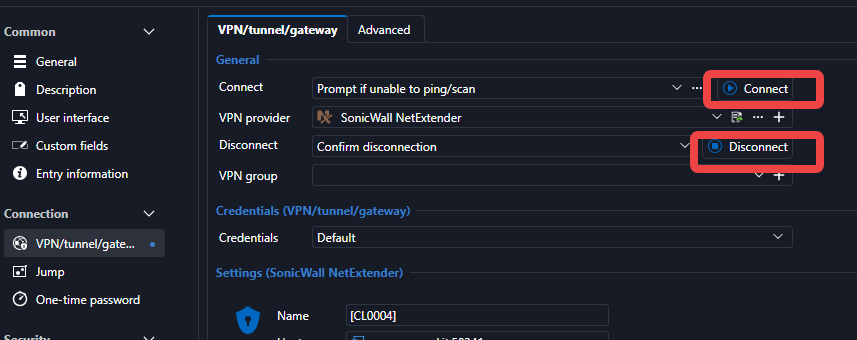
- the VPN connect/disconnect command works within the entry property windows (*) and doesn't work at all within the entry dashboard/toolbar if the entry is under some other (f.e. folder)!!!! (only if root entry);
- the auto digit of "1" for the OTP works;
- the connection profile is NOT DELETED within the NetExtender (in fact, I don't see any "deleting profile..." RDM's window);
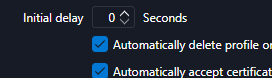
- the "Initial delay" option, if not 0, interfere with foreground/background windowing (NetExteder CLI goes background, so you need to focus it again to digit the OTP)
(*)
b323fd5d-fd61-47d9-a03f-bbb5f0a927db.png
21459e45-5e80-4a8c-b820-5aa12a127d3c.png
Just to add a point: what happens if NetExteder's connection profile is closed externally (f.e. app crash, user action, etc.)? Is RDM meant to delete the profile based on the name (string match) the next disconnect clear action? Or does it use a sort of ID to manage/clear "his" profiles only?
Hi Nicola,
Thank you for the feedback.
I confirmed that the NetExtender connection profile is not being deleted reliably when using the VPN connect/disconnect actions from an entry’s properties. I am investigating this and will correct it.
Regarding your question about externally closing NetExtender: RDM tracks the live VPN connection instance and retains the exact NetExtender profile name created for that instance. This is intended to ensure that only the profile associated with the RDM-opened VPN is cleaned up.
I also agree that the Initial delay behavior is inconvenient. Rather than forcing the terminal to remain always on top, I will change the behavior so that RDM keeps the configured delay without opening a dialog that takes focus away from the NetExtender console. This should allow you to enter the OTP without having to bring the terminal window forward again.
Regarding this point:
The VPN connect/disconnect actions do not work from the entry dashboard/toolbar when the entry is under another item, such as a folder. They work only for root entries.
I would appreciate a little more information so I can reproduce the issue:
- What happens specifically when you select Open VPN or Close VPN from the dashboard or toolbar?
- Does the NetExtender terminal window appear?
- Is a connection profile created in the NetExtender interface?
- Is the VPN configuration defined on a folder and inherited by the entry, or configured directly on the entry?
- Does the behavior differ between a folder-level configuration and a root-level configuration?
I have tried reproducing the issue with both direct and inherited VPN configurations but have not yet been able to reproduce it. Any additional details, screenshots, or logs you can provide would be very helpful.
Best regards,
Léon Le Brun