Winget upgrades not working

I've noticed since I added RDM to my Winget update script, a couple RDM versions ago:
C:\Windows\System32>winget upgrade -h -e --id Devolutions.RemoteDesktopManager
Aucune mise à niveau applicable trouvée.
Une version de package plus récente est disponible dans une source configurée, mais elle ne s’applique pas à votre système ou à la configuration requise.
I first thought it was because I had manually installed RDM manually using the .exe instead of the .msi (the .exe is much smaller). I'm not 100% sure if it was working with 2025.x but it definitely is not working with 2026.x.
You can reproduce with a fresh reinstall (Win11 25h2):
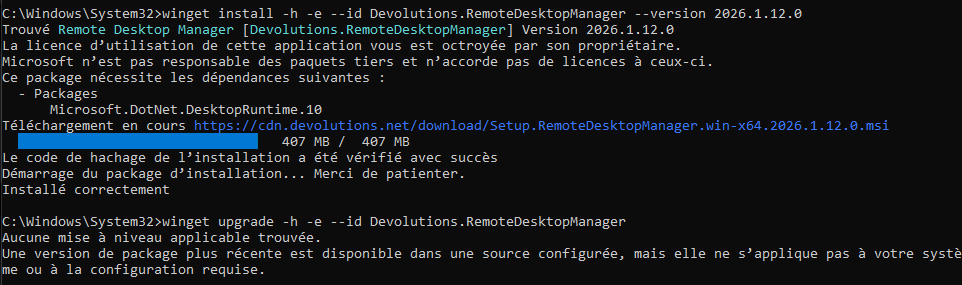
C:\Windows\System32>winget install -h -e --id Devolutions.RemoteDesktopManager --version 2026.1.11.0
Trouvé Remote Desktop Manager [Devolutions.RemoteDesktopManager] Version 2026.1.11.0
La licence d’utilisation de cette application vous est octroyée par son propriétaire.
Microsoft n’est pas responsable des paquets tiers et n’accorde pas de licences à ceux-ci.
Ce package nécessite les dépendances suivantes :
  - Packages
      Microsoft.DotNet.DesktopRuntime.9
(1/1) Trouvé Microsoft .NET Windows Desktop Runtime 9.0 [Microsoft.DotNet.DesktopRuntime.9] Version 9.0.14
La licence d’utilisation de cette application vous est octroyée par son propriétaire.
Microsoft n’est pas responsable des paquets tiers et n’accorde pas de licences à ceux-ci.
Téléchargement en cours https://builds.dotnet.microsoft.com/dotnet/WindowsDesktop/9.0.14/windowsdesktop-runtime-9.0.14-win-x64.exe
  ██████████████████████████████  57.7 MB / 57.7 MB
Le code de hachage de l’installation a été vérifié avec succès
Démarrage du package d’installation... Merci de patienter.
Installé correctement

Téléchargement en cours https://cdn.devolutions.net/download/Setup.RemoteDesktopManager.win-x64.2026.1.11.0.msi
  ██████████████████████████████   407 MB /  407 MB
Le code de hachage de l’installation a été vérifié avec succès
Démarrage du package d’installation... Merci de patienter.
Installé correctement

C:\Windows\System32>winget upgrade -h -e --id Devolutions.RemoteDesktopManager
Aucune mise à niveau applicable trouvée.
Une version de package plus récente est disponible dans une source configurée, mais elle ne s’applique pas à votre système ou à la configuration requise.Recommended Answer
Hello,
Could you please try running the upgrade using the following command instead:
winget upgrade -h -e --id Devolutions.RemoteDesktopManager --locale en-US
This version of the command should work properly for your case.
Let me know how it goes or if you run into any issues.
Best regards,
Tommy Sanders
All Comments (14)
Hello,
Thank you for contacting us regarding this matter.
We will test this on our end and get back to you shortly.
Best regards,
Tommy Sanders
Just want to add:
2025.3.32.0 gets upgraded to 2026.1.12.0.
but 2026.1.11.0 don't seem to qualify for the upgrade.
Hello,
We are releasing versions more quickly since the latest 2 weeks because of the major release of 2026.1
RDM 2026.1.14.0 is available since yesterday.
Are you able to upgrade to this latest version properly?
Best regards,
Jeff Dagenais
RDM 2026.1.14.0 is not available yet on Winget repository.
Current latest is still 2026.1.12.0: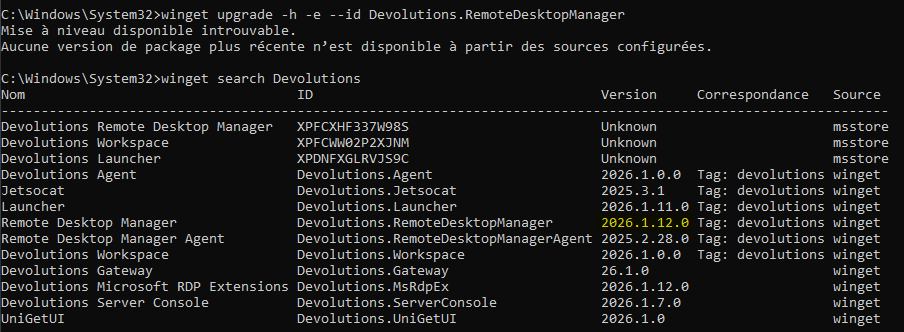
-edit- looks like the 2026.1.14.0 hasn't been submit at all:
https://github.com/microsoft/winget-pkgs/tree/master/manifests/d/Devolutions/RemoteDesktopManager
708a48d6-8fd0-4707-a525-cd0c24f6ff99.png
There can be a slight delay for versions to be available on winget as Microsoft needs to approve the update request. Version 2026.1.14 was approved a couple minutes ago and should be available soon.
https://github.com/microsoft/winget-pkgs/pull/349167
Sébastien Duquette
2026.1.14.0 is available now, but upgrade still doesn't work:

Uninstalled / reinstalled, same result:
09a46705-4f0a-4e33-a724-d4bb3812d0c6.png
ad0feaf7-c1c9-4f80-91d2-eec542c316e4.png
The winget output displays "A newer package version is available in a configured source, but it does not apply to your system or requirements". Could you run the command with --verbose-logs and share the output? According to this winget issue it should output the reason why the package does not apply and look something like this:
2024-03-26 19:15:53.600 [CLI ] Installer [X86,msi,User,en-US] not applicable: Installer scope does not match currently installed scope: User != Machine
Looking at this message makes me think, could RDM be installed in your user folder? The winget package is installed at the machine scope (Program Files folder), that would explain the issue.
Sébastien Duquette
I confirm it's installed in C:\Program Files\Devolutions\Remote Desktop Manager\.
You can look at commands used in my previous post:winget install -h -e --id Devolutions.RemoteDesktopManager --version 2026.1.12.0winget upgrade -h -e --id Devolutions.RemoteDesktopManager
I didn't specify a --scope argument to change it from default.--verbose-logs doesn't really add anything:
I did some more tests:
The upgrades are not eligible if RDM was installed (or last upgraded) using the .msi setup installer (which is what winget uses to do the install/upgrade).winget upgrade works if RDM was installed (or last upgraded) using the .exe setup installer.
That explains why 2025.3.32.0 (reinstalled recently using the .exe) did upgrade to 2026.1.12.0 via winget upgrade (upgrade done with the .msi) and then next upgrades (2026.1.14.0) are not eligible.
Note: You should be able to reproduce this issue very easily on your side. Winget is built-in on Windows 11 (and Win10 since 1809).
f26220a6-6744-4957-b841-c1e9c49608b4.png
I noticed 2026.1.15 is out and I confirm it has the same issue.
I gave --verbose-logs another try, and figured out it's applying not to winget command output but to winget logfiles.
It looks like an issue with locales, specific to winget upgrade.winget upgrade log:
[...]
2026-03-27 09:36:31.569 [CLI ] Market Filter created with market: CA
2026-03-27 09:36:31.569 [CLI ] Locale Comparator created with Required Locales: [] , Preferred Locales: [fr-FR] , IsInstalledLocale: 1
2026-03-27 09:36:31.569 [CLI ] Architecture Comparator created with allowed architectures: [X64, X86, Neutral]
[...]
2026-03-27 09:36:31.576 [CLI ] Updating from [2026.1.14.0] to [2026.1.15.0]
2026-03-27 09:36:31.576 [REPO] Did not find pin Package=[Devolutions.RemoteDesktopManager] Source=[Microsoft.Winget.Source_8wekyb3d8bbwe]
2026-03-27 09:36:31.576 [CORE] Reading cached file [C:\Users\{username}\AppData\Local\Temp\WinGet\cache\V2_M\Microsoft.Winget.Source_8wekyb3d8bbwe\manifests/d/Devolutions/RemoteDesktopManager/2026.1.15.0/44e3]
2026-03-27 09:36:31.576 [YAML] Detected UTF-8
2026-03-27 09:36:31.580 [CLI ] Starting installer selection.
2026-03-27 09:36:31.580 [CLI ] Installer [Neutral,msi,Machine,en-US] not applicable: Installer locale does not match required locale: en-USRequired locales: [] Or does not satisfy compatible match for Preferred Locales: [fr-FR]
2026-03-27 09:36:31.580 [CLI ] Installer [X64,msi,Machine,en-US] not applicable: Installer locale does not match required locale: en-USRequired locales: [] Or does not satisfy compatible match for Preferred Locales: [fr-FR]
2026-03-27 09:36:31.580 [CLI ] Installer [Arm64,msi,Machine,en-US] not applicable: Installer locale does not match required locale: en-USRequired locales: [] Or does not satisfy compatible match for Preferred Locales: [fr-FR]
2026-03-27 09:36:31.580 [CLI ] Installer [Arm64,msi,Machine,en-US] not applicable: Machine is not compatible with Arm64
2026-03-27 09:36:31.599 [CLI ] Terminating context: 0x8a15002b at C:\__w\1\s\external\pkg\src\AppInstallerCLICore\Workflows\UpdateFlow.cpp:be
I'm not sure why it's detecting fr-FR as Preferred Locales in this case.
Note that my OS is configured with fr-CA, but was installed with a fr-FR iso.winget install log:
2026-03-27 09:49:42.339 [YAML] Detected UTF-8
2026-03-27 09:49:42.343 [CLI ] Manifest fields: Name [Remote Desktop Manager], Version [2026.1.14.0]
2026-03-27 09:49:42.344 [CLI ] Market Filter created with market: CA
2026-03-27 09:49:42.344 [CLI ] Locale Comparator created with Required Locales: [] , Preferred Locales: [fr-CA] , IsInstalledLocale: 0
2026-03-27 09:49:42.344 [CLI ] Architecture Comparator created with allowed architectures: [X64, X86, Neutral]
2026-03-27 09:49:42.344 [CLI ] Starting installer selection.
2026-03-27 09:49:42.344 [CLI ] Installer [Neutral,msi,Machine,en-US] is current best choice
2026-03-27 09:49:42.344 [CLI ] Installer [X64,msi,Machine,en-US] is better [strong] than [Neutral,msi,Machine,en-US] due to: Machine Architecture
2026-03-27 09:49:42.344 [CLI ] Installer [X64,msi,Machine,en-US] is current best choice
2026-03-27 09:49:42.344 [CLI ] Installer [Arm64,msi,Machine,en-US] not applicable: Machine is not compatible with Arm64
2026-03-27 09:49:42.344 [CLI ] Completed installer selection.
2026-03-27 09:49:42.344 [CLI ] Selected installer Architecture: 2
2026-03-27 09:49:42.344 [CLI ] Selected installer URL: https://cdn.devolutions.net/download/Setup.RemoteDesktopManager.win-x64.2026.1.14.0.msi
2026-03-27 09:49:42.344 [CLI ] Selected installer InstallerType: msi
2026-03-27 09:49:42.344 [CLI ] Selected installer Scope: Machine
2026-03-27 09:49:42.344 [CLI ] Selected installer Language: en-US
Hello,
Thank you for your response.
I have reported the issue for further investigation and will keep you updated on any progress.
Best regards,
Tommy Sanders
Hello,
we've managed to reproduce the issue and a ticket has been sent to the Engineering Team.
Best regards,
Antoine Mauger
Hello,
Could you please try running the upgrade using the following command instead:
winget upgrade -h -e --id Devolutions.RemoteDesktopManager --locale en-US
This version of the command should work properly for your case.
Let me know how it goes or if you run into any issues.
Best regards,
Tommy Sanders
Hi,
I confirm adding --locale en-US does work: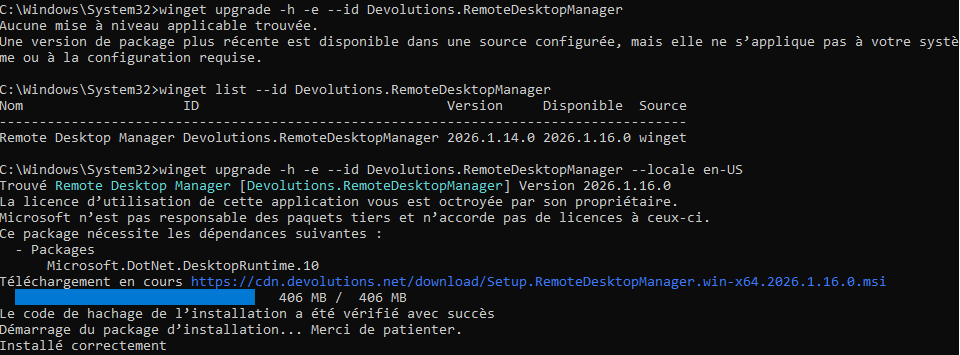
I tried to do some more testing (since upgrading from 2025.x to 2026.x doesn't require --locale en-US).
But while this flag is not supposed to be persistent, I can't seem to be able to reproduce the issue anymore ¯\_(ツ)_/¯
ced1ffa4-69ca-45fc-818e-ef607b51a023.png
Hello,
glad to see the issue resolved. Don't hesitate to contact us again if needed.
Best regards,
Antoine Mauger