Encryption via authentication for offline access
0 vote

Feature request from a user
Hello,
One of our users has requested the ability to enforce a policy requiring additional encryption for the local cache of users with offline access, using authentication methods such as Windows Hello.
Here are the user's original comments:
I saw in the Devolutions Academy and in the general documentation that you can set a password for Offline Security.
Unfortunately, I could not find what the enforced policy is for the password.
It would be great if a certain policy can be enforced and even better if one could require a user with the privilege of Offline Mode that a form of authentication can be used (for example Windows Hello).
The goal I was trying to achieve is to enforce as a company policy to the users that have offline access that their local cache has additional encryption via the authentication.
At this moment it seems that it would not be possible.
Original Documentation forum thread: https://forum.devolutions.net/topics/43010/offline-security#198349.
Thank you!
Jean-Sébastien Simard
Learning experience team leader
All Comments (9)
Hello!
I'd like to see this implemented too!
As far as I know, there's currently no way to enable the Enhanced security option automatically - neither using default.cfg nor GPO. I'd like a way to enable this option by default, without specifying a default password of course. RDM should prompt the user to set a password when RDM needs to encrypt the offline data for the first time.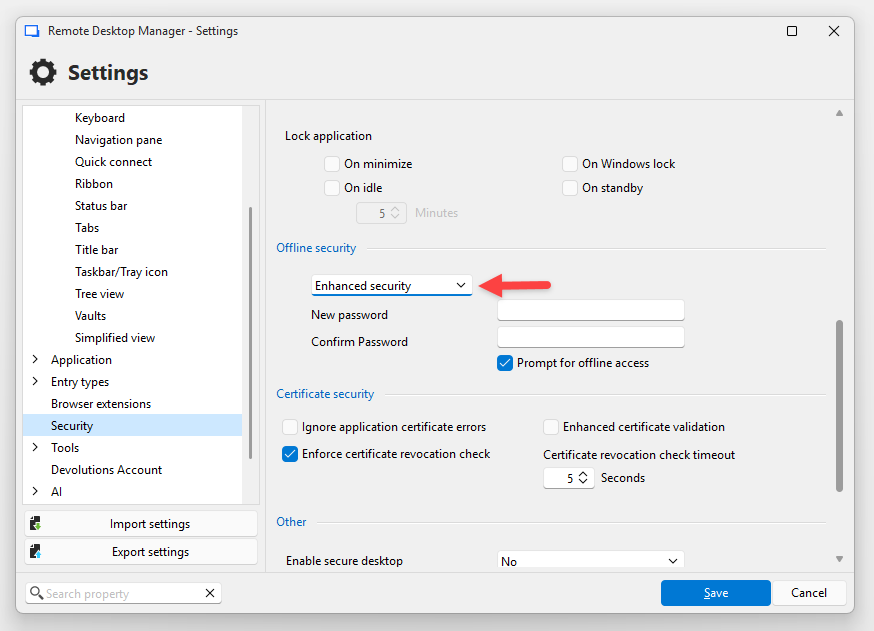
Also, maybe you can help me understand the offline data security more...
The documentation says:
The offline cache is first encrypted using our own private key mixed with some information taken from the local computer. This makes it impossible for a copy on another machine to be readable. By default it is also encrypted with Windows NTFS encryption, in which case there is no key saved anywhere.
I don't know if I agree with the statement "there is no key saved anywhere" :)
So as far as I understand the offline data (without the enhanced security mode) is ultimately unlocked by the user's Windows login session (using a password, Windows Hello or other mechanism)
User session → DPAPI → EFS Certificate private key → file-specific NTFS encryption key → static RDM + machine derived keys → plain text offline data
That means if the user is signed in, they (and malware they execute) can decrypt the data without extra steps, even if RDM is in online mode or not running at all.
So I think enabling the "Enhanced security" option is very important, and it would be good to have more options other than a user-chosen password to protect the data. Windows Hello is used to unlock the application itself. Can it also be used to protect a randomly generated key that's used for offline data encryption?
Also I don't understand how the offline password is actually used... Is the password actually stored somewhere? How is that encrypted? Is it protected against brute-force attacks?
If RDM can encrypt the offline cache without the user entering a password (I assume it updates the offline cache each time the vault gets refreshed), why does it need a password to decrypt it? Is there an asymmetric key pair behind the scenes?
Sorry for the many questions but I'm really interested, and I'd like to make sure the data is safe.
Thank you!
Best regards,
Daniel
b1230658-4f0b-49c9-8998-302efe19cddd.png
Hi Daniel,
Thanks for the detailed breakdown. Let me go through each question.
As far as I know, there's currently no way to enable the Enhanced security option automatically - neither using default.cfg nor GPO.
We will open a ticket to track this feature request.
I don't know if I agree with the statement "there is no key saved anywhere" :)
You're right to question it. A randomly generated local encryption key is stored locally by RDM, but it is protected at rest with Windows DPAPI (CurrentUser scope) rather than stored in cleartext. Without Enhanced Security, DPAPI handles that protection transparently and ties access to your Windows user session. A more accurate statement would be: no key is stored in cleartext.
So as far as I understand the offline data (without the enhanced security mode) is ultimately unlocked by the user's Windows login session (using a password, Windows Hello or other mechanism)
Yes, you are correct. Without Enhanced Security, any process running under the same Windows user account can request DPAPI to decrypt the local key transparently, without a password prompt. This is an intentional convenience trade-off. The threat model is equivalent to any DPAPI/EFS-protected file: it protects against physical extraction or a different local user, but not against code running inside the same session. This is precisely why Enhanced Security exists.
There are 3 cryptography layers :
plaintext -> Crypto Layer 1 (Password(EnhancedOnly) + Host specific generated key) -> Crypto Layer 2 (256 bit key generated at installation) -> Crypto Layer 3 (DPAPI)
So I think enabling the "Enhanced security" option is very important, and it would be good to have more options other than a user-chosen password to protect the data. Windows Hello is used to unlock the application itself. Can it also be used to protect a randomly generated key that's used for offline data encryption?
Windows Hello on Windows currently only gates the UI, it does not cryptographically wrap the offline cache key. We will investigate using Windows Hello to protect the key directly.
Is the password actually stored somewhere? How is that encrypted? Is it protected against brute-force attacks?
The password itself is not stored in cleartext. RDM stores verification material so it can validate the password, and it stores the local encryption key in a form protected by a key derived from that password. The password cannot be recovered from the stored data. This does provide protection against brute-force attacks, but the level of protection still depends on the strength of the chosen password.
If RDM can encrypt the offline cache without the user entering a password (I assume it updates the offline cache each time the vault gets refreshed), why does it need a password to decrypt it? Is there an asymmetric key pair behind the scenes?
No asymmetric key pair. Both encrypting and decrypting the cache use the same symmetric key, which is held in memory for the entire session. The password is only asked once at application startup to unwrap that key into memory. After that, both reading and writing the offline cache happen transparently with no prompt. If RDM is already running and goes offline, no password is needed, the key is still in memory. There is also a "Prompt for offline access" setting that, when enabled, will ask for the password when transitioning to offline mode as an additional verification step.
Best regards,
Mathieu Morrissette
Hi Mathieu!
Thank you for tracking the feature request and for the detailed explanation - that's very helpful!
But some of my testing disagrees with your explanation...
The password is only asked once at application startup to unwrap that key into memory.
In my testing, the password is not asked at application startup. It is asked when entering offline mode only if "Prompt for offline access" is enabled. With "Prompt for offline access" disabled, RDM never asks for the password, but offline mode still works, and in online mode the offline cache is still updated. With "Prompt for offline access" enabled, it still can write the offline cache without entering the password, so if it's a symmetric key, it has to be decrypted somehow without the user entering the password. So I also question if "Prompt for offline access" can even enhance security beyond a check in the GUI.
So I think "Enhanced security" doesn't actually provide any additional security, because there is no additional step to unlock the data. It might be protected by DPAPI, but that's the case with "Default security" mode too. Without enabling the "Prompt for offline access" option I was never asked for the password, so I assumed enabling it is the key to actually protecting offline data with an additional step, but if it's a symmetric key and the prompt is just an additional check in the GUI, that wouldn't actually protect the key/data, right? Using an asymmetric key pair could actually enable writing the cache in the background, and enforcing additional checks (password, Windows Hello, Yubikey etc.) only when the cache needs to be decrypted for offline mode.
I'm no cryptography expert, so maybe I'm missing something, but I'm curious how it works and if we can improve the security here.
Thanks again for your help!
Daniel
Hi Daniel,
Thank you for testing this so thoroughly. Your observation is correct, and my previous explanation was inaccurate.
Enhanced offline security does not ask for the offline password on every cold start. After reviewing the implementation, RDM stores a hash of the offline password, not the plaintext password, in the local sensitive options file (RemoteDesktopManager.stv), and uses that stored value to derive the offline protection material it needs. That is why RDM can continue to refresh the offline cache while online without asking for the password again.
- DPAPI alone: protects against offline extraction and other Windows users
- Enhanced offline mode: adds limited extra verification, but not a major new at-rest protection layer.
We will update the documentation and our previous explanation to reflect this more accurately.
Application Lock with a local password is the feature that gets closest to that goal. In that mode, the local encryption key is stored in password-protected form, so RDM cannot restore it until the user provides the application password. That is a more meaningful cryptographic barrier than Enhanced offline mode alone. This key is used in the second crypto layer.
If you want the strongest local protection on Windows, you should also enable "Enable DPAPI encryption on local files". This adds Windows file-level protection for RDM's local files at rest. However, it does not protect against code already running in the same unlocked Windows session, and it does not protect after RDM itself has already been unlocked and loaded the local key into memory.
Regards,
Mathieu Morrissette
Thank you!
Honestly I think the offline mode security needs to be reworked.
There's all these options, but as far as I understand, they don't add any real security:
- Enhanced security: It's just an extra symmetric encryption, but the key is derived from a user-chosen password and is stored locally, only protected by DPAPI. With both Standard and Enhanced security, any process running as the user can simply read the key and decrypt offline data.
- Prompt for offline access: This apparently just makes the user verify the password in the GUI. You can simply bypass it by changing <PromptForOfflineAccess> to "false" in the config file.
- Enable DPAPI encryption on local files: The sensitive data is already encrypted using NTFS/EFS, which is also unlocked by DPAPI, so it doesn't add any extra security either.
I have two more questions:
- How are the keys from both offline mode and application password derived from the password? If it's a simple hash, it might be easy to crack depending on the complexity of the password. With the current implementation it doesn't really matter, but if the password is actually needed in a future implementation, it should use a good KDF like Argon2id.
- In the current implementation, if you can achieve offline data security beyond DPAPI using the "Application security (local)" settings, does it only work when you set an application password, or does it also work when it's set to Windows Hello? If that doesn't work, it should :)
I think the security and transparency can be improved a lot here!
You could implement encryption using asymmetric keys to be able to write the encrypted cache in the background, and require an extra step from the user only when entering offline mode and the data needs to be decrypted. The extra step could be a password with a good KDF, Windows Hello, Passkey, FIDO2 or other hardware key
Also the two redundant layers of DPAPI protection could be reduced by removing file-system-level encryption and forcing the "Enable DPAPI encryption on local files" option. I don't know how it works on platforms other than Windows/NTFS, but there should be something similar there too.
Let me know if I got anything wrong!
Thank you!
Best regards,
Daniel
Hello!
There's all these options, but as far as I understand, they don't add any real security:
These settings are designed to add layers of protection for specific scenarios like physical disk theft or unauthorized local access.
They are not intended to be a substitute for OS-level security, and we always recommend ensuring your Windows session itself is properly secured.
How are the keys from both offline mode and application password derived from the password? If it's a simple hash, it might be easy to crack depending on the complexity of the password. With the current implementation it doesn't really matter, but if the password is actually needed in a future implementation, it should use a good KDF like Argon2id.
The application password is derived using PBKDF2; the iteration count is configurable by the user, with a default of 10,000. We are currently looking to increase the default iteration count to follow OWASP recommendations. We are also investigating switching to Argon2id in the future. You can view our open source cryptographic library here ( https://github.com/devolutions/devolutions-crypto).
The offline password is derived using SHA-512, we understand that this is not considered a proper KDF.
If it's a simple hash, it might be easy to crack depending on the complexity of the password.
Password strength is ultimately the user's responsibility. We recommend following standard password hygiene practices and using a strong, unique password for this purpose.
In the current implementation, if you can achieve offline data security beyond DPAPI using the "Application security (local)" settings, does it only work when you set an application password, or does it also work when it's set to Windows Hello? If that doesn't work, it should :)
Window Hello currently only gates the UI. It does not cryptographically wrap the local encryption key. When Hello is configured as the lock mode, the key is loaded directly from DPAPI. Your suggestion that it should work the same way is valid, and we will investigate it.
forcing the "Enable DPAPI encryption on local files" option.
When we released the application password feature, this was enabled by default. We later changed it because we had a lot of support cases where users had had their account passwords reset, and this prevented them from actually decrypting the data.
So our ultimate end-goal.
- Evaluate the use of Windows Hello to wrap the encryption key, like the application password. (also investigate for FIDO2, Passkeys, or Yubikeys, etc...)
- Switch to Argon2id for key derivation; We are waiting on the Cyber Resilience Act for guidance on this. Recommended algorithms are still being evaluated but are pretty sure Argon2id will be included as it is much more modern than PBKDF2. In the meantime, we will increase the iteration count.
- Evaluate offline password relevance since we could use the application password only/windows hello/physical keys, etc.
Regards
Mathieu Morrissette
Thank you Mathieu for the explanations and transparency! Understanding the implementation helps a lot!
These settings are designed to add layers of protection for specific scenarios like physical disk theft or unauthorized local access.
More layers of protection are good, but I hope you see where my critique is coming from. If every layer ultimately relies on DPAPI (and a GUI check that can be disabled by editing a config file) it doesn't meaningfully add protection. Options like "Enhanced security" and "Prompt for password" sound like they add security, but they really don't.
As it stands, malicious code running as the same user could decrypt the offline data, even when RDM isn't running. The only setting that adds a barrier beyond the Windows session is the application password, but that isn't clear from the wording of the options in the UI or the documentation.
I agree with your goals of adding stronger mechanisms to protect the decryption key, and of improving the KDF when passwords are used. I'm sure there a good ways to implement proper key protection using Windows Hello, TPM, FIDO2, YubiKey, etc.
I still think you should look into asymmetric encryption for this. RDM could update the offline cache and encrypt the data using the public key, while the private decryption key only needs to be unlocked when the user actually switches to offline mode.
Thanks again for the transparency and the valuable discussion - I really appreciate it!
Best regards,
Daniel
Hello,
An update on the GPO part of this request: we've added a new Group Policy that lets you enforce Enhanced offline security centrally, so you no longer have to rely on each user enabling it manually.
The policy is "Force Enhanced security for Offline mode" (Security category of our ADMX template). When it's enabled:
- RDM forces the offline cache to use Enhanced security.
- If a user hasn't configured an offline password yet, they're prompted to set one before they can continue, the same pattern as our existing "Force application password" policy.
This directly covers the "enable Enhanced Security automatically via GPO" piece you raised, and it'll ship in an upcoming build.
To be clear about the scope so it doesn't get conflated with the broader discussion in this thread: this change is about enforcing/enabling Enhanced security through policy. It does not yet include encrypting the offline cache with Windows Hello (i.e. having Windows Hello cryptographically wrap the offline key). That deeper work, along with the other items Mathieu mentioned earlier (evaluating FIDO2/passkeys/YubiKey, moving to Argon2id, and revisiting the offline password model itself), is still being investigated separately and isn't part of this delivery.
We'll keep the thread updated as those investigations progress.
Regards,
Another update, we are working on adding support to encrypt the configuration files with Windows Hello, we hope to have this ready for 2026.3. We will let you know when it is available.
Sébastien Duquette