
Marc Beausejour
AD Sync Module – Overlaps when synchronizing computer objects
Hi,
Thanks for posting.
Could you check what the operatingSystem attribute shows on a few of your Linux computer objects? You can see it in the Attribute Editor tab in Active Directory Users and Computers, or with Get-ADComputer <name> -Properties operatingSystem.
You should be able to do this with two synchronizers pointing to the same OU and vault. The key is to make the filters mutually exclusive using the operatingSystem attribute in the Other filters field (Filters tab):
Windows synchronizer: (operatingSystem=Windows*)
Linux synchronizer: (!(operatingSystem=Windows*))
If you still see overlap, could you share the filters you’re using now and describe what happens (duplicates, deleted entries, or entries moving)?
That will help us pinpoint it.
Best regards,
Cortex SIEM integration
Posting on behalf of a client
"We would like to have an integration with Cortex SIEM in Devolutions Cloud so we can have real-time audit logs sent to the platform." https://www.paloaltonetworks.com/cortex/cortex-xsiam
If anyone would like to have this integration as well, please let us know by commenting or upvoting this post.
Prevent team users to create solo databases
Hi!
Thanks for posting.
You can disable the ability to add a new workspace (formerly data source) with the help of GPOs - https://docs.devolutions.net/rdm/knowledge-base/how-to-articles/apply-policies-gpos
Disable the menu File – Workspaces
%Root%\SOFTWARE\Policies\Devolutions\RemoteDesktopManager\DisableFileDataSources
Hope this helps!
Regards,
RDM 2026.2 adds multi-factor authentication (MFA) on PAM checkouts
DUO would be a nice addition :-)
@Marcel Gerber
Thanks for the feedback, sorry for the late reply.
We're taking note :)
Cannot recover a PIN of Certificate pfx entry
Thanks for clarifying!
Just to be sure, are you storing the certificate file in RDM or linking to it?
The PIN is specifically for the case where you will use the certificate as a smartcard logon certificate for RDP. It’s the PIN for the smart card reader.
If you are storing it, you should not try to manage the password for the internally stored certificate in RDM, the application does it.
Best regards,
RDM 2026.2 lets you administer Devolutions Server directly from RDM
In Remote Desktop Manager (RDM) 2026.2, one of the bigger items is being able to administer Devolutions Server without leaving RDM.
What we added:
Embedded administration tabs for Devolutions Server inside RDM, so you can manage users, groups, and licenses right where you're already working.
No more jumping back and forth between the DVLS web interface and RDM to handle routine admin tasks.
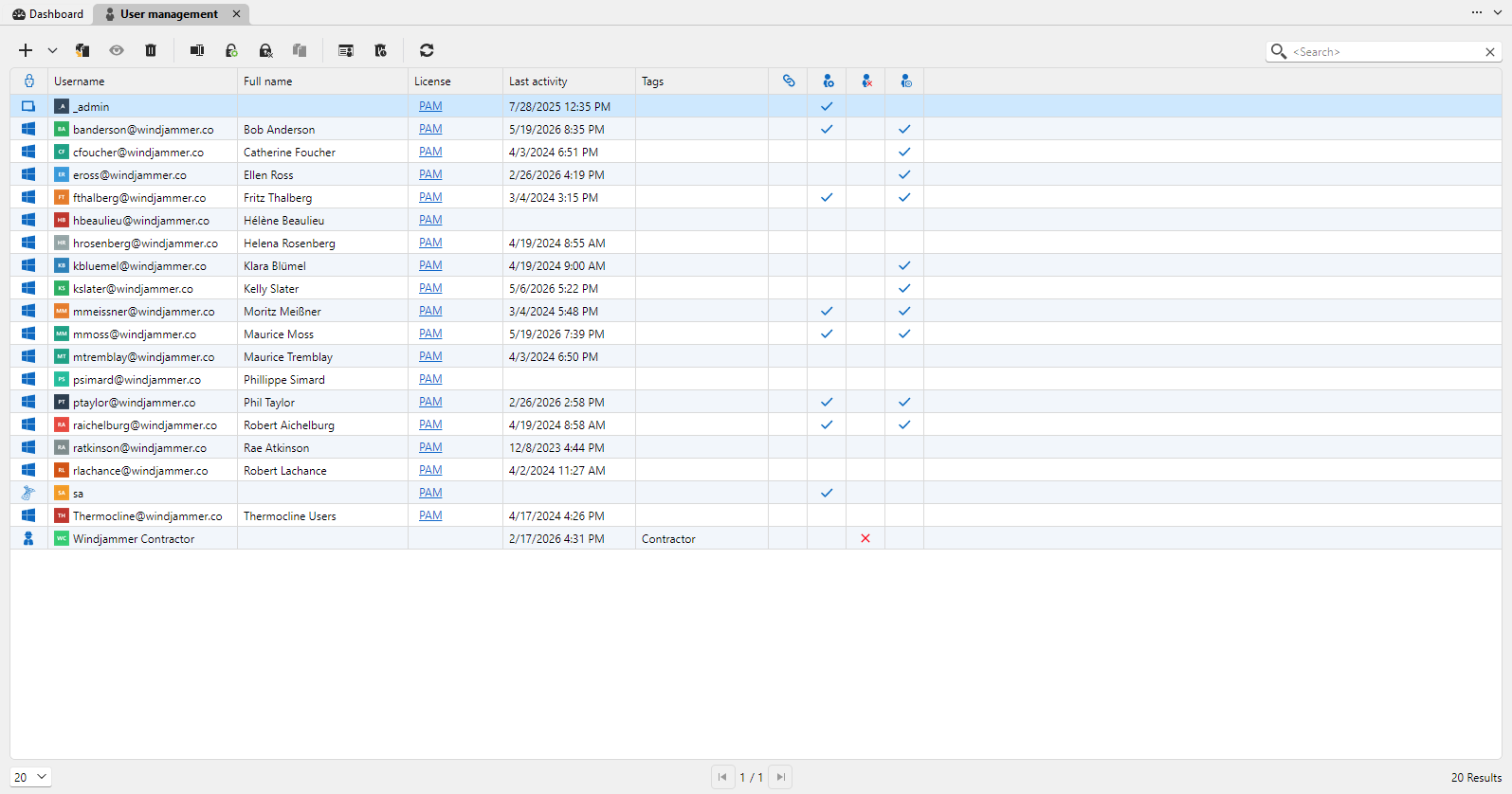
The goal is to keep DVLS admin work in the same place you do everything else, so there's less context switching and fewer interfaces to bounce between.
If you run Devolutions Server, update to 2026.2 and give it a try.
Which DVLS admin tasks do you do most, and are they covered by the embedded tabs?
Anything you still find yourself opening the DVLS web interface for?
Does managing users, groups and licenses from inside RDM fit how you work, or do you prefer keeping admin separate?
Full details are in the release blog: What's new in Devolutions Remote Desktop Manager 2026.2
Cannot recover a PIN of Certificate pfx entry
Hi,
Thanks for sharing this issue you're having.
Could you please clarify one thing? What do you mean by "save the keystore passphrase"?
Best regards,
Devolutions Password Manager 2026.2 adds import from other password managers and global search
With our newly released Devolutions Password Manager 2026.2, two items stand out: importing from other password managers, and global search.
What we added:
Built-in import so you can move from KeePass, Bitwarden, LastPass, 1Password, Keeper, RoboForm and others without rebuilding folders by hand.
A global search that looks across vaults, workspaces, entry types, tags, and credentials from one place, with results showing up as you type.
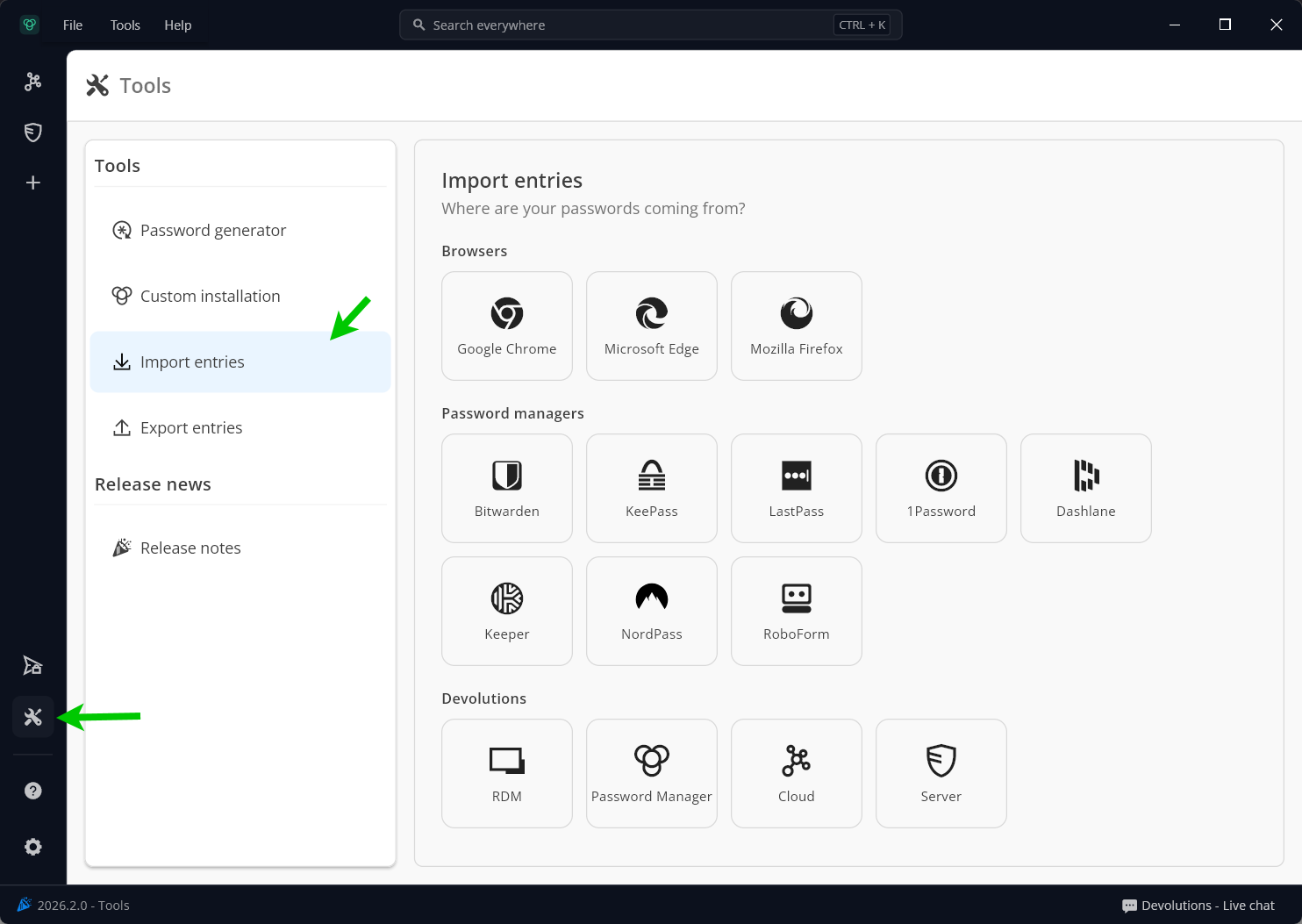
The aim is to make two things easier: getting your data in, and finding it once it's there.
If you're using Devolutions Password Manager, update to 2026.2 today and give both a try.
Which password manager did you import from, and did the folder structure and entry data come over the way you expected?
Using a password manager that's not on the import list? Let us know and we'll take a look!
Does global search surface what you're after, or are there entry types, tags, or fields you wish it covered?
Full details are in the release blog: What's new in the Devolutions platform 2026.2
MFA to initiate a remote connection
Hi Ryan,
We recently added a function to require MFA on session as part of our access request workflow with privileged accounts.
This will allow to enforce the requirement for session MFA within RDM.
At the same time, you can create contractor user accounts and set an expiration on these accounts that will be used by the consultants - https://devolutions.net/blog/spotlight-on-manage-external-users-with-the-contractor-user-type/
The idea is that you can still use a few accounts used by them but on a temporary basis (you can set an expiration date).
This way, MFA is always enforced on sessions (you can use a code sent by email) and you won't have a ton of accounts to manage.
Does that sound like something that could work for you?
Best regards,
RDM 2026.2 adds multi-factor authentication (MFA) on PAM checkouts
We released Remote Desktop Manager (RDM) 2026.2, and one of the bigger items is MFA on PAM checkouts.
What we added:
RDM can now prompt for MFA when a PAM checkout is requested, so verification happens right before privileged access is granted, not just at login.
Supported methods for now are TOTP, email, and SMS.
It works on Windows, macOS, Linux, and mobile.
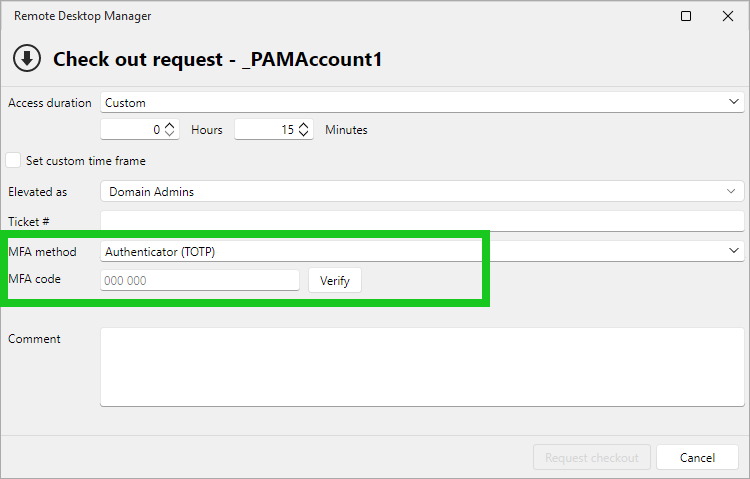
The idea is to put a checkpoint exactly where it matters: at the moment someone's about to open a sensitive session.
If you're using PAM, update to 2026.2 and give it a try.
Does the prompt land at the right point in your workflow, or does it add friction where you don't want it?
We started with TOTP, email, and SMS. What would you want next? Push? Hardware keys?
Anything that feels different (or off) between desktop and mobile?
Full details are in the release blog: What's new in Devolutions Remote Desktop Manager 2026.2
[Try & share] Simplifying contractor access with Devolutions Cloud
Tell us what you think!
For external users who only need limited, time-bound access, the Contractor user type offers a simpler way to get them connected without treating them like regular internal users.
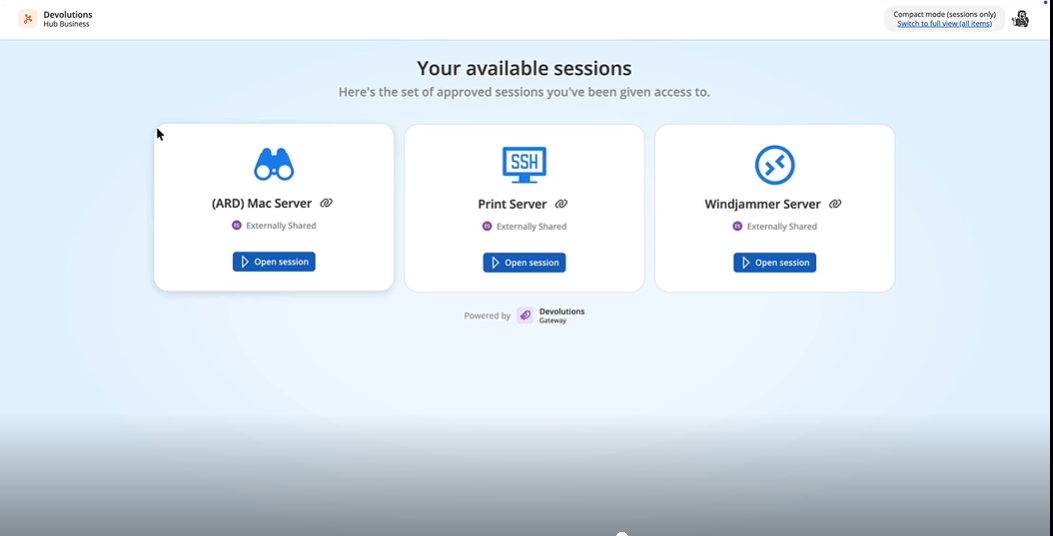
In Devolutions Hub Business, contractors can be invited by email, start with a temporary password, and use a lighter web interface, the compact mode, to open sessions quickly and securely.
How are you handling contractor or vendor access today?
Would this fit your needs, or is something missing?
Try it out and share your thoughts in the comments!
“Mouse Jiggler” for RDP sessions
Having this feature would allow me to uninstall Remmina as I have one use case where this is needed, hope to see it soon!
@myonlinestuff
Good news! We have a surprise and this is now available in the latest release of RDM Linux in your RDP settings under the Experience tab.
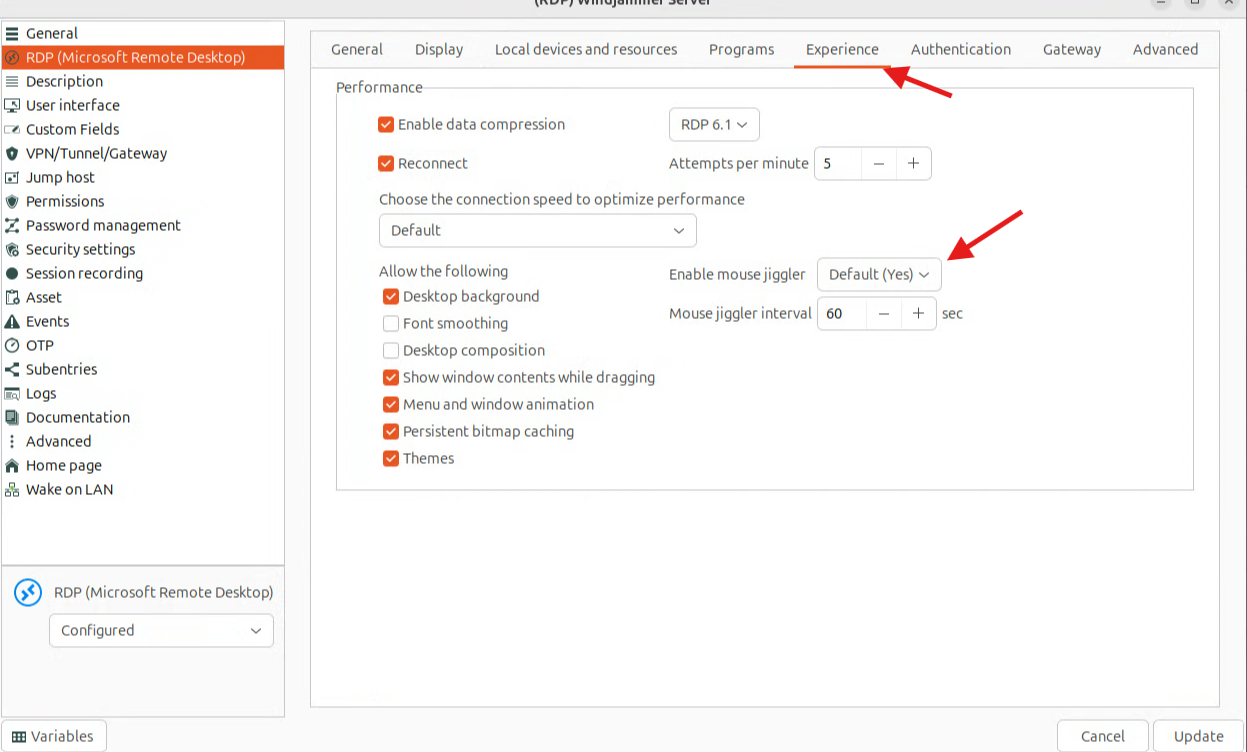
Let us know what you think!
Cheers,
I would like a proxmox integration that's like VMWare Dashboard
Hello,
im hosting my own Proxmox environment and would like to be able to view my Hypervisor like VMware
@adixon
Hi!
Proxmox is now available in RDM for you to use, just like VMware.
Just type Proxmox when you add a new entry. Here's an article to help - https://docs.devolutions.net/rdm/kb/how-to-articles/proxmox-console/
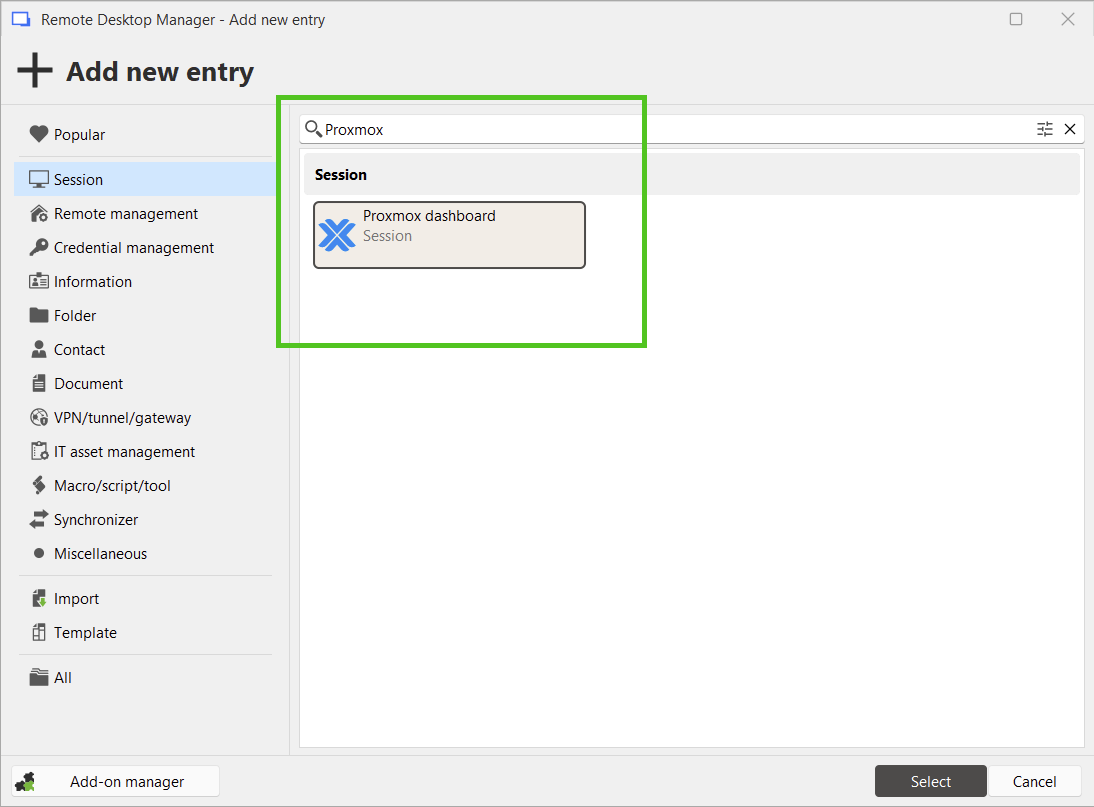
Let us know what you think and if you see anything missing that you need!
Regards,
Add Amazon AWS Cognito for SSO
We received a request to add AWS Cognito as an Identity provider
https://aws.amazon.com/cognito/
If anyone is also interested, please let us know in the comments below.
Remote Desktop Manager suitable as a remote maintenance tool?
Hi Karl,
Thanks for the question.
Remote Desktop Manager is an application designed to manage all your connections and credentials. Remote Desktop Manager acts like a wrapper and a manager around existing remote access technologies but is not a replacement to them. Therefore, it doesn't enable incoming connections, only outgoing.
Hope this helps!
Best regards,
CyberArk Dashboard Component save for each session
Hi Joachim,
Thank you for the screenshots. I've been able to recreate this with one of our Safes in CyberArk as well.
We'll investigate and provide updates as soon as we have something to share.
Thank you again for reporting this!
Best regards,
CyberArk Dashboard Component save for each session
Hi Joachim,
Thanks for sharing this with us. Can you please share with me the version of RDM you're currently using?
I've been discussing this Hubert and others and this is something we actually implemented recently.
What is the protocol type you use for connecting? Is it RDP?
Best regards,
Support des variables
Hi Joe,
It's still on track for version 2024.3 releasing later this year. This will also work with the Workspace application.
Best regards,
.Net 8 Runtime only or .Net Desktop Runtime for RDM 2024.1.x?
Hi Andreas,
Thank you for the question.
It's the .Net 8 Desktop Runtime that you need to download.
We will update our system requirements for RDM shortly to reflect this.
Best regards,
Latest upgrade turns RDM into a brick for SCP/SFTP
Hi Robert,
As a potential workaround until a fix is out, you can revert to the previous version of RDM where it was working.
https://devolutions.net/remote-desktop-manager/home/previousversions/
Hope this helps. Apologies for this inconvenience.
Best regards,
VMWare Dashboard Option No Longer Available?
Hi Chuck,
It is still available under the Remote Management category of new entries.
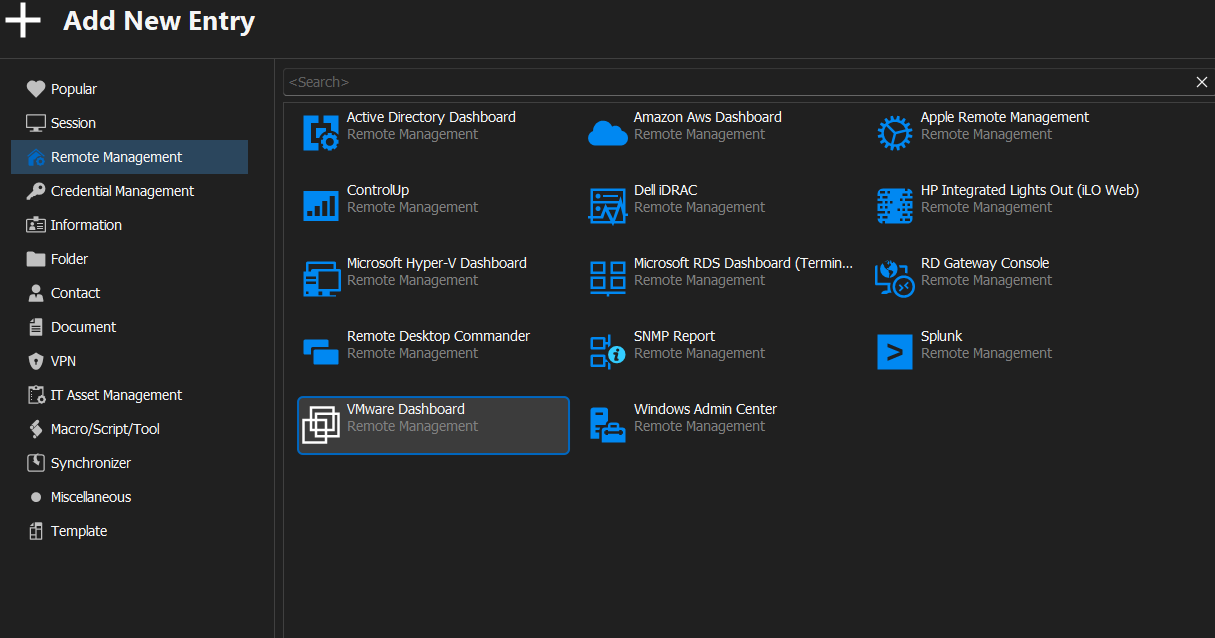
Cheers!
Unauthenticated / Anonymous Email Configuration
Hi Andrew,
Thanks for conveying this.
As discussed on the chat, this is a known issue and is currently being addressed by our engineering team.
Let us know if you have anything else to share.
Best regards,
Unable to upgrade due to missing msi file
Excellent!
Glad I was able to help!
Unable to upgrade due to missing msi file
Hi Ross,
The solution requires a repair tool from Microsoft.
This should help fix the issue.
We've documented the link here - https://kb.devolutions.net/rdm_unable_uninstall_missing_msi.html
Please let us know if this helps!
Best regards,
Is RDM Agent free?
Hello!
The RDM Agent is indeed free to use with RDM Enterprise.
Here's our documentation for it in case you need it;
https://help.remotedesktopmanager.com/gettingstartedwhatisrdmagent.htm
Best regards,