CyberArk Dashboard Component save for each session
0 vote

I would like to be able to save the component selection of the CyberArk Dashboard for each connection.
This would eliminate the selection when connecting, as this is usually always the same.
Thanks Joachim
All Comments (19)
Hello,
Thank you for the request. We will open a ticket for this and get back to you once it's available or if we have additional questions.
Regards,
Hubert Mireault
Hi Joachim,
Thanks for sharing this with us. Can you please share with me the version of RDM you're currently using?
I've been discussing this Hubert and others and this is something we actually implemented recently.
What is the protocol type you use for connecting? Is it RDP?
Best regards,
Marc Beauséjour
Hello Marc
We use RDM 2024.1.28.0 at the moment.
To clarify:
We use the Cyberark Dashboard
I log in to the PAM system and select the correct user from the vault.
After that, I double click a session/connection in RDM (Connect using dashboard on double click is enabled).
I get a selection of components to connect to.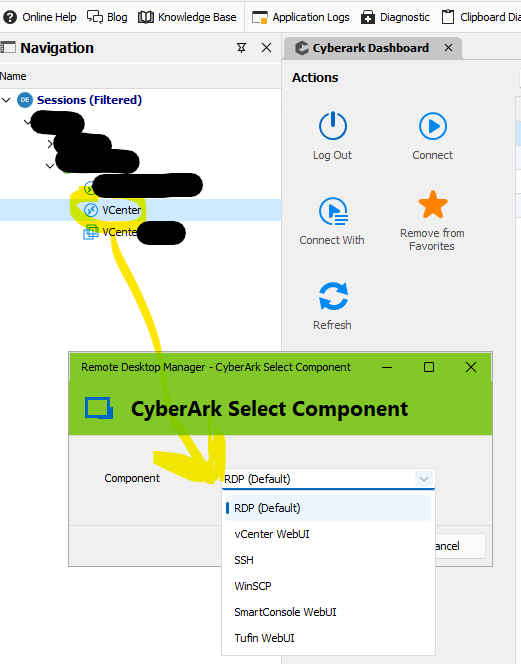
And this selection, I would like to save per connection, so I don't have to select them anymore.
Thanks Joachim
9c060e4c-e1f9-43b1-a792-4acf93572c10.png
1e90dfd5-4a2d-4f90-b23c-5d72cd44c79a.png
Hi Joachim,
Thank you for the screenshots. I've been able to recreate this with one of our Safes in CyberArk as well.
We'll investigate and provide updates as soon as we have something to share.
Thank you again for reporting this!
Best regards,
Marc Beauséjour
Hi Joachim,
Is this behavior different from the web dashboard of CyberArk itself?
With recent version of RDM, we dynamically load the components for an account. If it only supports one, we directly launch with it, but if it supports multiple one, we don't have much choice but to prompt for it.
Best regards,
Xavier Fortin
Hello Xavier,
it behaves the same on the web, hence the feature request. It would be great if I could save components in an RDM session and the RDM remembers them.
Br Joachim
I think I understand your request. You'd like, when selecting your component after launching a CyberArk account by selecting and entry in RDM tree, for RDM to remembers the component selected for this entry, so that it does not prompt for it in the future when launching the same account with the same connection`s host. Is that it?
Xavier Fortin
Exactly, or that you can save the selection in the entry in advance and then just double-click to connect.
Like this: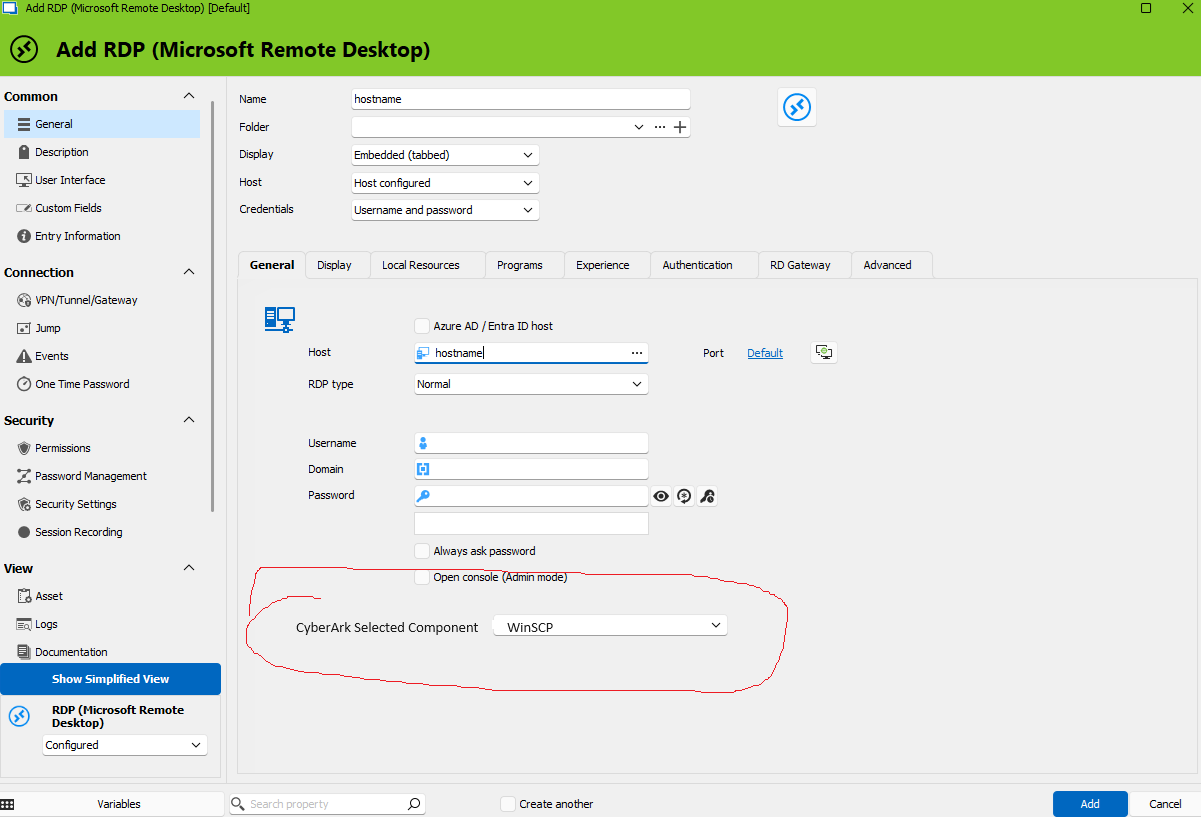
7e379992-4dfc-4a06-877e-fcfb531d9692.png
This second option might be more straightforward to implement, but it could not be a combo box, since the list of components is dynamic for each account (and we are unaware of the account while editing a connection settings). It would have to be a text field and the component id would need to be entered manually.
Best regards,
Xavier Fortin
A textbox would also be great to start with.
Alright, I've added this to the ticket. We might go with this for now.
Best regards,
Xavier Fortin
Hello,
Was a solution implemented for this already?
I would be very interested in this also.
Thanks
Victor
Hi,
No, unfortunately not yet. The ticket for this is still opened.
Best regards,
Xavier Fortin
Is there any news about this yet?
Hi,
This ticket has been added to the roadmap for our next release.
Unless something unexpected comes up, this should be available in 2025.1.
Regards
Jonathan Lafontaine
HI,
I have already seen this function in the GUI in the last beta version. But it doesn't really seem to do anything. Is this already implemented?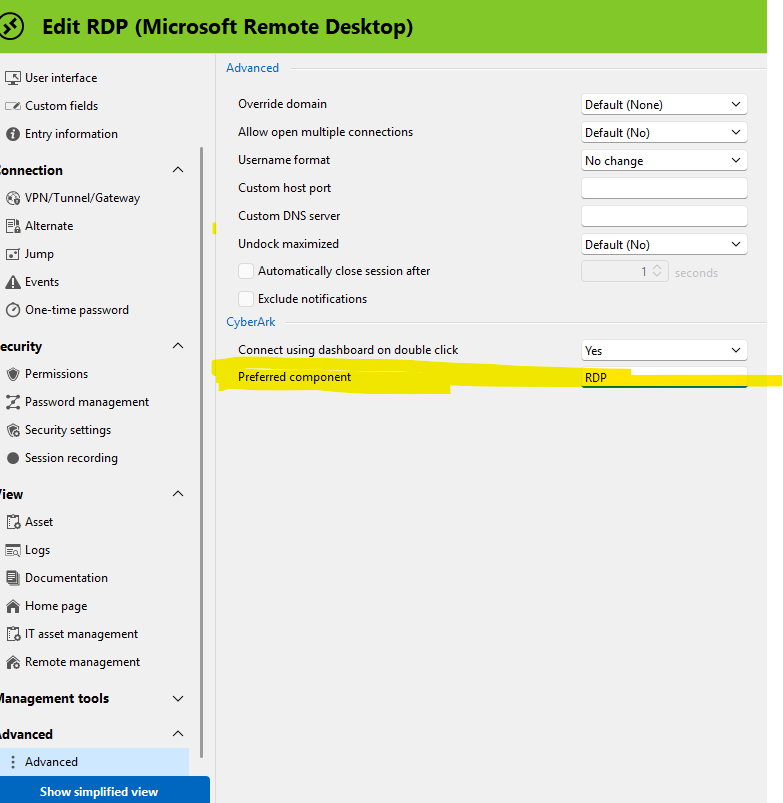
1a26e191-a18d-43d5-a592-d92134985223.png
Hi Joachim,
The component ID should be used in this field, not the component name (as this is not necessarily unique). By default, the ID for the default RDP component in CyberArk is PSM-RDP. Could you try with this?
Best regards,
Xavier Fortin
Hi,
Yes, it works with that. Thanks!
Glad to hear it! Do not hesitate if you have any other questions!
Best regards,
Xavier Fortin