Latest upgrade turns RDM into a brick for SCP/SFTP

I mistakenly allowed RDM to upgrade itself on my MacBook Pro (Intel) this morning. After the upgrade, none of my existing SCP/SFTP sessions work in that double-clicking on them or trying to run Open Session does nothing.
I have isolated the problem to the fact that all of my SCP/SFTP entries use a private key without a passphrase. If I enable "Always prompt for passphrase", then the session starts, prompts me for a passphrase, and will not allow me to proceed without supplying a passphrase. As expected, if I supply a bogus passphrase, the application tries to open a connection but fails since my private keys have no passphrase.
All Comments (9)
Hi,
I will investigate the issue.
Best regards,
Gabriel Dufresne
Hi,
I have managed to recreate the problem, I will open a ticket for it.
Best regards,
Gabriel Dufresne
This is really problematic since without SCP/SFTP support, I have no way to transfer files to/from my VMs... Time to go dig out the command-line programs to accomplish this...
Hi Robert,
As a potential workaround until a fix is out, you can revert to the previous version of RDM where it was working.
https://devolutions.net/remote-desktop-manager/home/previousversions/
Hope this helps. Apologies for this inconvenience.
Best regards,
Marc Beauséjour
Yeah, unfortunately, I don't know exactly which version that was... I do remember something about a database upgrade being required during the upgrade process.
Hi rhpatrick,
You should be able to find your version history directly in RDM, in the Update History tab of the About window: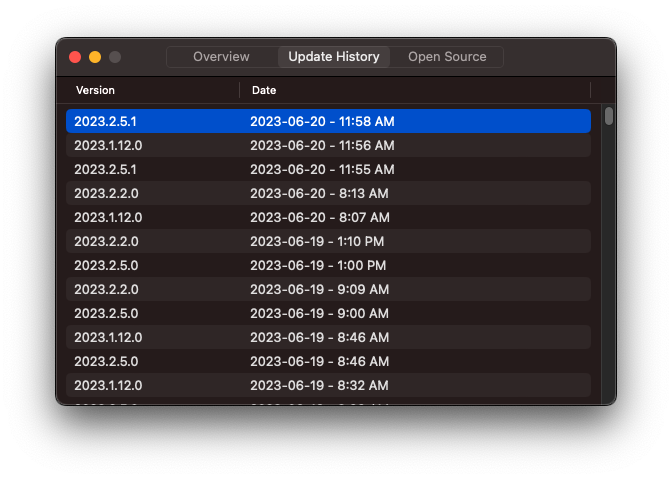
Best regards,
Xavier Fortin
UpdateHistory.png
OK, I was able to find the previous version and install it. Unfortunately, it is not working either. I will need to go back in time until I find the last working version...
I was able to restore functionality by reverting to 2022.3.19.0.
I can verify that 2023.1.11.1 and 2023.2.5.1 have the same issue...I skipped trying earlier versions of 2023.*
Hi Robert,
the fix for this issue will be available in rdm 2023.2.6.0.
Best regards,
Gabriel Dufresne