
Mathieu Morrissette
How secure are passwords and keys generated by RDM?
Hello,
Thank you for the questions.
Does RDM use cryptographically secure random number generator for password/keys generation?
The password generator gets its randomness from .NET System.Security.Cryptography.RandomNumberGenerator.
We don’t use System.Random or any time-seeded generator. SSH key generation uses BouncyCastle’s SecureRandom.
Does the generator have sufficient amount of entropy?
Since both draw from the operating system’s CSPRNG, RDM doesn’t seed or manage entropy itself, the OS handles it.
Is the generation secure on every platform RDM is available (Windows, macOS, Linux)?
The generator code is shared across platforms.
Beyond this, RDM’s code goes through security reviews as features are developed, regular third-party penetration tests, and our private bug bounty program.
We use OWASP recommendations as a reference for these reviews, including for cryptography and secure random number generation.
Regards,
Mathieu
Encryption via authentication for offline access
Hello!
There's all these options, but as far as I understand, they don't add any real security:
These settings are designed to add layers of protection for specific scenarios like physical disk theft or unauthorized local access.
They are not intended to be a substitute for OS-level security, and we always recommend ensuring your Windows session itself is properly secured.
How are the keys from both offline mode and application password derived from the password? If it's a simple hash, it might be easy to crack depending on the complexity of the password. With the current implementation it doesn't really matter, but if the password is actually needed in a future implementation, it should use a good KDF like Argon2id.
The application password is derived using PBKDF2; the iteration count is configurable by the user, with a default of 10,000. We are currently looking to increase the default iteration count to follow OWASP recommendations. We are also investigating switching to Argon2id in the future. You can view our open source cryptographic library here ( https://github.com/devolutions/devolutions-crypto).
The offline password is derived using SHA-512, we understand that this is not considered a proper KDF.
If it's a simple hash, it might be easy to crack depending on the complexity of the password.
Password strength is ultimately the user's responsibility. We recommend following standard password hygiene practices and using a strong, unique password for this purpose.
In the current implementation, if you can achieve offline data security beyond DPAPI using the "Application security (local)" settings, does it only work when you set an application password, or does it also work when it's set to Windows Hello? If that doesn't work, it should :)
Window Hello currently only gates the UI. It does not cryptographically wrap the local encryption key. When Hello is configured as the lock mode, the key is loaded directly from DPAPI. Your suggestion that it should work the same way is valid, and we will investigate it.
forcing the "Enable DPAPI encryption on local files" option.
When we released the application password feature, this was enabled by default. We later changed it because we had a lot of support cases where users had had their account passwords reset, and this prevented them from actually decrypting the data.
So our ultimate end-goal.
Evaluate the use of Windows Hello to wrap the encryption key, like the application password. (also investigate for FIDO2, Passkeys, or Yubikeys, etc...)
Switch to Argon2id for key derivation; We are waiting on the Cyber Resilience Act for guidance on this. Recommended algorithms are still being evaluated but are pretty sure Argon2id will be included as it is much more modern than PBKDF2. In the meantime, we will increase the iteration count.
Evaluate offline password relevance since we could use the application password only/windows hello/physical keys, etc.
Regards
Encryption via authentication for offline access
Hi Daniel,
Thank you for testing this so thoroughly. Your observation is correct, and my previous explanation was inaccurate.
Enhanced offline security does not ask for the offline password on every cold start. After reviewing the implementation, RDM stores a hash of the offline password, not the plaintext password, in the local sensitive options file (RemoteDesktopManager.stv), and uses that stored value to derive the offline protection material it needs. That is why RDM can continue to refresh the offline cache while online without asking for the password again.
DPAPI alone: protects against offline extraction and other Windows users
Enhanced offline mode: adds limited extra verification, but not a major new at-rest protection layer.
We will update the documentation and our previous explanation to reflect this more accurately.
Application Lock with a local password is the feature that gets closest to that goal. In that mode, the local encryption key is stored in password-protected form, so RDM cannot restore it until the user provides the application password. That is a more meaningful cryptographic barrier than Enhanced offline mode alone. This key is used in the second crypto layer.
If you want the strongest local protection on Windows, you should also enable "Enable DPAPI encryption on local files". This adds Windows file-level protection for RDM's local files at rest. However, it does not protect against code already running in the same unlocked Windows session, and it does not protect after RDM itself has already been unlocked and loaded the local key into memory.
Regards,
Encryption via authentication for offline access
Hi Daniel,
Thanks for the detailed breakdown. Let me go through each question.
As far as I know, there's currently no way to enable the Enhanced security option automatically - neither using default.cfg nor GPO.
We will open a ticket to track this feature request.
I don't know if I agree with the statement "there is no key saved anywhere" :)
You're right to question it. A randomly generated local encryption key is stored locally by RDM, but it is protected at rest with Windows DPAPI (CurrentUser scope) rather than stored in cleartext. Without Enhanced Security, DPAPI handles that protection transparently and ties access to your Windows user session. A more accurate statement would be: no key is stored in cleartext.
So as far as I understand the offline data (without the enhanced security mode) is ultimately unlocked by the user's Windows login session (using a password, Windows Hello or other mechanism)
Yes, you are correct. Without Enhanced Security, any process running under the same Windows user account can request DPAPI to decrypt the local key transparently, without a password prompt. This is an intentional convenience trade-off. The threat model is equivalent to any DPAPI/EFS-protected file: it protects against physical extraction or a different local user, but not against code running inside the same session. This is precisely why Enhanced Security exists.
There are 3 cryptography layers :
plaintext -> Crypto Layer 1 (Password(EnhancedOnly) + Host specific generated key) -> Crypto Layer 2 (256 bit key generated at installation) -> Crypto Layer 3 (DPAPI)
So I think enabling the "Enhanced security" option is very important, and it would be good to have more options other than a user-chosen password to protect the data. Windows Hello is used to unlock the application itself. Can it also be used to protect a randomly generated key that's used for offline data encryption?
Windows Hello on Windows currently only gates the UI, it does not cryptographically wrap the offline cache key. We will investigate using Windows Hello to protect the key directly.
Is the password actually stored somewhere? How is that encrypted? Is it protected against brute-force attacks?
The password itself is not stored in cleartext. RDM stores verification material so it can validate the password, and it stores the local encryption key in a form protected by a key derived from that password. The password cannot be recovered from the stored data. This does provide protection against brute-force attacks, but the level of protection still depends on the strength of the chosen password.
If RDM can encrypt the offline cache without the user entering a password (I assume it updates the offline cache each time the vault gets refreshed), why does it need a password to decrypt it? Is there an asymmetric key pair behind the scenes?
No asymmetric key pair. Both encrypting and decrypting the cache use the same symmetric key, which is held in memory for the entire session. The password is only asked once at application startup to unwrap that key into memory. After that, both reading and writing the offline cache happen transparently with no prompt. If RDM is already running and goes offline, no password is needed, the key is still in memory. There is also a "Prompt for offline access" setting that, when enabled, will ask for the password when transitioning to offline mode as an additional verification step.
Best regards,
Powershell embedded script editor > refused to connect
Hello,
Looking at your picture, it seems that your computer only allows listeners on the IPv6 interfaces only.
Is this an intended configuration on your part?
Regards,
Sophos Connect 2 - security concerns
Hello,
We are investigating a potential fix by injecting the credentials directly in the process standard input.
Regards,
Powershell embedded script editor > refused to connect
Hello,
Thank you for this precision. Do you happen to have any IP addresses configured in this netsh command?
netsh http show iplisten

Output:
IP addresses present in the IP listen list:
-------------------------------------------
Best regards
Powershell embedded script editor > refused to connect
Hello,
Thank you for the diagnostic logs.
It seems that the Powershell Editor isn't able to listen on the 127.0.0.1 address, could it be possible your loopback address is different than the default one?
Regard,
Sophos Connect 2 - security concerns
Hello,
We will investigate if any improvements can be made to this module.
Sometimes command line arguments can get logged in the system's event viewer and/or the task manager process list.
Regards,
Powershell embedded script editor > refused to connect
Hello,
Thank you for reporting this issue.
To help us investigate further, could you please enable debug logging in Remote Desktop Manager and send us the generated logs?
This will provide more insight into the root cause of the problem.
Please note that the code editor is hosted on a randomly assigned port on 127.0.0.1, within the range of 10000 to 65635. It's possible that the selected port is already in use even though our code checks for already used ports.
Restarting Remote Desktop Manager will trigger a new port allocation, which may resolve the conflict.
Regards,
Version 2024.3.X.X kills Google Drive authentication
Hello,
Our verification request was finally approved by Google. In the newest 2024.3.19 update RDM will request access only to the application data when adding a new Google Drive data source.
Our experience with the Google review process was similar to what other software companies like Panic and ia.net have reported. We initially requested access to the drive to make it possible for users to migrate their data source easily to application data. That request was denied, so we switched to requesting only application specific scopes (auth/drive.appdata). That request was also denied because we were missing some information in our request, which we quickly resubmitted. There was a multiple weeks delay each time we updated our approval request which made the process drag on.
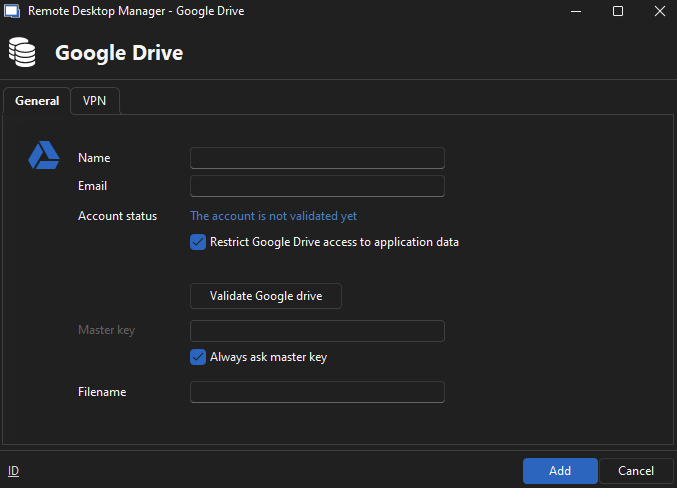
The new Google Drive Restricted Mode is now available in RDM 2024.3.19. This feature is enabled by default for new Google Drive data sources (see the image below).
Please note:
There is no automatic migration from the non-restricted mode. The XML file must be manually re-imported into the new Google Drive data source.
This data source is still considered deprecated and may stop functioning in the future. We strongly recommend switching to Hub Personal for a more reliable and future-proof solution.
Thank you for your understanding.
Regards
Problems with Google Drive data source after updating to RDM 2024.3.10
Hello,
Our verification request was finally approved by Google. In the newest 2024.3.19 update RDM will request access only to the application data when adding a new Google Drive data source.
Our experience with the Google review process was similar to what other software companies like Panic and ia.net have reported. We initially requested access to the drive to make it possible for users to migrate their data source easily to application data. That request was denied, so we switched to requesting only application specific scopes (auth/drive.appdata). That request was also denied because we were missing some information in our request, which we quickly resubmitted. There was a multiple weeks delay each time we updated our approval request which made the process drag on.
The new Google Drive Restricted Mode is now available in RDM 2024.3.19. This feature is enabled by default for new Google Drive data sources (see the image below).
Please note:
There is no automatic migration from the non-restricted mode. The XML file must be manually re-imported into the new Google Drive data source.
This data source is still considered deprecated and may stop functioning in the future. We strongly recommend switching to Hub Personal for a more reliable and future-proof solution.
Thank you for your understanding.
Regards

Google drive not connecting. I have a file there which contains all my clients connections.
Hello,
Our verification request was finally approved by Google. In the newest 2024.3.19 update RDM will request access only to the application data when adding a new Google Drive data source.
Our experience with the Google review process was similar to what other software companies like Panic and ia.net have reported. We initially requested access to the drive to make it possible for users to migrate their data source easily to application data. That request was denied, so we switched to requesting only application specific scopes (auth/drive.appdata). That request was also denied because we were missing some information in our request, which we quickly resubmitted. There was a multiple weeks delay each time we updated our approval request which made the process drag on.
The new Google Drive Restricted Mode is now available in RDM 2024.3.19. This feature is enabled by default for new Google Drive data sources (see the image below).
Please note:
There is no automatic migration from the non-restricted mode. The XML file must be manually re-imported into the new Google Drive data source.
This data source is still considered deprecated and may stop functioning in the future. We strongly recommend switching to Hub Personal for a more reliable and future-proof solution.
Thank you for your understanding.
Regards

Google drive data source blocked
Hello,
Our verification request was finally approved by Google. In the newest 2024.3.19 update RDM will request access only to the application data when adding a new Google Drive data source.
Our experience with the Google review process was similar to what other software companies like Panic and ia.net have reported. We initially requested access to the drive to make it possible for users to migrate their data source easily to application data. That request was denied, so we switched to requesting only application specific scopes (auth/drive.appdata). That request was also denied because we were missing some information in our request, which we quickly resubmitted. There was a multiple weeks delay each time we updated our approval request which made the process drag on.
The new Google Drive Restricted Mode is now available in RDM 2024.3.19. This feature is enabled by default for new Google Drive data sources (see the image below).
Please note:
There is no automatic migration from the non-restricted mode. The XML file must be manually re-imported into the new Google Drive data source.
This data source is still considered deprecated and may stop functioning in the future. We strongly recommend switching to Hub Personal for a more reliable and future-proof solution.
Thank you for your understanding.
Regards

Google Drive as data source asks for FULL access to ALL user's files on Drive
Hello,
The new Google Drive Restricted Mode is now available in RDM 2024.3.19. This feature is enabled by default for new Google Drive data sources (see the image below).
Please note:
There is no automatic migration from the non-restricted mode. The XML file must be manually re-imported into the new Google Drive data source.
This data source is still considered deprecated and may stop functioning in the future. We strongly recommend switching to Hub Personal for a more reliable and future-proof solution.
Thank you for your understanding.
Regards,

Google Drive access blocked
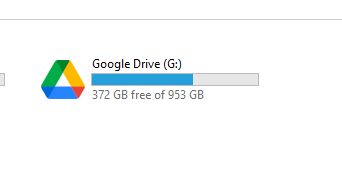
If you have Google Drive installed on your host, there should be a Google Drive hard disk.
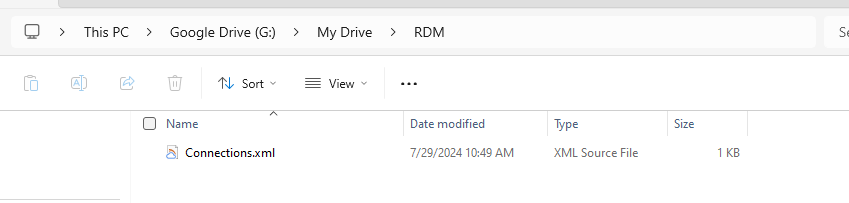
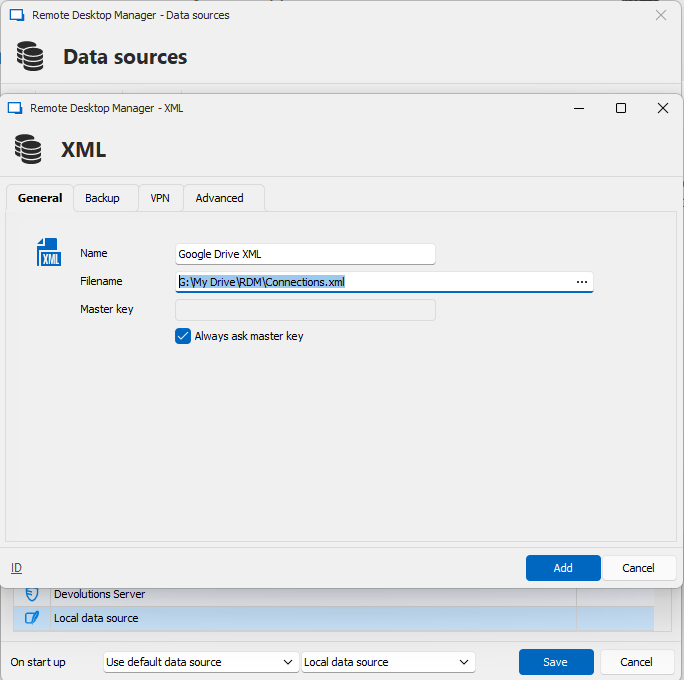
You can create an XML data source that link to the file that is stored in the Google Drive.
If Google Drive is not installed, you can copy the file on your host then use the XML data source to use it.
See the images below :
Regards,
Google Drive access blocked
So there is no workaround at this time?
Exactly, there is no workaround for the moment apart from using the data source file locally with a local data source.
We are working to get the necessary approvals from Google.
Their review process can take up to 4 to 6 weeks.
Regards,
Google Drive access blocked
Hello,
We are aware of this issue and are in contact with Google to resolve the situation.
This issue stems from a Google policy change that happened on July 23rd.
We will keep you updated on this.
Regards,
Error seen when making changes.
Hello,
We have received your data source information.
Just letting you know that we are handling this issue as high priority on our side.
We are making great progress on this issue but still are unable to reproduce it.
Our findings shows that there might be edge case in the security providers initialization logic which causes it to not be initialized properly and so, causing a crash.
We are implementing changes to this initialization logic to make it more robust.
We might have time to provide you with a private build today to see if the fix is working for you.
If we don't have time there will be a release next week.
Regards,
Error seen when making changes.
Hello,
Just letting you know that we might have found the culprit of the issue.
We are planning to include the fix in the next release, which will be released quite soon.
In the meantime, you can try deleting the .shk files located in your `%localappdata%\Devolutions\RemoteDesktopManager` folder.
Example files in this folder:
ca4796c9-9384-4d71-b339-aecf5709cc8f-84209266-b4b3-46ca-ad1e-1b0b0e9f402e.shk (<datasource-id>-<vault-id.shk)
ca4796c9-9384-4d71-b339-aecf5709cc8f.shk (<datasource-id>.shk)
Best regards,
Error seen when making changes.
Hello,
Thank you for bringing this issue to our attention. We are aware that other customers are experiencing the same problem.
Could you please try rolling back to RDM version 2024.1.25 and let us know if this version resolves the issue for you?
We are actively investigating the root cause of this issue.
Best regards,
Mathieu
Method to set the backups to a state of not needed
Hello,
Just letting you know that we added the ability to ignore security items in the security dashboard in version 2024.2.3 of Devolutions Server.
Best regards,
Where Is the Data Source Information Stored?
Hello,
I would recommend using an MDM such as Microsoft Intune to deploy the configuration file.
You need to deploy it with the path :
`C:\Program Files\Devolutions\Remote Desktop Manager\Default.cfg`
and you need to set the GPO to force loading this file.
If you want to prevent configuration changes by users there is this GPO to hide the settings menu :
Regards
Where Is the Data Source Information Stored?
Hello,
This is Mathieu from the Devolutions Application Security team. I would like to provide some technical details regarding RDM files.
If you need to move RDM configuration files, I recommend using the built-in export feature (File -> Settings). This method bundles the following files into a single file, ensuring that all necessary components are included. Manually moving the files could lead to issues such as missing encryption keys or lost data source configurations.
The key files involved are:
RemoteDesktopManager.enc: Contains the encryption key used to encrypt sensitive options.
RemoteDesktopManager.enb: Contains a backup of the encryption key file.
RemoteDesktopManager.stv: Contains sensitive options such as data source configurations, authentication tokens, 2FA keys, etc. It is encrypted with the key contained in the .enc file.
RemoteDesktopManager.stb: Contains a backup of the sensitive options file.
I hope these additional details assist you in your RDM usage.
Regards,
Mathieu
RSS Feed for Security Advisories
Hello,
You can use the following feed :
https://devolutions.net/security/feed/advisories.xml
Best regards,