Version 2024.3.X.X kills Google Drive authentication

Hi all,
I upgraded to 2024.3.12.0 this morning and after the upgrade all of my (Google Drive stored) config was empty.
I tried to reauthenticate and kept getting a message saying the master key was wrong. I was in a panic ...
I remembered I had an old laptop (with 2022.3.29.0 installed), powered it on and it connected fine.
I copied appdata , removed 2024.3 from affected machine, installed 2022.3.29.0, replaced appdata and all was good again.
I exe upgraded in stages and the last successful version I can get to is 2024.2.21.0 , both 2024.3.12.0 and 2024.3.10.0 trigger the issue.
Not sure if this is by design as I know its depricated.
All Comments (2)
Hello,
Due to a recent security update from Google Drive, RDM no longer has access to the data source file.
You will need to export your entries and import them into a new data source. You can follow the steps outlined in our documentation here:
https://docs.devolutions.net/rdm/kb/rdm-windows/troubleshooting-articles/access-your-en-rdm-entry-in-google-chrome-if-google-drive-integration-does-not-work/
Let me know if you need any assistance!
Best regards,
Carl Marien
Hello,
Our verification request was finally approved by Google. In the newest 2024.3.19 update RDM will request access only to the application data when adding a new Google Drive data source.
Our experience with the Google review process was similar to what other software companies like Panic and ia.net have reported. We initially requested access to the drive to make it possible for users to migrate their data source easily to application data. That request was denied, so we switched to requesting only application specific scopes (auth/drive.appdata). That request was also denied because we were missing some information in our request, which we quickly resubmitted. There was a multiple weeks delay each time we updated our approval request which made the process drag on.
The new Google Drive Restricted Mode is now available in RDM 2024.3.19. This feature is enabled by default for new Google Drive data sources (see the image below).
Please note:
- There is no automatic migration from the non-restricted mode. The XML file must be manually re-imported into the new Google Drive data source.
- This data source is still considered deprecated and may stop functioning in the future. We strongly recommend switching to Hub Personal for a more reliable and future-proof solution.
Thank you for your understanding.
Regards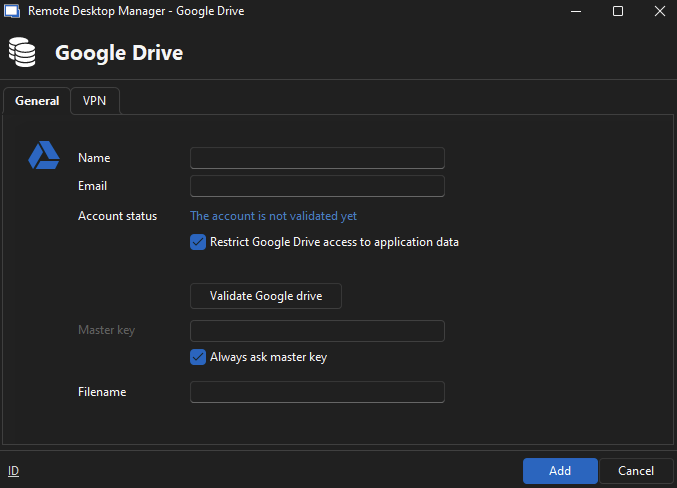
Mathieu Morrissette
5aa77c18-8550-418e-9470-2ef6fc2a457e.png