Error seen when making changes.

When I make change to a session or if I add session I am seeing the following error.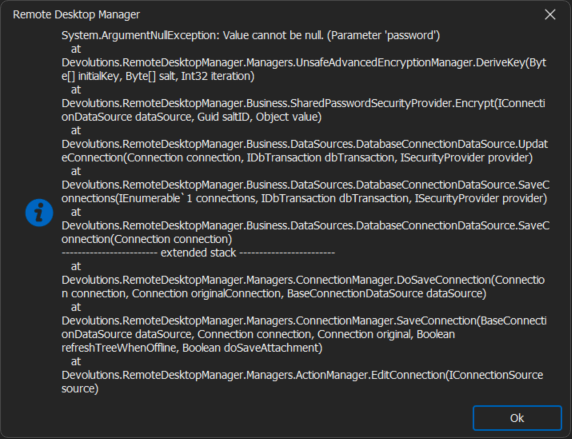
I can fix the issue temporally doing the following steps:
- Go to File > Data source > Edit
- Select Advance > Manage Cache
- Delete
- Press CTRL+F5
I am then able to make the edit. May be a day or even a couple hours now and the issue will come back. I will then need to repeat the above steps to make any edits.
Thanks
Iain
Version 2026.2.13.0 64-bit
Data Source SQL
a2526eb3-32d0-489b-bd49-8c96091bb0df.png
All Comments (21)
Hello,
Could you confirm your Remote Desktop Manager version?
Best regards,
Etienne Lord
Sorry, its 2024.2.11.0 SQL data source.
Appears it happening on every edit, I don't need to clear the cache I just need to leave the vault and go back in and the entry appears.
Thanks
Iain
Version 2026.2.13.0 64-bit
Data Source SQL
Hi,
We are investigating (I contacted the security team). I will also ask the support team to pull up your other tickets to see what was done in the past so that we don't start from the beginning again.
From what I can gather here, it looks like you have a passphrase security provider configured therefore RDM is trying to encrypt the entry during the save but the passphrase looks wrong/missing and the save fails.
Warning! Chances are the entry never made it to the DB server and what you are seeing is only in memory. In other words, data lost possible here, you might want to export the entries or keep the information around in case of data lost.
We will get back to you once we figure something out.
Best regards,
Stéfane Lavergne
Hello,
Thank you for bringing this issue to our attention. We are aware that other customers are experiencing the same problem.
Could you please try rolling back to RDM version 2024.1.25 and let us know if this version resolves the issue for you?
We are actively investigating the root cause of this issue.
Best regards,
Mathieu
Mathieu Morrissette
Hi,
I can't roll back as all users are now running this version and I have done some extensive house keeping.
You are right that it is only keeping the entries in memory, clearing the cache results in them being removed.
However, I can then add them again with no error.
Its not a major issue not rolling back as we only allow a small sub set of users to make edits so we will pause any further edits for the time being.
Could I please request I am added to any support ticket you have so I can be updated when a resolution is submitted?
If you require any further information or logs please let me know.
Thanks
Iain
Version 2026.2.13.0 64-bit
Data Source SQL
Hello,
Just letting you know that we might have found the culprit of the issue.
We are planning to include the fix in the next release, which will be released quite soon.
In the meantime, you can try deleting the .shk files located in your `%localappdata%\Devolutions\RemoteDesktopManager` folder.
Example files in this folder:
- ca4796c9-9384-4d71-b339-aecf5709cc8f-84209266-b4b3-46ca-ad1e-1b0b0e9f402e.shk (<datasource-id>-<vault-id.shk)
- ca4796c9-9384-4d71-b339-aecf5709cc8f.shk (<datasource-id>.shk)
Best regards,
Mathieu Morrissette
Thank you, I will take a look in the morning and see if this helps.
Regards
Iain
Thanks
Iain
Version 2026.2.13.0 64-bit
Data Source SQL
Deleted them, then had to re add the security passkey.
Still got the error when making edits and still had to clear the cache for it work.
Thanks
Iain
Version 2026.2.13.0 64-bit
Data Source SQL
v2024.2.13.0 has been released. Can you please give it a try?
Stéfane Lavergne
Installed and attempted my first edit..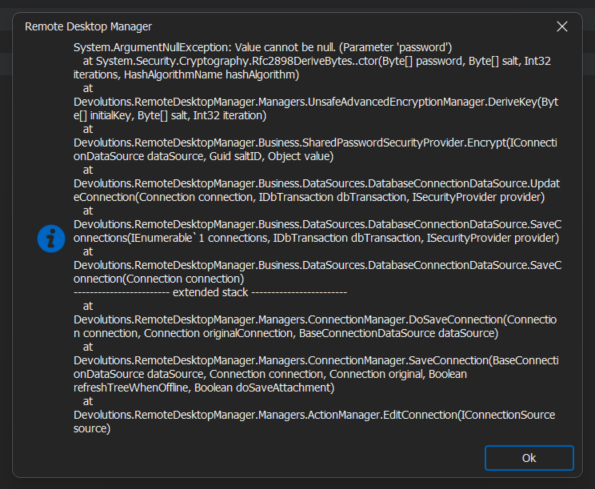
Do I need to delete the files again?
Thanks
Iain
Version 2026.2.13.0 64-bit
Data Source SQL
3e1e4301-bfd0-4f71-9b3e-6d05d7b85bdb.png
Thank you for the test. We will need to debug again, we were pretty confident we had the proper fix.
We will get back to you as soon as possible.
Sorry for the inconvenience.
Best regards,
Stéfane Lavergne
No problem.
I have cleared my cache again and have been able to make edits.
I will see how long that lasts (usually not very long).
Thanks
Iain
Version 2026.2.13.0 64-bit
Data Source SQL
Got about 4 or 5 edits completed before the issues came back.
Thanks
Iain
Version 2026.2.13.0 64-bit
Data Source SQL
Interesting observation.
Could you please send us your "Data Source Information" report? Go to File > "My Data Source Information" > Email Report to Support.
Please add: topics-42318 - Stefane to the subject or body of the message.
Thanks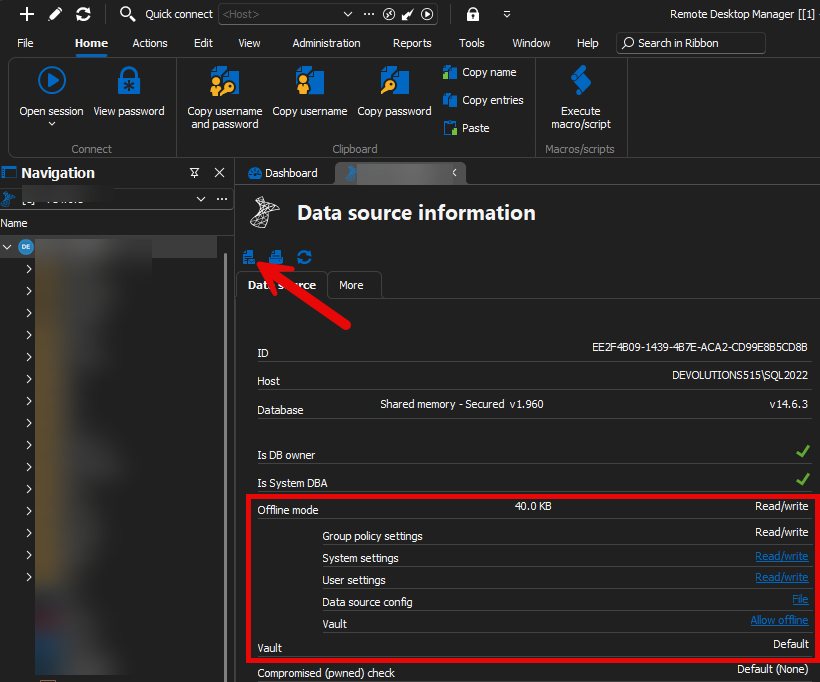
Stéfane Lavergne
326fa10b-9b06-41c8-a0d2-72e805069a4c.png
Should be on its way now.
Thanks
Iain
Version 2026.2.13.0 64-bit
Data Source SQL
Hello,
We have received your data source information.
Just letting you know that we are handling this issue as high priority on our side.
We are making great progress on this issue but still are unable to reproduce it.
Our findings shows that there might be edge case in the security providers initialization logic which causes it to not be initialized properly and so, causing a crash.
We are implementing changes to this initialization logic to make it more robust.
We might have time to provide you with a private build today to see if the fix is working for you.
If we don't have time there will be a release next week.
Regards,
Mathieu Morrissette
All good, I'm all done for the day shortly. It's not effecting anything major so happy to wait for a full fix.
Thanks
Iain
Version 2026.2.13.0 64-bit
Data Source SQL
Any update on this not seen any updates?
Thanks
Iain
Version 2026.2.13.0 64-bit
Data Source SQL
Sorry for the delay getting back to you.
The changes were completed on Wednesday and we are working on getting a new guild out early next week.
Best regards,
Stéfane Lavergne
Thank for the update, look forward to updating next week then.
Thanks
Iain
Version 2026.2.13.0 64-bit
Data Source SQL
So far so good, all edits appear to be working without error!
Will keep testing over the next couple of days.
Thank you to the team for sorting the issue though.
Regards
Iain
Thanks
Iain
Version 2026.2.13.0 64-bit
Data Source SQL