
Sam Moynihan
Data source tree collapse after filtering entries
Hello Ronald,
Thank you for your patience!
Our developer team informed that this issue may have already been patched in our latest RDM version 2026.3.17.0.
Could you please update and let us know if the issue persists?
Thank you in advance!
Best regards,
RDM 2026.3.16.0 – SSH Duplicate Connection causes flickering tab
Hello Paulo,
Thank you for your feedback. We're pleased to hear that everything is now working as expected.
Please don't hesitate to create a new thread if you need any further assistance.
Best regards,
alt+tab - After alt-tabbing to RDM... I have to click alt to allow me to use session... ALT seems to get stuck
Hello,
Thank you for your feedback. We're pleased to hear that everything is now working as expected.
Please don't hesitate to create a new thread if you need any further assistance.
Best regards,
Data source tree collapse after filtering entries
Hello Ronald,
Thank you for the extra details.
We have forwarded your case details to our developer team for review.
We will report back once we have an update from their side.
Thank you again!
Best regards,
RDM 2026.3.16.0 – SSH Duplicate Connection causes flickering tab
Hello Paulo,
Thank you for testing 2026.3.17.0.
The new tab comes from the Duplicate button itself: it always opens the copy as a tab in the same window. It does not use the entry's Display setting or the "Undocked windows" option, and from what I can remember, previous versions worked the same way, unless you always opened a second session this way, and it was different before?
Your settings are correct. To get a second session in its own undocked window, open the entry again from the Navigation pane instead of clicking Duplicate. The entry allows multiple connections and its Display is set to Undocked, so each session you open this way gets its own window.
Thank you again!
Best regards,
Data source tree collapse after filtering entries
Hello Ronald,
Thank you for the answers and the screenshots. Your settings look correct, so this does not appear to be a configuration issue.
We tested the same sequence on our side, including on version 2026.3.15.0, and the folders stay expanded. In your video, we noticed that several sessions are already open in tabs, which was not the case in our tests.
Two more checks would help us narrow it down:
Please close all open sessions, or restart Remote Desktop Manager, then right-click the navigation tree and choose Expand all. Search for an entry, open it, and clear the filter with the X. Does the tree still collapse?
If it does not, please open a few sessions from different folders first, then repeat the same steps. Does the tree collapse then?
Thank you for your ongoing cooperation!
Best regards
RDM 2026.3.16.0 – SSH Duplicate Connection causes flickering tab
Hello,
Thank you for the detailed report and for the tests you already ran.
We tried the same steps on Remote Desktop Manager 2026.3.16.0 and have not been able to reproduce the issue yet, so it likely depends on something specific to your setup. So we can reproduce your exact setup, could you provide the following:
The workspace type you are using (Devolutions Server, Devolutions Cloud, SQL Server, local or other)
Where you open the entry from before clicking Duplicate (the Navigation tree, Favorites or somewhere else)
Whether the entry uses anything beyond the host and credentials, such as an SSH tunnel, a gateway or credentials linked from another entry
The full error details, including the stack trace if the error window shows one
In the meantime, version 2026.3.17.0 is now available and includes several fixes to session tab handling, so it is worth trying as well.
Thank you in advance!
Best regards,
RDP v2026.3.15.0 - keyboard shortcuts for tab navigion (previous, next) sometimes are not functional
Hello,
Thank you for your feedback. We're pleased to hear that everything is now working as expected.
Please don't hesitate to create a new thread if you need any further assistance.
Best regards,
RDP v2026.3.15.0 - inactive focus to SSH terminal window when switching tabs
Hello,
Thank you for your feedback. We're pleased to hear that everything is now working as expected.
Please don't hesitate to create a new thread if you need any further assistance.
Best regards,
Data source tree collapse after filtering entries
Hello Ronald,
Thank you for the detailed description and the video. They made the steps very clear.
We followed the steps from your video on our side with a similar folder structure, but we have not been able to reproduce the collapse yet. A few details about your setup would help us get closer:
What type of data source is "Local data source" (for example, SQLite or XML)?
Please right-click in the navigation tree and choose Collapse all, then right-click again and choose Expand all. After that, search for an entry and clear the filter with the X. Does the tree still collapse?
Does the tree still collapse if you restart Remote Desktop Manager, expand the folders, and then search and clear with the X?
Please send us screenshots of these two pages in File > Settings:
User interface > Tree view
User interface > Filter
Thank you in advance!
Best regards,
Stuck in a ghost window!
Hello,
Thank you for the information.
We have forwarded the details regarding the stuck prompt on RDM to our developer team.
We will report back once we have an update from their side.
Thank you again!
Best regards,
Data source tree collapse after filtering entries
Hello,
Thank you for reaching out!
Could you please send us a brief video of the issues you are experiencing so we can investigate further?
Please upload it to this link and let us know once it's been uploaded: FOR - 57247
Thank you in advance!
Best regards,
Stuck in a ghost window!
Hello,
Thank you for the feedback.
Yes, you're good now. The 30 day prompt only applies to the temporary key from the welcome email. The key you generated replaces it and does not expire, so you won't need a new one every 30 days.
The reminder Michel mentioned for six months from now is a check, not a new key. When it opens, you can:
enter the key from your PDF and click Validate key
click I already have a valid recovery key, which dismisses it for another six months
Thanks for pointing out that the prompt opened out of reach. To help us look into it, could you tell us the exact Remote Desktop Manager version you are running?
Thank you in advance!
Best regards,
How to remove menu bar?
Hello Mark,
Thank you for the feedback.
A correction to our earlier reply: when we looked into this again, the behaviour we reproduced came from a setting on our side, not from a change to Alt+F11. Sorry for the confusion.
RDM ignores its keyboard shortcuts while keyboard grab is not turned on. This is the magnet icon in the status bar at the bottom right of the RDM window:
Hover over the magnet. If the tooltip ends with "Click to grab the keyboard", click it once.
Then press Alt+F11. It should hide the ribbon, and pressing it again brings it back.
Please let us know if that works for you.
Thank you again!
Best regards,
select relavent folder when I select sessions
Hello Neil,
Thank you for the feedback.
I will relay this information to the team and get back to you.
Thank you again!
Best regards,
RDP v2026.3.15.0 - keyboard shortcuts for tab navigion (previous, next) sometimes are not functional
Hello Ales,
Thank you for the additional details.
Our team reproduced the issue you described: when sessions are opened together with Ctrl+Enter, the next tab has an inactive terminal cursor, and the tab shortcuts stop working. Our developer team has a fix for it, planned for an upcoming update. We will let you know as soon as it is available. Until then, clicking each tab once after opening the folder keeps the shortcuts working.
Once you have installed the update, could you test both cases and let us know the result?
Opening the folder with Ctrl+Enter and moving between tabs with your shortcuts.
Using the shortcuts after RDM locks and you unlock it with your PIN.
Thank you in advance!
Best regards,
Graphical artifacts in RDP
Hello,
Thanks for running the mstsc test, that result helps a lot. Since the same stripes appear in Microsoft's own client, the cause points to something in the RDP connection itself rather than in RDM.
These answers will help us narrow down where:
Do the stripes appear when you connect to other remote machines, or only this one?
Is the remote machine a virtual machine (if so, on which hypervisor) or a physical computer?
Do they also appear when you connect to it from a different local computer?
Inside the remote session, do they go away when that area is redrawn, for example, by dragging a window over it?
To check the data source, go to File > Workspaces and let us know how the workspace you use is listed there.
Let us know whether the Performance change makes any difference once you've had time to test it.
Thank you in advance!
Best regards,
alt+tab - After alt-tabbing to RDM... I have to click alt to allow me to use session... ALT seems to get stuck
Hello Allan and Spencer,
Thank you for the additional details.
We reproduced this in-house. In an embedded RDP session, after using Alt+Tab to come back to Remote Desktop Manager, the session behaves as if Alt is still held down. Our developer team is working on a fix.
Until then, this workaround prevented the issue in our tests:
In Remote Desktop Manager, go to File > Settings > Entry types > Sessions > Remote Desktop (RDP), then open the Advanced tab.
Set Enable API hooking to Disabled, then restart Remote Desktop Manager.
This setting applies to all RDP entries. If you connect to any RDP entries through Devolutions Gateway, do not apply it.
The issue is set to be patched in our next minor version release of RDM.
We will update you once it's available.
Thank you again!
Best regards,
RDP v2026.3.15.0 - inactive focus to SSH terminal window when switching tabs
Hello Ales,
Thank you for your feedback.
Our developer team has identified the issue and is currently working on a patch.
We will update you once it's been implemented.
Thank you again for your cooperation throughout!
Best regards,
RDP v2026.3.15.0 - inactive focus to SSH terminal window when switching tabs
Hello Ales,
Thank you very much for the detailed answers; they helped a lot. You were right: the difference was how we switched tabs. We repeated the test with 16 SSH sessions in one folder, opened with Ctrl+Enter on the folder, the main window maximized, both "Auto-focus tab on item select" and "Auto-select item on tab focus" set to "never", and Ctrl+Alt+PageDown as the next tab shortcut.
What we saw on RDM 2026.3.16.0: with the sessions freshly opened, the shortcut moves to the next tab once and then stops working. After we went back to the Dashboard tab, it moved one more tab and stopped again. After we clicked each tab once with the mouse, the shortcut worked through all 16 tabs without stopping. So the tabs that were opened in the batch and never selected seem to be the ones that block it. This matches what you described.
Please try this on your side:
1. Open File - Settings - User interface - Keyboard, find "Select the next tab" and "Select the previous tab", and check the Mode column. If it says "When not in session", change it to "Default". RDM asks for a restart, so please restart it.
2. Open the folder with Ctrl+Enter and click each tab once, then use your shortcuts.
Could you tell me which Mode value you had before the change, and whether step 2 makes the shortcuts work on all your tabs? If it does not, a short screen recording would help.
I am going to report this to our development team so they can check why the shortcut stops on tabs that were opened in the batch but not selected yet. I will let you know as soon as I have news.
Best regards,
Navigation pane as tab
Hello,
Thank you for the feedback.
Glad to hear it is working.
Have a great day!
Hypervisor Host connect since 2026.2
Hello Alexander,
Thank you for your feedback.
Glad to hear it worked!
Have a great day!
Best regards,
select relavent folder when I select sessions
Hello Neil,
Thank you for your patience.
Our developer team retested the reproduction steps to make sure, and everything works correctly in 2026.3.16.0.
Can you please confirm if you have changed the setting highlighted in the screenshot below?
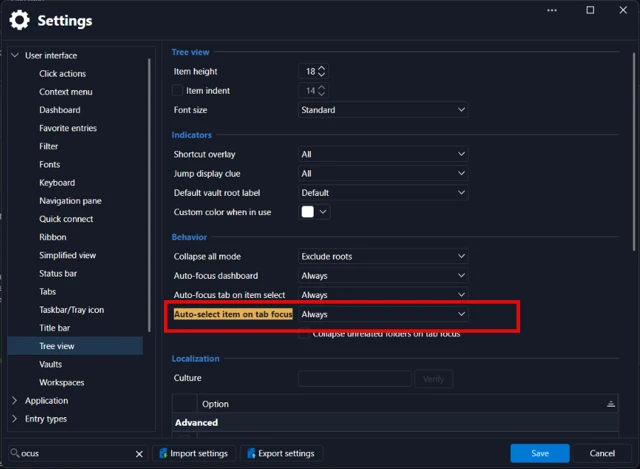
Thank you in advance!
Best regards,
RDP v2026.3.15.0 - keyboard shortcuts for tab navigion (previous, next) sometimes are not functional
Hello Ales,
Thank you for the update, and for testing so carefully. It is useful that the shortcuts came back after the second restart, because it tells us the problem is not in the shortcut configuration itself.
To narrow it down, could you tell us:
1. What type of entry are the two "terminal" sessions (for example SSH Shell, PuTTY, PowerShell or Windows Terminal)?
2. When it happens, is there any session open at all? Does it also happen right after starting RDM, before opening any session?
3. What keyboard layout do you use? Do you have other keyboard software running (AutoHotkey, a keyboard or mouse utility, another remote tool)?
4. Does it tend to start after something specific, such as locking or unlocking the PC, waking it from sleep, or switching windows with Alt+Tab?
The next time it happens, please do not restart RDM first. Open Help > Troubleshooting > Application logs, and send us what you see there from that moment.
As a test, you could also change the two tab shortcuts to a combination without Alt, for example Ctrl+Shift+PageUp and Ctrl+Shift+PageDown.
Please let us know whether the behavior is the same.
Thank you in advance!
Best regards,
RDP v2026.3.15.0 - inactive focus to SSH terminal window when switching tabs
Hello Ales,
Thank you for testing 2026.3.16.0 and for the detailed description. Good to hear that opening the SSH sessions one by one now works as expected, including the keyboard shortcuts for moving between tabs.
For the case where you open several sessions with Ctrl+Enter on the folder, we tried to reproduce it on 2026.3.16.0 with a folder of four SSH Shell entries. We confirmed the "Do you want to open 4 sessions?" prompt and then clicked each tab header, both after the sessions had connected and while they were still connecting. In every tab, the terminal took the keyboard focus right away, so we could not see the problem on our side yet. That means something in your setup or in the exact steps differs from ours, and we would like to find out what.
Could you please answer the following?
- How many SSH entries are in the folder, and are they all direct entries of that folder, or is there a subfolder?
- Do the entries use a typing macro, an after-opening event, or another event that runs after connecting?
- Is the anchor icon in the status bar at the bottom right of the main window turned on? (This is a different icon from the tray icon of RDM.)
- Under File - Settings - User interface - Tree view, what are the values of "Auto-focus tab on item select" and "Auto-select item on tab focus"?
- Is the main window maximized when this happens, and are the tabs docked in the main window?
- If you select the same entries and use Open selection from the right-click menu instead of Ctrl+Enter on the folder, does the focus problem also appear?
A short screen recording would help us a lot. Please keep the whole RDM window visible, open the sessions with Ctrl+Enter on the folder, and then switch through the tabs until you reach one where the cursor focus is missing. You can send me the video via DM, I will DM you now so you can see where to send it.
The tab navigation shortcuts that stop working are already being followed in your other case, so we will keep that part there. If a tab does not take the focus, clicking once inside the terminal is the only workaround for now.
Thank you for your patience and your help.
Best regards,