SFTP explorer showing local folders in remote view

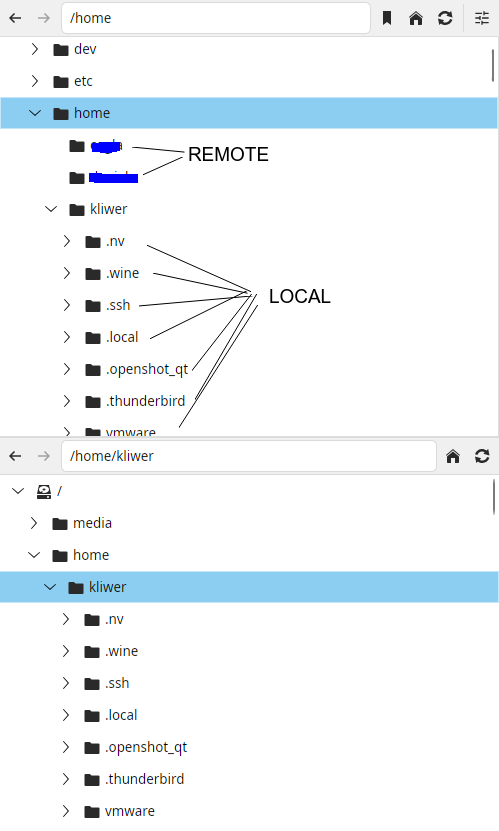
Hi. I don't know yet what causes this but noticed it quite a few times already. Probably happens when tab with opened SFTP was left for some time. Using refresh buttton on remote view fixes this.
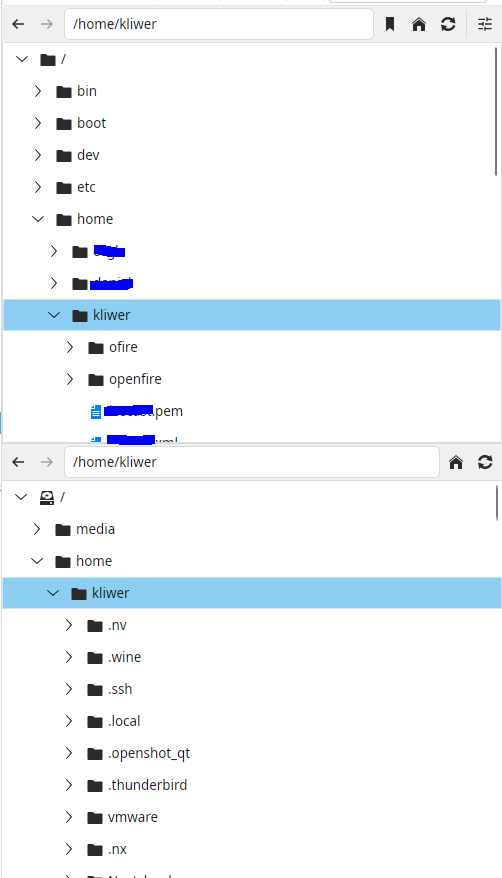
After refresh:
All Comments (3)
Hello Bartlomiej,
Thanks for the screenshots, they helped a lot.
The folders that appear under /home/kliwer in the remote view are your local ones, in the same order as the local pane, so the mix-up happens inside RDM and not on the server.
Looking at how the explorer updates after a transfer, this can happen when a download finishes into a local folder that has the same path as a folder already opened in the remote view, as /home/kliwer is on both sides here. Refresh on the remote view reloads it from the server, which is why it clears it.
Could you confirm whether, before the remote view changed, you had dragged a file from the remote view into your local /home/kliwer, or downloaded something into that folder?
Thank you in advance!
Best regards,
Yes, it is as you say. After downloading from remote server it refreshes and shows content of local folder.
Hello Bartlomiej,
Thanks for confirming, that matches what we found.
We have escalated this to our developer team for review and will report back once we have an update.
Thank you again & Best regards,