select relavent folder when I select sessions

Hi
Seems there is bug when I setup my navigation panel to auto-hide, the function of select relavent folder when I select different sessions doesn't work, it works if I pin the navigation panel.
All Comments (16)
My RDM version is 2026.3.12 portable
Hi,
Any advice on this?
Hello Neil,
Thank you for reaching out!
Could you please upload a brief video of the issue you are experiencing so we can investigate further?
Please upload it to this SharePoint link and let us know once it's been uploaded: FOR - 56 720
Thank you in advance!
Best regards,
Hi
Here is example, I had folder structure as below, I opened entry A1, B1 and C1, when I selected on opened entry C1, navigation panel should focue on C1 in folder C, but now seems it work not like when you set your navigation panel to auto hide .
As I have long list of folders, if this not working correctly will be quite annoy
Folder A
|_entry A1
|_entry A2
|_entry A3
Folder B
|_entry B1
|_entry B2
|_entry B3
Folder C
|_entry C1
|_entry C2
|_entry C3
Hello Neilson,
Thank you for the detailed example.
We set up the same folder structure in our lab and tested it with the navigation pane set to auto-hide.
In our test, the matching entry was selected when we switched tabs, so we could not reproduce the issue yet.
To find the difference between our setups, could you please send us the following:
- The value of "Auto-select item on tab focus" in File > Settings > User interface > Tree view
- The types of sessions you open, for example RDP, SSH or web sessions
- How you switch between sessions, for example by clicking the tab, with a keyboard shortcut or from the tab list
- Whether the sessions open as embedded tabs or in undocked windows
- If you are not on the latest version, please update to 2026.3.13.0 and test again
Several fixes for the auto-hide navigation pane were included in the recent releases.
You can find more details about the tree view options here:
https://docs.devolutions.net/rdm/ribbon-menu-bar/file/settings/user-interface/tree-view
Best regards,
Gerhard Ryznar
Hi
Can you send me a direct message, so I may can upload video clip to show you.
Hi
I upgraded to lastest version and tested a bit more detail on this, the correct entry on Navigation panel was selected/focused when I switch between multi session tabs, but it will not display in the center of Navigation panel (or visiable in Navigation panel) as I had long list of entries. Here is the drawing may can help you understanding. More like the scroll bar of navigation panel didn't working correctly during you change between session tabs. 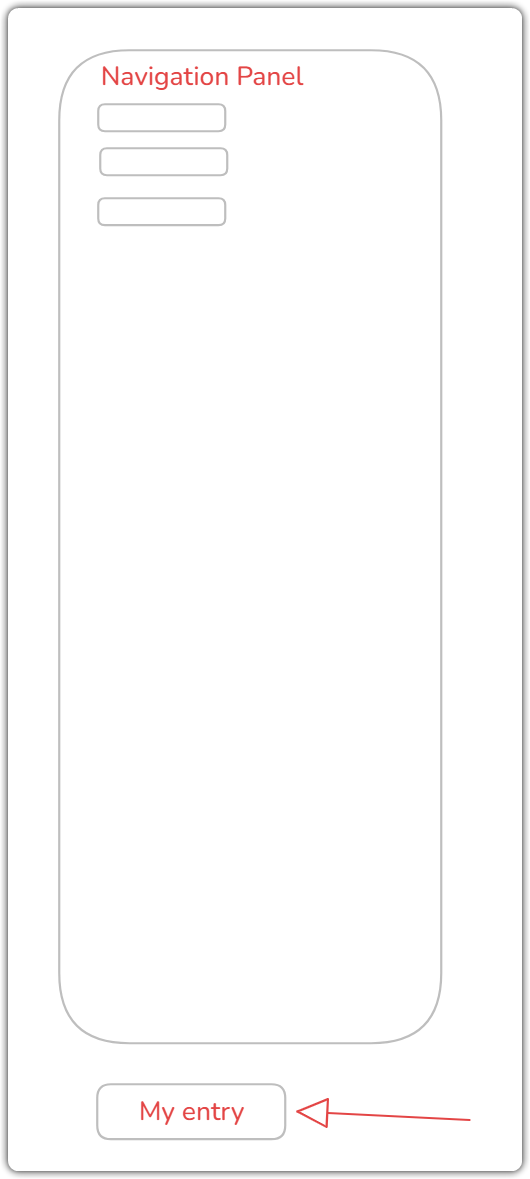
afbcb77a-c0b1-457d-a886-5059d1e6f12e.png
Hello,
Thank you for your response!
I have sent you a private message with the link so you can share us the recording. Once we have the recording, we will try to reproduce the issue.
If you have any further questions, please don't hesitate to let us know.
Best regards,
Maxim Robert
Hi
The file has been uploaded. Please check.
Hello Neil,
Thank you for the recording,
I will try to reproduce the issue band will let you know with more details as soon as possible.
In the meantime, If you have any further questions, please don't hesitate to let us know.
Best regards,
Maxim Robert
Hello,
We have been able to reproduce the issue, and a ticket has been sent to the Engineering Team.
Best regards,
Antoine Mauger
Hello,
Thank you for your patience while our team looked into the issue you reported.
I'm happy to let you know that the latest version of Remote Desktop Manager (2026.3.16.0) includes a fix for this problem. You can download it from our website here:
https://devolutions.net/remote-desktop-manager/download/
Once you have installed the update, could you please test it in your environment and confirm that everything now works as expected? If the issue persists or if you notice anything unusual related to the same original problem, just reply to this message with a few details, and we will be glad to look into it further.
Thank you for your collaboration.
Best regards,
Maxim Robert
Hi
I updated to lastest version, but problem still same as before. The entry will be selected correctly but not list in the view of navigation pannel can see, same as video I sent before.
More like the scroll bar of navigation panel not relate with entry what was select and scroll to correct location.
By the way: my navigation panel set as auto-hide.
Hello Neil,
Thank you for the feedback.
I will relay this information to the team and get back to you.
Thank you again!
Best regards,
Hello Neil,
Thank you for your patience.
Our developer team retested the reproduction steps to make sure, and everything works correctly in 2026.3.16.0.
Can you please confirm if you have changed the setting highlighted in the screenshot below?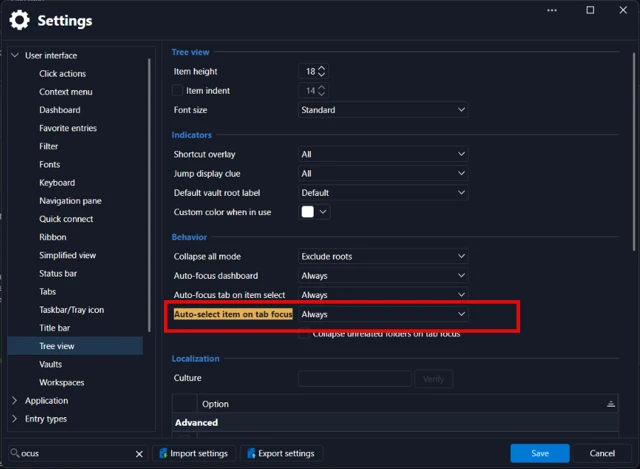
Thank you in advance!
Best regards,
b57d3134-f8ae-47ba-9c34-8e3ae19c3a4a.png
Hi, Sam
Here is my setting. The selection working correct, but the display in navigation panel is not visible, either above or below of navigation panel. 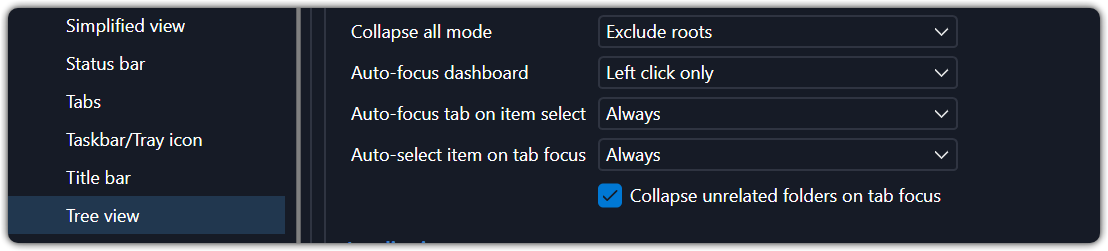
881191b8-5cfc-4902-97b0-bd27709d0cec.png