
Léon Le Brun
Import points for Aufgabenliste/TODO-list
Hello Andreas,
Good news: task lists can now be imported and exported. This will be available in the next major release of Remote Desktop Manager, 2027.1.0.0.
Export
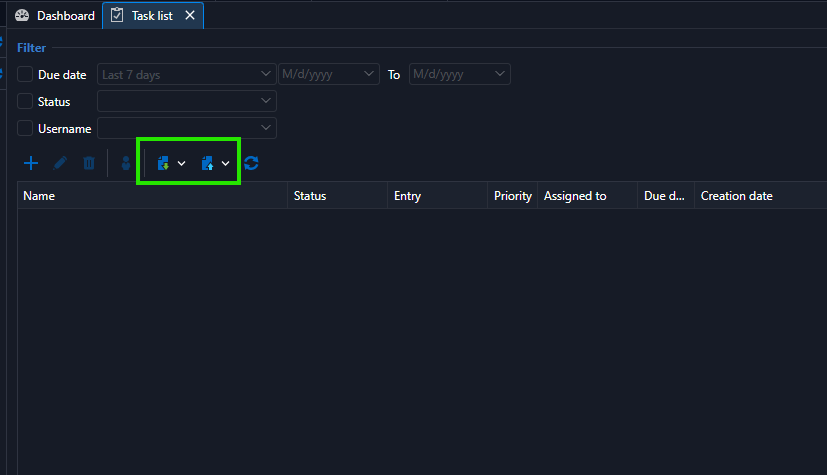
Both the global task list and an entry's Tasks tab now have an Export button. It saves all the tasks shown to a CSV or JSON file.
To export only some tasks, select them, right-click and choose Export selection.
The CSV opens cleanly in Excel.
Import
Use the Import button and pick a CSV or JSON file, for example one you exported earlier.
A preview opens before anything is saved. It shows which tasks are ready to import and flags any problems, such as an entry or user that can't be found, or a task that already exists.
You can fix those problems in the preview: choose an entry, assign a user, or decide what happens with duplicates (skip, overwrite or add a copy). Then click Import.
Your list of 20 tasks can now go to and from a CSV file without being entered by hand.
Thank you for the suggestion, and let us know how it works for you once 2027.1.0.0 is out.
Best regards,
Léon Le Brun
Contact entries are not accessible in Offline Mode with SQL Server – RDM 2026.3.15 / 2026.3.16
Hello @theblackid,
Thank you for the detailed report.
We were able to reproduce the issue. It is a regression introduced in 2026.3, and it is not the same issue we fixed in 2026.2.12. It has now been fixed and will be included in RDM 2026.3.17.0.
Thanks again for reporting this, and let us know if you still see the problem after updating.
Best regards,
Léon Le Brun
Opening Multiple Tabs Doesn't Connect Until Clicked
Hello,
This issue has been resolved in version 2026.3.11.0 and later. There is no setting to change. Updating to that version or newer should restore the expected behavior.
If you still encounter the issue after updating, please reply with your exact RDM version and how you open the entries.
Best Regards,
Léon Le Brun
netbird VPN Support
Hello,
We've just finished adding NetBird support to RDM. You will be able to configure this new VPN type in the next major version, 2027.1.0.0.
Best regards,
Léon Le Brun
Envoyer une liste de mot de passe dans la fonctionnalité "Liste de mots de passe"
Bonjour,
Votre proposition a été implémentée et sera disponible dans la prochaine version majeure, 2027.1.0.0. Il suffira de sélectionner plusieurs mots de passe dans la grille avant de cliquer sur le bouton d’envoi.
Cordialement,
Léon Le Brun
New SonicWall NetExtender 10.3.0 changed .exe (addon broken)
Hi Nicola,
Thank you for the feedback.
I confirmed that the NetExtender connection profile is not being deleted reliably when using the VPN connect/disconnect actions from an entry’s properties. I am investigating this and will correct it.
Regarding your question about externally closing NetExtender: RDM tracks the live VPN connection instance and retains the exact NetExtender profile name created for that instance. This is intended to ensure that only the profile associated with the RDM-opened VPN is cleaned up.
I also agree that the Initial delay behavior is inconvenient. Rather than forcing the terminal to remain always on top, I will change the behavior so that RDM keeps the configured delay without opening a dialog that takes focus away from the NetExtender console. This should allow you to enter the OTP without having to bring the terminal window forward again.
Regarding this point:
The VPN connect/disconnect actions do not work from the entry dashboard/toolbar when the entry is under another item, such as a folder. They work only for root entries.
I would appreciate a little more information so I can reproduce the issue:
What happens specifically when you select Open VPN or Close VPN from the dashboard or toolbar?
Does the NetExtender terminal window appear?
Is a connection profile created in the NetExtender interface?
Is the VPN configuration defined on a folder and inherited by the entry, or configured directly on the entry?
Does the behavior differ between a folder-level configuration and a root-level configuration?
I have tried reproducing the issue with both direct and inherited VPN configurations but have not yet been able to reproduce it. Any additional details, screenshots, or logs you can provide would be very helpful.
Best regards,
Léon Le Brun
New SonicWall NetExtender 10.3.0 changed .exe (addon broken)
Hi Nicola,
Thank you for the additional information. I was able to fix both the NetExtender connection-profile deletion issue and the automatic input of 1 for the OTP action.
These fixes are planned for the next minor release, 2026.3.13.0. Please do not hesitate to let us know if anything does not work as expected.
Best regards,
Léon Le Brun
New SonicWall NetExtender 10.3.0 changed .exe (addon broken)
Hi Nicola,
Thank you for the additional details.
I have not yet been able to consistently reproduce either the profile-deletion issue or the OTP behavior in every setup. However, I was able to reproduce a specific profile-deletion scenario:
A VPN is configured on a session entry.
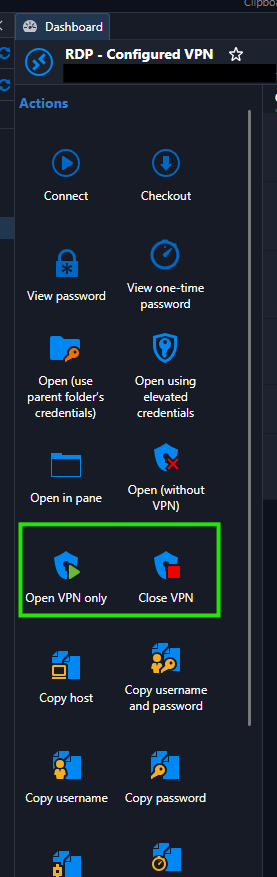
The VPN is started using the Open VPN Dashboard action.
The VPN is then stopped using the separate Close VPN Dashboard action.
In this workflow, the NetExtender profile was not deleted. In my tests, opening the session normally and then closing the session worked correctly. We identified why the separate Dashboard VPN-action workflow can lose the generated NetExtender profile name that is required for deletion, and we are working on a correction.
Could you please confirm whether this matches your workflow? In particular, are you using the Dashboard Open VPN action followed by the Dashboard Close VPN action, rather than opening and closing the session itself?
It is also expected that you no longer see the NetExtender terminal window when RDM deletes a profile. The deletion now runs in the background; RDM displays a small loading indicator with “Deleting connection” instead.

Regarding OTP, I have not been able to reproduce the automatic OTP issue in my environment so far, so I would like to better understand your configuration. For NetExtender, automatic OTP injection requires the OTP credential to be configured for the session with its Usage set to Specific to session.
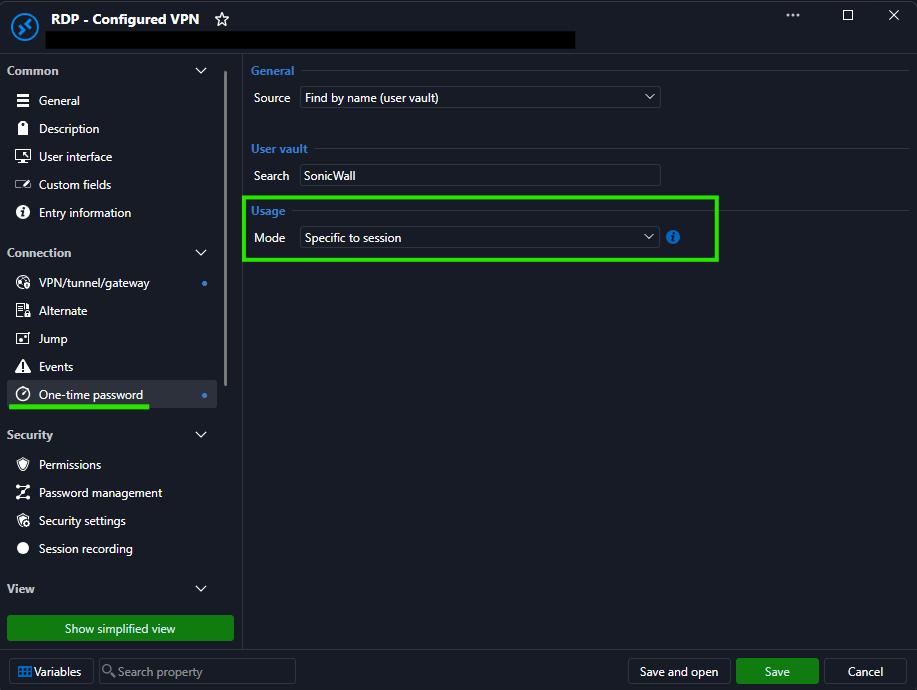
Could you please share how the OTP credential is configured and linked to the affected session?
Best regards,
Léon Le Brun
Opening Multiple Tabs Doesn't Connect Until Clicked
Hello,
We have opened a ticket to investigate the issue further and will keep you updated on our progress.
Best Regards,
Léon Le Brun
Display issue with Navigation pane
Hello,
We apologize for the regression, and thank you for your patience and feedback.
We have managed to find a proper fix for the pane-sizing issue without undesirable side effects, including the pane being hidden behind open sessions.
The fix is expected to be included in the next minor release, 2026.10.0.0.
Best regards,
Léon Le Brun
Display issue with Navigation pane
Hi,
Thanks for asking.
This was recorded laptop-only setup. No displays connected.
@slawek
Hello,
Thank you for your feedback. I was able to reproduce the issue and have reopened the ticket for further investigation. I will keep you updated on any progress.
Best Regards,
Léon Le Brun
Copy Username and Password" button not working after update to 2026.3.5.0
Hello,
Thank you for the clarifications. I have created a ticket for our development team to investigate this issue. We will keep you updated on any progress.
Best Regards,
Léon Le Brun
Display issue with Navigation pane
Thank you.
This is correct. My laptop is set as the primary display, and I use RDM on a monitor.
Changing the primary display to the monitor "fixes" the issue.
When can the update be expected to be available?
Regards
Slawek
@slawek
We do not have an exact release date yet, but you can expect version 2026.3.9.0 later this week.
Display issue with Navigation pane
I'm pleased to be back with a positive update,
The fix for the Navigation Pane sizing issue is complete and will be included in the next minor release, 2026.3.9.0.
Have a wonderful day,
Léon Le Brun
RDM v2026.3.5: top and bottom of Navigation Pane flyout is cut off when set to "Auto-Hide"
Hello,
The fix for the Navigation Pane sizing issue is complete and will be included in the next minor release, RDM 2026.3.9.0.
Best Regards,
Léon Le Brun
Display issue with Navigation pane
Hello,
Thank you for providing the recording. We have created a ticket to investigate this issue.
We found that this can occur when a laptop display is set as the main display in Windows and RDM is opened on a secondary display. If your setup matches this scenario, a temporary workaround is to set another monitor as the main display under Settings > System > Display, then reopen RDM.
We will keep you updated on our progress.
Best Regards,
Léon Le Brun
Opening Multiple Tabs Doesn't Connect Until Clicked
Hello,
Thank you for reporting the issue. I was unable to reproduce it in our current development build or in a build from before the latest release, so I would like to gather a bit more information.
Could you confirm the exact RDM version you are using? Also, how are you opening the multiple connections. For exemple, do you select several entries in the Navigation Pane, choose Open, and confirm the multiple-open prompt? When the multiple tabs are opening, do you remain on the first tab that opens, or are you automatically taken through each tab as it opens?
Best Regards,
Léon Le Brun
Copy Username and Password" button not working after update to 2026.3.5.0
Hello,
Thank you for reporting the issue. I was unable to reproduce it on my end, so I would like to gather a little more information.
Do the separate Copy Username and Copy Password actions work correctly when the combined Copy Username and Password action does not?
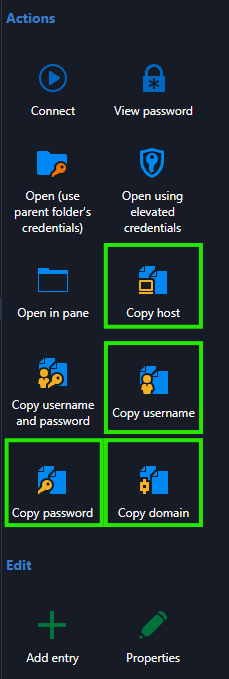
When the issue occurs, does Copy Username and Password work when launched from the session’s context/menu options rather than the toolbar/button?
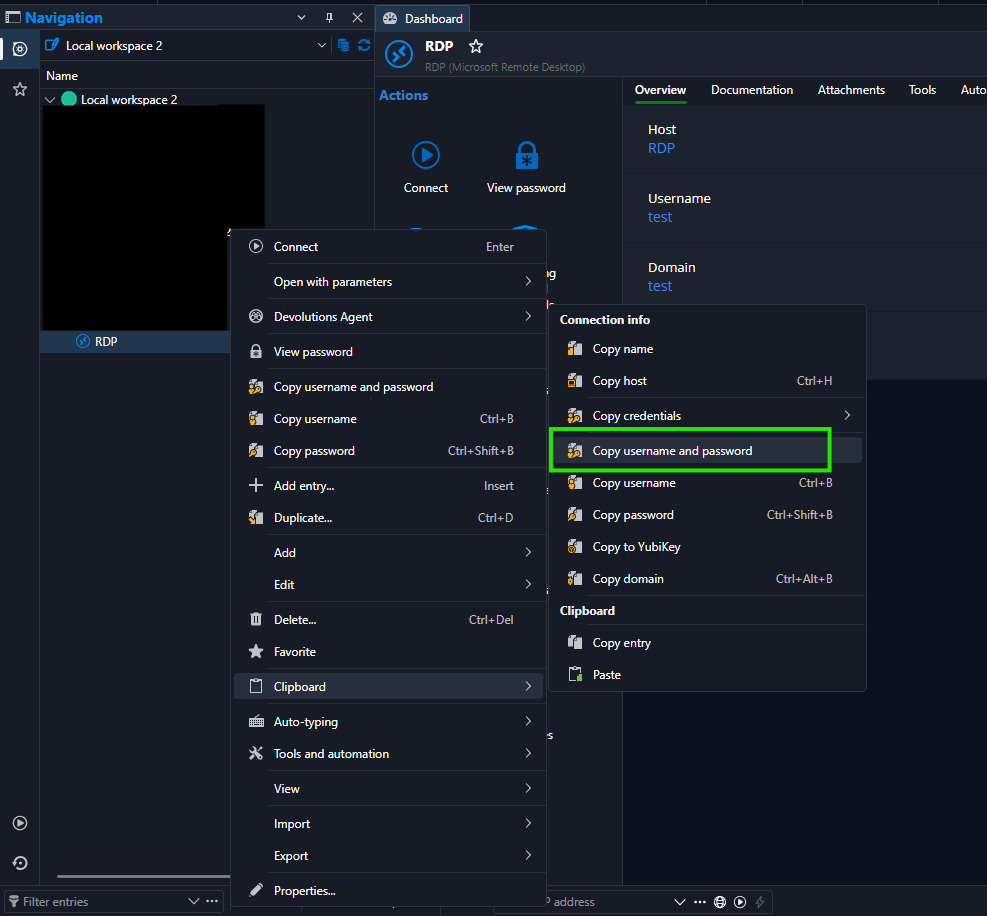
Could you also verify the configured clipboard-clearing delay? RDM can clear copied credentials from the clipboard after a configurable interval to avoid leaving sensitive information there. Is it possible that the copied content is cleared before pasting it?
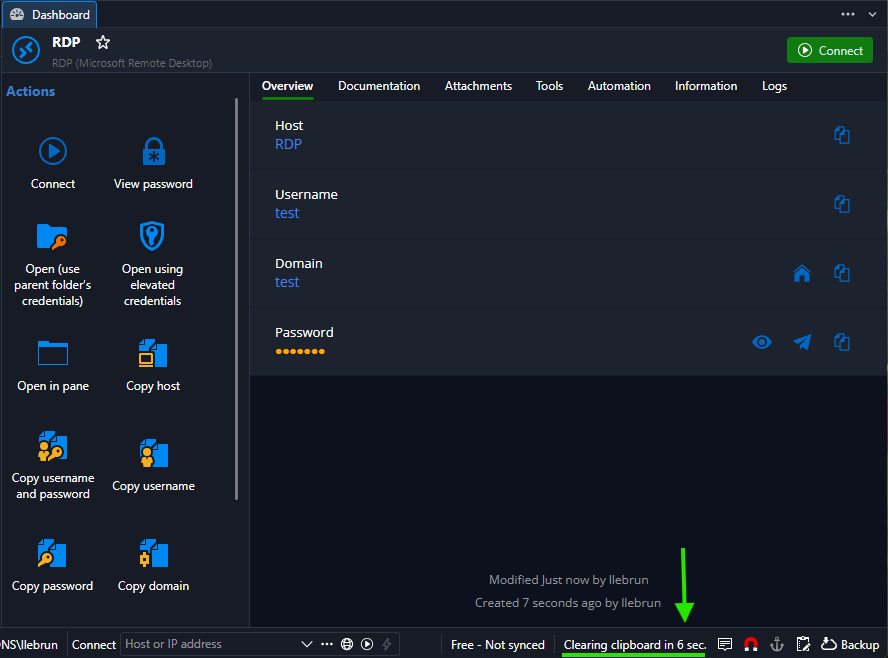
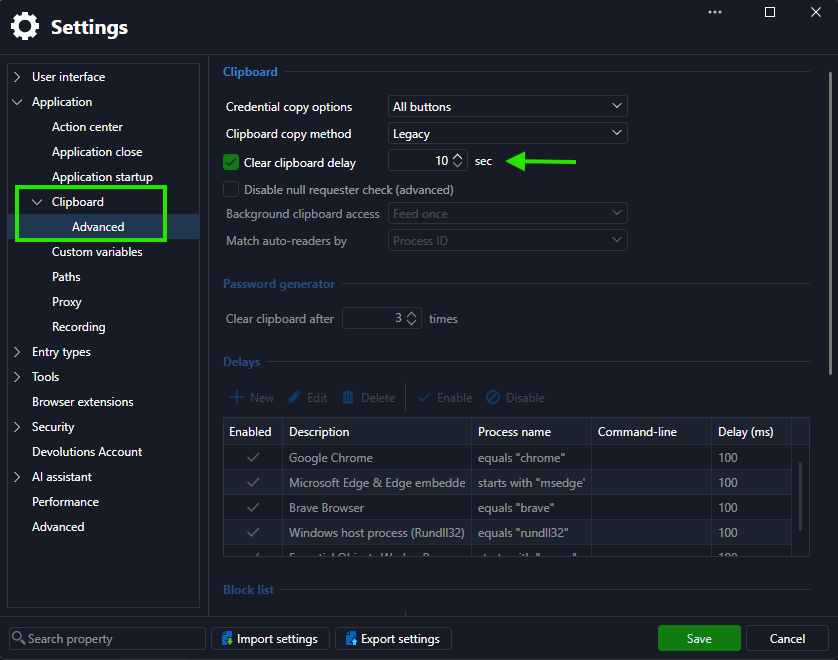
Since the behavior differs between users and can temporarily resolve after resetting the local RDM folder, these details will help us narrow down the cause.
Best Regards,
Léon Le Brun
RDM v2026.3.5: top and bottom of Navigation Pane flyout is cut off when set to "Auto-Hide"
Hello,
Thanks for reporting this issue. I was able to reproduce the problem and have created a bug ticket for our team to investigate. We’ll keep you updated on any progress.
In the meantime, I found that the Pin button becomes visible when the ribbon is expanded. You can expand it by double-clicking any ribbon tab, then pin the Navigation Pane again. I’ll add a screenshot below for reference.
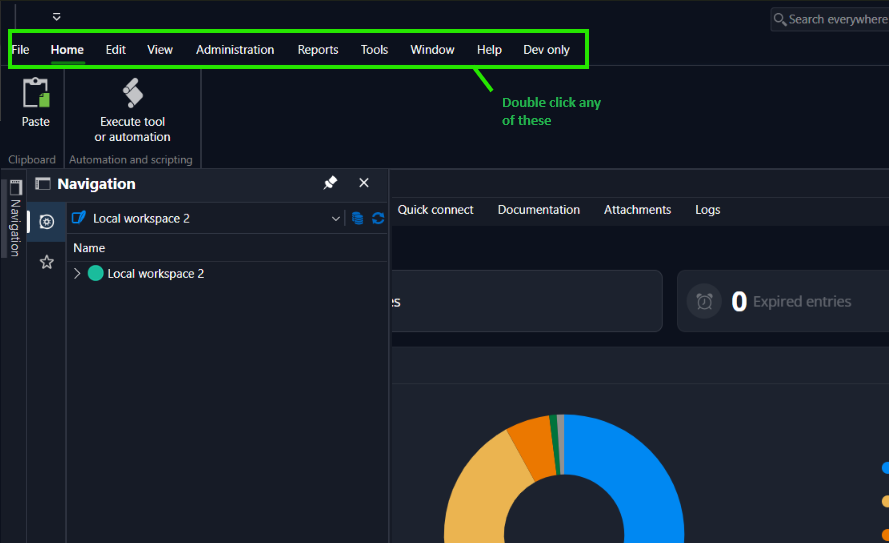
Best Regards,
Léon Le Brun
Integration of VcXsrv directly into RDM
Hi @edgarz,
A built-in Devolutions XServer (the one Luc has been building) is coming in the next major version, 2026.3.0.0. Since it ships inside RDM, there's nothing extra to install or start beforehand, so it should fit your locked-down clients that already get RDM through your deployment store.
You'll find the server under Tools > All tools > XServer, and you turn it on per entry in the SSH Shell properties under X11 Forwarding: set Enable X11 forwarding = Yes and X server type = Devolutions.
Best regards,
Léon Le Brun
X11 Forwarding with Access Control on AIX
Hi @kmknox,
A built-in Devolutions XServer (the one Luc has been building) is coming in the next major version, 2026.3.0.0. It runs locally on your Windows machine and replaces XMing, so nothing changes on the AIX side. You just keep X11Forwarding enabled in sshd like you already did.
It supports MIT-MAGIC-COOKIE-1 authentication (an option in its settings), so only the X client from your authenticated SSH session can connect, and input injection is off by default. You'll find the server under Tools > All tools > XServer, and you turn it on per entry in the SSH Shell properties under X11 Forwarding: set Enable X11 forwarding = Yes and X server type = Devolutions.
Best regards,
Léon Le Brun
User specific settings - embedded password gone switching from 2025 version to 2026.2.8
Hi Dennis,
Thank you for your reply and for your patience.
The issue should be fixed in our next minor version, 2026.2.17.0. Your credentials will then resolve properly, without requiring you to enter them in an interactive authentication prompt.
Best regards,
Léon Le Brun
Copy UPN if available
Hello,
Thank you for your suggestion, I've added the "Copy UPN" action to the context menu and the ribbon.
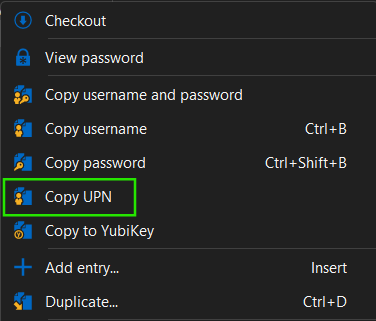
You'll be able to see these additions in the next minor version 2026.2.14.0.
Best regards,
Léon Le Brun
Microsoft Entra ID dashboard - customer tenant
Hi Nicolai,
I looked into the tenant count issue and believe to have fixed it. This fix should be in the next minor release 2026.2.14.
Best regards,
Léon Le Brun
User specific settings - embedded password gone switching from 2025 version to 2026.2.8
Hi Dennis,
I'm the developer investigating this one. I believe I've found a fix, but before I add it I'd like to validate a couple of things about your setup to make sure it covers your exact case.
We've reproduced an issue where a legacy Embedded credential resolved through inheritance comes back empty when opening a session, which matches the interactive‑authentication prompt you're seeing on your switches. Could you confirm two things on a switch entry that shows the prompt?
Its Credentials mode is Inherited (inheriting from the parent folder), rather than a credential set directly on the switch.
The credential it inherits is configured as Embedded, either on the parent folder or through User Specific Settings. Could you let us know which of the two you use?
Once you confirm, we'll include the fix in an upcoming minor release. Thanks again for your help pinning this down!
Best regards,
Léon Le Brun