
Jacob Lafrenière
High memory use of embedded web tabs
Hello,
Thank you for reaching out to Devolutions Support. I have answered your questions below using your numbering.
1. Hidden tabs: Remote Desktop Manager does not currently lower the memory target or suspend web tabs that are not visible. Each tab keeps running its page as long as it is open. For feature requests, I recommend visiting our forum. Each product has a dedicated Feature Request section: https://forum.devolutions.net/forums/17/remote-desktop-manager--feature-request
2. Shared environment: Website entries share one browser process tree when they use the same settings. Entries with different additional browser arguments, proxy settings, language, single sign-on or private session settings each get their own cache folder and process tree. Aligning those settings across your Website entries should reduce the number of processes.
3. WV2Profile folders: Remote Desktop Manager does not cap or automatically clean up these folders. Each entry that uses a private session gets its own profile folder. You can safely rename or delete the old folder while Remote Desktop Manager is closed. You will lose the cookies, saved web logins and site data for those entries. You can refer to the following documentation article: https://docs.devolutions.net/rdm/knowledge-base/how-to-articles/clear-web-browser-cache/
4. Renderer limits and browser arguments: There is no supported way to limit renderer processes or suspend idle tabs. Browser arguments should be set in the Additional browser arguments field of each entry. Remote Desktop Manager manages the WebView2 environment variables itself, so the WEBVIEW2_ADDITIONAL_BROWSER_ARGUMENTS variable is not supported.
5. Busy tabs: Pages that keep working in the background, such as WebRTC video streams and live web consoles, keep their renderer active as long as the tab is open. For the overview panel setting, a quick test with it disabled would show whether it makes a difference in your environment.
6. Memory leaks: The memory growth you saw on 2026.3.15 matches an issue that was fixed in 2026.3.16, and there is no known open leak after that version. To answer your offer, yes: if Remote Desktop Manager itself still grows steadily on 2026.3.16, please create a memory dump of RemoteDesktopManager.exe from Task Manager once it reaches about 2 GB. Please also tell me your data source type and how long it had been running. This will help me determine whether it is a different issue.
7. Recommended setup for a dedicated VM:
Run 2026.3.16 or newer on all your VMs.
Keep the WebView2 Runtime up to date, since you already noticed an improvement there.
Use the same settings on your Website entries, so they share one browser process tree.
Close the video and live console tabs when you are not using them.
Please let me know if this helps.
Best regards,
Editor - where we can enter account notes and instructions loses formatting or adds lines, or does not scroll to the end
Hello,
Thank you for providing the screenshots.
They show that you are using a Markdown documentation page on Remote Desktop Manager 2026.3.16.0. Version 2026.3.17.0 includes a fix for an issue where parts of a Markdown documentation page were not displayed. Therefore, I recommend updating to 2026.3.17.0 and letting me know whether the page still stops partway through, or whether empty bullets are still added between your list items.
If the issue still occurs after the update, could you please send me a short screen recording of the problem, along with a copy of the page content from the Source tab (with any sensitive information removed)? This will help me reproduce the behavior on my side with the same content.
I look forward to your reply.
Best regards,
Showing the CORRECT Password when there's multiples
Hello,
Thank you for the follow-up. I'm glad to hear that the Exact comparing type now shows only the correct entry.
Regarding your question, there is no single command that switches every entry to Exact, but you may not need one. Each URL in an entry has a Default comparing type option, and entries set to Default follow the Default comparison type configured for your workspace in the browser extension settings. If that is the default you updated, every entry still set to Default will now use Exact, and only entries with a specific comparing type selected will keep their own setting.
You can refer to the following documentation article:
https://docs.devolutions.net/password-manager/browser-extension/settings
Please keep in mind that with Exact as the default, any site whose login page adds parameters to the address (for example, after a redirect) will no longer match. For those entries, I recommend selecting Starts with individually.
If you still prefer to script the change, the Devolutions PowerShell module includes the Get-DCEntry and Set-DCEntry commands to read and update Devolutions Cloud entries:
https://docs.devolutions.net/powershell/powershell-commands/set-dcentry/
Please let me know if you have any questions.
Best regards,
Showing the CORRECT Password when there's multiples
Hello,
Thank you for reaching out to Devolutions Support.
The browser extension lists every entry that matches the current page in alphabetical order. It does not currently move an exact match to the top. This means the admin entry appears on your diags page because its URL comparing type (Host by default) matches the whole website, not only the admin page.
To show only the right entry on each page, I recommend narrowing the comparing type on each entry's URL. For example, set the admin entry's URL to https://yoursite/admin/ with the Starts with comparing type, and the diags entry to https://yoursite/diags with Starts with. With this setup, only the diags entry should be offered on the diags page. Exact also works, but only if the page URL never changes, since any extra parameter in the address will prevent it from matching. If an entry also has equivalent URLs, please make sure they are narrowed the same way.
You can refer to the following documentation article:
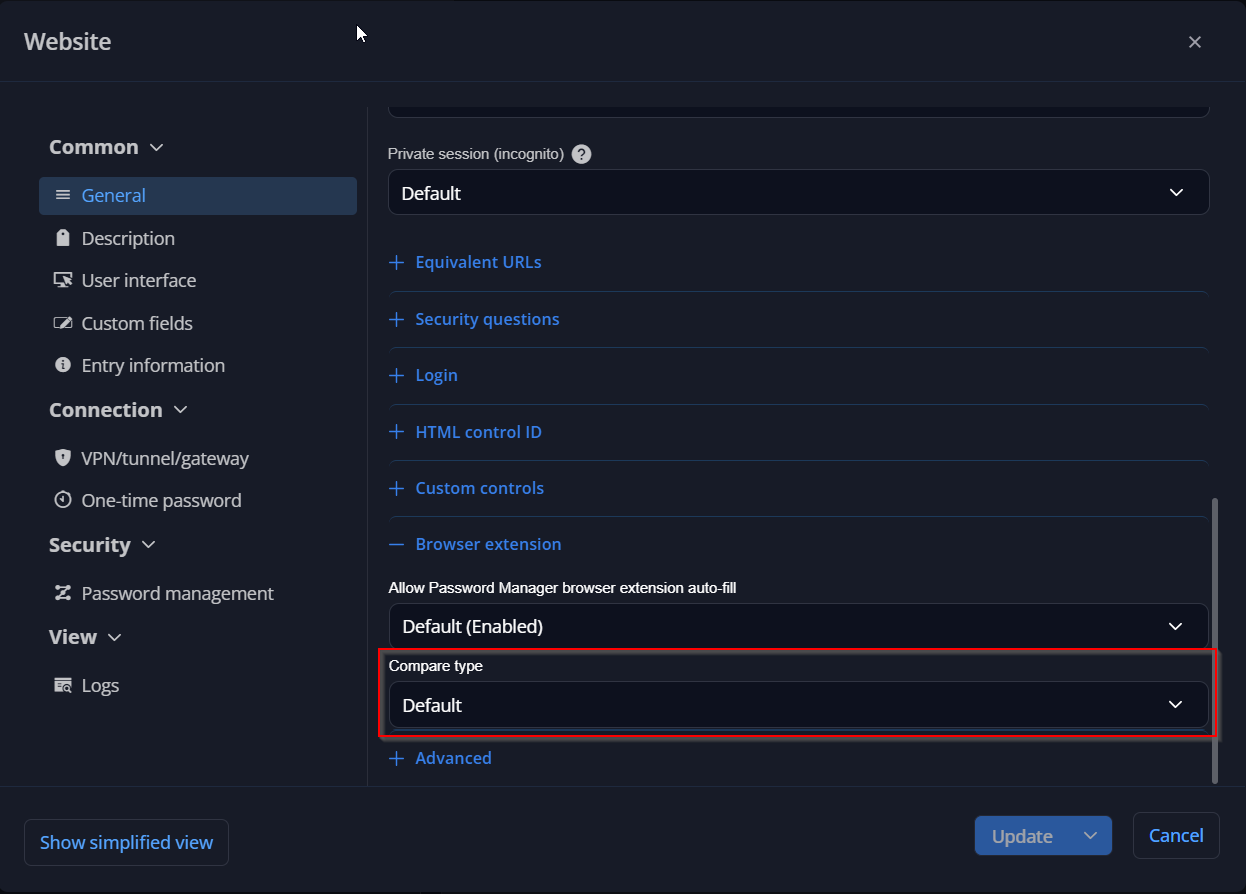
Regarding the "Exact Match" label, it was most likely the "Matching current website" section, which appears when you type in the search box and the results include both entries that match the page and entries that don't. There is no setting to make it appear in the default list.
Please let me know if this helps.
Best regards,
Bei RDP Verbindung auf Hyper-V Host werden lokale LW verbunden
Hallo,
vielen Dank, dass Sie sich an den Devolutions Support gewandt haben.
Wenn Sie über einen Hyper-V-Eintrag oder das Hyper-V-Dashboard Mit Hypervisor-Host verbinden verwenden, öffnet Remote Desktop Manager eine temporäre RDP-Verbindung zum Host. Diese Verbindung verwendet die Standardeinstellungen für lokale Ressourcen, zu denen auch die lokalen Laufwerke gehören. Anders als bei einem regulären RDP-Eintrag gibt es bei einem Hyper-V-Eintrag derzeit keine Option, um dies zu ändern. Deshalb verhalten sich Ihre anderen Server anders.
In der Zwischenzeit können Sie dies auf eine der folgenden Arten vermeiden:
Erstellen Sie einen regulären RDP-Eintrag für Ihren Hyper-V-Host, deaktivieren Sie in dessen Einstellungen unter Lokale Ressourcen die Laufwerke, und verwenden Sie diesen Eintrag anstelle von „Mit Hypervisor-Host verbinden“.
Wenn lokale Laufwerke in RDP-Sitzungen grundsätzlich nie freigegeben werden sollen, können Sie die Richtlinie „Freigabe lokaler Laufwerke deaktivieren“ anwenden. Sie gilt für alle RDP-Verbindungen, die aus Remote Desktop Manager geöffnet werden.
Weitere Informationen finden Sie in der folgenden Dokumentation:
Könnten Sie mir bitte bestätigen, wie Sie die Verbindung zum Hyper-V-Host öffnen (Hyper-V-Eintrag, Hyper-V-Dashboard oder regulärer RDP-Eintrag) und welche Version von Remote Desktop Manager Sie verwenden? So kann ich bestätigen, dass es sich um dieses Verhalten handelt.
Ich freue mich auf Ihre Rückmeldung.
Hinweis: Diese Nachricht wurde mithilfe von KI übersetzt.
Mit freundlichen Grüßen
RDM 2026.3.15 – Frequent DVLS Authentication Prompts, Slow Connections, and Freezing
Hello,
Thank you for the follow-up.
This issue matches an existing case that has already been escalated to our development team. The team has implemented a fix, and we are currently awaiting QA validation and the release of a new RDM version.
I have linked the development case to this support case so that you will be notified once the new RDM version containing the fix is released.
In the meantime, I would also recommend updating DVLS to the latest version, as a similar issue on the DVLS side was addressed in version 2026.3.12.0.
Thank you for your patience and understanding.
Best regards,
RDM 2026.3.15 – Frequent DVLS Authentication Prompts, Slow Connections, and Freezing
Hello,
Thank you for reaching out to Devolutions Support, and for the screenshots.
The "Yes, it's me" confirmation comes from a security change in recent Devolutions Server versions, which fixed a phishing risk in the device sign-in flow. This step can't be turned off, but it should only appear when Remote Desktop Manager needs a completely new sign-in. Normally, RDM restores the previous session at startup using a token saved on the device.
The "Not connected" screen in your screenshot appears when that sign-in doesn't complete. Because your users see the prompt this often, it seems their session isn't being restored, which also explains the slow connection attempts.
Could you please confirm the following?
Which authentication method is used for the Devolutions Server workspace (Windows SSO, Microsoft Entra ID, or a Devolutions Server user)
Whether Always ask for username is enabled in File > Workspaces > Edit workspace > General
The Refresh token lifetime value in Administration > Server settings > Advanced in the Devolutions Server web interface
Whether the affected users are on persistent workstations or non-persistent VDI
When the "Not connected" screen appears, whether clicking Reconnect connects right away or RDM becomes unresponsive
Could you also collect a debug log from an affected user by following the "Collect a debug log" section of this article, ideally including a time when the "Not connected" screen appears or RDM becomes unresponsive, with the approximate time it happened? This will help me find out why the session isn't being restored and what happens while RDM is frozen.
I look forward to your reply.
Best regards,
Auto-Sign-in office 365 portal from RDM
Hello,
Thank you for following up.
I apologize for the delay in my response.
RDM 2026.3.15.0 includes numerous bug fixes and stability improvements, making it significantly more reliable than previous versions.
Could you please update to version 2026.3.15.0 and check whether the issue persists?
If the issue remains, please share screenshots of your Website entry configuration, particularly the settings under Properties > Common > General > Login > HTML Control. This will help us investigate further.
Thank you for your patience and cooperation.
I look forward to your reply.
Best regards,
Possible regression in Devolutions Password Manager 2026.3.1.9 – Autofill fails with linked credentials and password lists
Hello,
Thank you for sharing the new logs.
Our development team is actively investigating the issue on their end. I will keep you updated as soon as we have any additional information to share.
Thank you for your patience and understanding.
Best regards,
Pasing issue with windows rdp connection.
Hello,
Thank you for the follow-up.
Since version 2026.3.15.0, Copy username and password works as a clipboard sequence. The username stays on the clipboard until you move to the next value. This prevents an application reading the clipboard in the background from consuming the username or password before you paste it. A notification is displayed while the sequence is active.
To paste both values, please use the following:
Ctrl+V to paste the username.
Ctrl+Alt+V to move to the next value.
Ctrl+V to paste the password.
Could you please try this in your RDP session and let me know if the password is pasted correctly? In the meantime, using Type clipboard as you are doing now is a valid alternative.
Regarding the Type Clipboard issue with longer text mentioned earlier in this topic, our development team has implemented a fix, and I will update this thread once a version containing it is released.
I look forward to your reply.
Best regards,
Possible regression in Devolutions Password Manager 2026.3.1.9 – Autofill fails with linked credentials and password lists
Hello,
Thank you for following up.
I've investigated the issue further and carefully reviewed your recording. Based on my findings, the two methods that are failing (User Vault and Linked Password List) appear to be affected by a similar issue.
1. User Vault Linked Credential
This method requires your User Vault to be selected in the vault filter of the DPM browser extension. Otherwise, DPM will not be able to resolve the linked credential.
Normally, the DPM browser extension should display a prompt allowing you to select the appropriate credential. However, based on your recording, this prompt does not appear to be displayed.
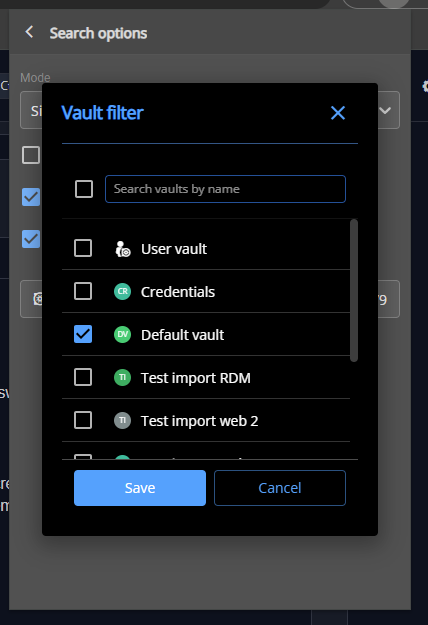
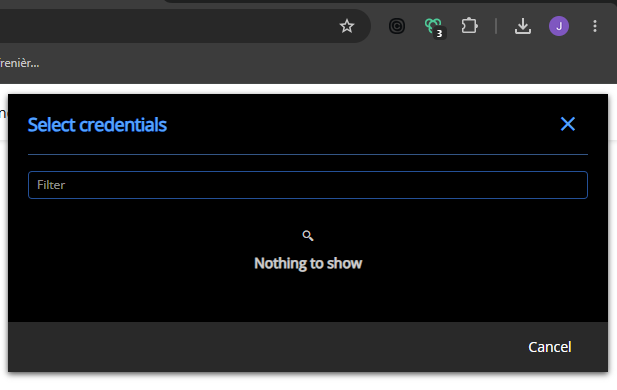
2. Password List Linked Credential
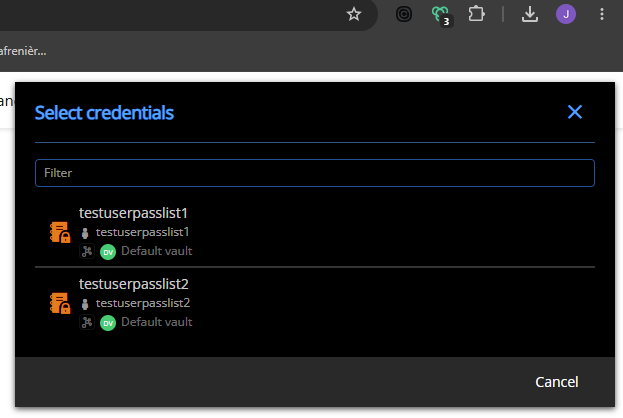
When linking a Password List to an entry in Devolutions Cloud, there is currently no option to preselect a specific credential from that list.
As a result, when selecting the entry through the browser extension, you should be prompted to choose a credential from the associated Password List.
Once again, based on your recording, this credential selection prompt appears to be missing.
Next Steps
To help us investigate further, could you please confirm which version of DPM you are currently using?
We will also need to collect additional diagnostic information. Could you please upload the following files to the SharePoint location previously shared with you?
An HAR report
A web console log export
You can find instructions on how to capture this information in the following documentation:
https://docs.devolutions.net/cloud/knowledge-base/how-to-articles/send-a-trace-report
Important: Before capturing or sharing the HAR report, please carefully review the disclaimer in the documentation regarding the potential exposure of sensitive information in HAR files.
Thank you for your continued cooperation and assistance with this investigation.
Best regards,
Another VPN/tunnel/gateway related issue
Hello,
Thank you for reaching out regarding this matter.
This behavior is most likely related to the original jump host issue you reported. I believe that once the underlying issue is resolved, the behavior you're currently experiencing should also be addressed.
I'll reach out to our development team to see if it's possible to increase the priority of the investigation.
Thank you for your continued patience and understanding.
Best regards,
Possible regression in Devolutions Password Manager 2026.3.1.9 – Autofill fails with linked credentials and password lists
Hello,
Thank you for the follow-up.
I'm still unable to reproduce the issue with the password list. The closest scenario I encountered was when I configured a password list without preselecting a credential.
In this case, autofill does not occur automatically. I first need to click on the extension and select a credential from the password list, after which autofill works as expected. However, this is normal behavior, as DPM cannot determine which credential to use when none has been preselected.
Is this similar to the behavior you're experiencing? Does autofill work correctly when a credential is preselected from a password list?
Regarding the support ticket, we can continue troubleshooting in this thread for now. I'll share a SharePoint link with you via private message so you can securely upload the logs for further investigation.
I look forward to your reply.
Best regards,
Best practice for sharing linked credentials across multiple vaults
Hello,
Thank you for reaching out regarding this matter.
That is a great question, and here is what I would recommend.
I suggest creating a dedicated vault for credentials that need to be shared. You can then link these credentials to different entries across multiple vaults.
Regarding permissions on the credentials themselves, granting the View permission is sufficient; the View Password permission is not required.
As for your last question, unfortunately, it is not possible to allow a user to use a credential without granting them View permission on the credential entry.
Please let me know if you have any further questions.
Best regards,
Certificate via ADFS for VCenter Login
Hello,
Thank you for the follow-up, and I am glad to hear that the Website entry works with your certificate.
Regarding the VMware dashboard, this entry connects directly to the vCenter API using a username and password. It does not go through the vCenter web sign-in page, so it cannot redirect to ADFS or request a certificate. Therefore, certificate-based authentication through ADFS is currently not supported for the VMware dashboard. Only username and password credentials can be used with it.
If this is something you would like to see added, I recommend posting a request in the Feature Request section of our forum for Remote Desktop Manager. This allows our product team to evaluate it and other users to show their interest.
Please let me know if you have any questions.
Best regards,
Certificate via ADFS for VCenter Login
Hello,
Thank you for reaching out regarding this matter.
Certificate-based authentication through ADFS should work in Remote Desktop Manager if you open your vCenter URL in a Website entry. I have not been able to test this on my side, since we do not have this ADFS setup in our lab.
Could you please try the following?
Create a Website entry pointing to your vCenter URL.
In the entry properties, go to General > Settings and make sure Ignore certificate authentication is unchecked.
Open the entry. When ADFS requests a certificate, Remote Desktop Manager should ask you to select one from your personal certificate store.
Please let me know whether it works. If it does not, please send me your Remote Desktop Manager version and a screenshot of what you see at the ADFS step.
Best regards,
Possible regression in Devolutions Password Manager 2026.3.1.9 – Autofill fails with linked credentials and password lists
Hello,
Thank you for the detailed follow-up and for running the control test with the duplicated entry.
Regarding your questions, we currently have no known regression matching this behavior. I tested this on my side with the same extension version, using a website entry with a linked credential, including one stored in another vault, and autofill worked correctly. This may indicate that the behavior is related to the existing entries or the extension's local data in your environment rather than to linked credentials in general.
To narrow this down, could you please run the following tests?
Create a new website entry for the same login page, linked to a new test credential entry with dummy values, and check whether the extension fills it.
On one existing affected entry, make a small change in Remote Desktop Manager (for example, add a character to the description), save it, then click Refresh in the extension and try the fill again.
In the extension, use Copy password on an affected entry and confirm whether the correct password is copied.
If the issue persists, please collect the extension logs by following the Edge section of this article: https://docs.devolutions.net/password-manager/knowledge-base/browser-extension-knowledge-base/devolutions-password-manager-browser-extension-troubleshooting-connection-logs/#edge Under Inspect views, the link may be shown as service worker or background/background.html depending on the extension version. Once the DevTools window is open, try the fill on an affected entry again, then send me a screenshot of the Console tab and of any request shown in red in the Network tab.
These results will help me determine whether the issue comes from the existing entries themselves or from the extension.
I look forward to your reply.
Best regards,
Pasing issue with windows rdp connection.
Hello,
Thank you for following up.
I tested the behavior on my end, and you are correct. The issue still occurs when the copied text is long enough to trigger the prompt.
I will request that the internal case be reopened and will keep you updated once a fix has been deployed.
Thank you for your patience and understanding.
Best regards,
Pasing issue with windows rdp connection.
Hello,
Thank you for the feedback,
I will set this topic as resolved, if the issue comes back feel free to reply bellow to reopen it!
best regards
Pasing issue with windows rdp connection.
Hello,
A quick follow-up with some good news.
The development team identified the issue and has implemented a fix. The fix is planned for release in version 2026.3.13.0.
Unfortunately, I do not have an ETA for this release yet, but I wanted to share the good news and keep you updated on the progress.
Thank you for your patience and understanding.
Best regards,
Pasing issue with windows rdp connection.
Hello,
Thank you for reaching out regarding this matter.
I was able to reproduce the issue with the Type Clipboard feature using the latest version of RDM (2026.3.12.0).
I will report this issue to our development team so they can investigate and work on a fix.
I will follow up with you as soon as a fix becomes available in a future update.
Best regards,
Remote Desktop Sessions Disconnecting Improperly
Hello,
Thank you for the follow-up.
I believe you are using RDM on macOS. Could you please confirm this? I want to make sure we are discussing this issue in the correct section of the forum.
Regarding RDM for macOS, we released version 2026.3.1.2 yesterday. Could you please update your RDM instance to the latest version and let me know if the issue persists?
If RDM indicates that you are already running the latest version when using Help > Check for Updates, please download and install the latest version directly from our Download Center. We have encountered an issue with the update check in the past, and I apologize for any confusion or inconvenience this may cause.
https://devolutions.net/remote-desktop-manager/download/
I look forward to your reply.
Best regards,
Backup and Restore gone?
Hello,
Thank you for reaching out regarding this matter.
Could you please confirm which type of workspace you are currently using? You can find this information under File > Workspaces.
Once I know which workspace you are using, I will be able to provide you with more specific information and guidance.
I look forward to your reply.
Best regards,
multiple session autofocus prompt
Hello,
Thank you for reaching out regarding this matter.
I spoke with the development team, and they confirmed that you can press either Enter or the Spacebar on the multiple-entry opening prompt to proceed successfully. However, the focus indicator is not currently displayed correctly on the prompt, which makes this behavior unclear.
I have asked the development team to review this, and they will work on resolving the remaining user interface issue.
I apologize for the confusion. I’ll keep you updated once the fix is released.
Best regards,
tile vertical has a sizing of its own
Hello,
Thank you for the follow-up.
You are correct, the issue where focus is not automatically placed on the open multiple-entry prompt is still present in version 2026.3.10.0.
I have requested that the internal case be reopened so the team can investigate and work on this issue again.
I look forward to your reply.
Best regards,