Remote Desktop Sessions Disconnecting Improperly

In one of the past few RDM releases, whenever a Microsoft RDP session is closed, there is a high chance that the next time I try to RDP into it, I'll get the following error shown below. 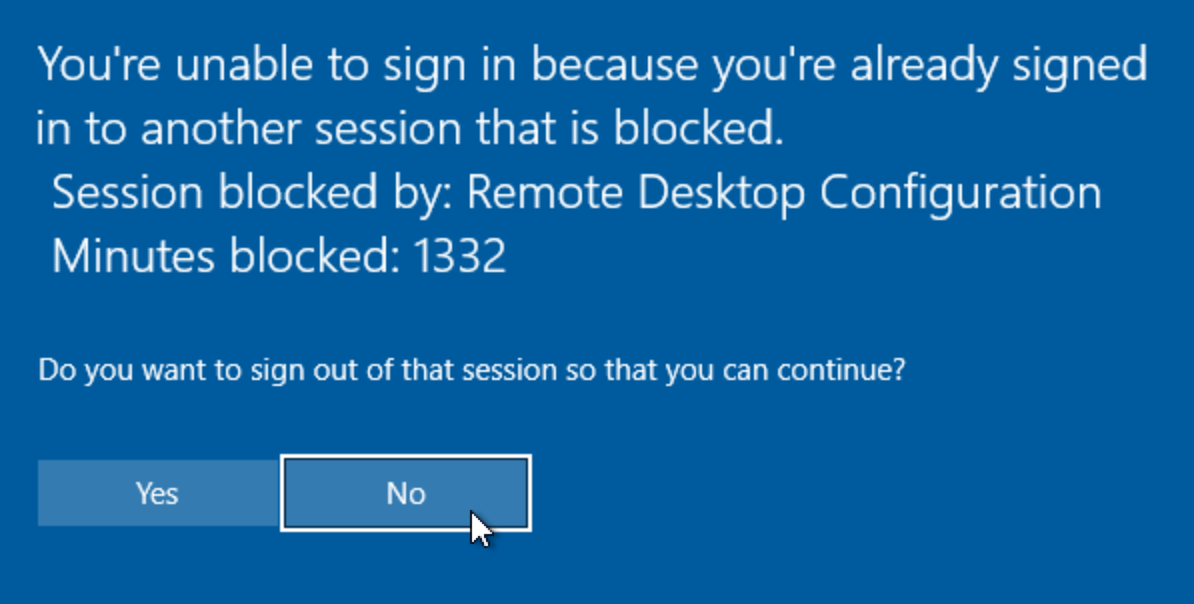
If I click Yes, it logs out of the current session I want to connect to and starts a new RDP session. If I click No, it kills the attempted RDP connection. On the Windows side, it still thinks that there is an active RDP session even though it was closed in RDM. If I go to Task Manager and view the user, it doesn't show the user as disconnected. When it's in this state, I either have to wait for an unknown amount of time before Microsfte registers that it's disconencted and will allow me again to RDP in, or I have to do the following hack to force it out of its fake connected state.
# Connect remotely to the locked PC
Enter-PSSession -ComputerName <computerHostname>
# Get a list of the RDP connections
query session
# Force disconnect the "active" connection that needs to be disconnected
tsdiscon <sessionID>
If I don't execute the command above, I'm unable to RDP into the current RDP session as the OS still thinks it's connected and has somehow gotten into this state. If I wait for a while, I can log in again, but I'm not sure when the PC I want to RDP into decides it's OK again to log in. This is happening on multiple VMs and desktops that I'm trying to RDP into.
Current RDM: 2026.2.4.4
b092f32d-d794-4a09-8e61-f8eb20c9744f.png
All Comments (13)
Hello,
Thank you for reaching out regarding this matter.
The RDM version you are currently using appears to be for macOS. Could you please confirm if this is correct?
If so, I will transfer the case to the macOS section of the forum.
Additionally, would it be possible for you to update RDM to the latest version and try again?
The latest versions are:
- RDM for Windows: 2026.3.9.0
- RDM for macOS: 2026.3.0.5
Please let me know if updating RDM resolves the issue.
Best regards,
Jacob Lafrenière
I am running the latest RDM (2026.2.4.4). With the latest version, I've still had it happen a couple of times. It seems like maybe it's happend a bit less, but it's still happened to ma a few times since the upgrade a few days ago.
Hello,
Thank you for the follow-up.
I believe you are using RDM on macOS. Could you please confirm this? I want to make sure we are discussing this issue in the correct section of the forum.
Regarding RDM for macOS, we released version 2026.3.1.2 yesterday. Could you please update your RDM instance to the latest version and let me know if the issue persists?
If RDM indicates that you are already running the latest version when using Help > Check for Updates, please download and install the latest version directly from our Download Center. We have encountered an issue with the update check in the past, and I apologize for any confusion or inconvenience this may cause.
https://devolutions.net/remote-desktop-manager/download/
I look forward to your reply.
Best regards,
Jacob Lafrenière
Yes, this is for MacOS. Also, I just updated to the following MacOS release below:
Remote Desktop Manager 2026.3.1.2
Runtime: .NET 10.0.12
Platform: macOS 26.6.2
Workspace: Local Data Fix
Allocated memory: 247 MB
I will keep my eye out and see if I have the RDP error show up with this new release.
Hello
Just to clarify, you are talking about embedded RDP sessions in RDM? Not those launched externally (i.e. in Windows App)? I assume it's true based on your report, but I do want to clarify because I will say that I also experience this semi-regularly with Windows App but not embedded sessions in RDM. The RDP engine is different in both cases.
Thanks and kind regards,
Richard Markievicz
Yes, this is specifically for the embedded RDP that is built into RDM and not the external Windows App by Microsoft. I like utilizing the tabs because of how many RDP sessions I log into each day for my job.
Hello
Thanks. If the issue goes away after updating, that's great; but I suspect it will not. So if you're still experiencing it, please follow up.
I've done some digging here and there's a couple of things I noticed:
- When an RDP client closes a session cleanly, it sends a disconnect ultimatum to the server. The most likely thing in your case is that this is not being sent. I tried on my machine, and on a normal graceful disconnect it works correctly: the PDU is sent, TLS is torn down, the session ends happily.
- I noticed what might be a latching issue in FreeRDP. From a quick look, an unrelated transient error earlier in the session (a brief network stall, something like that) could cause it to skip sending the disconnection notice
- Additionally it always logs that it sent the disconnection notice, even if it actually failed
- Both of these need a closer look on my side
- However, even without the disconnection notice, the dropped TCP connection should still cause the server to mark the session disconnected. For it to remain active, the teardown mustn't have reached the server and so the server thinks the connection is still up until the keep alive timeout. The RDP level keep alive is not configured by default on Windows (it's a GPO), which means we fall under TCP rules and the timeout could be something like 2 hours.
- But it's not clear to me why the TCP connection isn't getting torn down (or at least, the half that the server sees). Are you making direct connections here? Or are you using e.g. RD Gateway, Devolutions Gateway; a VPN, something along those lines? Any details would be helpful
Please, let me know if something isn't clear or you have other questions
Kind regards,
Richard Markievicz
I just had it occur again. I did notice a new bug with the current RDM that may actually increase the rate of the issue.
Whenever I return to a different tab, it will automatically reconnect the RDP conenction even through the actual screen resolution or window size has not changed for the RDM session. I have "Show tabs in multiple rows" disabled. Sometimes the connections will reconnect if the tabs go from a single row to 2 rows and now the available pixel space for the RDP window changes and reconnects the RDP session as a result. For my case, with the single row, it's reconnecting every tab every time I switch to a differnt tab, the just selected tab will show the display, then shortly after refresh the connection. It's worth noting that I also have the Screen sizing mode set to "Smart reconnect" which I presume is what is causing this issue to occur, but since the screen resolution and tab rows has not changed in size, the RDP connection should not be reconnecting each time the tab is switched.
Hello
The same thing was reported today by another user. It looks like the ribbon is causing a layout recalculation when switching tabs, and that may or may not be noticeable depending on your screen sizing mode but it will be very noticeable with smart reconnect. Is there a reason you don't use dynamic resolution? It's much more ergonomic. Regardless, that is clearly a bug on our side and I'm going to address it at a high priority. I'll link the ticket here so you're notified of the fix version.
In the meantime, I recommend switching to dynamic resolution and/or if you can, either collapse the ribbon or switch it to the "simplified ribbon". That should workaround the issue.
In terms of your original problem, yes if you're getting a lot of unexpected reconnections that would certainly aggravate things. Can you tell me if you're connecting directly to your servers, or you're traversing some kind of tunnel / Gateway / VPN?
Thanks and kind regards,
Richard Markievicz
Hello
Sorry - correction to my previous post - I think this is caused by using the collapsed ribbon, so the closest workaround would be the simplified ribbon instead. Let me know if that helps.
Kind regards,
Richard Markievicz
Hi @davisoncaleb
I responded on the other thread about the reconnection issue with the collapsed ribbon. Sorry for the inconvenience, it should be fixed in the next version of RDM Mac and for now using the full or simplified ribbon should workaround the problem, unless you can confirm otherwise.
For your original post, I'd still like to understand if you're connecting directly to your RDP servers or otherwise traversing any kind of tunnel, Gateway or VPN.
Thanks and kind regards,
Richard Markievicz
Hi @davisoncaleb
I responded on the other thread about the reconnection issue with the collapsed ribbon. Sorry for the inconvenience, it should be fixed in the next version of RDM Mac and for now using the full or simplified ribbon should workaround the problem, unless you can confirm otherwise.
For your original post, I'd still like to understand if you're connecting directly to your RDP servers or otherwise traversing any kind of tunnel, Gateway or VPN.
Thanks and kind regards,
@Richard Markiewicz
I am connected directly to my RDP servers directly to their IP addresses on my LAN. I am not using any tunnel, gateways, or VPN.
Hi @davisoncaleb
So to recap what I think I already said: there's two possible failure modes that I can see here, and they're independent but they might also combine:
- FreeRDP isn't sending the disconnect ultimatum to the server
- The transport is not being torn down or not fully torn down leaving at least half an open TCP connection
We know that in this state the server still considers the connection "Active". FreeRDP might be able to tell us what's going on if we could see a log, but actually that's a bit tricky due to the way logging works in RDM and the fact that this is only happening somethings (the logging is not really tuned to gather logs across multiple independent sessions).
So maybe we can try to narrow this down a bit further. The next time you find yourself in this state, while the session is still shown "Active" on the server, can you check:
- Event Viewer > Applications and Service Logs > Microsoft > Windows > Terminal Services-LocalSessionManager > Operational
- A normal disconnection on my side is two events: event 40 followed by event 24. Do you see the same thing?
- PowerShell >
Get-NetTCPConnection -State Established | Where-Object { $_.LocalPort -eq 3389 }- Do you see an established connection from your client (Mac) IP address? This will be trickier to acknowledge if you have more than one RDP session from your Mac to that server at that time, but if it's just a single connection and it's still listed, the TCP connection is still up (as far as the server is concerned)
Please, let me know if something isn't clear or you have further questions
Kind regards,
Richard Markievicz