tile vertical has a sizing of its own

before when you tiled vertically it would be equal sized windows depending on amount of space vs how many connection windows open.
now over last couple versions it will sometime make the middle one about 1/2 the screen. left one about a quarter and right one a quarter. toggling cascade and back to vertical corrects it
Remote Desktop Manager 2026.3.8.0 64-bit (PreJIT)
Runtime: .NET 10.0.12
Platform: Microsoft Windows 10.0.26100
Workspace: Local Data Source
Allocated memory: 593 MB
All Comments (9)
Hello,
Thank you for reaching out regarding this matter.
Could you please share screenshots of the issue? This will help me better understand what you are experiencing and assist you further.
I look forward to your reply.
Best regards,
Jacob Lafrenière
Hello,
Thank you for reaching out regarding this matter.
Could you please share screenshots of the issue? This will help me better understand what you are experiencing and assist you further.
I look forward to your reply.
Best regards,
@Jacob Lafrenière
I set view as vertical, and then I CTRL+select 3 ssh connection from nav menu. I get prompted to confirm i want to open 3.(btw, this does not get auto focus so I cant press enter to confirm, i have to use mouse... new issue)
Then all 3 servers launch and connect and this is how they display instead of 3 equal windows:
****** 1= 1/4 ****************** 2= 1/2 ***************** 3= 1/4******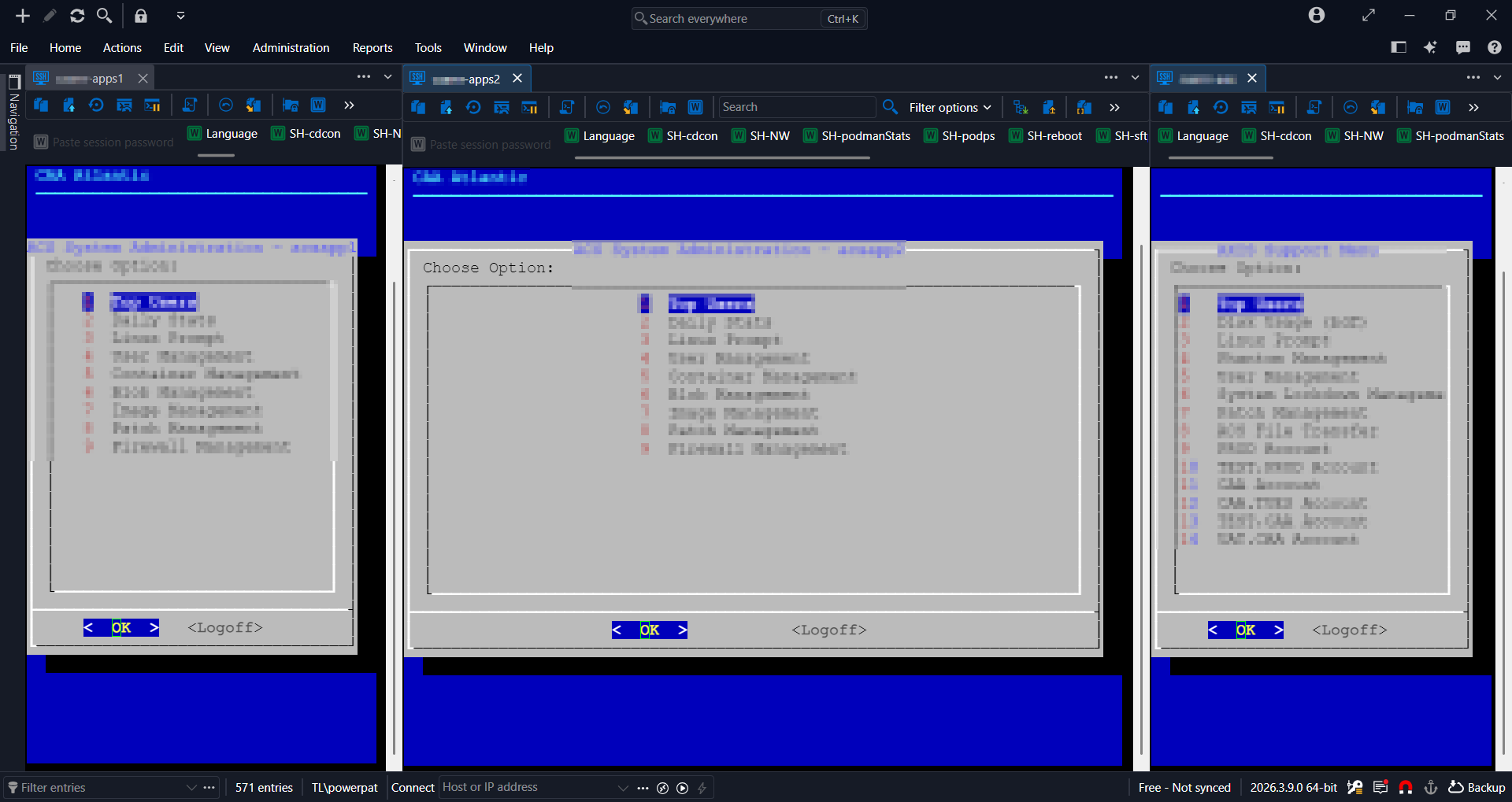
3da87fa5-05a4-4b5c-8e0f-63252abb572e.png
Hello,
Thank you for the follow-up.
I was able to reproduce both issues on my side and have reported them to the development team. They will begin working on fixes.
I will keep you updated once the issues have been resolved and the fixes have been deployed in a new version.
Thank you for your patience.
Best regards,
Jacob Lafrenière
Hello,
Thank you for being so patient!
If possible, could you update your RDM to the latest version (2026.3.10.0) and see if the problem persists? This version should resolve your issue.
Latest Version: Download RDM
If the problem persists after the update, please let us know so we can inform our development team.
Best regards,
Maxim Robert
yes appears to be resolved. the additional issue still is not. I will make a new post for it
"I CTRL+select 3 ssh connection from nav menu. I get prompted to confirm i want to open 3.(btw, this does not get auto focus so I cant press enter to confirm, i have to use mouse)"
Hello,
Thank you for the follow-up.
You are correct, the issue where focus is not automatically placed on the open multiple-entry prompt is still present in version 2026.3.10.0.
I have requested that the internal case be reopened so the team can investigate and work on this issue again.
I look forward to your reply.
Best regards,
Jacob Lafrenière
Hello,
Thank you for the follow-up.
You are correct, the issue where focus is not automatically placed on the open multiple-entry prompt is still present in version 2026.3.10.0.
I have requested that the internal case be reopened so the team can investigate and work on this issue again.
I look forward to your reply.
Best regards,
@Jacob Lafrenière
https://forum.devolutions.net/topics/56559/multiple-session-autofocus-prompt
Hello,
Thank you for being so patient!
If possible, could you update your RDM to the latest version (2026.3.12.0) and see if the problem persists? This version should resolve your issue.
Latest Version: Download RDM
If the problem persists after the update, please let us know so we can inform our development team.
Best regards,
Maxim Robert
Hello,
Thank you for being so patient!
If possible, could you update your RDM to the latest version (2026.3.12.0) and see if the problem persists? This version should resolve your issue.
Latest Version: Download RDM
If the problem persists after the update, please let us know so we can inform our development team.
Best regards,
@Maxim Robert
confirmed