Possible regression in Devolutions Password Manager 2026.3.1.9 – Autofill fails with linked credentials and password lists
Possible regression in Devolutions Password Manager 2026.3.1.9 – Autofill fails with linked credentials and password lists

Hello Devolutions Support Team,
We are experiencing an issue with the Devolutions Password Manager browser extension in Microsoft Edge.
The autofill functionality stopped working correctly recently, although the exact same configuration worked without any issues until approximately October 8, 2026.
We suspect a regression introduced by a recent update of the browser extension or Remote Desktop Manager.
Environment
- Remote Desktop Manager: 2026.3.12.0 (64-bit)
- Devolutions Password Manager extension: 2026.3.1.9
- Microsoft Edge: 155.0.4283.45 (64-bit)
- Windows: 11 26H2 (Build 26300.9457)
Problem Description
The browser extension correctly detects and displays matching entries from Remote Desktop Manager.
However, autofill fails when the corresponding RDM entry uses referenced credentials instead of directly stored credentials.
We have identified the following behavior:
Credential ConfigurationAutofill Result
Username and password stored directly in the RDM entry --> Working
Credentials – Linked (Vault) --> Not working
Credential – Find by name (User Vault) --> Not working
Credentials referenced from a Password List --> Not working
When selecting an affected entry in the browser extension, neither the username nor the password is inserted into the login fields.
Steps to Reproduce
- Create a website entry in Remote Desktop Manager.
- Configure the entry to use linked credentials or credentials referenced from a Password List or User Vault.
- Open the corresponding login page in Microsoft Edge.
- Select the matching entry in the browser extension.
- Observe that the username and password fields remain empty.
Control test:
- Duplicate the same RDM website entry.
- Configure the duplicated entry with a username and password stored directly in the entry.
- Open the same login page using the same browser and extension.
- Autofill works correctly.
This confirms that the issue is specifically associated with referenced credentials rather than the login page itself.
Troubleshooting Performed
- Restarted Microsoft Edge and Remote Desktop Manager.
- Disabled other browser extensions to rule out conflicts.
- Verified extension permissions.
- Tested multiple websites and autofill methods.
- Inspected the browser developer console.
- Reviewed browser policies and security settings.
- Tested different HTML form configurations.
The issue persists with linked or referenced credentials.
Expected Behavior
The browser extension should automatically resolve referenced credentials from RDM and fill the username and password fields, as it did previously.
Actual Behavior
Entries are correctly detected and displayed, but autofill does not populate the login fields when credentials are referenced.
Questions
- Is this a known regression in Devolutions Password Manager 2026.3.1.9 or RDM 2026.3.12.0?
- Have there been recent changes to the handling of linked credentials, Password Lists or User Vault references?
- Is there an available hotfix, newer version or recommended workaround?
- Are there specific debug logs we can provide to help investigate this issue?
We rely on centralized credential management and would prefer to avoid storing duplicate credentials directly in individual website entries.
Thank you for your assistance.
Best regards,
Oliver
Recommended Answer
Hello,
Thank you for your patience while our team looked into the issue you reported.
I'm happy to let you know that the latest version of the Devolutions Password Manager browser extension (2026.3.3.0) includes a fix for this problem. You can download it from our website here:
https://devolutions.net/password-manager/download/
Please note that the version for Microsoft Edge and Chrome/Brave is currently under review. Unfortunately, there is nothing we can do in the meantime, and we have to wait for it to be approved. Once it has been approved, please update the extension to get the fix.
Once you have installed the update, could you please test it in your environment and confirm that everything now works as expected? If the issue persists or if you notice anything unusual related to the same original problem, just reply to this message with a few details, and we will be glad to look into it further.
Thank you for your collaboration.
Best regards,
Maxim Robert
All Comments (15)
Hi,
To help us narrow down the issue:
Is the Devolutions Password Manager browser extension connected directly to Remote Desktop Manager or Devolutions Server or Devolutions Cloud?
Are you using the “Automatically fill in credentials on load” option, or are you manually selecting the entry from the extension?
Have you configured any HTML Control IDs in the affected website entries?
Best regards,
Olivier Désalliers
Hi Olivier,
Thanks for your reply!
I've tested both automatic autofill on page load and manually selecting the entry from the extension. Neither works.
I also tried reinstalling the browser extension and switching between a direct connection to the locally installed RDM using an Application Key and our Devolutions Cloud Workspace. Unfortunately, the behavior is the same in both cases.
I haven't configured any custom HTML Control IDs in the affected entries.
One interesting finding: Autofill works perfectly when I store the username and password directly in the website entry. It only fails when the credentials are linked to another vault entry, retrieved by name from the User Vault, or referenced from a Password List.
Since this worked until recently, I suspect something may have changed in one of the latest updates.
Let me know if there's anything else I can check.
Best regards,
Oliver
Hello,
Thank you for the detailed follow-up and for running the control test with the duplicated entry.
Regarding your questions, we currently have no known regression matching this behavior. I tested this on my side with the same extension version, using a website entry with a linked credential, including one stored in another vault, and autofill worked correctly. This may indicate that the behavior is related to the existing entries or the extension's local data in your environment rather than to linked credentials in general.
To narrow this down, could you please run the following tests?
- Create a new website entry for the same login page, linked to a new test credential entry with dummy values, and check whether the extension fills it.
- On one existing affected entry, make a small change in Remote Desktop Manager (for example, add a character to the description), save it, then click Refresh in the extension and try the fill again.
- In the extension, use Copy password on an affected entry and confirm whether the correct password is copied.
- If the issue persists, please collect the extension logs by following the Edge section of this article: https://docs.devolutions.net/password-manager/knowledge-base/browser-extension-knowledge-base/devolutions-password-manager-browser-extension-troubleshooting-connection-logs/#edge Under Inspect views, the link may be shown as service worker or background/background.html depending on the extension version. Once the DevTools window is open, try the fill on an affected entry again, then send me a screenshot of the Console tab and of any request shown in red in the Network tab.
These results will help me determine whether the issue comes from the existing entries themselves or from the extension.
I look forward to your reply.
Best regards,
Jacob Lafrenière
Hi Jacob,
I was able to narrow down the issue further. Regular linked credentials work correctly.
The problem specifically occurs when using credentials from a Password List, either through "Find by name (User Vault)" or "Linked (Vault)".
The extension correctly finds the entries, and I can manually copy both the username and password from the extension and paste them into the login fields. However, autofill does not work with these Password List entries.
I'm currently trying to collect more information through the browser developer tools.
Could you please provide a support ticket number so I can send you the logs and diagnostic data directly rather than posting them publicly in the forum?
Best regards,
Oliver
Hello,
Thank you for the follow-up.
I'm still unable to reproduce the issue with the password list. The closest scenario I encountered was when I configured a password list without preselecting a credential.
In this case, autofill does not occur automatically. I first need to click on the extension and select a credential from the password list, after which autofill works as expected. However, this is normal behavior, as DPM cannot determine which credential to use when none has been preselected.
Is this similar to the behavior you're experiencing? Does autofill work correctly when a credential is preselected from a password list?
Regarding the support ticket, we can continue troubleshooting in this thread for now. I'll share a SharePoint link with you via private message so you can securely upload the logs for further investigation.
I look forward to your reply.
Best regards,
Jacob Lafrenière
Hello Jacob,
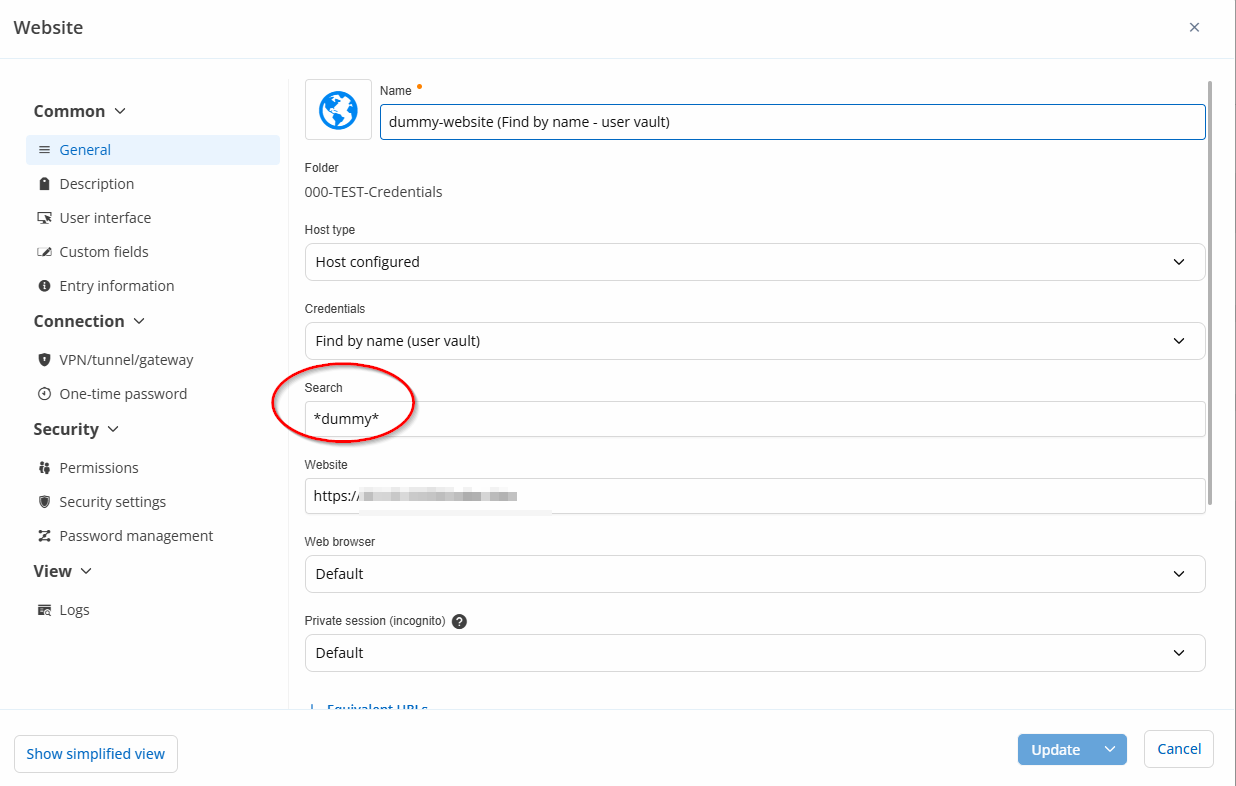
I've uploaded a recorded TeamViewer session to the SharePoint folder you provided. The recording demonstrates three scenarios:
- Find by name (User Vault) – Autofill fails
- Directly linked credentials – Autofill works
- Credentials linked from a Password List – Autofill fails
In the recording, you can see the configuration of the website entries and the dummy credentials used for testing.
I manage these entries using the native Remote Desktop Manager application, where everything works as expected.
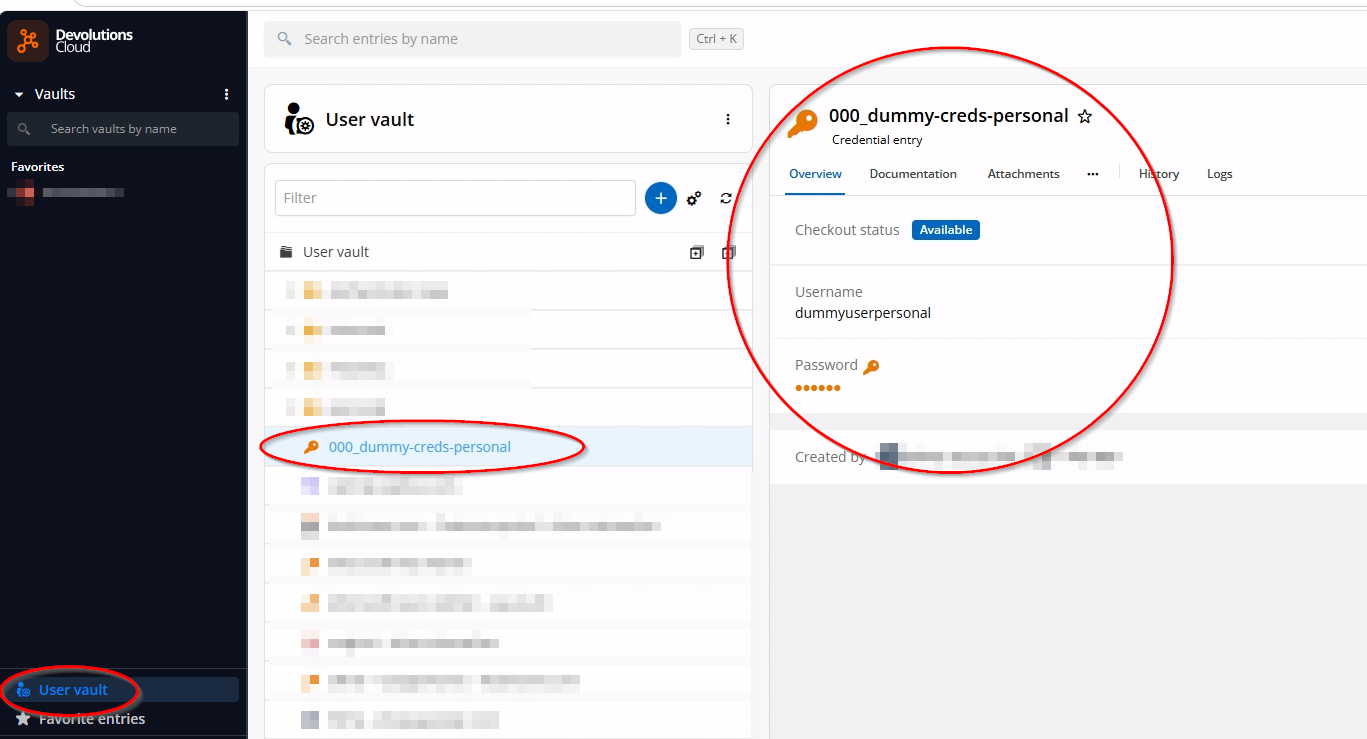
However, I noticed something interesting: When I open the same vault in the Devolutions web app, the affected entries cannot be found.
I'll also attach screenshots of the relevant entry configurations to help illustrate the issue.
Best regards,
Oliver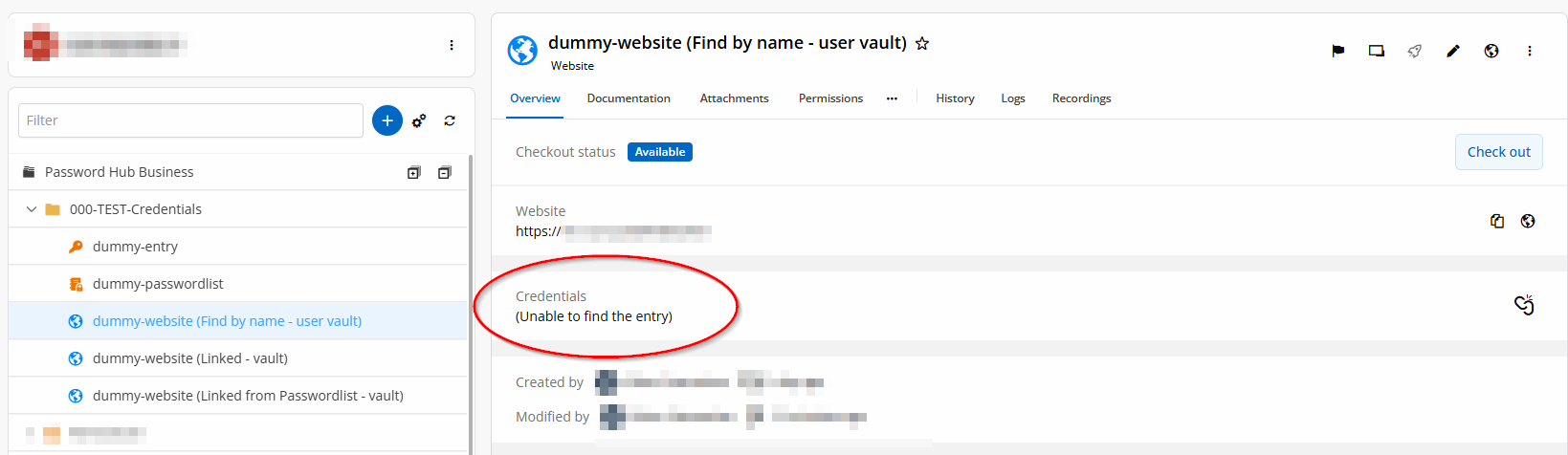
141abfbf-c2d1-4c60-8ff4-fc130f2cb8e9.png
f37d2f15-ef75-4564-a4f9-d49fb3edc559.png
47cb9dc6-792f-4a7b-abc8-108f291bacbf.png
Hello,
Thank you for following up.
I've investigated the issue further and carefully reviewed your recording. Based on my findings, the two methods that are failing (User Vault and Linked Password List) appear to be affected by a similar issue.
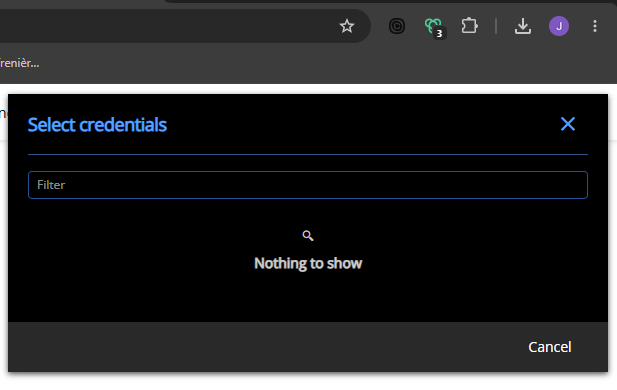
1. User Vault Linked Credential
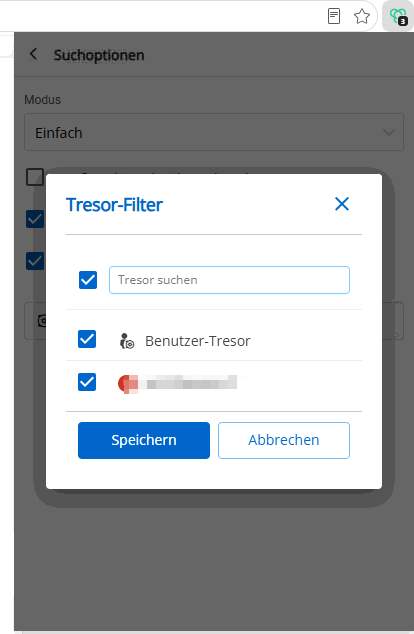
This method requires your User Vault to be selected in the vault filter of the DPM browser extension. Otherwise, DPM will not be able to resolve the linked credential.
Normally, the DPM browser extension should display a prompt allowing you to select the appropriate credential. However, based on your recording, this prompt does not appear to be displayed.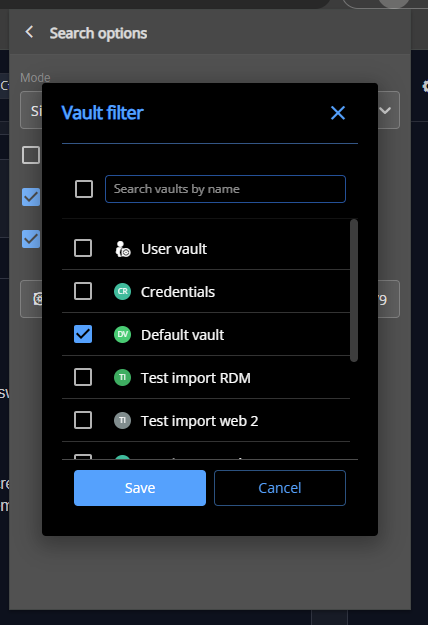
2. Password List Linked Credential
When linking a Password List to an entry in Devolutions Cloud, there is currently no option to preselect a specific credential from that list.
As a result, when selecting the entry through the browser extension, you should be prompted to choose a credential from the associated Password List.
Once again, based on your recording, this credential selection prompt appears to be missing.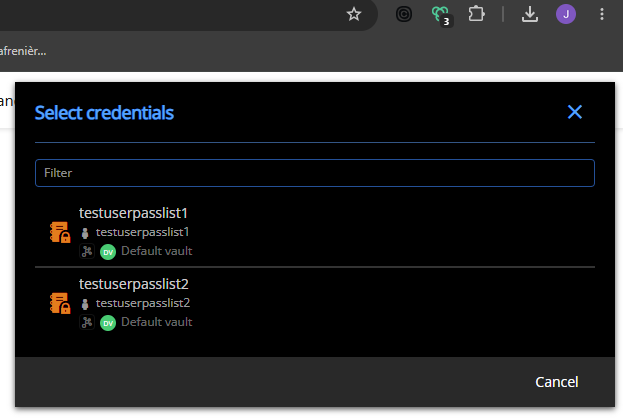
Next Steps
To help us investigate further, could you please confirm which version of DPM you are currently using?
We will also need to collect additional diagnostic information. Could you please upload the following files to the SharePoint location previously shared with you?
- An HAR report
- A web console log export
You can find instructions on how to capture this information in the following documentation:
https://docs.devolutions.net/cloud/knowledge-base/how-to-articles/send-a-trace-report
Important: Before capturing or sharing the HAR report, please carefully review the disclaimer in the documentation regarding the potential exposure of sensitive information in HAR files.
Thank you for your continued cooperation and assistance with this investigation.
Best regards,
Jacob Lafrenière
f9fa8180-791d-4241-b030-46db9101616d.png
cb9fbca9-bbb0-48b9-894a-52742fc390f4.png
f6cff87b-6d9a-4e96-9f87-783966df34e6.png
Hi Jacob,
I've done some further testing on a different computer with a freshly installed DPM extension. I also tested Chrome and Firefox, and all three browsers show exactly the same issue.
Current versions:
- Microsoft Edge: 155.0.4283.62 (64-bit)
- DPM extension: 2026.3.1.9
I've recorded another TeamViewer session and uploaded the recording, along with the corresponding logs and HAR files, to the SharePoint folder.
Since the issue occurs across different browsers and computers, it doesn't seem to be related to a specific browser installation.
Hopefully, the additional logs will help identify the cause.
Best regards,
Oliver
2026-10-21 07_31_31- TeamViewer.jpg
Hello,
Thank you for sharing the new logs.
Our development team is actively investigating the issue on their end. I will keep you updated as soon as we have any additional information to share.
Thank you for your patience and understanding.
Best regards,
Jacob Lafrenière
Hello,
We might have found a cause for this issue but we are not sure.
We recently found an issue with the .json and .rdm entry imports in the Cloud web client as well as some other clients, this issue caused imported entries to have a corrupted vault id which would explain the debug print that says the extension cannot find the entry.
To confirm this we would like to know if the workaround of editing the entry name and saving it in the web client fixes your issue, you would have to do this for the website and linked entries.
Best regards,
Samuel
Hi Samuel,
I tested your workaround and can confirm that it works. After editing and saving the affected entries in the Cloud web client, autofill works correctly again.
This strongly suggests that the corrupted vault ID is indeed the cause of the issue.
However, we have quite a few entries in our User Vault, and manually editing and saving all of them would be very time-consuming.
I'm looking forward to the hotfix!
Thanks again for your help!
Best regards,
Oliver
Hello Oliver,
Thanks for the confirmation, a hotfix has been made and will be deployed for the next minor extension version.
Said version will most likely pass QA at the start of next week and will be out after the extension stores finish their review and approval process which has no set ETA.
We will notify you when it is released. If the problem persist after the update, please contact us in this tread so we can debug further.
Best regards,
Samuel
Hello,
Thank you for your patience while our team looked into the issue you reported.
I'm happy to let you know that the latest version of the Devolutions Password Manager browser extension (2026.3.3.0) includes a fix for this problem. You can download it from our website here:
https://devolutions.net/password-manager/download/
Please note that the version for Microsoft Edge and Chrome/Brave is currently under review. Unfortunately, there is nothing we can do in the meantime, and we have to wait for it to be approved. Once it has been approved, please update the extension to get the fix.
Once you have installed the update, could you please test it in your environment and confirm that everything now works as expected? If the issue persists or if you notice anything unusual related to the same original problem, just reply to this message with a few details, and we will be glad to look into it further.
Thank you for your collaboration.
Best regards,
Maxim Robert
Hello,
Important detail, the update does fix the issue but does not fix entries that already exists. To fix your entries you need to refresh by clicking this button: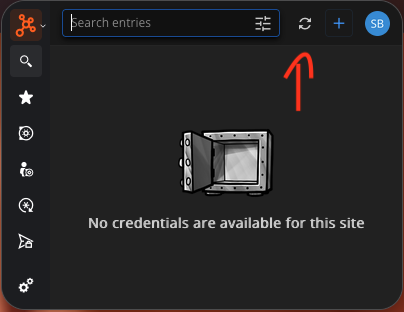
everything should work afterwards
Best regards,
Samuel
e8072310-0f1d-4866-8eb7-27ce9a90d6aa.png
Hi Samuel and Maxim,
I've updated Remote Desktop Manager to version 2026.3.17.0 and the browser extension to version 2026.3.3.0. After refreshing the entries in the extension, everything is working perfectly again, including autofill with the previously affected credentials.
Thank you both and the entire team for your great support and for fixing the issue!
Best regards,
Oliver