
davisoncaleb
Entry Menu Actions Target the Main RDM Window Instead of the Actively Selected External Window
Ah! That Auto-focus tab on item select was the culprit! I swtiched to 'Always' and now it's doing what I'd expect! Not perfect, but much better than what it was before! It actually works now if I click on the tab first.
Entry Menu Actions Target the Main RDM Window Instead of the Actively Selected External Window
I don't understand why the Entry actions are tied to the main RDM window instead of the window that currently has focus.
If I have multiple RDM windows open and I'm actively working with an entry in the second window, I would expect Reconnect Entry to reconnect that active entry. Performing the action against an entry in another window that I'm not currently using feels unexpected and makes the behavior of these shortcuts confusing.
A good comparison is Chrome. With multiple Chrome windows open, clicking Reload applies to the active tab in the window that currently has focus. It doesn't reload a tab in the original or main Chrome window.
I believe RDM's Entry actions should follow the same behavior: the action should apply to the active entry in the currently active RDM window.
Entry Menu Actions Target the Main RDM Window Instead of the Actively Selected External Window
Issue: Entry menu actions target the main RDM window instead of the active external window.
When a session is open in an external RDM window, selecting Entry > Reconnect reconnects the active tab in the main RDM window instead of the session selected in the external window.
Using the Connect button directly from the external window works as expected.
The issue appears to affect multiple actions within the Entry menu. These actions seem to target the active tab in the main RDM window rather than the currently selected session in the external window.
Remote Desktop Manager 2026.3.1.2
Runtime: .NET 10.0.12
Platform: macOS 26.7.1
Workspace: Local Data Fix
Allocated memory: 445 MB
Unknown Amount of Text Pasted/Typed After Exiting RDM on MacOS
@Carl Marien
Not sure if it's relevant, but I was able to capture this large amount of text after quitting RDM. I had my terminal open so it typed it in the terminal window. As a result, I could see exactly what it was pasting repeatedly. The text I was able to capture is below. There was also a lot before this because Terminal was not in the foreground when it first occurred. Looks like a repeat of updanyover and over followed eventually by an occasional updaminetrctt\dany
The captured output I could see is below:
ny updany updany updany updany updany updany updany updany updany updaminetrctt\dany updany updany updany updany updany updany updany updaminetrctt\dany updany updany updany updany updany updany updany updaminetrctt\daRDM Hotkeys Consistently Resetting to Default
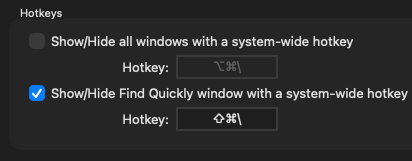
I am currently using "Shift + CMD + \" for my modifier shortcut. This is consistenly resetting at restart of the application.
RDM Hotkeys Consistently Resetting to Default
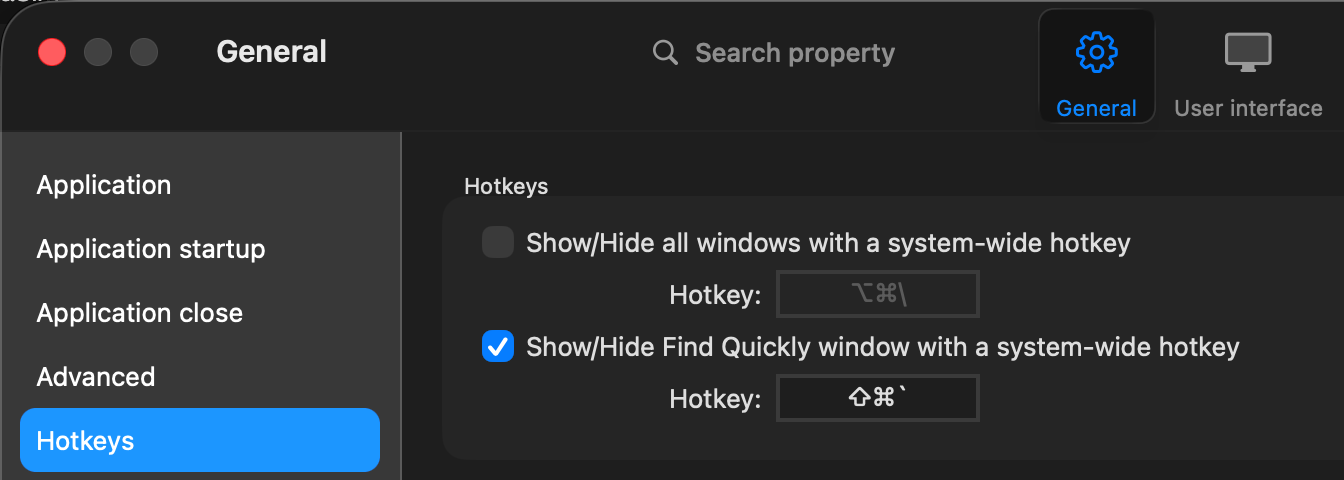
In the latest RDM release, the keyboard shortcuts for "Show/Hide Find Quickly window with a system-wide hotkey" are consistently getting reset. I believe it's getting reset every time the program restarts. My keyboard shortcut stops working, and when I go into the settings, I see that it's reset to the default SHIFT + CTRL + `. I am able to change it back to my desired shortcut, but it keeps somehow resetting itself.
Below is a screenshot of the default shortcut that the enabled shortcut keeps resetting itself to after a certain time or program restart.
The version information is below for RDM:
Remote Desktop Manager 2026.3.1.2
Runtime: .NET 10.0.12
Platform: macOS 26.7.0
Workspace: Local Data Fix
Allocated memory: 436 MB
Remote Desktop Sessions Disconnecting Improperly
Hi @davisoncaleb
I responded on the other thread about the reconnection issue with the collapsed ribbon. Sorry for the inconvenience, it should be fixed in the next version of RDM Mac and for now using the full or simplified ribbon should workaround the problem, unless you can confirm otherwise.
For your original post, I'd still like to understand if you're connecting directly to your RDP servers or otherwise traversing any kind of tunnel, Gateway or VPN.
Thanks and kind regards,
@Richard Markiewicz
I am connected directly to my RDP servers directly to their IP addresses on my LAN. I am not using any tunnel, gateways, or VPN.
RDM 2026.3.1.2 - search everywhere
Btw - essentially the same thing was already discussed in this thread - https://forum.devolutions.net/topics/45052/keyboard-shortcut-to-quick-find-and-connect-directly#242009. A new option "Launch on Enter" was added as a result of that discussion, but I can't see it there any longer.
@tfabo
Hi,
This option has been replaced with Ctrl + Enter, which opens the entry.
Best regards,
@Jesse Galarneau
Is there a way to get the original functionality back? Having to reach to the control key to do this instead of just Enter seems a step in the opposite direction and makes the original feature less productive. I've already actively opened the search everywhere textbox so I shouldn't have to do another keyboard shortcut to actually open what I searched for.
Remote Desktop Sessions Perform Full Reconnect When Switching Between Open Sessions
I'm having this exact same issue! I'm wondering if it's occuring from the new default blue border around the tab of the active connection. When I click on another tab, the blue bar goes away from the previously selected tab and moves to the new tab. I wonder if for a short miliseconds timeframe, the blue border disappears making the tab bar only a pixel or 2 less height then renders the new blue bar increasing the size again which triggers the resize logic. This is a complete guess, but it does appear that there is slight "flicker" on the horizontal tabs bar when switching between tabs where the tabs all shift up/down very minimally and quickly.
Remote Desktop Sessions Disconnecting Improperly
I just had it occur again. I did notice a new bug with the current RDM that may actually increase the rate of the issue.
Whenever I return to a different tab, it will automatically reconnect the RDP conenction even through the actual screen resolution or window size has not changed for the RDM session. I have "Show tabs in multiple rows" disabled. Sometimes the connections will reconnect if the tabs go from a single row to 2 rows and now the available pixel space for the RDP window changes and reconnects the RDP session as a result. For my case, with the single row, it's reconnecting every tab every time I switch to a differnt tab, the just selected tab will show the display, then shortly after refresh the connection. It's worth noting that I also have the Screen sizing mode set to "Smart reconnect" which I presume is what is causing this issue to occur, but since the screen resolution and tab rows has not changed in size, the RDP connection should not be reconnecting each time the tab is switched.
Remote Desktop Sessions Disconnecting Improperly
Yes, this is specifically for the embedded RDP that is built into RDM and not the external Windows App by Microsoft. I like utilizing the tabs because of how many RDP sessions I log into each day for my job.
Remote Desktop Sessions Disconnecting Improperly
Yes, this is for MacOS. Also, I just updated to the following MacOS release below:
Remote Desktop Manager 2026.3.1.2
Runtime: .NET 10.0.12
Platform: macOS 26.6.2
Workspace: Local Data Fix
Allocated memory: 247 MB
I will keep my eye out and see if I have the RDP error show up with this new release.
Remote Desktop Sessions Disconnecting Improperly
I am running the latest RDM (2026.2.4.4). With the latest version, I've still had it happen a couple of times. It seems like maybe it's happend a bit less, but it's still happened to ma a few times since the upgrade a few days ago.
Remote Desktop Sessions Disconnecting Improperly
In one of the past few RDM releases, whenever a Microsoft RDP session is closed, there is a high chance that the next time I try to RDP into it, I'll get the following error shown below.
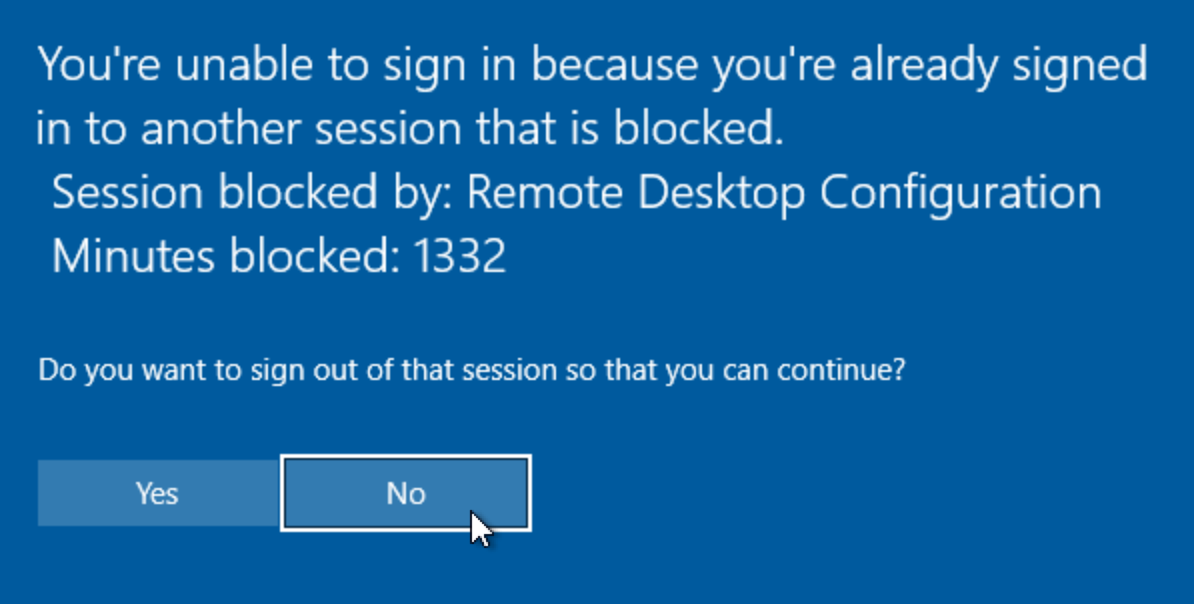
If I click Yes, it logs out of the current session I want to connect to and starts a new RDP session. If I click No, it kills the attempted RDP connection. On the Windows side, it still thinks that there is an active RDP session even though it was closed in RDM. If I go to Task Manager and view the user, it doesn't show the user as disconnected. When it's in this state, I either have to wait for an unknown amount of time before Microsfte registers that it's disconencted and will allow me again to RDP in, or I have to do the following hack to force it out of its fake connected state.
# Connect remotely to the locked PC
Enter-PSSession -ComputerName <computerHostname>
# Get a list of the RDP connections
query session
# Force disconnect the "active" connection that needs to be disconnected
tsdiscon <sessionID>
If I don't execute the command above, I'm unable to RDP into the current RDP session as the OS still thinks it's connected and has somehow gotten into this state. If I wait for a while, I can log in again, but I'm not sure when the PC I want to RDP into decides it's OK again to log in. This is happening on multiple VMs and desktops that I'm trying to RDP into.
Current RDM: 2026.2.4.4
Unknown Amount of Text Pasted/Typed After Exiting RDM on MacOS
I switched all of those to Automatic and haven't seen the issue yet. It has only been about 24 hours of the change though, so it may have not yet occurred since I haven't figured out how exactly it triggers since it doesnt' always occur on exit of the application.
In the meantime, is there any specific logging settings I coudl enable that woudl be beneficial for if it occurs again with all of them set to Automatic? I also don't want the logging to fill my disc space (I had that happen once when I forgot to turn it off after a support ticket).
Unknown Amount of Text Pasted/Typed After Exiting RDM on MacOS
Hello,
Thank you for confirming these settings.
As a test, please change the Log off method from Default to Automatic, save the entry, and then try reproducing the issue again.
Please let us know whether the unexpected text input still occurs after making this change.
Best regards,
@Carl Marien
Is there a way to make this change in bulk? I have hundreds of RDP connections saved in my settings? If not in the UI, perhaps there's a sqlite query that could make the change for me?
Unknown Amount of Text Pasted/Typed After Exiting RDM on MacOS
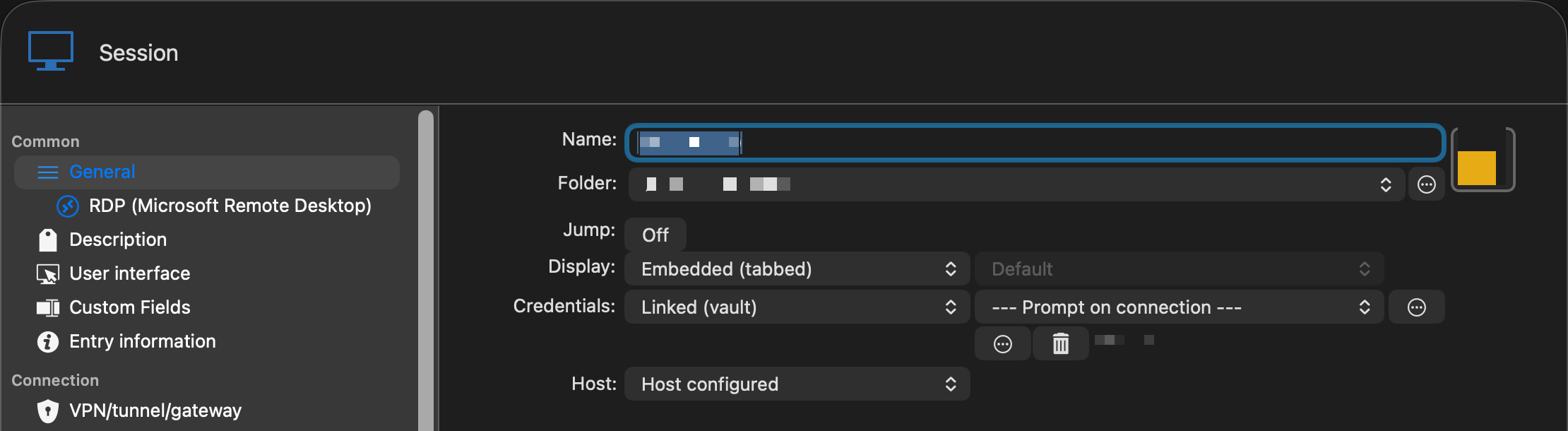
Looks like I'm using the Default option for both the "Log off method" and "Automatically log off when disconnecting."
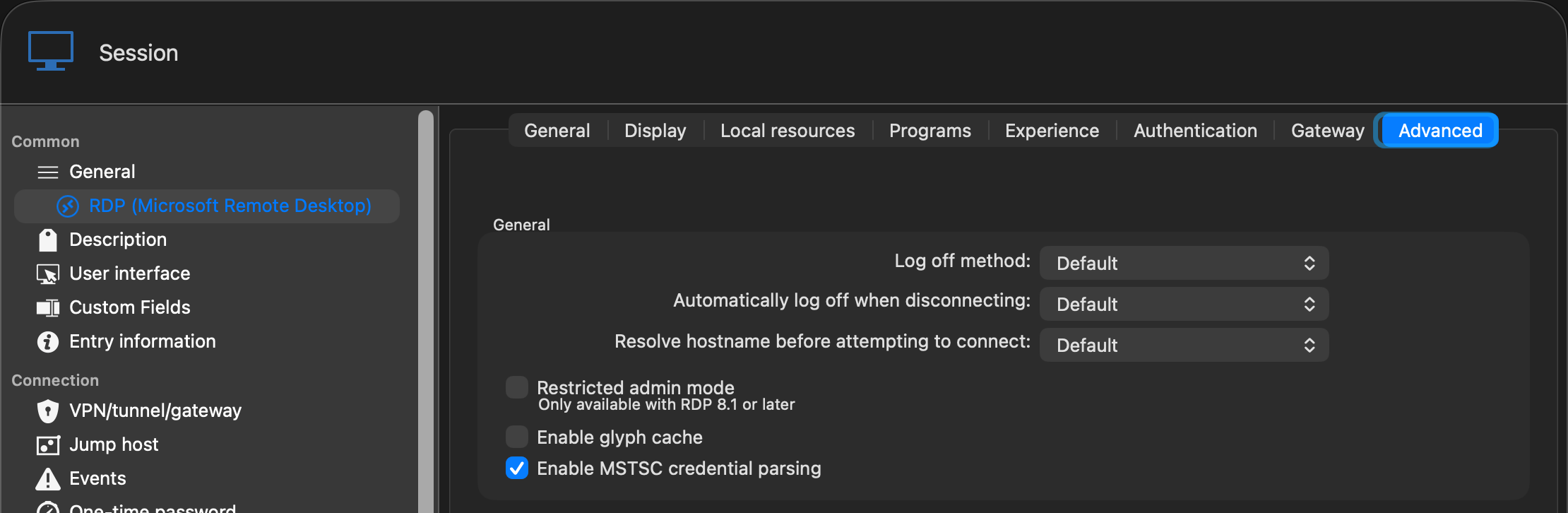
I'm using the Embedded (tabbed) display for my Display settings.
Unknown Amount of Text Pasted/Typed After Exiting RDM on MacOS
Where is the RDM > Display and RDM? I'm not finding that in the MacOS version.
Unknown Amount of Text Pasted/Typed After Exiting RDM on MacOS
I'm currently on the most recent RDM 2026.2.4.4. This issue has existed even prior to this release also.
When I quit RDM and select "Yes" for the "Are you sure you want to close Remote Desktop Manager" prompt, I will get a MacOS notification noise (not actual notification, just the noise like when you click tab in a terminal and it's telling you it's done the autocomplete). During this time, it seems to be pasting a bunch of gibberish text in a massive dump of uknown data. I'm not sure exactly what's in it, jsut that it's doing it. Often, I'll notice later that my MacOS hard drive is renamed because the random gibbersish pasted after the exit somehow managed to select my hard drive (presumabily hit Enter, and rename it with text).
I have no idea what would cause this or how the applciation still has permissions to type after it's exited, but it's somewhow escaping the application sandbox and pasting text outside of the application itself.
Tabs Cannot Be Reordered When Single-Row Tab Bar Overflows Available Width
I have the the "Show tabs in multiple rows" disabled as I also have the dynamic auto-reconnect so that the RDP sessions reconnect with the current available screen resolution fo the window. WHen I enable the mulitple rows feature, the RDP sessions all reconnect/resize when it overflows to a second row, so I disabled that option.
Tabs Cannot Be Reordered When Single-Row Tab Bar Overflows Available Width
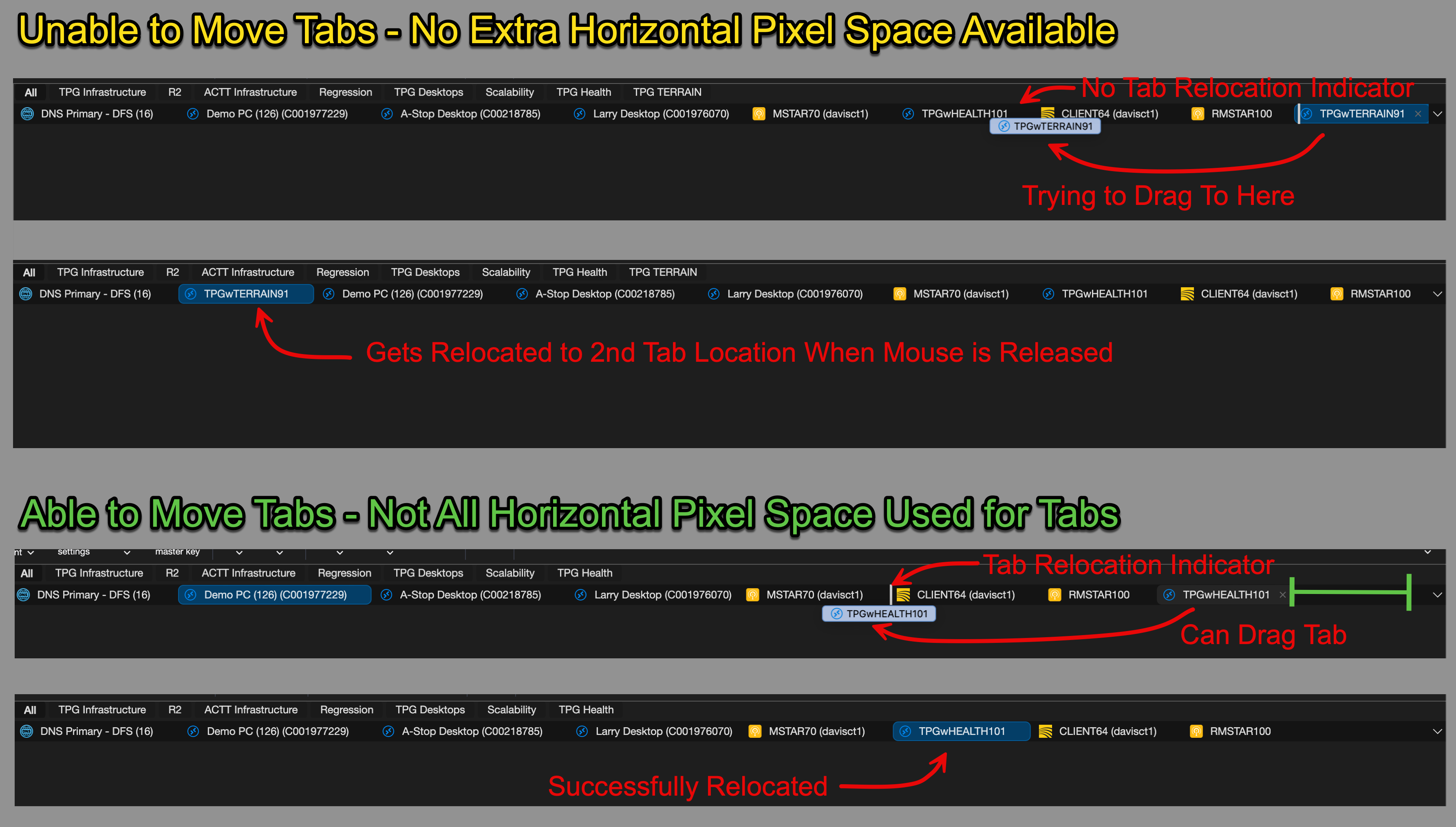
In the latest macOS RDM release (2026.2.4.4), I have observed an issue with tab reordering when the total width of open tabs exceeds the available width of the tab bar.
When a tab is located beyond the visible portion of the tab bar and is selected, it is correctly displayed on the far right side of the visible tab area. This behavior is expected and appears to be functioning as designed.
However, once the tab bar enters this overflow state, tabs can no longer be reliably rearranged. As long as the total tab width exceeds the available pixel width of the tab bar, drag-and-drop reordering either does not work at all or behaves unexpectedly. In some cases, attempting to move a tab causes it to automatically reposition itself as the second tab from the left. I'm not sure why this specific location is chosen, but it is consistently what I've observed. After the tab is moved to that position, it cannot be moved back to its original location and effectively becomes stuck.
I previously reported Tab Not Displayed for Current Tab if Single Row Width is Enabled, which was subsequently fixed. This new issue may be related to the changes made for that fix, although I cannot confirm that. It is also possible that this tab reordering problem existed prior to this release and simply went unnoticed because of the previous tab visibility issue.
Expected Behavior
Tabs should remain fully draggable and reorderable regardless of whether the tab bar has exceeded its available width.
Selecting a tab that is outside the visible area should not affect the ability to reposition tabs.
Actual Behavior
Once the tab bar overflows the available width, tab reordering becomes unreliable or stops working entirely.
Attempting to move a tab may unexpectedly relocate it to the second position from the left.
Tabs that have been relocated in this manner cannot be moved back to their intended position.
Tab not Displayed for Current Tab if Single Row Width is Enabled
Looks like this was fixed as of macOS RDM 2026.2.4.1.
Double-Click to Close Tabs No Longer Working
Looks like this feature made its way back in macOS RDM version 2026.2.4.1.
Add Split Windows Hover Menu in MacOS like Windows Version
In the Windows Version of Remote Desktop Manager, there is a feature to drag a tab over the current RDM window and there will be a Center box and then a top/right/left/bottom arrows to indicate how to split the current window. This would be nice to have in the MacOS version too. Currently, the graphic is less intuitive and not as friendly feedback.
Below is how the Windows image looks when the tab is hovered over the current window session.

Tab not Displayed for Current Tab if Single Row Width is Enabled
Has this feature been fixed yet? It's still not present in the current 2026.2.2.1 release.