
davidwillis
Entry Templates Columns
Hello,
Can we please make more columns available in the Entry Templates page? Right now it seems only Name and Description are available; it would be very helpful to see things like host, URL for websites, maybe port, etc.
Thanks in advance for your consideration.
Best regards,
Custom Terminal Emulator for SSH Sessions
Since I can't edit my original post (too old I think 🙂 ), I just wanted to add that I marked my other reply as a solution to this, since it did solve the original problem I had when I made this request. And I also notice that a couple more recent posts here may describe how to further customize the coloring for people who want to do so, which is great.
With that no longer being an issue, the built-in terminal works well for me, and I no longer really have any reason to request a custom one, at least not at this time. If that changes I will post back here or open a new thread. Thank you for all the responses , help and ideas.
Assigning Hostname to Template Group
Hello,
I am starting to play around with template groups a bit, which seem like a cool feature. I created a group which is a website with a set of 3 sub-entries that are configured to use variable values from the parent host and such. This works well, however the issue is when I create a new item from a template group, I am not prompted to give a hostname. When we create the template group, we have to fill in something - I can put a variable in the name like "$HOST_WITHOUT_DOMAIN$ Website" for example. But for the URL I just put a placeholder name (this URL will be a consistent format).
So anyway, when I create the host from the template group, all I get prompted for is a location where to put it, and whether to create a new folder at the destination to put it in. So I have to create it first, it gets created with the placeholder name from the template, then I can go back in to the parent entry and set the URL properly. Once I do that, the variables I used in other places all pick up their values properly and so then everything gets populated the way it should.
My question - is there a way we could make the template group prompt for hostname or URL (perhaps depending on entry type) on creation, or just open the full Properties window for the parent entry in the group, similar to how it does when we create an entry from a single template. Or is there a different workflow I can use to achieve this?
I am on v2026.2.29 using SQL Server as the data source. Any help is appreciated.
Best regards,
Cycle Through Tabs in MRU Order
Hello again, just wondering if there was any update on this? Having the ability to Ctrl+Tab to go back and forth between the most recently used tabs would be very useful for me (I use this key combo very often in browser, SSMS and other apps for the same). Not sure how big of a lift it would be though.
Best regards,
Template Does Not Inherit Tab Group From Host
Hi Carl,
Thanks for the response and information. If there's currently no way to achieve this then I would appreciate if we could turn it into a feature request. I'd be open to whatever people think the best route is for this - whether it's an option to allow a host to override its templates' UI settings such as Tab Group, or something else like a variable (e.g. $PARENT_TAB_GROUP$ or something along those lines). The variable route might be more flexible to be used in other scenarios as well, and I see there are already lots of similar $PARENT$ variables like that - but if a template is not considered a child object of a host, then I suppose $PARENT$ variables might not help here. Anyway, just some ideas. As always, I appreciate the consideration.
Best regards,
Forward and Back Navigation Buttons/Shortcuts
Hi Hubert,
Just wanted to follow up - so I'm on v2026.2.19 now, and I do see the forward and back buttons in the View ribbon:
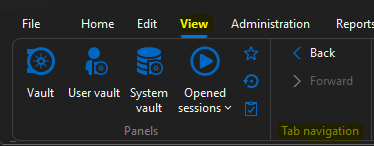
However, I still don't see any option to add them to the quick access/quick launch bar:
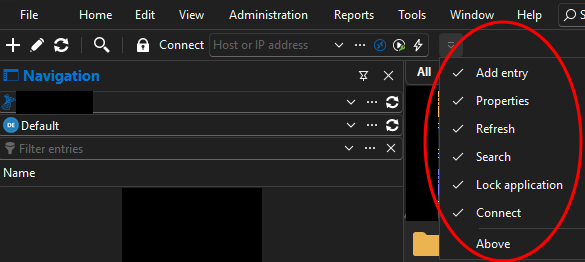
Is there some setting I need to enable to add this?
Best regards,
User-Specific Settings for Large Number of RDP Entries
Hello,
I have a situation where I might want to set user-specific settings for myself to override some of the "local resources" settings for all the RDP entries in a certain folder (which has a decent sized subfolder structure under it). I know I can right-click the folder -> batch edit -> user-specific settings, but I think that will set a user-specific override on each entry individually right?
Ideally, I would prefer not to do that , as it is not sustainable (when someone adds a new entry I have to manually override again, etc.). It would be much better to be able to attach the user-specific settings to a parent folder - ideally the top level folder I'm referring to - so those could take effect on any applicable entries below it (presumably for non-RDP entries it would just be ignored).
Is there some way I can go about this within the current capabilities of the product? Or would this be a new feature request? If there is another way to accomplish a similar goal, I am open to it (doesn't have to be user-specific settings, I just figured that would be the most appropriate route here based on my current knowledge of the product).
Best regards,
2026.3.12 iDRAC
Hello @Richard Markiewicz ,
Thank you very much for all the information! The part about the DRAC host header was very helpful, looks like that is what was causing it to only work with the short name instead of FQDN. It's strange because if I understand Dell's article correctly it sounds like it -should- work when using the DRAC name + domain suffix as defined in DRAC settings (which we do always have those values set statically in there as that is part of our standard DRAC config) but for some reason that was not the case (at least, for some - but I have at least two other iDRAC 9's that do work fine without this change - maybe it depends on firmware version or something). But I confirmed when we set the host header check to 0 then it does connect properly on the ones that were requiring the short name previously.
For the connection refused error, it is possible that was generated based on some (obviously incorrect) combination of settings I had tried while troubleshooting. But when I configure explicitly to VNC over WebSockets with port 443 on the "weird" one, it still doesn't connect - it doesn't generate the "connection actively refused" error though - just the cert validation warning, the 404 not found , parameter URI empty, and "unexpected error sending message"/"web socket not connected" (the last one repeats several times).

If I set it back to "automatic" and default port (which is how my other iDRAC 9's have been working), then it actually fails earlier (with the explicit WebSockets/443, it gets to the point of opening a tab and trying to connect to 127.0.0.1 on some random port which I presume is part of that connection flow, whereas when I leave it automatic/default port , it never even opens a tab - I just get the "unable to connect" box):
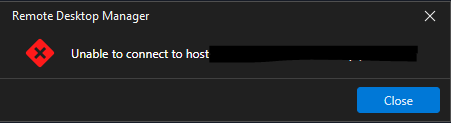
Seems to generate the same entries in the log either way though...I will keep playing around with it , maybe try removing and re-creating the RDM entries or something and see if that helps...
(edited to add summary + iDRAC 8 details)
Just to recap - 3 different states of iDRAC 9 behavior for me currently:
Some connect fine with no HostHeader change using the FQDN as defined in the DRAC settings (DRAC name + domain DNS name)
Some require the HostHeaderCheck=0 change in order to connect with the FQDN as defined by the aforementioned settings (but work fine with the short name if HostHeaderCheck=1).
At least one will not connect in either case, despite having its aforementioned DRAC settings also confirmed configured properly.
Regarding the iDRAC v8 - I've tried seemingly all different settings combos of the console type and port at one point or another, and it was working at one point. The problem is, I think in the course of troubleshooting we've changed it so much, I can't say for sure what the working combo of settings back then was. But I know in recent months (probably the past year or so actually) it seems like the iDRAC 8 consoles haven't been working. Current behavior is if I leave defaults (automatic console type, default port) then it fails to connect (same "unable to connect to host" as above). If I change port to 443 with type automatic, then it seems to get a little further in the process (it tries to open a tab) but then I get this:

I get the same also if I set console type "native" with port 443 or "native" with port default.
If I use type "VNC" with port default, then I get a slightly different message:

Please let me know if you want more details on the v8 stuff.
Really appreciate the help!
Best regards,
Resizing Columns in Navigation Pane Not Working
Hi Alexis,
Thanks for the detailed response and suggestions, it's very useful info. Just wanted to report back that on v2026.2.19, the problem does seem to recur, and adding a new column does not always seem to fix it. When it happens, it reverts back to the behavior I described where only a very quick change will be accepted - e.g. if I click and drag the column border for a half-second and let go, that might work, but if I try to drag for 1-2 seconds or longer, it does nothing (the "drag line" disappears, and nothing changes when I release the click). The main columns I have visible there are always the same ones - Name, Host, URL and Specific Settings. In this case I tried adding Creation Date again to see if that would work around the issue, but it did not.
I will try a restart of RDM shortly here once I finish some things I am working on, to see if that might help. But I just wanted to let you know it does appear to be an intermittent issue that pops back up at times.
Also I will say I am a little hesitant to do a "reset layout" as you mentioned since I do have a lot of things about the layout in general configured to my liking (non-default), and it would probably take me a little while poking around to find all the settings to change to get it just right again 🙂 But if it becomes necessary to do at some point then I can if I have to.
Really appreciate the help thus far!
Best regards,
2026.3.12 iDRAC
Hello, just wondering if there are also known issues with connecting to iDRAC console in v2026.2.19? I am unable to connect to iDRAC 9 consoles now seemingly, with any combination of settings (including setting explicitly to VNC WebSockets which supposed to be the correct protocol for iDRAC 9 firmware v7+ per the message in the UI). And setting port explicitly to 443 or leaving default 5900, doesn't work either way. Website works fine and console through the website works fine.
When I check the app and debug logs, this is what I see - something about a cert being rejected although I'm not sure how to bypass that (don't see any cert settings in the iDRAC console session settings) plus the debug output says the GET request (which is to https://idracservername.domain.com/console/..., sorry I had to redact it in my screenshot) gets a 404 not found in response. I confirmed via cURL sending the same URL I get the same response.
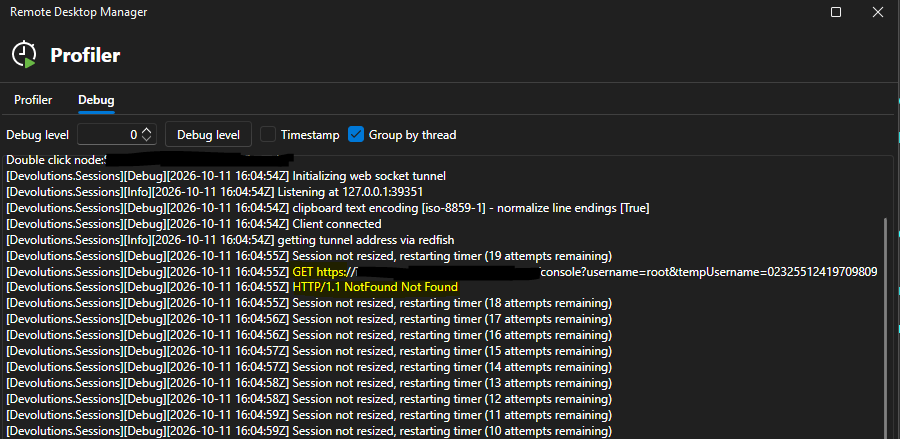

Details from the two prior messages - a "not found" and null param exception:


FWIW, connecting to earlier iDRAC (v8) console also doesn't work using any combo of settings but that was sketchy in the past anyway, I figured it might just be too old now though it would still be nice to have it work since we still have quite a few in use. But the v9 working is definitely more important for me.
Any help is appreciated! Please let me know if I should open a new thread since this is on a different version (v2026.2.19) rather than the one mentioned in the title.
EDIT: After playing around with it some more I figured out a workaround....it seems the iDRAC certs were generated with the short name only, not FQDN (it's a self-signed cert). Originally, I was using the FQDN in the name. Once I changed to use the short name then it worked - even though it does still generate the cert error noted above in the logs when I connect (but at least it connects). The other two errors I was getting above when using FQDN (the 404 not found and null URI param) no longer occur when I use the short name (at least on a few I've tried - there's one still giving me trouble though, throwing same errors as above even with short name - but that might just be an issue with that box).
The strange thing is, it's a self-signed cert anyway, which is not installed in my CA store as a CA. So, regardless of the name used, I would think it still wouldn't be trusted (and based on the message that is still occurring in the logs, it's not) - but it's letting me connect. So I am still curious why it wouldn't let me do the same when using the FQDN if the cert would not be trusted either way. Also, having some consistent way to define this behavior (e.g. bypass cert error setting or something for iDRAC Console session type) would be helpful.
EDIT 2: Still something weird. Some iDRAC 9's are working with the short name as noted above, but I have at least one that doesnt work with the exact same settings as the others. Confirmed not only identical settings in RDM but also iDRAC console settings. If I enable the (legacy) VNC server on port 5901 in iDRAC, and set the RDM entry to use regular VNC on port 5901, that works:
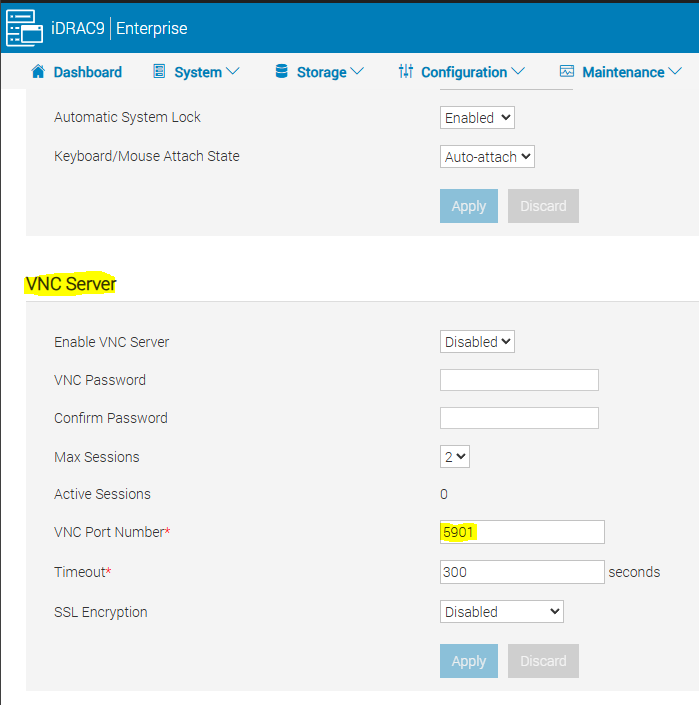
I have to set creds to use username/password w/ the VNC password set on the screen above, in that case. But, I've never had to do that on any iDRAC to connect before.
Using my normal config (with the VNC feature above disabled on the iDRAC) and using VNC WebSockets or Automatic on the RDM side w/ normal port 5900 or port 443 does not work on this box for some reason.
I'm now seeing these messages in the logs:
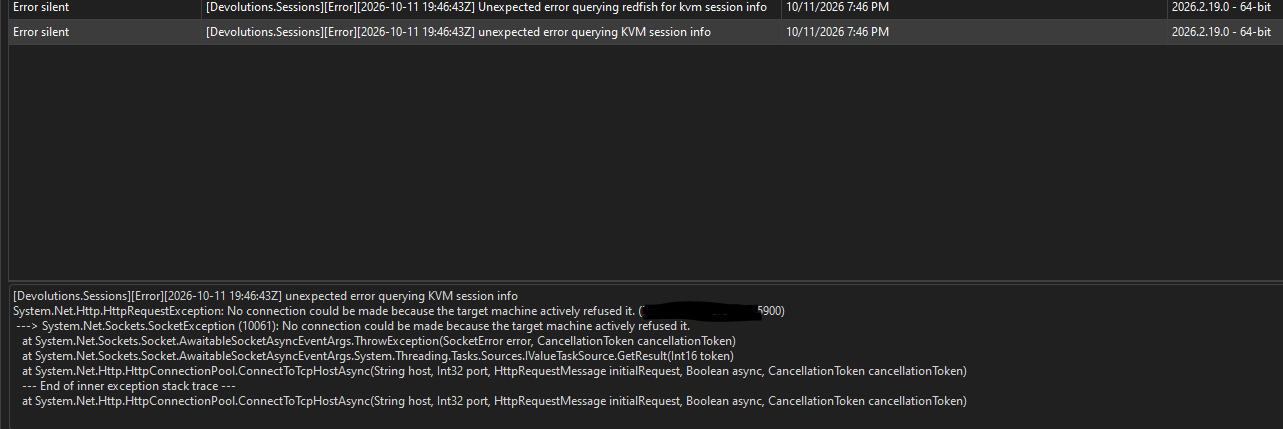
Same results trying to connect from RDM v2026.2.19 from at least two different machines (data source is SQL Server).
Best regards,
Tag Management Questions
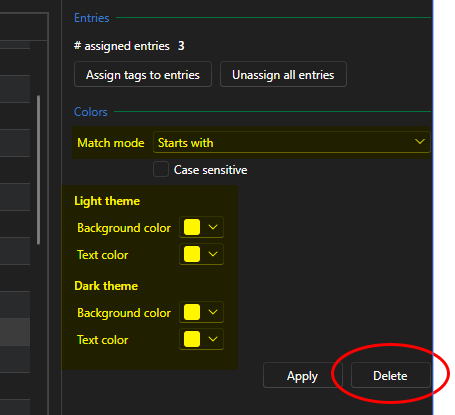
Hello, I just have some questions about the Tag Management window. In the "colors" section there is a "match mode" dropdown which defaults to "exact match" but has other options like "starts with", "ends with", etc. How does this setting impact the tag behavior - is it when we search for tags, it will attempt to match our search term against this tag using the match mode selected here? Or does the match mode specifically pertain to the "color" settings somehow (since it is in the "color section" of the settings, as seen in the screenshot)? But if so - how?
Also, I noticed a "delete" button appears next to "apply" once we click "apply" to change some settings. But for tags where we've never done this, there is no "delete" button. Is that button just to clear any tag-specific settings/to revert the tag to defaults?
Another thing I'm wondering, how do the color settings here work? Would this be to auto-colorize tabs for sessions that have these tags? Or something else?
Screenshot below shows what I am referring to for my above questions:
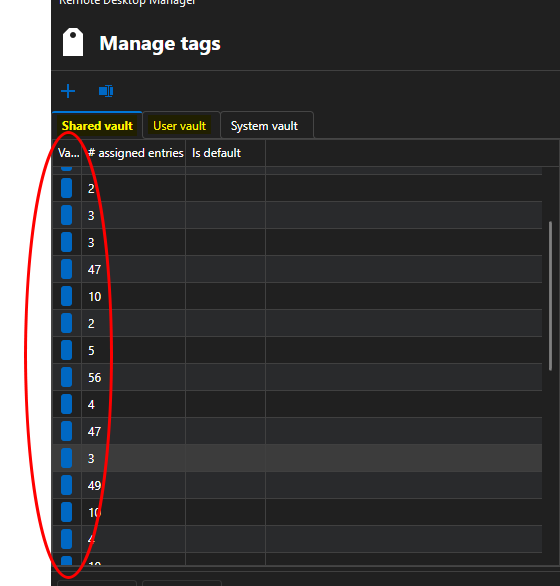
Also, I've noticed the UI seems to be a little inconsistent with the columns...like for example if I click "apply" for some settings on a tag, and then after that I switch tabs to User Vault and back to Shared Vault, the column widths are messed up so I can't see any tags. Even if I fix the column - if I go to another tab and back again, the column widths are messed up again. So it seems to not be saving column settings in this dialog.
Note I am on v2026.2.19 (data source is SQL Server); I know the UI was revamped in v2026.3 but I also saw that maybe still had some UI issues , so I am debating on whether to update now or wait a bit. But if these issues are resolved already in the v2026.3 line then please let me know. This is a minor issue for me, so not urgent.
Any help is appreciated.
Best regards,
Double-Click Action on Recent Items Pane
Thank you both @Alexis Geller Peiro and @Maxim Robert - that's great news! I will check out the new version as soon as I can. It does sound like there may be some other UI issues in the new one though (I believe some portions of the UI underwent a significant overhaul in v2026.3, per various discussions where this has been mentioned), so I am watching a couple threads (like this one) hoping those could get worked out before I upgrade my primary machine. Maybe I can run the portable version to test. One way or the other, I'll give it a try and let you know if there are still any issues.
Really appreciate the the responsiveness (as always) and quick resolution!
Drag-N-Drop and Rearrangement Issues with Tabs In/Out or Between Tab Groups
Hi @Michel Audi
No worries, thanks for the update - I can try v2026.3 but there is/was another issue I was watching on that related to tab rows (on a certain build the option to have multiple tab rows had disappeared altogether and the only option was to use an overflow menu instead, which would've impacted me quite a bit because I almost always have multiple rows of tabs I'm working with), but I think that is fixed now. But that was why I was planning to stay on the 2026.2.x build initially when I wrote that, so I was fine with upgrading to that version. I am currently on v2026.2.19 (upgraded last week). Now that has been resolved I can try it out (v2026.3.9 , which does now appear as the available version when I check for updates) and see how the tab group management is as well. Also thank you very much for passing along those feature requests, it's much appreciated!
Hi @Maxim Robert sure I will give it a try as soon as I get a chance. Might be next week but I will report back here when I do. Thank you!
Best regards
Question about Tab Pinning and Tab Strip Organization
Hi Paul,
Thank you so much, that's great news! I will definitely give it a try as soon as I can (sorry if my replies are a little delayed, been heads down on a big project lately). I agree making the shuffling an option would be good if some users prefer that behavior. I greatly appreciate the help, and the quick resolution to the "multiple tab row" issues (both the fact they had unexpectedly disappeared in the new version as well as the shuffling issue) - as soon as I get a chance to test it out, I will post back here to let you know how it goes.
Best regards,
Unselected tab coloring
Hi Jafran,
Ok thanks, that makes sense. I will upgrade as soon as I can and give it a try and then report back here with results.
Thanks for taking a look at this!
Best regards,
Unselected tab coloring
Hi Jafran and Hubert,
Thanks for the updates - I will upgrade to the new version when I get a chance and try them out to see how they work.
So if we set a static "unselected tab color" here, it would apply to all tabs regardless of the tab's original color? Or we are able to set an "unselected color" on a per-tab basis just like we do with the regular tab color?
Best regards,
Double-Click Action on Recent Items Pane
Hi Alexis,
Thanks for the response. That makes sense about the setting - thanks for clarifying it's purpose ( after looking a little closer at the wording and selection options it has, I realized it was probably more along the lines of what you described and not what I initially thought).
I don't use the Recent pane all that often, so it's not that big of a deal for me. But I am curious, why the change in behavior? Was it a request, or a safety measure perhaps (to prevent people from accidentally reopening sessions)? I guess I'm just thinking that going to the Recent pane to open a session is probably far more common than going there just to double-click a session and find it in the navigator tree, so I think it would make sense to at least have an option to configure that behavior (if not make "open" the default like it used to be).
I can probably live with it either way, just wondering whether there is benefit to having it default the way it does now , as opposed to having sessions open automatically.
Best regards,
Question about Tab Pinning and Tab Strip Organization
Hi Paul,
Thank you for the details - and no worries, I understand sometimes unexpected things like this can happen. It just caught me by surprise a little since I'd grown quite accustomed to using the multi-row tabs. I could work with the overflow style as well - in fact having an option to maybe combine the two and set a "max limit" of tabs (even with the multi-row), after which the overflowed tabs would go into a dropdown/overflow menu could be helpful. But I think at least retaining the option to utilize the multi-row tabs would be very beneficial.
I really appreciate the heads up though, about this coming down the pipeline in v2026.3.x - because it would've been much more of a surprise if the multi-row tabs just disappeared after upgrading 🙂 . And also appreciate the transparency , providing the details on the reason for the situation. The Devolutions Team has always provided excellent tech support and customer service in my experience, both on the forums and on support calls I've had, as well as being very receptive and responsive to customer feedback. This can be very hard to find nowadays - so I just want to say thanks for that!
I will probably stay on the v2026.2.x build for now, but will definitely stay tuned to the release notes for the v2026.3.x line to see if/when the issue could be resolved/multi-row tab functionality restored.
Circling back to the original issue, I realized I never answered one of @Eduard Sepúlveda López questions about data source type - it is a SQL Server. If the long-term plan (one way or another) is to keep the multi-row tab functionality, then I think my feature request would be to put pinned tabs in their own row (potentially expanding to multiple rows or overflow perhaps if there were a lot of pinned tabs), and that way any non-pinned tabs would rotate but the pinned ones would stay put.
Separately, I might also suggest to prevent the rows from rotating at all (or at least add an option to prevent this, if some people prefer the current behavior), or some way to control the tab row rotation behavior. I understand how some people could want the selected tab's row closer to the session (meaning it becomes the bottom row), but for me it's easier to remember where they are if the rows stay put. Like if tab X is in the top row, then I can always look for it there, regardless of which tab is active. Having those rows constantly rotate based on the active session is what throws me off.
But it sounds like maybe I should wait to see how the multi-row tab thing turns out before posting any specific requests, as that may change the requirements...
Best regards,
Resizing Columns in Navigation Pane Not Working
Hi Alexis,
Thanks for the response. Data source is SQL Server (we do not use Devolutions Server, just RDM). I have the "disable horizontal scrollbar" option in Settings -> User Interface -> Tree view disabled already, for this exact reason (as you mentioned, when that is enabled, I am not able to resize columns as needed and display them how I want - I disabled this many versions ago). Just double-checked to make sure it was still disabled, and it was. Display scaling in Windows is set to 100%.
I had some interesting findings today though. I originally noticed this issue on v2026.1.24. Yesterday, I upgraded to v2026.2.19, and confirmed even after the upgrade that the issue remained - that was when I posted this thread.
This morning I went to check on the things you asked - I had 4 columns displayed in the nav pane: name, host, URL and specific settings. So I went to column chooser and added a new column (Creation Date) to see if it made any difference - and suddenly the resizing seemed to start working again (for the most part - still one quirk - see below).
I don't know if adding the column somehow "reset" something or what, but it seems to have helped. Ever since I added that column, I seem to be able to resize normally now. Maybe my UI was just in a bad state or something still after the upgrade.
In hindsight I think I may have reported this too soon after upgrading. Now I'm wondering if the upgrade actually did fix the issue, but maybe there was some lingering bad UI state which the column change somehow reset. Not sure if it makes a difference but I did upgrade using the in-app upgrade process (so it launched the updater, closed and updated itself, and then re-launched), as opposed to closing RDM, manually downloading the installer and running it, and then re-launching. I apologize for the false alarm, I probably should've tested more thoroughly on the new version before posting.
That being said, there is still one thing I find strange - it doesn't let me resize the first column (which is "name" in my case) smaller than a certain point. For example, even with it working better now - I can expand - but I can't shrink any further than this (drag-n-drop now shows the line moving with the mouse but when I release the click it just does nothing).

Not sure if that is by design or not? Do you know if there's a minimum width on the Name (or any) column?
Also, a side note/question I encountered as I was testing some of this - how do we remove columns from the navigation pane? I seem to recall there used to be a "remove" button if we right-clicked a column header, but I don't see it anymore? And when we go to "column chooser", we only see the columns that haven't yet been added - we can add them with double-click, but not sure how we remove existing ones now...
I very much appreciate all the help. Please let me know if any further details are needed from my side.
Best regards,
Resizing Columns in Navigation Pane Not Working
Hello,
When we have more than one column in the navigation pane, it seems we are not able to resize them right now (at least, not reliably). If I click on the "divider", the line appears for a brief second as if it will let me resize, but then it disappears, and dragging while holding my click does nothing.
If I try to click and then drag super quickly after clicking and then let go quick (so the whole resize attempt takes 1s or less), it will sometimes work - maybe 1 out of 4 or 5 tries. But any resize attempt that takes any length of time seems to just fail silently, and even the very "quick" attempts usually don't work.
This is in v2026.2.19.0 (just upgraded today).
If any additional info is needed, please let me know.
Best regards,
Drag-N-Drop and Rearrangement Issues with Tabs In/Out or Between Tab Groups
Hi Michel,
Thanks for the response, and sorry I forgot to include the version - it's v2026.1.24. I am planning on upgrading, the latest available to me currently shows v2026.2.18 so I was going to try that.
As far as the exact behavior, it actually varies a little bit. Sometimes the move will not occur at all. Sometimes another (seemingly) random entry will get added to the group I tried to drop it in instead. From what I can see, it does not appear they are neighbors (at least not in the tab group list). I just did one test where I took screenshot before and checked after, and it was an entry two items up in the list from the one I had dragged-n-dropped that appeared in the group. Also sometimes the pane shows windows that aren't even in there, for example the "Update available" pane right now is showing as being in one of my tab groups even though it's not (it only shows on the "all" tab group). And sometimes the tab groups (shown as folders in the pane) will reorder themselves for no apparent reason as well (e.g. when we try to drag-n-drop an item in, suddenly the group will go to the bottom of the list when it was at the top before). Just overall, the behavior in the Tab Groups pane seems very sketchy/inconsistent.
Dragging a tab from the tab strip into a tab group is not supported today: the pane only accepts items dragged from inside the pane itself. The supported way to move an open session to another group is to right-click its tab in the tab strip and use Tab group > Move to, which is the menu in your screenshot.
Understood - I do think it would be convenient to be able to drag-n-drop on the tab strip, and thus might be worth an addition in the future. But if we can do the same via the Tab Groups pane it's not that big of a deal (for me anyway) right now. But I don't believe we can select multiple tabs in the tab strip - so we can't move multiple tabs at a time using "move to". Hence the reason I would like to see it on the context menu from the Tab Groups pane (see below). Currently with the drag-n-drop behavior in the Tab Groups pane inconsistent, and no "move to" option for the context menu there, there seems to be no viable way to move multiple tabs. The only method working reliably for me currently is right-click a single tab in the tab strip -> Tab Group -> Move To.
On your third point you are right, and it is a related gap. Move to is not offered when you right-click an entry in the Tab Groups pane; there you get the regular entry menu.
Are there plans to fix this already? Or would I need to submit a feature request? Seems only natural that tab group-related options should appear on the context menu for items in the Tab Groups management pane.
Best regards,
Unselected tab coloring
Hello, just wondering if there were ever any improvements made in this regard? I agree with the OP about the coloring of non-selected tabs being an extremely "light" version of the selected color which is non-intuitive (as they mentioned, unselected things are usually darker, not lighter). It actually doesn't seem to be as bad with the auto-generated "smart coloring" if you use that, because those colors seem to be very light by default. But for any manually-selected colors, if I want to use a darker shade then yeah it appears very weird when unselected, as OP described (as an excessively bright shade of the selected color).
I realize this may not be an easy problem to solve, just wondering if there had been or was any planned improvements in this area?
Maybe rather than trying to auto-shade the unselected color, maybe it's easier to just let the user set it? Or at least give them an option to - e.g. an option to override the default unselected color, in which case they could choose a shade of their own - if they care to put in the extra effort (as some of us might 🙂 ). Just some ideas.
Best regards,
Double-Click Action on Recent Items Pane
Hello,
I seem to recall that in the past, double-clicking an item in the Recent Items pane would connect to it (maybe dependent on your "default action" setting in the Navigation pane settings, I'm not sure). But now, it seems even with my settings set to connect as the default action, double-clicking in the Recent Items just brings me to the entry in the main Navigation. Then I have to double-click it again to actually open it.
I can see there is an ellipsis menu on the right where we can choose to connect or open in Navigation pane, which makes sense. But if we just double-click, shouldn't it follow the same default action we have set for the rest of the Navigation pane?
Or is there a separate setting we can use to configure this for the Recent Items pane?
This is on v2026.1.24.
Here are my Navigation pane settings:
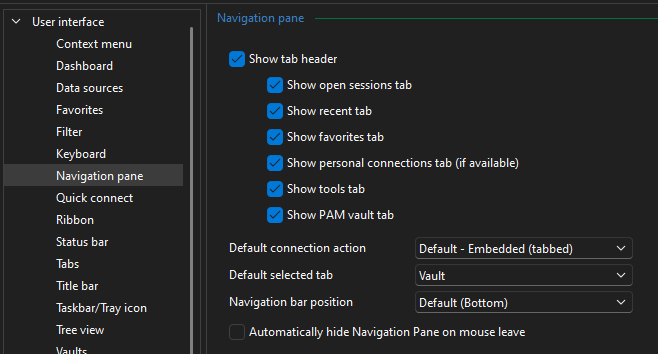
Any help is appreciated!
Best regards,
Add an option to set the tab group color to its child tabs
Hello - This sounds cool, found this as I was looking for something similar, but now I'm wondering - how do we set a tab group color? I don't see a way to do that anywhere... I was hoping there was some way to either A. configure a color for tab groups (e.g. that shows colorized in tab group bar) and/or B. possibly be able to have child tabs inherit that same color.
Question about Tab Pinning and Tab Strip Organization
Hi Eduard,
Thanks for the response. Sorry I forgot to include the version, it's v2026.1.24. So, multi-row tab has been removed as an option in v2026.3? Why? To me, that is at least much better than trying to shrink tabs to fit (which inevitably leads to them becoming so small you can't see which is which). Removing multi-row tab functionality would seem like a regression...I could see that some people would prefer a bar with an overflow menu (depending how small the tabs were allowed to shrink before overflowing), but multi-row tabs seems like a pretty standard feature now in apps that utilize tabbed windows.
I can post a feature request for the pinning. But, if the plan is to do away with multi-row tabs, that likely also changes how I would even use pinned tabs, so I would have to probably think about it or try out the new functionality a bit , to get an idea of what would work best for my workflow. I suppose if there's only ever one tab row, then pinning to the left of that row (i.e. current behavior) would probably work just fine.
Thanks for the other suggestions as well - I have tried working with the Tab Groups navigation pane which I think could be good but still has some issues to be worked out (I posted another ticket for an issue related to that here , I actually need to reply back on that thread next 🙂 ). If the stability/consistency of that pane's behavior can be improved then I think that might be a good workaround for me (as you probably can guess, I usually have many tabs open). And I've been playing around with tab coloring as well, I agree I think that will help in general with differentiating tabs. But even with that, I would still prefer the multi-row tab functionality (with pinning, ideally..).
Best regards,