Double-Click Action on Recent Items Pane

Hello,
I seem to recall that in the past, double-clicking an item in the Recent Items pane would connect to it (maybe dependent on your "default action" setting in the Navigation pane settings, I'm not sure). But now, it seems even with my settings set to connect as the default action, double-clicking in the Recent Items just brings me to the entry in the main Navigation. Then I have to double-click it again to actually open it.
I can see there is an ellipsis menu on the right where we can choose to connect or open in Navigation pane, which makes sense. But if we just double-click, shouldn't it follow the same default action we have set for the rest of the Navigation pane?
Or is there a separate setting we can use to configure this for the Recent Items pane?
This is on v2026.1.24.
Here are my Navigation pane settings: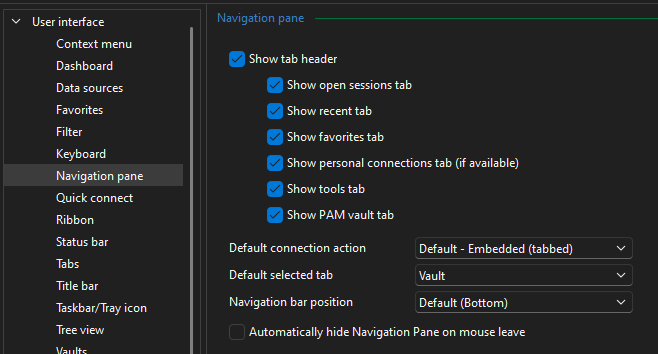
Any help is appreciated!
Best regards,
David Willis
4bf8da51-ff59-492f-a933-1f18f37931c2.png
All Comments (6)
Hello David,
Thank you for the clear description, and for the screenshot of your settings. I was able to confirm what you are seeing.
First, about the setting you highlighted: Default connection action in the Navigation pane options controls how a session opens once it is launched, for example in an embedded tab, an external window, fullscreen or console. It does not control whether a double-click connects or navigates, and it has never applied to the Recent pane. So your configuration is correct and is not what is causing this.
Second, your recollection is accurate. Up to the 2025.3 versions, double-clicking an item in the Recent pane did launch the entry. Starting with the 2026.1 line, the Recent pane's double-click performs "Select in Navigation Pane" instead, which is the behaviour you are describing. I also checked this against 2026.2.19.0, the version I believe you are now on after your upgrade, and the behaviour is the same there.
To answer your last question directly: there is currently no separate setting to configure the double-click action for the Recent pane, and it does not inherit the Navigation pane setting.
As you already found, the ellipsis menu on the item gives you Open in one step. One other path you may find quicker: if RDM is minimized to the notification area, left-clicking the RDM tray icon and picking the entry from the Recent submenu launches the session directly.
Please let me know if you would like me to look further into this one.
Best regards,
Alexis Geller Peiro
Hi Alexis,
Thanks for the response. That makes sense about the setting - thanks for clarifying it's purpose ( after looking a little closer at the wording and selection options it has, I realized it was probably more along the lines of what you described and not what I initially thought).
I don't use the Recent pane all that often, so it's not that big of a deal for me. But I am curious, why the change in behavior? Was it a request, or a safety measure perhaps (to prevent people from accidentally reopening sessions)? I guess I'm just thinking that going to the Recent pane to open a session is probably far more common than going there just to double-click a session and find it in the navigator tree, so I think it would make sense to at least have an option to configure that behavior (if not make "open" the default like it used to be).
I can probably live with it either way, just wondering whether there is benefit to having it default the way it does now , as opposed to having sessions open automatically.
Best regards,
David Willis
Hi David,
Good news, and thank you for raising it.
I checked with the team. There was no deliberate reason behind the change, it was not a safety measure or a request, and your reasoning was right: the Recent pane is there to relaunch things, so a double-click should open the entry.
Our developer has confirmed that the previous behaviour will be brought back as the default, and that settings will be added so the double-click action in the Recent pane can be configured. I do not have a target version yet, but I will update you here once I do.
Thanks again for taking the time to explain your use case, it is exactly the kind of feedback that gets things fixed.
Best regards,
Alexis Geller Peiro
Hello,
Thank you for being so patient!
If possible, could you update your RDM to the latest version (2026.3.9.0) and see if the problem persists? This version should resolve your issue.
Latest Version: Download RDM
If the problem persists after the update, please let us know so we can inform our development team.
Best regards,
Maxim Robert
Thank you both @Alexis Geller Peiro and @Maxim Robert - that's great news! I will check out the new version as soon as I can. It does sound like there may be some other UI issues in the new one though (I believe some portions of the UI underwent a significant overhaul in v2026.3, per various discussions where this has been mentioned), so I am watching a couple threads (like this one) hoping those could get worked out before I upgrade my primary machine. Maybe I can run the portable version to test. One way or the other, I'll give it a try and let you know if there are still any issues.
Really appreciate the the responsiveness (as always) and quick resolution!
David Willis
Hi David,
Whenever you have a chance to test it, please let us know how it goes. We’re glad we could help and appreciate your kind words!
Best regards,
Alexis Geller Peiro