2026.3.12 iDRAC

With the latest updates to iDRAC and/or RDM, I am no longer able to connect directly to the iDRAC console screen. I can still connect to idrac and then open the console from there. Any suggestions?
All Comments (16)
Hello
Sorry for the inconvenience. We've not changed how the DRAC console sessions connect, but the UI side has changed. I did evaluate the changes on my side against multiple DRAC versions, so you're obviously hitting something I did not.
Can you let me know your RDM version and the DRAC firmware version(s) you connect to? Major versions is fine, I'm mainly interested because Dell changed the KVM protocol between version 8 and 9 so the implementation is different.
I'm also interested in what happens when you connect - an error message, a blank screen, nothing at all?
Thanks and kind regards,
Richard Markievicz
iDRAC 10 version 1.30.40.51
Hi
Ok, thanks; and I see the RDM version is in the subject title. What happens when you try to connect? Do you get an error message? Is there something in the application logs?
I don't have a DRAC 10 here to test with; it's possible Dell changed something; have you connected successfully to this machine with previous versions of RDM? You wrote "With the latest updates to iDRAC and/or RDM" which makes me think that maybe the DRAC itself got changed. If that's the case, and Dell indeed changed something, I would need your help to figure out what because it will take time on our side to acquire corresponding hardware. Let me know.
Thanks and kind regards,
Richard Markievicz
I do believe they did change something because my version 9 units work fine.
Here is the error message:
28812ac3-60f9-43b5-b233-76440e8fe7de.png
Hello
Thanks for that. Actually your previous message has the important clue: "iDRAC 10 version 1.30.40.51". It looks like Dell restarted the firmware versioning back at 1.x on revision 10 hardware. My best guess is that this breaks our automatic negotiation (different firmwares use different KVM technologies, so if we select the latest and greatest by asking "is the firmware major version greater than 7" then it will obviously be broken here).
In the "Console type" setting for a DRAC 10 entry, can you try explicitly choosing "VNC over WebSockets" and tell me if that works? Note that you'll also need to specify the port, not just leave at as default. Assuming everything is pretty standard on your side, use 443.
If it works, that means that I just need to fix the negotiation around the new versioning system.
If it does not work, can you tell me what (if any) errors you get in the application logs? It's always possible that Dell also changed how the websocket connection is actually established.
Please, let me know if something isn't clear or you have other questions
Kind regards
Richard Markievicz
It doesn't work.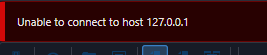
32ef51be-a211-4b51-b12a-2aa08894afe9.png
Hello
Ok, thanks. We may be out of luck here in the short time.
One thing that may help (although it's unlikely) is to open Help > Troubleshooting > Performance Profiling, switch to the "Debug" tab and set the level to 131. Try the connection. Depending on how far the connection gets, it will log a GET to the console:GET /console?username=…&tempUsername=…&tempPassword=…
And if authorization succeeds, a websocket address (wss://) containing a vck parameter.
Both of these (the temporary credentials and the vck) are short-lived, temporary credentials but you should obfuscate them and then send me the complete output by private message only.
The only viable workaround I can suggest is to enable VNC in the DRAC 10 virtual console settings (if Dell still supports that) and use it as an alternative. You'll need to manually specify the address and port in RDM.
If I can't figure it out from the logging (likely) it will probably be some time before we can get this resolved. The console side of the KVM is proprietary to Dell, and includes the web setup (generating temporary credentials, trading them for a websocket ticket and session key) and actual modifications to the VNC side (sending the session key interleaved with the VNC handshake). I can't figure out what has changed without studying actual hardware. An HAR or copy of the console's Javascript would probably give the answers but that can't be done securely or without potentially violating Dell's EULA. I need actual hardware to test on. I'll put in the request but it's likely to be a drawn out process.
Please, let me know if you have any questions
Kind regards,
Richard Markievicz
I have a work around, I can connect to the idrac and open the console.
I have a work around, I can connect to the idrac and open the console.
@Gr-ant001
This is something that can be useful for us all you share it.
@Nicola Farina
I believe he's talking about using the web console, which indeed is another workaround although not as ergonomic if you just want to connect to the KVM.
Kind regards,
Richard Markievicz
@Nicola Farina
I believe he's talking about using the web console, which indeed is another workaround although not as ergonomic if you just want to connect to the KVM.
Kind regards,
@Richard Markiewicz
Correct
Ok, waiting for an improvement then.
Hello, just wondering if there are also known issues with connecting to iDRAC console in v2026.2.19? I am unable to connect to iDRAC 9 consoles now seemingly, with any combination of settings (including setting explicitly to VNC WebSockets which supposed to be the correct protocol for iDRAC 9 firmware v7+ per the message in the UI). And setting port explicitly to 443 or leaving default 5900, doesn't work either way. Website works fine and console through the website works fine.
When I check the app and debug logs, this is what I see - something about a cert being rejected although I'm not sure how to bypass that (don't see any cert settings in the iDRAC console session settings) plus the debug output says the GET request (which is to https://idracservername.domain.com/console/..., sorry I had to redact it in my screenshot) gets a 404 not found in response. I confirmed via cURL sending the same URL I get the same response.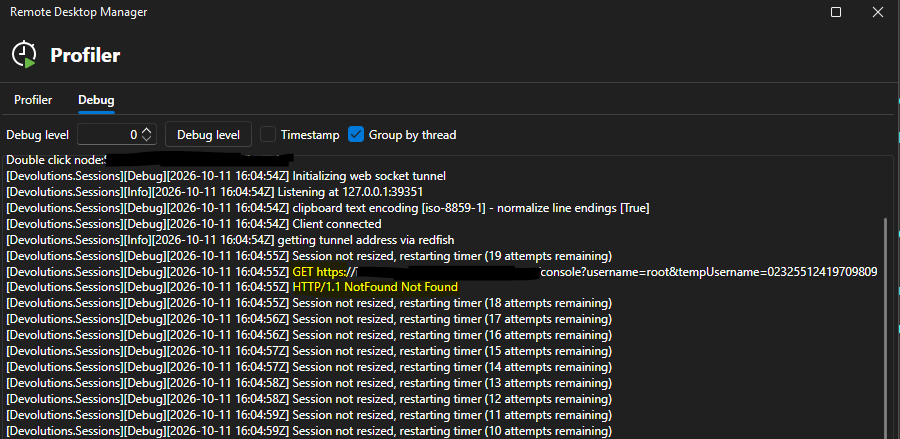

Details from the two prior messages - a "not found" and null param exception:

FWIW, connecting to earlier iDRAC (v8) console also doesn't work using any combo of settings but that was sketchy in the past anyway, I figured it might just be too old now though it would still be nice to have it work since we still have quite a few in use. But the v9 working is definitely more important for me.
Any help is appreciated! Please let me know if I should open a new thread since this is on a different version (v2026.2.19) rather than the one mentioned in the title.
EDIT: After playing around with it some more I figured out a workaround....it seems the iDRAC certs were generated with the short name only, not FQDN (it's a self-signed cert). Originally, I was using the FQDN in the name. Once I changed to use the short name then it worked - even though it does still generate the cert error noted above in the logs when I connect (but at least it connects). The other two errors I was getting above when using FQDN (the 404 not found and null URI param) no longer occur when I use the short name (at least on a few I've tried - there's one still giving me trouble though, throwing same errors as above even with short name - but that might just be an issue with that box).
The strange thing is, it's a self-signed cert anyway, which is not installed in my CA store as a CA. So, regardless of the name used, I would think it still wouldn't be trusted (and based on the message that is still occurring in the logs, it's not) - but it's letting me connect. So I am still curious why it wouldn't let me do the same when using the FQDN if the cert would not be trusted either way. Also, having some consistent way to define this behavior (e.g. bypass cert error setting or something for iDRAC Console session type) would be helpful.
EDIT 2: Still something weird. Some iDRAC 9's are working with the short name as noted above, but I have at least one that doesnt work with the exact same settings as the others. Confirmed not only identical settings in RDM but also iDRAC console settings. If I enable the (legacy) VNC server on port 5901 in iDRAC, and set the RDM entry to use regular VNC on port 5901, that works: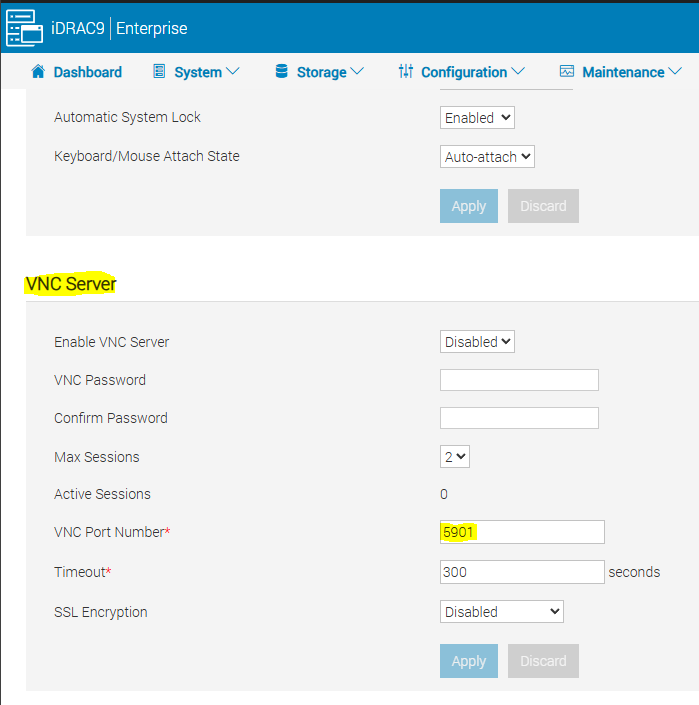
I have to set creds to use username/password w/ the VNC password set on the screen above, in that case. But, I've never had to do that on any iDRAC to connect before.
Using my normal config (with the VNC feature above disabled on the iDRAC) and using VNC WebSockets or Automatic on the RDM side w/ normal port 5900 or port 443 does not work on this box for some reason.
I'm now seeing these messages in the logs: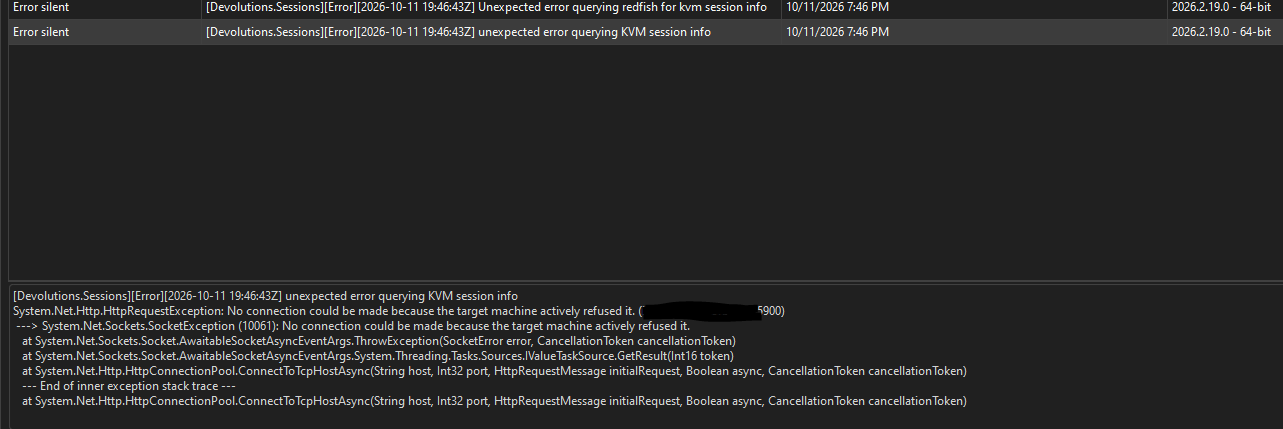
Same results trying to connect from RDM v2026.2.19 from at least two different machines (data source is SQL Server).
Best regards,
David Willis
db09d081-45db-4f73-b6aa-3a483711e8dd.png
ee9408da-aced-42c9-80ab-80b37e018c8b.png
9a734824-83df-40c5-a6a6-5f5be2224d53.png
c148709e-5afa-4b06-8e74-622beea943e3.png
44fa52ec-0d5b-403c-8e00-2733a89d7f0d.png
7effd4cb-cffb-460c-9f3f-44ea425a5e2c.png
Hi David
Thanks for the detailed problem report and I'm sorry for the inconvenience.
In the first case, we seem to not being a very good job surfacing the actual problems. The log line about "default certificate validation..." is just log noise, I don't think the problem actually relates to TLS.
Rather, there is a somewhat known issue where iDRAC9 enforces a host header check. The host header used for the request must match the DRAC IP, DNS RAC name (+ DNS domain) or an entry in iDRAC.WebServer.ManualDnsEntry. The web UI works whatever; the login and UI endpoints tolerate a mismatch I think, but the /console endpoint we need to talk to Redfish does not.
This article talks about the configuration on the DRAC side. We haven't changed anything here, if this turns out to be the problem I'm not sure why it would have suddenly broken. Perhaps firmware updates on the DRAC side changed something? Let me know.
For the "odd" machine, the error is quite clear: "no connection could be made because the target machine actively refused it", i.e. nothing was listening on that host/port or something in-between blocked the connection (like a firewall); but it's not clear to me what settings you were running when you got that error.
RDM is a bit confusing here because we overload the port field in the case of DRAC. Try to be explicit in the settings: configure "VNC over websockets" and set the port to 443. Do you get the same error? Please verify that that the management is running on 443 (it should be, if it's HTTPS) and that https://host:443/redfish/v1 answers from your machine.
I'll also touch on the DRAC 8; this is trickier on our side because it uses a proprietary KVM protocol (whereas the modern DRACs are just VNC and some bespoke additions). I have a DRAC 8 here that works fine, but if you can share the settings you use on your DRAC 8(s) and any error output as you did above I should be able to help.
Please, let me know if something isn't clear or you have further questions
Kind regards,
Richard Markievicz
Hello @Richard Markiewicz ,
Thank you very much for all the information! The part about the DRAC host header was very helpful, looks like that is what was causing it to only work with the short name instead of FQDN. It's strange because if I understand Dell's article correctly it sounds like it -should- work when using the DRAC name + domain suffix as defined in DRAC settings (which we do always have those values set statically in there as that is part of our standard DRAC config) but for some reason that was not the case (at least, for some - but I have at least two other iDRAC 9's that do work fine without this change - maybe it depends on firmware version or something). But I confirmed when we set the host header check to 0 then it does connect properly on the ones that were requiring the short name previously.
For the connection refused error, it is possible that was generated based on some (obviously incorrect) combination of settings I had tried while troubleshooting. But when I configure explicitly to VNC over WebSockets with port 443 on the "weird" one, it still doesn't connect - it doesn't generate the "connection actively refused" error though - just the cert validation warning, the 404 not found , parameter URI empty, and "unexpected error sending message"/"web socket not connected" (the last one repeats several times).
If I set it back to "automatic" and default port (which is how my other iDRAC 9's have been working), then it actually fails earlier (with the explicit WebSockets/443, it gets to the point of opening a tab and trying to connect to 127.0.0.1 on some random port which I presume is part of that connection flow, whereas when I leave it automatic/default port , it never even opens a tab - I just get the "unable to connect" box):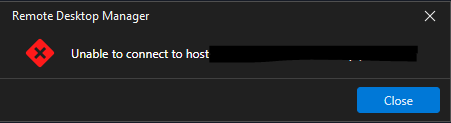
Seems to generate the same entries in the log either way though...I will keep playing around with it , maybe try removing and re-creating the RDM entries or something and see if that helps...
(edited to add summary + iDRAC 8 details)
Just to recap - 3 different states of iDRAC 9 behavior for me currently:
- Some connect fine with no HostHeader change using the FQDN as defined in the DRAC settings (DRAC name + domain DNS name)
- Some require the HostHeaderCheck=0 change in order to connect with the FQDN as defined by the aforementioned settings (but work fine with the short name if HostHeaderCheck=1).
- At least one will not connect in either case, despite having its aforementioned DRAC settings also confirmed configured properly.
Regarding the iDRAC v8 - I've tried seemingly all different settings combos of the console type and port at one point or another, and it was working at one point. The problem is, I think in the course of troubleshooting we've changed it so much, I can't say for sure what the working combo of settings back then was. But I know in recent months (probably the past year or so actually) it seems like the iDRAC 8 consoles haven't been working. Current behavior is if I leave defaults (automatic console type, default port) then it fails to connect (same "unable to connect to host" as above). If I change port to 443 with type automatic, then it seems to get a little further in the process (it tries to open a tab) but then I get this:
I get the same also if I set console type "native" with port 443 or "native" with port default.
If I use type "VNC" with port default, then I get a slightly different message:
Please let me know if you want more details on the v8 stuff.
Really appreciate the help!
Best regards,
David Willis
8736450c-d980-4005-a86e-3ec1e4368a9d.png
c41f0f6b-fbe1-46d3-9027-5b4563a09426.png
72eaa043-1292-4125-8486-c12f8e09eea0.png
914435e3-cbec-4e90-8041-4d12932e3d3b.png
Hi David
For that problematic machine, can you compare racadm get idrac.webserver between it and a working machine, and see if you spot any significant difference?
In your browser, if you try to load https://problem-drac.test.xyz:443/redfish/v1, does it respond with something?
This is the case I want to focus on first, because it's the one you have no connectivity from RDM.
Please, let me know if you have any questions
Kind regards,
Richard Markievicz