Drag-N-Drop and Rearrangement Issues with Tabs In/Out or Between Tab Groups
Drag-N-Drop and Rearrangement Issues with Tabs In/Out or Between Tab Groups

Hello,
Currently it seems drag-n-drop does not work for tab groups. In the "tab groups" navigation pane, if you display it - it looks like it's supposed to work, because when we drag an item there's a green arrow that appears. But trying to drop it in a tab group folder seems to produce inconsistent results - sometimes it works properly, sometimes it results in some other random entry getting placed in that folder, sometimes nothing happens at all. It's quite strange.
Furthermore, it does not appear we can drag tabs into tab groups via the tab strip at the top.
Finally, if we could add the "tab group -> move to" (or maybe just call it "move to" since it's already in the tab group navigation pane) context menu option to the right-click menu for items in the tab group navigation pane, that would be good. Right now if we right-click an item in the tab groups nav pane, it seems to have all the options for a regular entry, but not the tab or tab group submenu options that an active session tab would have (e.g. if we right-click a tab in the tab strip):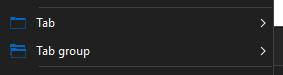
Please let me know if any additional info is needed.
Thanks!
David Willis
c5032278-5182-4703-b5c1-4081c1b722b3.png
All Comments (6)
Hello David,
Thank you for the detailed report. I will take your three points in order.
Dragging an open session onto a group inside the Tab Groups pane is meant to work, so the inconsistent result you are describing is a defect and not a limitation. Before I file it, could you confirm your exact version under Help > About? That pane was rebuilt in 2026.3, so 2026.2 and 2026.3 are two different implementations and the report has to name the right one. It would also help to know whether the entry that ends up in the group is a neighbour of the one you grabbed in the list.
Dragging a tab from the tab strip into a tab group is not supported today: the pane only accepts items dragged from inside the pane itself. The supported way to move an open session to another group is to right-click its tab in the tab strip and use Tab group > Move to, which is the menu in your screenshot.
On your third point you are right, and it is a related gap. Move to is not offered when you right-click an entry in the Tab Groups pane; there you get the regular entry menu.
The pane itself is documented here: https://docs.devolutions.net/rdm/ribbon-menu-bar/view/tab-groups/
Kind regards,
Michel
Michel Audi
Hi Michel,
Thanks for the response, and sorry I forgot to include the version - it's v2026.1.24. I am planning on upgrading, the latest available to me currently shows v2026.2.18 so I was going to try that.
As far as the exact behavior, it actually varies a little bit. Sometimes the move will not occur at all. Sometimes another (seemingly) random entry will get added to the group I tried to drop it in instead. From what I can see, it does not appear they are neighbors (at least not in the tab group list). I just did one test where I took screenshot before and checked after, and it was an entry two items up in the list from the one I had dragged-n-dropped that appeared in the group. Also sometimes the pane shows windows that aren't even in there, for example the "Update available" pane right now is showing as being in one of my tab groups even though it's not (it only shows on the "all" tab group). And sometimes the tab groups (shown as folders in the pane) will reorder themselves for no apparent reason as well (e.g. when we try to drag-n-drop an item in, suddenly the group will go to the bottom of the list when it was at the top before). Just overall, the behavior in the Tab Groups pane seems very sketchy/inconsistent.
Dragging a tab from the tab strip into a tab group is not supported today: the pane only accepts items dragged from inside the pane itself. The supported way to move an open session to another group is to right-click its tab in the tab strip and use Tab group > Move to, which is the menu in your screenshot.
Understood - I do think it would be convenient to be able to drag-n-drop on the tab strip, and thus might be worth an addition in the future. But if we can do the same via the Tab Groups pane it's not that big of a deal (for me anyway) right now. But I don't believe we can select multiple tabs in the tab strip - so we can't move multiple tabs at a time using "move to". Hence the reason I would like to see it on the context menu from the Tab Groups pane (see below). Currently with the drag-n-drop behavior in the Tab Groups pane inconsistent, and no "move to" option for the context menu there, there seems to be no viable way to move multiple tabs. The only method working reliably for me currently is right-click a single tab in the tab strip -> Tab Group -> Move To.
On your third point you are right, and it is a related gap. Move to is not offered when you right-click an entry in the Tab Groups pane; there you get the regular entry menu.
Are there plans to fix this already? Or would I need to submit a feature request? Seems only natural that tab group-related options should appear on the context menu for items in the Tab Groups management pane.
Best regards,
David Willis
Hello David,
Thank you for the version and the extra detail, and my apologies for the slow reply.
Your first point is a defect, not something you are doing wrong. On 2026.1.24 a single-entry drag in the Tab Groups pane acts on whichever row the pointer is over when the drag begins, not the row you grabbed, so if the pointer has left that row a different entry moves, and over a group folder nothing moves. That would account for both outcomes, including the entry two rows up.
There may be a way around it that also covers your multiple-tab problem, though I have not run it here. Select several entries in the pane (Shift-click, or Ctrl+A for all), entries rather than group folders, and drag them as one: a multi-entry drag uses the rows you selected, not the pointer position. The catch is that if only one ends up selected you are back on the single-entry path, so check what actually moved before relying on it. The pane is documented here: https://docs.devolutions.net/rdm/ribbon-menu-bar/view/tab-groups/
Before you upgrade: 2026.2.18 will not change this fault, as the drag handling there is identical to your build. Other parts of the pane did change, though nothing I can tie to the rest. The pane was rebuilt in 2026.3 and the faulty step is not in the new one, but time that move carefully: on current 2026.3 builds there is an open report of a single click on a tab in the tab strip starting a drag or undocking it, with no fix released yet. 2026.3 is generally available, so if your update check only offers 2026.2.18, tell me and I will look into why.
On your second and third points, dragging a tab in from the tab strip is still not supported, and Move to is still absent from an entry's right-click menu in the pane; both remain true in the rebuilt 2026.3 pane. I checked, and no ticket covers either today. You do not need to submit anything yourself, and I will send you the references once I have raised both.
The two other things you mentioned, the "Update available" window listed in a group and groups reordering themselves, will go into the defect report.
Kind regards,
Michel
Michel Audi
Hello,
Thank you for being so patient!
If possible, could you update your RDM to the latest version (2026.3.9.0) and see if the problem persists? This version should resolve your issue.
Latest Version: Download RDM
If the problem persists after the update, please let us know so we can inform our development team.
Best regards,
Maxim Robert
Hi @Michel Audi
No worries, thanks for the update - I can try v2026.3 but there is/was another issue I was watching on that related to tab rows (on a certain build the option to have multiple tab rows had disappeared altogether and the only option was to use an overflow menu instead, which would've impacted me quite a bit because I almost always have multiple rows of tabs I'm working with), but I think that is fixed now. But that was why I was planning to stay on the 2026.2.x build initially when I wrote that, so I was fine with upgrading to that version. I am currently on v2026.2.19 (upgraded last week). Now that has been resolved I can try it out (v2026.3.9 , which does now appear as the available version when I check for updates) and see how the tab group management is as well. Also thank you very much for passing along those feature requests, it's much appreciated!
Hi @Maxim Robert sure I will give it a try as soon as I get a chance. Might be next week but I will report back here when I do. Thank you!
Best regards
David Willis
Hello David,
Thank you for the update. Before you test 2026.3.9, here are a few corrections and clarifications to our earlier replies.
Please do not use Ctrl+A on 2026.2.19. It also selects the group folders and the All row, so the pane refuses the drag and nothing moves. I would not rely on the multi-entry drag I suggested either, as I have not confirmed that it moves only the entries you select.
Our source review confirms that 2026.2.19 still has the single-entry drag step that can act on the row under the pointer instead of the entry you grabbed. The Tab Groups pane was rebuilt for 2026.3, and 2026.3.9 anchors the drag to the entry you press. That should address the wrong-entry and no-move results, although we have not reproduced your exact sequence end to end. When you test it, please let me know whether a single-entry drag moves the entry you grabbed, and whether the "Update available" window listed in a group, or groups reordering themselves, happen again.
The single-click tab undocking issue I warned you about is fixed in 2026.3.9. A separate report is still open on current 2026.3 builds: an RDP session's screen can go blank after its tab is dragged to a new position, and moving the mouse over it, or switching tabs and back, brings the image back.
You are right about tab rows: 2026.3.9 has multiple rows. If yours come up on one row, right-click an empty part of the tab strip and choose Tab sizing > Show tabs in multiple rows; the same Tab sizing setting is in the Tabs settings under File > Settings > User interface: https://docs.devolutions.net/rdm/user-interface/ui-customization/tabs/
Dragging a tab in from the tab strip and Move to on an entry's right-click menu in the pane are still not in 2026.3.9. The defect report is filed and links back to this thread; the two requests are not posted yet, and I will send you the link as soon as they are.
Kind regards,
Michel
Michel Audi