Unselected tab coloring

Hi there,
I need a help about setting unselected tabs color. I have many options but:
- "light" is really too light (I use dark colors for entries and the difference is really "strong").
- "transparent" option seems useless (the same of "none").
Any hint?
All Comments (25)
Edit: I've tested more deeply and I want to correct my previous post. "Transparent" adds no color correction, "None" sets color with "no color".
The problem is (in my opinion) that coloring in a lighter way an unselected item is not natural: I would really prefer to have a darker tone for unselected items or, even better, a sort of transparent layer to make it less evident (which would not modify the color code, only his impact). It's the same of enable/disabled standard items in GUI. Another great option would be something on tab label border or similar (for don't touch the background color).
Moreover, "light" effect it's really too light for every color (making the screen a punch of light for eyes). "Light-light" is incredibly uncomfortable (and it's the default).
Hope to add something useful.
Thanks
Hello,
Could you post some screen shot with more details?
Regards
David Hervieux
I need to use very dark colors so the "light" unselected version is not too light:

If I use lighter base colors, unselected ones are really too light:

In any case, active/passive status is not so well perceptible (imho), maybe something less evident for unselected items could be better. For example (just a bunch of ideas):



a44c0017-5a2f-4697-bc51-f9cccd31ee7d.png
d8338014-434b-4a12-9673-3f0ff23b41c9.png
f72970c3-b02a-4de4-b066-12e331ace38c.png
271e1df9-56e7-4fcd-8cf3-7a565bb662e9.png
040fff2b-8fbb-43ce-adc3-d28b408c4a82.png
ed51da04-5f92-42a6-bf84-6f3df9bc8b51.png
7bb58953-f73c-49d9-bd6c-2f243ed76d80.png
913abead-10c4-4f77-a145-d52a5b49eb62.png
Hello,
Thank you. I will try to improve this with the next major version. It's not as simple as it look because the third party we use apply an effect and it's not easy to know the final output.
Regards
David Hervieux
I can understand. Apart from UI components maybe not fully customizable, it's not simple to achieve a good usability/visibility GUI for tabs (in general).
Working on less color difference for status and maybe on borders, seems the only way. For example, the famous Firefox extension "Sidebery" use this method: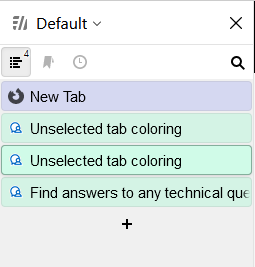
Hope to help.
22251aa5-3fa1-47d3-bc1a-8b534acdb97a.png
Hello, just wondering if there were ever any improvements made in this regard? I agree with the OP about the coloring of non-selected tabs being an extremely "light" version of the selected color which is non-intuitive (as they mentioned, unselected things are usually darker, not lighter). It actually doesn't seem to be as bad with the auto-generated "smart coloring" if you use that, because those colors seem to be very light by default. But for any manually-selected colors, if I want to use a darker shade then yeah it appears very weird when unselected, as OP described (as an excessively bright shade of the selected color).
I realize this may not be an easy problem to solve, just wondering if there had been or was any planned improvements in this area?
Maybe rather than trying to auto-shade the unselected color, maybe it's easier to just let the user set it? Or at least give them an option to - e.g. an option to override the default unselected color, in which case they could choose a shade of their own - if they care to put in the extra effort (as some of us might 🙂 ). Just some ideas.
Best regards,
David Willis
Still waiting some improvements...
Hello David, Nicola,
With 2026.3 we've reworked our UI framework completely and it will allow us a lot more flexibility with our UI. I'll open a ticket so we can investigate whether we can improve it without any new settings, and if it's not really easy, we'll see about adding new settings so the user can fully customize this.
Regards,
Hubert Mireault
Hello,
As of the latest version (2026.3 released), there are more customization options for the "Unselected tab" colors. We've added a difference between the lightest (the one you're referring to, is now labeled "Light-light"), and there is a darker shade named "Light".
You can also simply customize the colors of unselected tab, if you'd prefer a specific color.
Can you tell me if these options are good enough for your cases? Or do you specifically require more variety in shades of "light" than what is currently available.
Regards,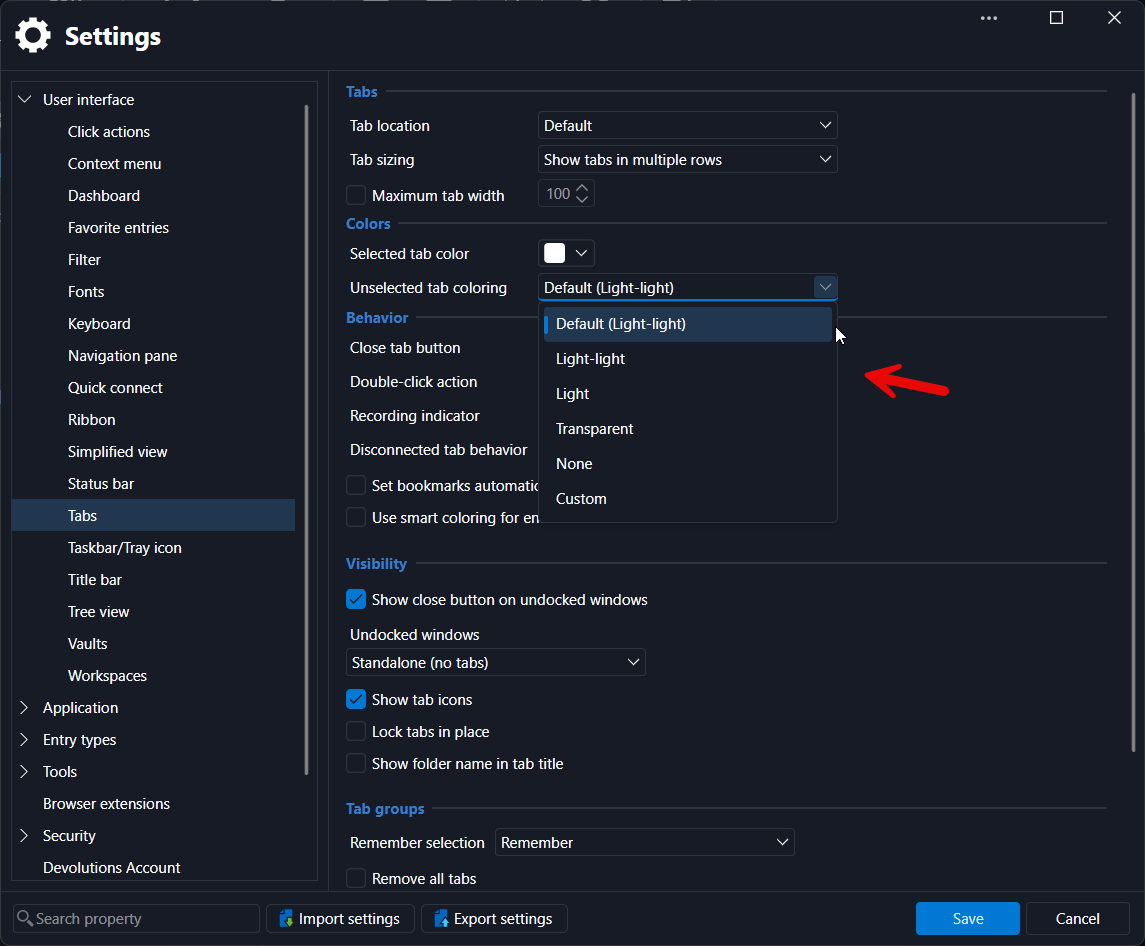
Jafran Majeau
2ee92575-9a28-4aa6-ab1a-7eb1fc670417.png
Hi Jafran and Hubert,
Thanks for the updates - I will upgrade to the new version when I get a chance and try them out to see how they work.
So if we set a static "unselected tab color" here, it would apply to all tabs regardless of the tab's original color? Or we are able to set an "unselected color" on a per-tab basis just like we do with the regular tab color?
Best regards,
David Willis
Hello,
Currently, the "Custom" unselected tab color would apply to all the tabs that are not currently selected (regardless of their original color). We don't currently support this on a per-entry configuration (although the shading provided by "Light-light" and "Light" do take into account the current tab colors).
Regards,
Jafran Majeau
Hi Jafran,
Ok thanks, that makes sense. I will upgrade as soon as I can and give it a try and then report back here with results.
Thanks for taking a look at this!
Best regards,
David Willis
Hi there,
thanks for the update but the original request is not solved though. What we are asking is a new opposite option: darker instead of lighter as a darker colour is generally more suitable for inactive elements than the lighter one. This could be a general settings that makes every custom colours "darker" if the relative tab is inactive.
Simply, the "light" and "light-light" seeams weird to us.
P.S. I don't know if the new GUI framework can be improved with new elements but a line on the bottom of the tab could be another great visual element for active ones.
Hello Nicola Farina,
Thank you for the clarification, I think I might have misunderstood your original intent. I thought you wanted a "darker" option than the "lightest" one we had, but I wasn't aware you wanted a "Darker than selected" shading.
I've done some testing already, and it is a bit difficult to find a "darker" shading that looks right. That said, if I understand correctly, you would also be open to simply having a selected tab with a "thick underline at the bottom of the tab" that showcases which tab is selected, is that correct? (I'm assuming you would use that with the unselected tab color set to "Transparent", in which case the colors of tabs would remain unchanged when selected/unselected, but you would have the "line at the bottom of the tab" to tell you what is selected.)
Am I understanding this correctly?
Regards,
Jafran Majeau
Hi Jafran,
correct. The option to use a lighter color for unselected tabs is unintuitive as, generally speaking, darker/soften/greyed elements are used for this.
Take this example:
I use green color for NAS GUI entries > I open three of them > I select one of them (active tab) > other two have a ligther green than the selected one. This is the opposite of the general visual behavior in GUI since years (the lighter element is the focused/active one).
As my several previous posts (look above), If "darker color" is not simple to achieve (I can understand), another GUI element can be added to the active tab to highlight it instead. This is something every software with tabs use. This is Firefox: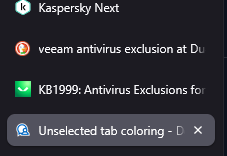
The "lighter" element is the selected one, not the opposite.
The idea of a bottom line for the selected/active tab is something to try if colors shading are not manageable (or not visually ideal). The Firefox screenshot above use the same color for all tabs so it's a bit simple but there are some extensione (like Sidebery) that use group colors and they use the lighter shade for selected, not unselected.
In short, I think we need a better way to identify the active tab instead of the lighter color (that is unintuitive).
Hope to be clearer than previous.
1ee206f3-c301-4d25-b335-c4c1c81e4794.png
Oh, I maybe focused the misunderstanding.
In the past, I also pointed that RDM colors in "lighter" form are too ligth in general (too vivid colors for our use). This is a side consideration, we need a better way to identify the active/selected tab (see above).
Hello,
Yes I think we're more on the same page now. By default RDM also has its selection "lighter" than non-selected tabs (or at least tinted with blue, depending on how "Dark" your theme is).
The tricky part is when we you also use custom tab colors, which causes discrepancies. I will tinker with possibilities and come back to you.
Regards,
Jafran Majeau
23add594-3793-4552-b17d-3c391c10248a.png
Yes, it's surely the use of custom colors that causes the "issue".
Hello Nicola Farina,
From some testing, I could give you configuration settings over the "Accent" color when a tab is selected (this is the outline of the tab). You would be able to choose its color, as well as the thickness of the line. (In the provided screenshot below, the thickness is 3px, you would be able to configure between 0 and 5 (0 meaning there is no outline).
Would that provide a sufficient fix for you?
Regards,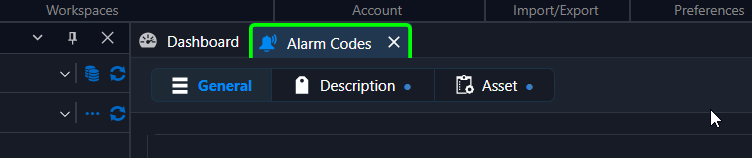
Jafran Majeau
b7ebba7c-cbc0-4e85-81d5-d9de8eb2a41a.png
It sounds perfectly suitable for what I'm looking for. The only caveat will be the color of the border that needs to be in contrast againts the tab color.
Thanks!
Hello,
I've added both configuration options (they will be located in the same place as the others in the Settings). You can expect these to reach live with the upcoming 2026.3.10 version.
Regards,
Jafran Majeau
Cheers!
Another possible improvement is inserting a little space (or visual similar trick/style > shadow?) to separate e bit the tabs with the same custom colors. For example, look at blu tabs:
They seem a big one instead of two.
34131487-ee48-48c9-a73e-9a5aec4892c1.png
Hello
I'll investigate our options for this and come back to you when I can.
Regards,
Jafran Majeau