
Jakub Vácha
2ß26.3.13 - RDM looses focus on RDP session logoff
Hi,
I'm having the same problem.
When I log out of an RDP session on a Windows server, RDM switches to the background after I log out.
I also have the latest version of RDM (2026.3.13.0) installed.
I haven't been able to find any workarounds or solutions. Do you have any updates on this issue?
Thank you
@Jakub Vácha
Updates on this issue can be found here RDM window goees to background when a RDP error occurs - Devolutions Forum
2ß26.3.13 - RDM looses focus on RDP session logoff
Hi,
I'm having the same problem.
When I log out of an RDP session on a Windows server, RDM switches to the background after I log out.
I also have the latest version of RDM (2026.3.13.0) installed.
I haven't been able to find any workarounds or solutions. Do you have any updates on this issue?
Thank you
Support for Privileged Accounts (CyberArk/PAM) in Macros/Scripts/Tools Execution
We would like to request an enhancement to the Tools functionality to allow individual tools to be executed using privileged accounts from CyberArk and ideally any PAM solution.
We have already discussed this topic in the following thread:
https://forum.devolutions.net/topics/41215/rdp-secret-macro--remote-tools--tool-credential#236502
Use case:
In Remote Desktop Manager (RDM), we configure an RDP session. From the Macros / Scripts / Tools tab, we want to launch built-in tools such as Computer Management, Event Viewer, or Services against a remote server.
In the RDP session properties under Management Tools → Tools, we can select either My Privileged Account or a CyberArk PVWA entry.
However, when launching any tool from this section, it does work with CyberArk privileged account. We have also confirmed with Devolutions Support that this functionality is currently not supported.
Expected behavior:
When a privileged account (e.g., CyberArk PVWA) is configured in Management Tools → Tools, all tools launched from the Macros / Tools / Scripts tab should run under that CyberArk privileged account.
This would allow administrators to launch remote tools (Computer Management, Event Viewer, Services, etc.) without opening a full RDP session and while securely using privileged credentials managed by CyberArk (or other PAM solutions)
This improvement would significantly streamline daily administrative tasks and enhance secure privileged access workflows.
Cyberark dashboard error
Hello Jonathan,
Yes, CyberArk Dashboard doesn't work in User Vault. I have tried run CyberArk Dashboard in shared Vault and it works fine.
So we will wait for fix in next version.
Thank you
Best regards
Jakub Vácha
SSMS v22 and SQL Server Management studio add-on
Hello,
We are not able to test it because We have problem v CyberArk Dashboard in latest version 2026.2.7.
I have reported this in https://forum.devolutions.net/topics/55109/cyberark-dashboard-error topic.
Cyberark dashboard error
I don't have the same issue as describe NeilSmith2025, but the CyberArk Dashboard isn't working properly in RDM 2026.2.7.
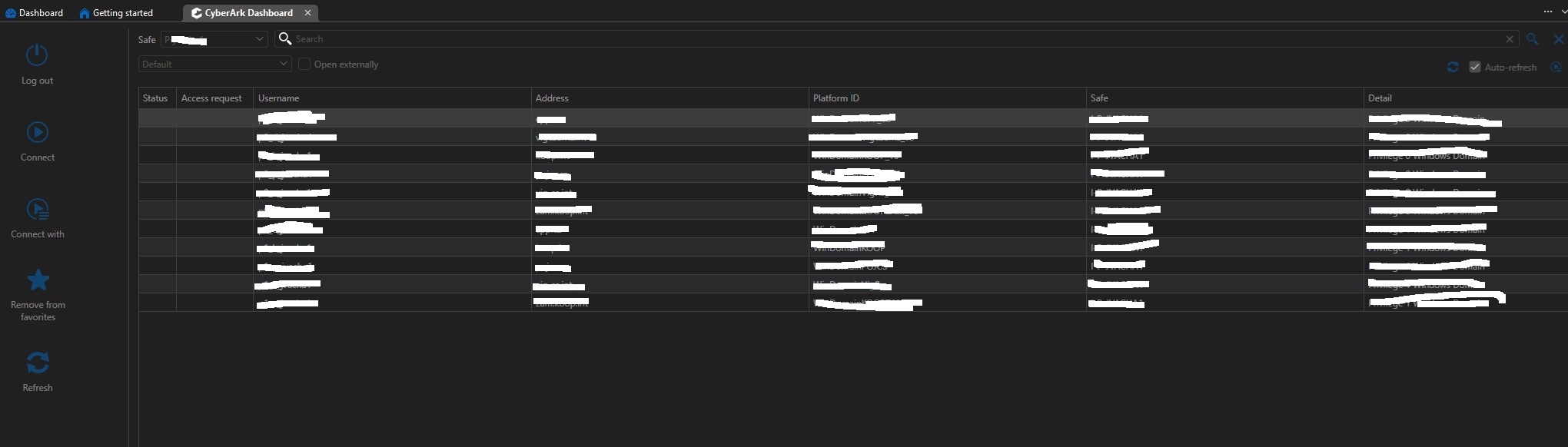
When I launch this object, I authenticate correctly and it logs me into CyberArk. The CyberArk Dashboard object lists all my privileged accounts, but the problem is that everything in the Dashboard is inactive. The buttons don't work, and I can't select any accounts.
You can see in attached screen
I reinstall RDM to version 2026.2.5. where this CyberArk Dashboard works.
SSMS v22 and SQL Server Management studio add-on
Hello Jafran,
I would like to ask you if this has been fixed in the recently released version 2026.2.5.
I didn't find any note about it in the release notes, or maybe I just missed it.
Thank you.
RDP secret Macro / Remote tools / Tool Credential
Hello Patrick,
First, here are answers for your questions:
I'm using RDM version 2026.1.23.0.
We are using CyberArk integration mode via PVWA , web services.
It happens with all tools.
I can run the mmc.exe process using my privileged account via the "Run as" feature in my admin workstation and works connecting to target server with correct rights. I tried change setting in "Properties" -> "Management Tools" -> "Tools" from My privileged account to Linked (user vault). I changed to my CyberArk PVWA object with injection mode. This setting doesn't work too with any tools.
I have tried create object Credentials where I setup Username and Passwrod for my privileged account from CyberArk. After that this tool need write password again to Command Prompt window to runas command.
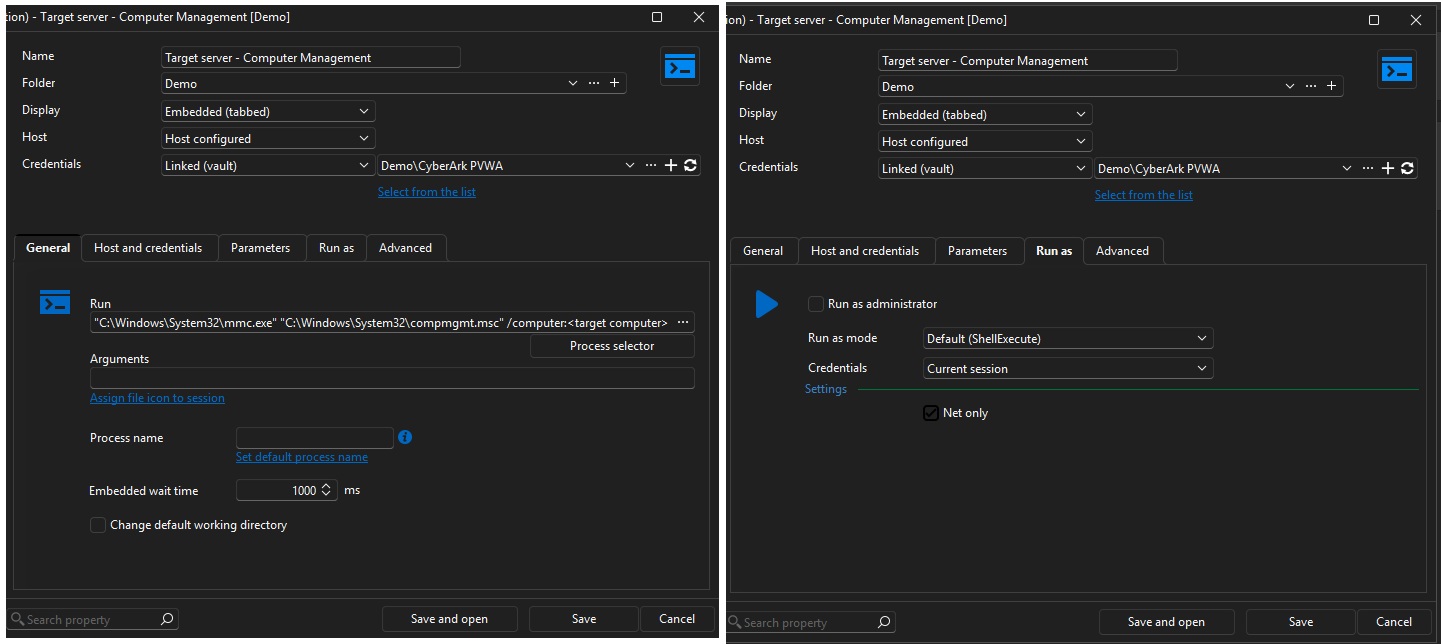
So I discovered that by using a Command-line object (external application), I can run mmc.exe or directly launch snap-ins such as Computer Management, etc., from RDM using a CyberArk account without having to enter a password.
We use these MMC tools—such as Computer Management, Services, and Event Viewer—on a daily basis for quick fixes and configuration.
It would be a great help if we could run all the tools in the Macros/Scripts/Tools tab using CyberArk accounts.
To give you a better idea, I've attached an image showing how I've configured the "Command line (external application)" object I mentioned above. (Parameter Net only is checked)
SSMS v22 and SQL Server Management studio add-on
Hello,
thank you for your info.
We'll wait for the new version and test it.
Best regards
Jakub Vácha
RDP secret Macro / Remote tools / Tool Credential
Dear all,
I need some advice on this setting.
I have servers in different domains, and I need privileged accounts from CyberArk to connect to these servers via RDP.
When I select the "Use session credentials" option in this setting, the MMC console with the appropriate snap-in opens and connects to the desired server. Everything works fine only for servers that are in the same domain as my admin workstation.
When I run, for example, Computer Management for a server in a different domain with this setting, the MMC console opens, the snap-in connects to the server in the other domain, but without the necessary permissions. The problem is likely that the MMC console launched this way runs in the context of the user I’m logged in as on the admin workstation. This account doesn’t have the necessary admin rights in the other domain. I can see this in Task Manager as well.
When I change the settings in the RDP session under "Properties" -> "Management Tools" -> "Tools" and select "My Privileged Account" (where I have correctly configured authentication for CyberArk accounts), the MMC console no longer launches, not even for a server in the same domain.
Please advise on how to configure this so that I can use these tools across domains.
Thank you
best regards
Jakub Vácha
SSMS v22 and SQL Server Management studio add-on
Dear all,
At RDM, we use the SQL Server Management Studio add-on to open the SSMS application. We need to run SSMS using a CyberArk privileged account. Therefore, we use RDM to launch the process "runas SSMS.exe /user:<privileged account>".
RDM_obrazek1.jpg shows an example of our SQL Server Management Studio object configuration, as we use it.

When we launch the object configured this way, RDM correctly retrieves the credentials from CyberArk for the privileged account and launches SSMS version 22. After SSMS launches, an error appears stating that an unknown -E switch was used.

S tímto nastavením v RDM vše dobře funguje např. se SSMS verze 20.
I read that the -E switch was deprecated in version 22 and replaced by the -A switch for Active Directory authentication in the SSMS documentation. See the link to the MS documentation. https://learn.microsoft.com/en-us/ssms/ssms-utility
I would like to ask you to fix this add-on.
As a workaround, we use the Command-line (external application) object to launch SSMS under a privileged account.
Thank you
Best regards
Jakub Vácha
RDM error "Request failed on background thread."
Hello Patrick Ouimet,
thank you for your answer. I have send email with logs to address as you mentionded.
Thank you
best regards
Jakub Vácha
RDM error "Request failed on background thread."
Hello Patrick,
we have same issue as pvansluisveld reported above.
We are getting the same error message. I am unable to say exactly under what conditions this message appears.
The data source logs on the server are logs of the type AUTHENTICATION_LOGIN_TIMING_DEBUG at the approximate time of the message.
We currently have the following versions:
DVLS: 2025.3.8
RDM: from version 2025.3.20.0 to 2025.3.23.0
We do not use Devolutions Gateway
Following your previous advice, we enabled Performance Profiling for a colleague who encountered this error today, and I have some data from this tool.
Do you have any advice on this issue? Would you like me to send you this data from Performance Profiling and Data source logs by email?
CyberArk Dashboard SAML authentication problem
Hello William,
Sure, we will provide you debuging logs from RDM.
But as I wrote, we are not able to reproduce this issue again. So we have to wait if this problem occure again. After that we will start debug loging as you describe on affected RDM and we will send you these logs.
Please be patient.
May I ask you for answers about specific setting in RDM as I mentioned in my previous post. I have copied them below:
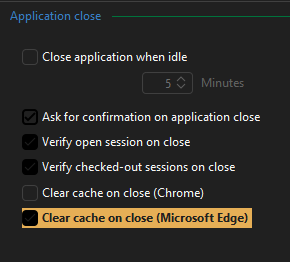
First. In the Application -> Application Close section, there is a Clear cache on close (Microsoft Edge) function. See the image. Which cache does RDM clear, and does it do so when RDM is closed?
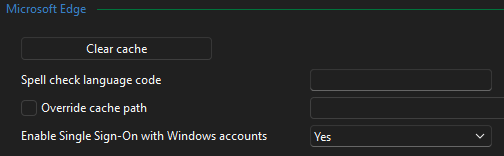
Second. In the Entry types -> Sessions -> Website section, there is an option called Enable Single Sign-on with Windows accounts. See the image. By default, it is set to Yes. Changing it to No displays a login window without selecting an account. How does this option work? I assume it affects all website objects, is that correct?
Thank you
Best Regards
Jakub Vácha
CyberArk Dashboard SAML authentication problem
Dear all
We need advice on CyberArk Dashboard and SAML authentication.
We have created PAW stations within our corporate PAM environment, where we use RDM. In the School and Work accounts section of PAW, we have added our accounts from the MS Edge browser to the Windows system. One of these accounts is used to log into CyberArk via SAML, and the other is for managing our MS tenant.
And when we launch CyberArk Dashboard on this PAW station, where we have set up authentication using SAML via our MS Tenant (as required), a window for selecting these accounts appears. Under normal circumstances, I can select the appropriate account and log in without any problems.
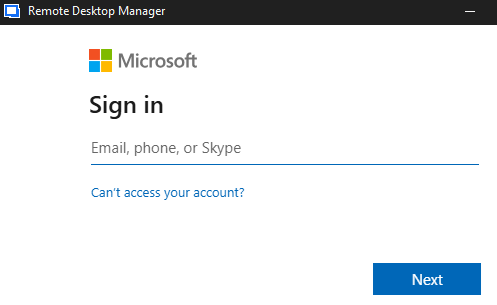
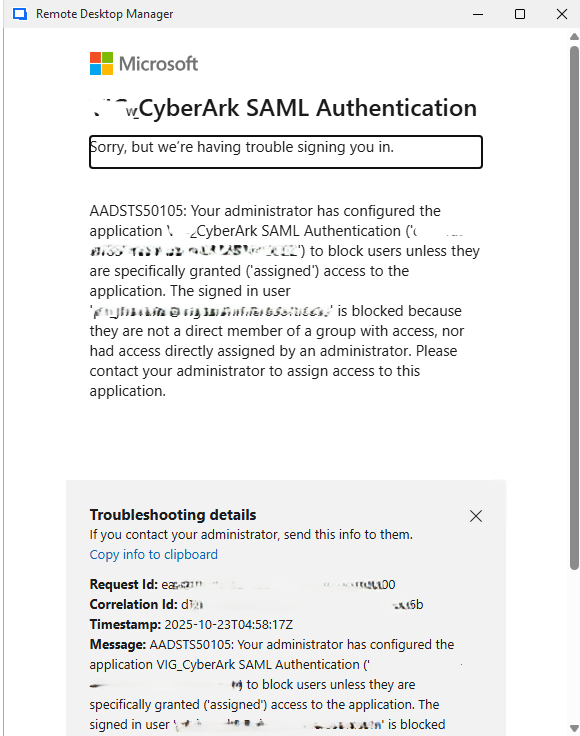
Occasionally, CyberArk Dashboard opens this window for selecting accounts but does not offer a list of accounts. Instead, it tries to use one of these accounts in the background to log in to CyberArk. It selects the wrong one and displays an authentication error, see image.
The strange thing is that when RDM and CyberArk Dashboard get into this state, the account selection window works fine in other applications.
So far, we have been able to resolve this issue either by deleting the RDM profile or, in some cases, by deleting the WebView2.Cache folder in the RDM profile.
Now, on one station, we are unable to get CyberArk Dashboard to offer a selection of accounts for authentication. Deleting the RDM profile does not help.
Unfortunately, we are unable to simulate this situation again.
In the RDM settings, I found the following options that could possibly solve our problem, or rather, consult their functionality.
First. In the Application -> Application Close section, there is a Clear cache on close (Microsoft Edge) function. See the image. Which cache does RDM clear, and does it do so when RDM is closed?
Second. In the Entry types -> Sessions -> Website section, there is an option called Enable Single Sign-on with Windows accounts. See the image. By default, it is set to Yes. Changing it to No displays a login window without selecting an account. How does this option work? I assume it affects all website objects, is that correct?
We need advice on where the error might be. It seems that RDM is reading the list of accounts from Windows incorrectly. Does RDM log its process of retrieving accounts from Windows somewhere?
Monitoring DVLS service Externally
Hello Michel,
Do you have any recommendations on how to set up a monitoring template in Zabbix? Or do you have any other recommendations on how to monitor DVLS that is ok?
We have 4 production servers running DVLS and we need to monitor if the application is running fine.
Devolutions Password Manager connected to DVLS
Hello,
We use RDM, DVLS and integration with CyberArk. I have created CyberArk PVWA entry.
Unfortunately, I cannot get the Website object to retrieve the username and password from the CyberArk vault.
Could I ask for a procedure on how to set up such a Website object and be able to use it in the Workspace browser plugin?
Issue with CyberArk Dashboard intergration in RDM after update to 2025.1.24.0
Hello Xavier,
We have the same problem.
I'm glad you already have a fix for this problem. I just want to ask, when will you release this fix?
Thank you
Best regard
Jakub
Can't export report Login History
Hello Alexandre,
we have installed version 2024.3.13.0 in our enviroment and problem is fixed.
Thank you for your support
best regards
Jakub
Can't export report Login History
Hello Erica,
we have made upgrade to version 2024.3.12.0 from version 2024.3.11.0, where we found this problem. This problem still presists after upgrade to latest version.
I have sent the generated report to the email service@devolutions.net as written in the article and mention this thread in the text.
We have tried run this Clean up logs feature, but it doesn't help. We hadn't setup this feature before.
Can't export report Login History
Hello,
We need to export data for the last 30 days from the Login History report.
When I have the data ready and click on the export button, nothing happens and the Data source logs report shows an error, see error text below.
Please help me to generate this report.
Alternatively, we need to get information what user, when they logged in and from what source they logged in (RDM, Web, etc). Through Powershell I was able to get the last login date of the users, but I don't know how to get the information from which source they last logged in. Is it possible to get this information using Powershell?
WriterException - An unexpected error occurred. See inner exception for details. IWriter state:
Message
WriterException - An unexpected error occurred. See inner exception for details.
IWriter state:
Row: 72
Index: 0
HeaderRecord:
72


at CsvHelper.CsvWriter.WriteRecords[T](IEnumerable`1 records)
at Devolutions.Server.Business.Reports.ReportExporter.Export[T,M](IEnumerable`1 listToExport)
at Devolutions.Server.Business.Reports.BasePagingReport`5.Export(Filters filters, PagingOptionsModel pagingOptions, Boolean buildEmpty)
at Devolutions.Server.Controllers.APIControllers.V3.ReportsController.GetLoginHistoryLogsExportFile(LoginHistoryLogsPagingParameters parameters)
at lambda_method4821(Closure, Object, Object[])
at Microsoft.AspNetCore.Mvc.Infrastructure.ControllerActionInvoker.InvokeActionMethodAsync()
at Microsoft.AspNetCore.Mvc.Infrastructure.ControllerActionInvoker.Next(State& next, Scope& scope, Object& state, Boolean& isCompleted)
at Microsoft.AspNetCore.Mvc.Infrastructure.ControllerActionInvoker.InvokeNextActionFilterAsync()
--- End of stack trace from previous location ---
at Microsoft.AspNetCore.Mvc.Infrastructure.ControllerActionInvoker.Rethrow(ActionExecutedContextSealed context)
at Microsoft.AspNetCore.Mvc.Infrastructure.ControllerActionInvoker.Next(State& next, Scope& scope, Object& state, Boolean& isCompleted)
at Microsoft.AspNetCore.Mvc.Infrastructure.ControllerActionInvoker.InvokeInnerFilterAsync()
--- End of stack trace from previous location ---
at Microsoft.AspNetCore.Mvc.Infrastructure.ResourceInvoker.<InvokeFilterPipelineAsync>g__Awaited|20_0(ResourceInvoker invoker, Task lastTask, State next, Scope scope, Object state, Boolean isCompleted)
at Microsoft.AspNetCore.Mvc.Infrastructure.ResourceInvoker.<InvokeAsync>g__Awaited|17_0(ResourceInvoker invoker, Task task, IDisposable scope)
at Microsoft.AspNetCore.Mvc.Infrastructure.ResourceInvoker.<InvokeAsync>g__Awaited|17_0(ResourceInvoker invoker, Task task, IDisposable scope)
at NSwag.AspNetCore.Middlewares.OpenApiDocumentMiddleware.Invoke(HttpContext context)
at Devolutions.Server.Middleware.RequireAuthenticationOnMiddleware.InvokeAsync(HttpContext httpContext)
at Microsoft.AspNetCore.Authorization.AuthorizationMiddleware.Invoke(HttpContext context)
at Devolutions.Server.Middleware.XHealTheBreachMiddleware.InvokeAsync(HttpContext httpContext)
at Devolutions.Server.Middleware.ReferrerPolicyMiddleware.InvokeAsync(HttpContext httpContext)
at Devolutions.Server.Middleware.StrictTransportMiddleware.InvokeAsync(HttpContext httpContext)
at Devolutions.Server.Middleware.XContentTypeOptionsMiddleware.InvokeAsync(HttpContext httpContext)
at Devolutions.Server.Middleware.XFrameOptionsMiddleware.InvokeAsync(HttpContext httpContext)
at Devolutions.Server.Middleware.CSPMiddleware.InvokeAsync(HttpContext httpContext)
at Microsoft.AspNetCore.Authentication.AuthenticationMiddleware.Invoke(HttpContext context)
at Devolutions.Server.OAuth.Middleware.AuthSchemeDetectionMiddleware.InvokeAsync(HttpContext context)
at Devolutions.Server.Middleware.LegacyTokenParserMiddleware.InvokeAsync(HttpContext httpContext)
at Devolutions.Server.OAuth.Middleware.OAuthTokenParserMiddleware.InvokeAsync(HttpContext httpContext)
at Microsoft.AspNetCore.ResponseCompression.ResponseCompressionMiddleware.InvokeCore(HttpContext context)
at Serilog.AspNetCore.RequestLoggingMiddleware.Invoke(HttpContext httpContext)
at Microsoft.AspNetCore.Diagnostics.ExceptionHandlerMiddlewareImpl.<Invoke>g__Awaited|10_0(ExceptionHandlerMiddlewareImpl middleware, HttpContext context, Task task)

------------------------------------------

NullReferenceException - Object reference not set to an instance of an object.

at Devolutions.Server.Business.Reports.LoginHistory.Export.LoginHistoryLogExport.InitFromLog(LoginHistoryLogItem log)
at Devolutions.Server.Business.Reports.BasePagingReport`5.<>c.<Export>b__1_0(Item log)
at System.Linq.Enumerable.SelectListIterator`2.MoveNext()
at CsvHelper.CsvWriter.WriteRecords[T](IEnumerable`1 records)Devolutions Server could not connect license server
Hello Érica,
thank you for your advise.
This option was disabled. When I have enabled this option than I don't see this error, I see our license details.
But I have another question. Could this feature have been disabled in a any last updates of Devolutions Server? We are not aware of turning off this feature.
Certainly earlier in the year when we were dealing with some licensing regarding Devolutions products, I could see the license status without any problems. But it was still version 2023.x.x.x
Best regards
Jakub Vácha
Devolutions Server could not connect license server
Hello, everyone,
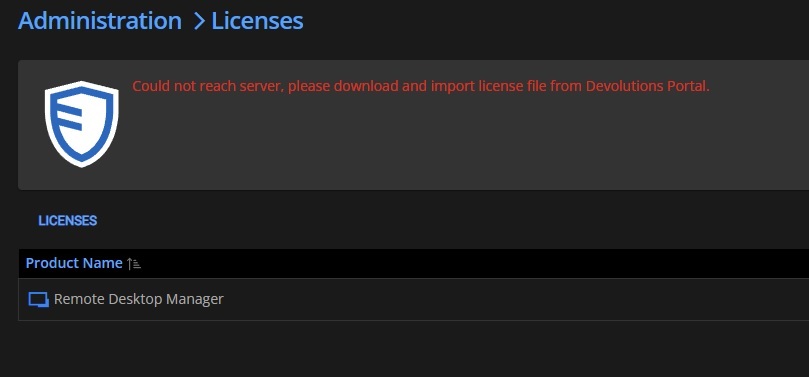
We have a problem with our Devolutions servers. When I open the Licenses menu in the administration menu I get an error message: Could not reach server, please download and import license file from Devolutions Portal. As mentioned below in screen
We have checked the communication to the internet with the networker admins and they have not discovered any blocked communication. I read in the documentation that the servers should communicate to the URL https://api.devolutions.com, which was not visible in the network communication to the Internet when I opened the License menu.
Please advise, is it possible to manually trigger an attempt to connect to the license servers or should the attempt be made to get the license information when the License menu is opened. Is the correct address for the license server or which address is correct for the license server?
We have the latest version of Devolutions Server 2024.1.11.0 installed
Thank you
Best regards
Jakub Vácha
RDM can't connect Devolutions Server
Hello Benoit,
I'm a colleague of jmalina's and I will add information about our problem.
We have upgraded all of 5 our servers to version 2024.1.6.0 and one of these server is affected with this issue. We have made upgrade from version 2023.x.x.x (I don't exactly remeber previous version) to version 2024.1.6.0. The issue started after this upgrade on one our sever. Other servers are ok
We have also tried make upgrade newer version 2024.1.8.0 on this server, but issue still persist.
With the uninstall, my colleague meant that we tried uninstalling the Devolutions server instance and installing it back on affected server. We didn't try downgrade version on this server.
Best regards
Jakub Vácha
DVLS Module: Error while retreiving tokens
Hello Erica,
we have tested this mode and it works fine. We have generated applications keys and secrets
Colleagues works on modifications in their scripts for this access mode.
Am I to take your last post to mean that logging in with a domain account in a powershell script is no longer functional and supported? Or this problem will be resolved in future release?
Thank you
Best regards
Jakub