RDM can't connect Devolutions Server

Hello,
RDM returns error by connecting to 1 of 5 servers with Devolutions Server. Web access to this server is OK.
The error:
Devolutions.RemoteDesktopManager.Business.TryGoOfflineException: Could not obtain data source settings. The server might not be responding.

   at Devolutions.RemoteDesktopManager.Business.DataSources.RDMSConnectionDataSource.GetDataSourceSettings(String repositoryID)

   at Devolutions.RemoteDesktopManager.Business.DataSources.RDMSConnectionDataSource.GetDataSourceSettings()

   at Devolutions.RemoteDesktopManager.Managers.ConnectionManager.LoadDataSourceSettingsFromDataSource(ConnectionEngine engine)

   at Devolutions.RemoteDesktopManager.Managers.ConnectionManager.ValidatePoliciesPart1(ConnectionEngine engine, Boolean hasChanged)

   at Devolutions.RemoteDesktopManager.Managers.ConnectionManager.LoadConnectionsFromDataSource(ConnectionEngine engine, Boolean hasChanged)

   at Devolutions.RemoteDesktopManager.Managers.ConnectionManager.LoadConnections(BaseConnectionDataSource dataSource)
The issue started after upgrade the devolutions server to the version 2024.1.6.0. We tried update that affected server to the latest 2024.1.8.0 but the issue still persists.
Unistall the devolutions server and install it back is the same issue.
RDM is in the last version 2024.1.20.0 64-bit
Thanks for your help.
All Comments (8)
Hello jmalina,
Normally this error message means that either the server is down (obviously not your case) or that the server is taking to much time to respond.
The Devolutions Server datasource configuration in RDM has an advanced parameter Connection Timeout that might help.
When you say that the error is happening on 1 of 5 servers do you mean that 1 of the 5 server was updated to 2024.1.6.0 or that all servers were updated but only one has the issue?
When you say that you uninstalled and and install it back, do you mean you rolled back the server to it's previous version?
Best regards,
Benoît Sansregret
Hello Benoit,
I'm a colleague of jmalina's and I will add information about our problem.
We have upgraded all of 5 our servers to version 2024.1.6.0 and one of these server is affected with this issue. We have made upgrade from version 2023.x.x.x (I don't exactly remeber previous version) to version 2024.1.6.0. The issue started after this upgrade on one our sever. Other servers are ok
We have also tried make upgrade newer version 2024.1.8.0 on this server, but issue still persist.
With the uninstall, my colleague meant that we tried uninstalling the Devolutions server instance and installing it back on affected server. We didn't try downgrade version on this server.
Best regards
Jakub Vácha
Hello Jakub,
It will be easier to troubleshoot this issue in a support session.
I will open a case for you and send you a link to book an emergency session.
Best regards,
Érica Poirier
Hello Jakub,
Thank you for being so patient.
We have solved the HTTP Unauthorized issue in RDM by disabling the Basic Authentication of the DVLS web application in IIS Manager. With ASP.Net 8, the Basic Authentication must not be enabled or installed.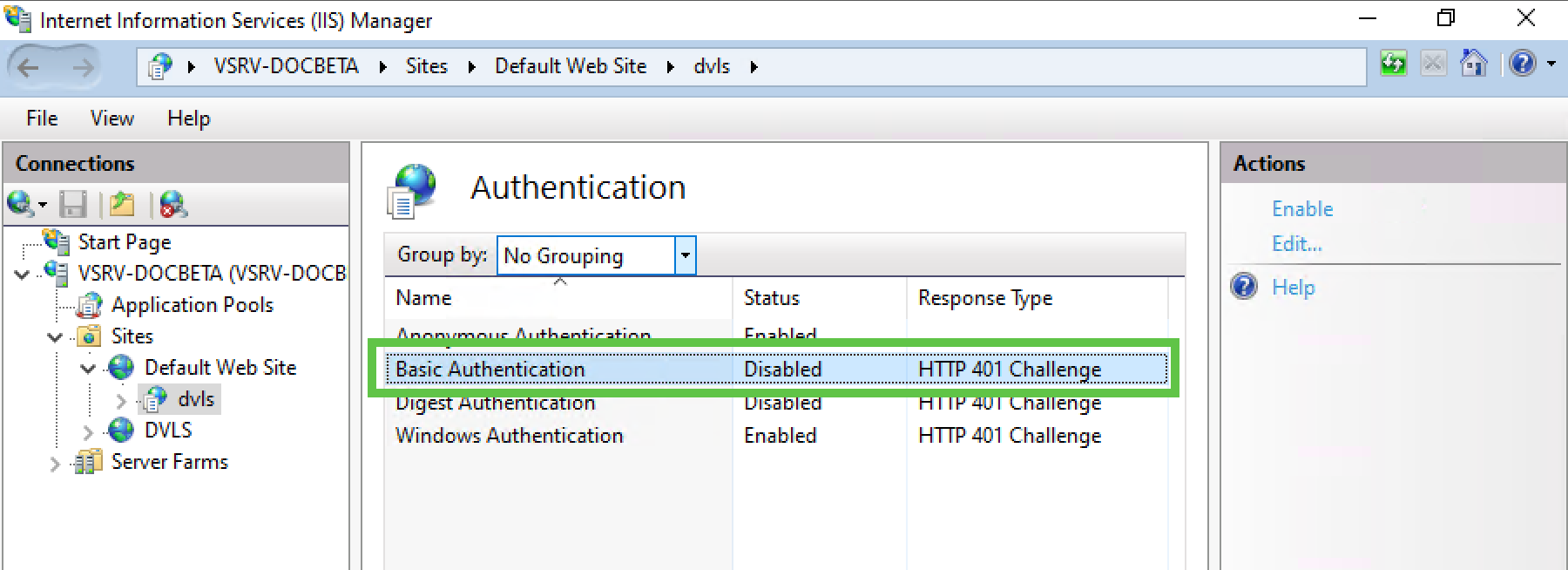
Best regards,
Érica Poirier
a5cf0a90-8aef-426b-a77a-e075510940a9.png
Hi Erica,
I hope I can re-open this bug report with my reply, as this problem now re-occurs because of your fix in versions > 2024.1.8.0 that you did trying to mitigate this for everyone.
- In DVLS versions > 2024.1.8.0, you added in line #74 of the web.config the line "<basicAuthentication enabled="false" /> => trying to solve this for everyone
- However this setting breaks the authentication section completely with a syntax error (at least on our IIS servers), if basicAuthentication is already disabled on a higher level (either Default Web Site or at Serverlevel)
- The result is that our RDMs cannot connect anymore to DVLS which brings us back to the initial post of this bug ticket (same error).
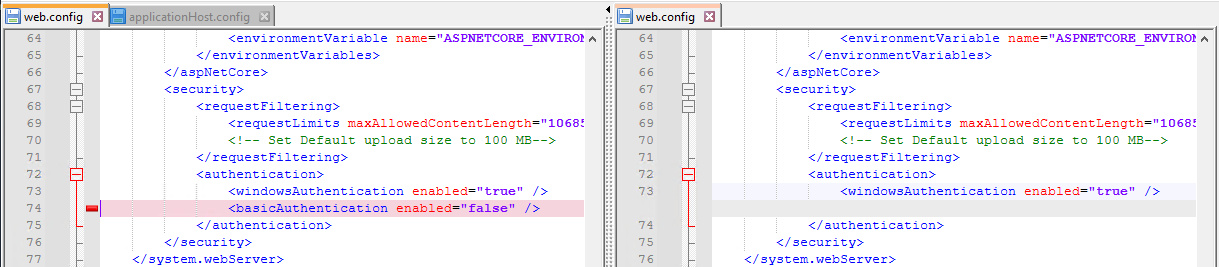
The IIS error is: "web.config. Line number: 74. Error: This configuration section cannot be used at this path. This happens when the section is locked at a parent level. Locking is either by default (overrideModeDefault="Deny"), or set explicitly by a location tag...."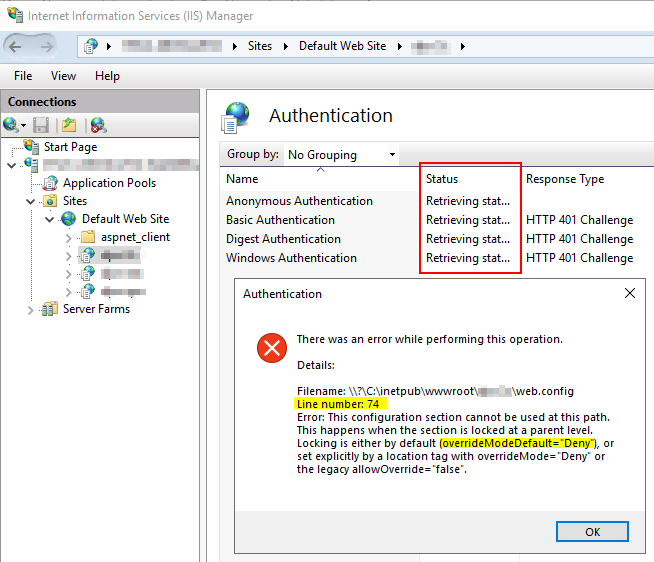
The error message describes exactly the issue:
- In our applicationHost.config the basicAuthentication section is locked with overrideModeDefault="Deny" />
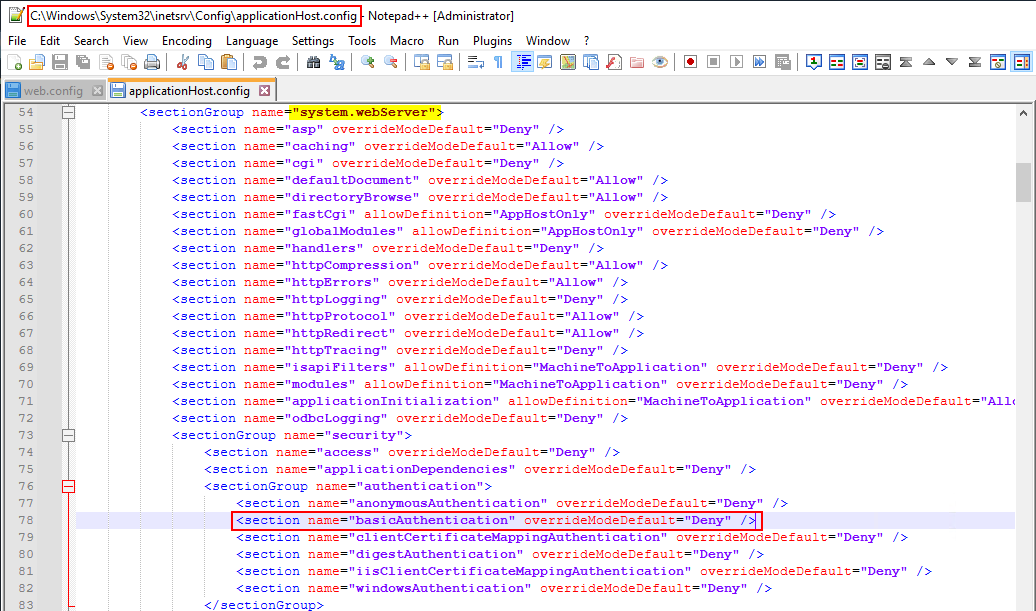
- I don't know, if that is only on our servers, or if this is the default setting in IIS
- Anyway: Adding line #74 in the web.config "<basicAuthentication enabled="false" /> breaks authentication
Workaround:
- Manually remove line #74 in the web.config "<basicAuthentication enabled="false" /> => RDM works again
Todo:
- Check if line #74 in the web.config "<basicAuthentication enabled="false" /> can be added withour IIS Syntax error by first parsing the applicationHost.config
I attach a few screenshots to make it more clear.
I hope I could explain the issue properly! :)
IIS_ApplicationHostConfig.png
WebConfigError.png
WebConfigDiff.png
Hello Alexander,
Thank you for sharing this information with our community. Our developer team will have a look at this.
Best regards,
Érica Poirier
Hi Erica, I'm also having the same issue as ascheipner. I just attempted to install Devolutions Server for the first time today on a Windows 2019 fresh build. Removing that line they suggested still gives me the error, however.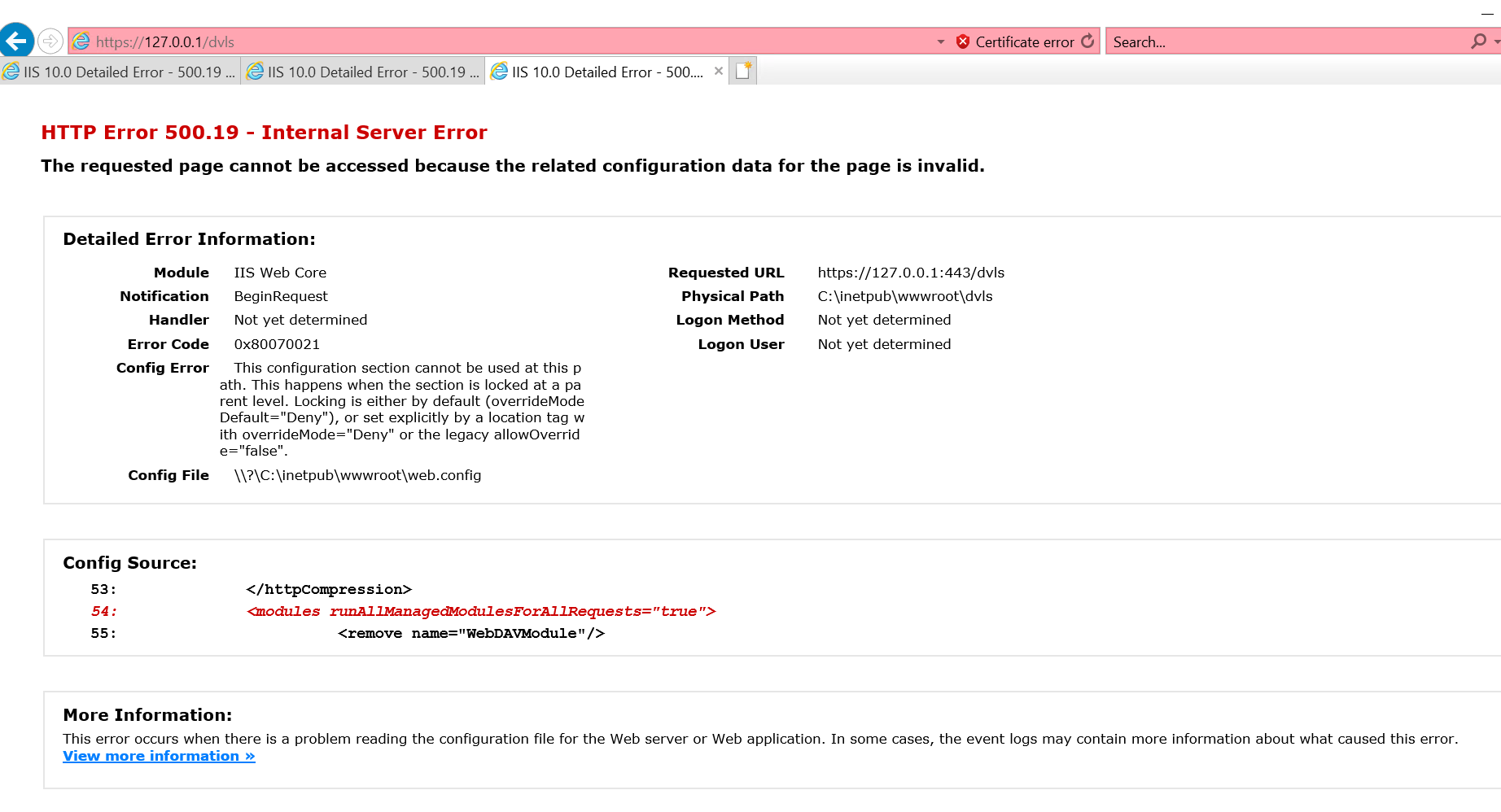
8c4cc440-48b4-442e-8c62-4274f9496e3a.png
Hi bubbafrombama,
Is the Basic Authentication disabled on the DVLS web application in IIS Manager?
If you only have the DVLS web application on this server, you can even remove the Basic Authentication from the web server roles. Please see this article about the minimum required server roles.
https://docs.devolutions.net/server/getting-started/installation/installing-web-server-prerequisites/
Best regards,
Érica Poirier